

t4akawolf
Banned
Ok, this question is split into two parts.
1.) I recently had some sort of registry corruption or something, due to a virus, in my Win 7 Ultimate 64Bit and I had to do a clean install of the same OS again.
But before I had formatted my C:\ drive, I had taken a Backup of the 'Users', 'AppData' and 'ProgramData' folders to restore after the re-install.
I formatted C:\ and did a clean install and was about to restore my files when I thought 'What if the virus was backed up too?'
And that's the first part. Do viruses get backed up too when I use the Backup&Restore feature? Is there a way to scan my backup file? Is there any way to prevent viruses from getting backed up? Should I not restore my files? Is it enough if I have an active anti-virus shield to immediately detect the virus when I restore the files?
2.) As I was worried about the virus I tried restoring only a few, select, files and folders to their original location (stuff like custom themes, Firefox's bookmarks etc).
BUT I got this error...
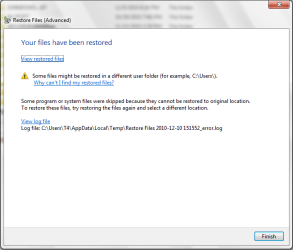
And that was only 1 file. I tried with multiple files, single folders, multiple folders and taking ownership of the folder I was restoring to but nothing helps. I used the administrator account when I backed up and I am using the administrator account right now.
What is wrong??? How do I fix this?
Hoping for a quick reply,
T4
1.) I recently had some sort of registry corruption or something, due to a virus, in my Win 7 Ultimate 64Bit and I had to do a clean install of the same OS again.
But before I had formatted my C:\ drive, I had taken a Backup of the 'Users', 'AppData' and 'ProgramData' folders to restore after the re-install.
I formatted C:\ and did a clean install and was about to restore my files when I thought 'What if the virus was backed up too?'
And that's the first part. Do viruses get backed up too when I use the Backup&Restore feature? Is there a way to scan my backup file? Is there any way to prevent viruses from getting backed up? Should I not restore my files? Is it enough if I have an active anti-virus shield to immediately detect the virus when I restore the files?
2.) As I was worried about the virus I tried restoring only a few, select, files and folders to their original location (stuff like custom themes, Firefox's bookmarks etc).
BUT I got this error...
And that was only 1 file. I tried with multiple files, single folders, multiple folders and taking ownership of the folder I was restoring to but nothing helps. I used the administrator account when I backed up and I am using the administrator account right now.
What is wrong??? How do I fix this?
Hoping for a quick reply,
T4
My Computer
At a glance
Windows 7 Ultimate x32 (UPDATE: Now x64!)Intel(R) Core(TM)2 Duo CPU - E4600 @ 2.40GHz ...4096 RAMATI Radeon HD 4350 1GB DDR2
- Computer Manufacturer/Model Number
- Intel DG31PR
- OS
- Windows 7 Ultimate x32 (UPDATE: Now x64!)
- CPU
- Intel(R) Core(TM)2 Duo CPU - E4600 @ 2.40GHz (2CPUs)
- Motherboard
- Intel DG31PR
- Memory
- 4096 RAM
- Graphics Card(s)
- ATI Radeon HD 4350 1GB DDR2
- Sound Card
- In-built
- Monitor(s) Displays
- Generic Pnp Monitor 1024x768 (32 bit) (85Hz)
- Screen Resolution
- 1024x768
- Hard Drives
- [s]250GB HDD[/s] 1TB HDD + 150GB Ext + 4GB PD
- PSU
- 450W
- Case
- Uhm, a normal one I guess
- Cooling
- No cooling thingamabobs installed
- Keyboard
- MS Standard PS/2 Keyboard
- Mouse
- MS HID Compliant Mouse
- Internet Speed
- 256Kbps-768Kbps
- Other Info
- Creative 2.1 Speakers


