sadly it did NOT list restore points as an option to delete.
I just examined my own Restore Points, on my Win7 "reinstalled from scratch" system that I just rebuilt two weekends ago. This was built on a brand new completely empty hard drive, from scratch.
Remarkably, I was presented with exactly the same [unexpected] message that said I had NO restore points to restore from!! Amazing, actually, since I've had this newly reinstall Win7 operating for several weeks now.
Sure enough, when I checked Control Panel -> System -> Advanced System Settings -> System Protection tab, and examined the Protection Settings, when I scrolled down to the C drive area I strangely saw TWO relevant items: one was for the "C (system)" drive with protection shown as ON, and one was for "C (missing)" drive with protection shown as OFF. Surprising again, actually.
At first I was confused and thought the first C item pertained to the 100MB reserved special reserved system partition created on my empty drive by the Win7 install, for the Boot Manager files. And I assumed the second C item pertained to my true C partition where Win7 etc. lives. But eventually I came to think that I had these backwards and that it was in fact the genuine Win7 C partition that theoretically was marked as ON and the 100MB reserved system partition also shown as C (missing) which was marked as OFF.
But I agree with your similar surprise when seeing that you had NO Restore Points to select from if you wanted to. With WinXP (where there was no "special reserved system partition", but where the Boot Manager files were in the one-and-only C partition itself), the genuine WinXP C partition was installed as automatically enabled for Protection Settings active, and you automatically had a non-zero max percentage of hard drive allocated to these periodic Restore Points that were taken, with the oldest ones automatically deleted when the max disk usage limit got reached.
This seems to have been done as well for Win7 in that first C item, but mysteriously there was the second C (missing) item that was set as OFF, and that I think is what is causing the suppression of Restore Points for the real Win7 C partition (at least in my initial post-install state that I'm examining).
Anyway, I was now suspicious that the reason I myself also showed NO RESTORE POINTS even after two weeks was because of the second/last C item that showed "OFF", even though the first item showed "ON".
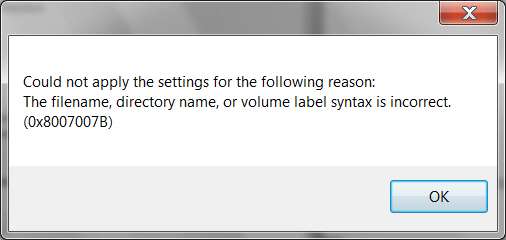
Investigating further, when I selected the second C ("missing"???) item and pushed the Configure button, sure enough the disk usage slider was sitting at 0%. I moved that over to 8% and pushed OK. I assumed this would "activate" Protection (and Restore Points)... but got an error message, complaining that the volume label (on the drive) was unacceptable. Furthermore, there was no disk space approximation shown (to equate to the 8% mark), further confirming my hunch that this was really 8% of 100MB, and that I was looking at the wrong so-called C partition.
I tried pushing the OK button but got another seeming error response, pushed OK again (I think) and/or had to cancel this dialog. Can't recall exactly now. But I suspect this all had to do with the C item I'd selected, which now I believe was probably for that 100MB special system reserved partition and not the first C item ("System") which probably was the real Win7 C partition.
Somehow, for some reason, when I backed out of everything and started all over again from the beginning, when I tried to repeat the process just to be sure I hadn't done anything wrong, now miraculously I no longer see TWO items for drive C! Instead I only see ONE item... for the "C (System)" drive!!! Just like with WinXP! Just one C! And its "active" (i.e. ON) for protection.
Furthermore, when I selected that now one-and-only C and pushed the Configure button, sure enough the disk space slider is sitting at the 8% mark (where I'd put it, but for the other C partition!).
Anyway, I think I'm now in business (quite by this accident really, trying to research my own system because of your post and question). It looks like I have one and only one C item shown, it has protection "ON", and it has 8% disk space shown on the slider. And, there was about 3GB of disk space allocated as the max utilization limit, again confirming my expectation that I was now dealing with my true Win7 C partition.
I am going to speculate that this will now really and truly activate system protection for my Win7 system C drive (which probably was NOT enabled for real until now, because of the two C items shown with the second one, probably for the 100MB system partition, set as OFF). I am going to speculate that System Restore points will now be automatically produced each night (or at least periodically), and that I will be able to select any of them for restoring from, and that I will be able to clean them out (all but the most recent) using Disk Cleanup.
Hope this helps you.