Windows 7 Forums


Windows 7: Cannot Delete Old System Restore Entries

25 Dec 2010   #1

Windows 7 Professional x64
 
 
Cannot Delete Old System Restore Entries

I have searched around the web and there doesn't seem to be any answers to this issue.

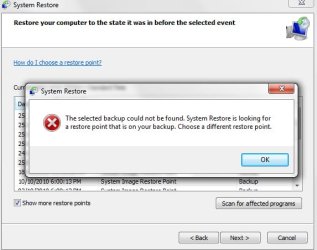
When opening System Restore, there are a whole bunch of old entries. I cannot remove them, and even deleting all other shadow copies doesn't affect them. When trying to restore from them, an error message shows up.

It appears these restore points do not actually exist anymore and are just references to old points. Is there anyway I can delete them from the list??

Thanks

Attached Thumbnails
Cannot Delete Old System Restore Entries-shot1.jpg   Cannot Delete Old System Restore Entries-shot2.jpg  
My System SpecsSystem Spec

25 Dec 2010   #2

Windows 7 Ultimate RTM (Technet)
Charlotte, NC


Quote   Quote: Originally Posted by BearAttack View Post
I have searched around the web and there doesn't seem to be any answers to this issue.

When opening System Restore, there are a whole bunch of old entries. I cannot remove them, and even deleting all other shadow copies doesn't affect them. When trying to restore from them, an error message shows up.

It appears these restore points do not actually exist anymore and are just references to old points. Is there anyway I can delete them from the list??

Thanks
It's a problem with your backups. There is a catalog showing that those backups exist, yet the drive they are on is either disconnected or the backups have been improperly deleted from the drive. The restore points marked "backup" are not standard restore points.
My System SpecsSystem Spec
25 Dec 2010   #3

Windows 7 Professional x64


Even after disconnecting the backup drive, these restore points are still shown. How can I remove them? Will reformatting the backup drive help?
My System SpecsSystem Spec
.


25 Dec 2010   #4

Windows 7 Ultimate RTM (Technet)
Charlotte, NC


Quote   Quote: Originally Posted by BearAttack View Post
Even after disconnecting the backup drive, these restore points are still shown. How can I remove them? Will reformatting the backup drive help?
Go into the backup system and delete the old backups.
My System SpecsSystem Spec
25 Dec 2010   #5

Windows 7 Home Premium x64
Osceola, WI


Don't know if this any use in this case, but CCleaner will remove old System Restore Points.
My System SpecsSystem Spec
25 Dec 2010   #6

Windows 7 Professional x64


I have tried CCleaner, the restore points to not even appear there!
They seem as though they are not even treated as regular restore points (clearing all other restore points leaves these in tact).

I have only made backups on one computer, the one I am using now, and I have found no way to delete these redundant entries.
My System SpecsSystem Spec
Reply

 Cannot Delete Old System Restore Entries problems?


Thread Tools


Similar help and support threads for: Cannot Delete Old System Restore Entries
Thread Forum
System Protection Restore Points - Delete Tutorials
When does System Restore delete "old" System Restore Points? Backup and Restore
How To Get Rid Of Old System Restore Point Entries Backup and Restore
System Image restore points--How to delete Backup and Restore
Does system restore delete user accounts? Backup and Restore


All times are GMT -5. The time now is 01:32 PM.


Seven Forums Android App Seven Forums IOS App Follow us on Facebook

Windows 7 Forums is an independent web site and has not been authorized,
sponsored, or otherwise approved by Microsoft Corporation.
"Windows 7" and related materials are trademarks of Microsoft Corp.
© Designer Media Ltd
  

1 2 3 4 5 6 7 8 9 10 11 12 13 14 15 16 17 18 19 20 21 22 23 24 25 26 27 28 29 30 31 32