|
Welcome to Windows 7 Forums. Our forum is dedicated to helping you find solutions with any problems, errors or issues you are experiencing with Windows 7. The Windows 7 forum also covers news and updates and has an extensive Windows 7 tutorial section that covers a wide range of tips and tricks.
Windows 7 - Macrium Help Request-Cannot Schedule Backups Anymore |
02-13-2011
|
#1 | | |
Macrium Help Request-Cannot Schedule Backups Anymore Ok, here's the issue. After restoring a previous image of my OS, Macrium Reflect Free will no longer schedule a back up. An error message is given when creating a scheduled backup: "Keyset does not exist". Checking the Macrium Support Forums informs me that it is a Windows Task Scheduler problem. Unfortunately the suggested fix does not work. The solution given is to delete all files in the %ProgramData%\Microsoft\Crypto\RSA\S-1-5-18 folder in Safe mode, then restart. The files I deleted weren't recreated and the same error occurrs when creating a scheduled backup.
The strange thing is that I have restored this particular image several times without problems. Has anyone come across this problem before and was able to correct? Is there a known cause? Calling all Macrium gurus-Wolfgang, are you available?
See System Specs for configuration. My single drive is partitioned thus: C-OS, D-Users/ProgramData & M-Media/Downloads. Windows 7 Ultimate install is via Kari's excellent tutorial User Profiles - Create and Move During Windows 7 Installation. I've had no other issues with this install for the past 3 months. | My System Specs | | System Manufacturer/Model Number Gateway M-6862 OS W7 x64 Ultimate CPU T5750 2.0 Ghz Motherboard PM965 Memory 4 GB Graphics Card Mobility Radeon HD 2600 Cooling Undervolting Works! Hard Drives WD2500BEVS 250GB |
02-13-2011
|
#2 | | |
Does you account have a password? Perhaps it did before but now does not after the restore? If so, try giving it a password, or setup a new Administrator level account just to run scheduled tasks. I did this with my XP system and it worked well so maybe it's also needed for Win 7? | My System Specs | | System Manufacturer/Model Number Dell Precision 370 OS Windows 7 Pro X64 CPU Intel Pentium 4 Dual LP 3.4Ghz Memory 4GB DDR PC2-5200 ECC Graphics Card NVIDIA Quadro FX 3400/4400 Sound Card SoundMAX Integrated Digital Audio Monitor(s) Displays Westinghouse 22" L2210NW Screen Resolution 1680 x 1050 Hard Drives 300GB PATA
80GB SATA (boot)
1.5TB SATA Internet Speed Cable via Road Runner 2MB Upload, 20MB Download |
02-14-2011
|
#3 | | |
Ztruker - My account has the same password before & after the restore. Changed the password, reboot with no luck. I then created a new Admin Level account as suggested. Result unfortunately is the same. When attempting to create the scheduled image, it cannot with the reason given "Keyset does not exist".
Any other suggestions are welcome. | My System Specs | | System Manufacturer/Model Number Gateway M-6862 OS W7 x64 Ultimate CPU T5750 2.0 Ghz Motherboard PM965 Memory 4 GB Graphics Card Mobility Radeon HD 2600 Cooling Undervolting Works! Hard Drives WD2500BEVS 250GB |
02-15-2011
|
#4 | | MS Windows 7 Home Premium 64-bit SP1 |

Quote: Originally Posted by Laker Ztruker - My account has the same password before & after the restore. Changed the password, reboot with no luck. I then created a new Admin Level account as suggested. Result unfortunately is the same. When attempting to create the scheduled image, it cannot with the reason given "Keyset does not exist".
Any other suggestions are welcome. Dear Laker,
Very happy to meet another dedicated Mac-Ref user!
Problem :usually due to VB Script error
Solution: I do not know!
Have you tried a B & R, after this failed scheduled backup ? If you can successfully take one on the fly (unscheduled), you can rule out VB Script error!
Kindly check whether the system is creating "Restore points" OR you have the Restore option turned on and at least 15-20% of your C:/ Drive space allocated for it! If you find there are none,then that can be a very important cause!
If, you are scheduling a S-R once a week and you use the PC for long periods, downloading new things and/or erasing them, the system takes a snap shot, or you have to"create" one! I f there is not enough allocated space, the snapshots,get automatically deleted!
regards,
Sreedhav | My System Specs | | System Manufacturer/Model Number Sony Vaio C series VPCCB35FN laptop OS MS Windows 7 Home Premium 64-bit SP1 CPU IntelCore i5@2.40GHz; Sandy Bridge 32nm Tech. Motherboard Sony Vaio Version:C609NJYJ Memory 4096Mb RAM; Single ChannelDDR3@665MHz; DRAM Freq:662MHz Graphics Card AMD Radeon HD 6630M; GPU:Whistler;BIOS Core&mem Clock:123.36 Sound Card REALTEK High Definition Audio Device; INTEL Display Card Monitor(s) Displays Generic PnP Intel HD;Resolution:1920*1040 Pixels; BPP:32bits Screen Resolution Current Resolution:1920*1080 Pixels; Monitor Frequency:60Hz Keyboard Logitech Bluetooth+ Generic Integrated K-B Mouse Logitech Bluetooth Cooling Lateral Exhaust with a Cooling Pad Placed Beneath. Hard Drives Internal HD:TOSHIBA MK5061GSY; Real Size:488 GB;NTFS; 3 Partitions; SATA; HEADS:16
External HDD: WD Elements 1023 PORTABLE; Estimated Size: 1TB; NTFS; 3 Partitions Internet Speed 2MBPS Other Info 1)Trend Micro Titanium Maximum Security Suite Version:3
2)SAS-PRO
3)MBAM--PRO
4)WATERFOX+IE9 +WOT+LINKEXTEND+ DRWEBCUREIT LINK CHECKER
5)SPYWAREBLASTER
6) WINPATROL PLUS
7) SANDBOXIE and
8) A BIT OF COMMON SENSE. |
02-15-2011
|
#5 | | MS Windows 7 Home Premium 64-bit SP1 |

Quote: Originally Posted by Laker Ok, here's the issue. After restoring a previous image of my OS, Macrium Reflect Free will no longer schedule a back up. Dear Laker,
Just for the sake of it,let us keep aside a scheduled backup, are you able to take a normal backup and Restore after this present episode? I have never used the option of "scheduling a B & R, but religiously take one once every 2-4 days OR sometimes even two B & R on the same day
Regards,
DR.Sreedhav | My System Specs | | System Manufacturer/Model Number Sony Vaio C series VPCCB35FN laptop OS MS Windows 7 Home Premium 64-bit SP1 CPU IntelCore i5@2.40GHz; Sandy Bridge 32nm Tech. Motherboard Sony Vaio Version:C609NJYJ Memory 4096Mb RAM; Single ChannelDDR3@665MHz; DRAM Freq:662MHz Graphics Card AMD Radeon HD 6630M; GPU:Whistler;BIOS Core&mem Clock:123.36 Sound Card REALTEK High Definition Audio Device; INTEL Display Card Monitor(s) Displays Generic PnP Intel HD;Resolution:1920*1040 Pixels; BPP:32bits Screen Resolution Current Resolution:1920*1080 Pixels; Monitor Frequency:60Hz Keyboard Logitech Bluetooth+ Generic Integrated K-B Mouse Logitech Bluetooth Cooling Lateral Exhaust with a Cooling Pad Placed Beneath. Hard Drives Internal HD:TOSHIBA MK5061GSY; Real Size:488 GB;NTFS; 3 Partitions; SATA; HEADS:16
External HDD: WD Elements 1023 PORTABLE; Estimated Size: 1TB; NTFS; 3 Partitions Internet Speed 2MBPS Other Info 1)Trend Micro Titanium Maximum Security Suite Version:3
2)SAS-PRO
3)MBAM--PRO
4)WATERFOX+IE9 +WOT+LINKEXTEND+ DRWEBCUREIT LINK CHECKER
5)SPYWAREBLASTER
6) WINPATROL PLUS
7) SANDBOXIE and
8) A BIT OF COMMON SENSE. |
02-16-2011
|
#6 | | |
Sreedhav,
Reflect operates flawlessly with the exception of a scheduled backup. So yes, I can create and restore images without a hiccup. I'm just lazy and want the program to do automatically.  Oh, and system restore has been turned off on all partitions since the windows installation 3 months ago.
Has anyone had problems with Windows Task Scheduler not accepting tasks from any programs not just Reflect? | My System Specs | | System Manufacturer/Model Number Gateway M-6862 OS W7 x64 Ultimate CPU T5750 2.0 Ghz Motherboard PM965 Memory 4 GB Graphics Card Mobility Radeon HD 2600 Cooling Undervolting Works! Hard Drives WD2500BEVS 250GB |
02-16-2011
|
#7 | | MS Windows 7 Home Premium 64-bit SP1 |
Dear Laker,
I did a bit of research reg. your prob. and had to go to the Windows 7 support forum : http://social.answers.microsoft.com/...a-f1fb3ea979da
One of the links posted there by a poster who was having the same prob. as yours( Only Task Scheduling) did the trick for him! I hope it does for you too: Waztech : News : Windows XP, Task Scheduler Error, 0x80090016, Keyset does not exist
The diagnosis was the security permissions for the Task Scheduler have become corrupted! Kindly get back and let us know how things panned out so that those using Macrium-Reflect can benefit.
Regards,
DR.Sreedhav 
PS: Pssst! It's 2 AM here and i am the consultant on duty! I am doing this on my lappy, sipping a hot cofee---- wanted you to know that your prob. was harassing me too! I can't see a fellow Mac-Ref user suffer! Yea, the lappy is safe from the coffee! | My System Specs | | System Manufacturer/Model Number Sony Vaio C series VPCCB35FN laptop OS MS Windows 7 Home Premium 64-bit SP1 CPU IntelCore i5@2.40GHz; Sandy Bridge 32nm Tech. Motherboard Sony Vaio Version:C609NJYJ Memory 4096Mb RAM; Single ChannelDDR3@665MHz; DRAM Freq:662MHz Graphics Card AMD Radeon HD 6630M; GPU:Whistler;BIOS Core&mem Clock:123.36 Sound Card REALTEK High Definition Audio Device; INTEL Display Card Monitor(s) Displays Generic PnP Intel HD;Resolution:1920*1040 Pixels; BPP:32bits Screen Resolution Current Resolution:1920*1080 Pixels; Monitor Frequency:60Hz Keyboard Logitech Bluetooth+ Generic Integrated K-B Mouse Logitech Bluetooth Cooling Lateral Exhaust with a Cooling Pad Placed Beneath. Hard Drives Internal HD:TOSHIBA MK5061GSY; Real Size:488 GB;NTFS; 3 Partitions; SATA; HEADS:16
External HDD: WD Elements 1023 PORTABLE; Estimated Size: 1TB; NTFS; 3 Partitions Internet Speed 2MBPS Other Info 1)Trend Micro Titanium Maximum Security Suite Version:3
2)SAS-PRO
3)MBAM--PRO
4)WATERFOX+IE9 +WOT+LINKEXTEND+ DRWEBCUREIT LINK CHECKER
5)SPYWAREBLASTER
6) WINPATROL PLUS
7) SANDBOXIE and
8) A BIT OF COMMON SENSE. |
02-16-2011
|
#8 | | MS Windows 7 Home Premium 64-bit SP1 |
Dear Laker,
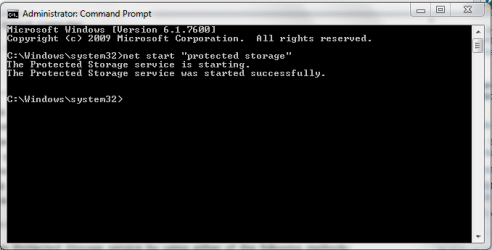
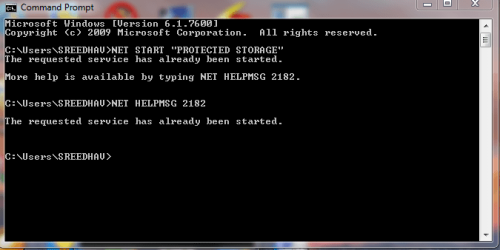
you can also find out whether the "protected service"is corrupted or not ,via the command prompt. Take Admin. previleges in cmd and type---> net start "protected storage" & click Enter. You should get a message "The protected storage service was started successfuly".Kindly view the snaps below:
Hope it helps.
Best wishes,
Sreedhav | My System Specs | | System Manufacturer/Model Number Sony Vaio C series VPCCB35FN laptop OS MS Windows 7 Home Premium 64-bit SP1 CPU IntelCore i5@2.40GHz; Sandy Bridge 32nm Tech. Motherboard Sony Vaio Version:C609NJYJ Memory 4096Mb RAM; Single ChannelDDR3@665MHz; DRAM Freq:662MHz Graphics Card AMD Radeon HD 6630M; GPU:Whistler;BIOS Core&mem Clock:123.36 Sound Card REALTEK High Definition Audio Device; INTEL Display Card Monitor(s) Displays Generic PnP Intel HD;Resolution:1920*1040 Pixels; BPP:32bits Screen Resolution Current Resolution:1920*1080 Pixels; Monitor Frequency:60Hz Keyboard Logitech Bluetooth+ Generic Integrated K-B Mouse Logitech Bluetooth Cooling Lateral Exhaust with a Cooling Pad Placed Beneath. Hard Drives Internal HD:TOSHIBA MK5061GSY; Real Size:488 GB;NTFS; 3 Partitions; SATA; HEADS:16
External HDD: WD Elements 1023 PORTABLE; Estimated Size: 1TB; NTFS; 3 Partitions Internet Speed 2MBPS Other Info 1)Trend Micro Titanium Maximum Security Suite Version:3
2)SAS-PRO
3)MBAM--PRO
4)WATERFOX+IE9 +WOT+LINKEXTEND+ DRWEBCUREIT LINK CHECKER
5)SPYWAREBLASTER
6) WINPATROL PLUS
7) SANDBOXIE and
8) A BIT OF COMMON SENSE. |
02-16-2011
|
#9 | | |
Sreehav,
I know you are enjoying your coffee much more than I am this issue & I appreciate all your efforts to correct. You linked to the same solution I attempted before posting here (see first post). But on the off chance the second time's a charm, I tried it again.
Steps: - Boot into Safe mode because I cannot stop Task Scheduler Service otherwise.
- Copied keys (3) before deleting them from %ProgramData%\Microsoft\Crypto\RSA\S-1-5-18 folder
- Restarted
- Created new image & attempted to create new scheduled back of this XML file.
- New message given "Access Denied". Not "Keyset does not exist"
- Uninstalled Macrium Reflect - Reboot
- Opened Regedit & deleted all "Macrium" & "Reflect" keys - Reboot
- Re-installed Macrium Reflect - Reboot
- Again created new image & attempted to create new scheduled back of this XML file.
- Same message "Access Denied" not "Keyset does not exist"
Things are slightly different but the same end result. Can't automate the backup. What I think is odd is that the deleted keys were not recreated. The "S-1-5-18" folder is empty where there were 3 files before. So, I'll begin searching for solutions of "Access Denied" rather than "Keyset does not exist".
Oh forgot: ran the command to check if protected storage was corrupt and received the all clear - "The protected storage service was started successfully". | My System Specs | | System Manufacturer/Model Number Gateway M-6862 OS W7 x64 Ultimate CPU T5750 2.0 Ghz Motherboard PM965 Memory 4 GB Graphics Card Mobility Radeon HD 2600 Cooling Undervolting Works! Hard Drives WD2500BEVS 250GB |
02-17-2011
|
#10 | | MS Windows 7 Home Premium 64-bit SP1 |
Dear Laker, The coffee was to keep me from slipping into sleep! In this part of India, Scorpion bites are common and usually ,unless treated with 1 hour (after the sting) are fatal ! We give to the patient what is termed"lytic cocktail", but only via IV drips! So, the sandGod left me and it was work time! My parents call me a terrier and you know why; i never give up until i solve any problem! If you read carefully my last post, your prob. was harassing me too! Regards, Sreedhav | My System Specs | | System Manufacturer/Model Number Sony Vaio C series VPCCB35FN laptop OS MS Windows 7 Home Premium 64-bit SP1 CPU IntelCore i5@2.40GHz; Sandy Bridge 32nm Tech. Motherboard Sony Vaio Version:C609NJYJ Memory 4096Mb RAM; Single ChannelDDR3@665MHz; DRAM Freq:662MHz Graphics Card AMD Radeon HD 6630M; GPU:Whistler;BIOS Core&mem Clock:123.36 Sound Card REALTEK High Definition Audio Device; INTEL Display Card Monitor(s) Displays Generic PnP Intel HD;Resolution:1920*1040 Pixels; BPP:32bits Screen Resolution Current Resolution:1920*1080 Pixels; Monitor Frequency:60Hz Keyboard Logitech Bluetooth+ Generic Integrated K-B Mouse Logitech Bluetooth Cooling Lateral Exhaust with a Cooling Pad Placed Beneath. Hard Drives Internal HD:TOSHIBA MK5061GSY; Real Size:488 GB;NTFS; 3 Partitions; SATA; HEADS:16
External HDD: WD Elements 1023 PORTABLE; Estimated Size: 1TB; NTFS; 3 Partitions Internet Speed 2MBPS Other Info 1)Trend Micro Titanium Maximum Security Suite Version:3
2)SAS-PRO
3)MBAM--PRO
4)WATERFOX+IE9 +WOT+LINKEXTEND+ DRWEBCUREIT LINK CHECKER
5)SPYWAREBLASTER
6) WINPATROL PLUS
7) SANDBOXIE and
8) A BIT OF COMMON SENSE. Macrium Help Request-Cannot Schedule Backups Anymore problems? All times are GMT -5. The time now is 12:48 AM. |  |