| Windows 7: Why is W7 Saying Not Enough Backup Space? |
04 Mar 2011
|
#1 | | Windows 7 Home Premium 64 bit UK |
Why is W7 Saying Not Enough Backup Space? Hi,
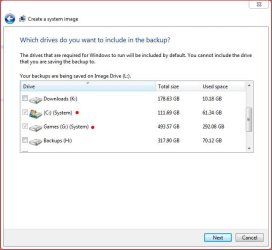
I have now tried two ways to do a Windows Backup. My desktop hard drive is only 250GB and I know I have 755GB fee on my 1TB external hard drive, because it told me (both in the System Image setup and on the drive properties; y'know with the pie diagram).
So I know I have over three times as much space as I need. But it won't let me do a Backup nor a System Image onto the external hard drive, and the reason given is "not enough free space"!
Anyone know why this might be?
Thanks a lot | My System Specs |
| System Manufacturer/Model Number iBuild™ custom PC OS Windows 7 Home Premium 64 bit CPU Intel® Core™ i5 650 Dual Core 2x 3.2Ghz 4MB Cache Motherboard ASUS P7H55-M 6x Rear USB 2.0 2x Front Memory Samsung 4GB (2x2GB) DDR3 1333MHz Graphics Card nvidia GT430 1GB Graphics Card Sound Card Built-in audio Monitor(s) Displays Videoseven CMC 17" AD Screen Resolution 1280 x 1024 Keyboard Packard Bell 9205 Mouse Microsoft IntelliMouse Optical PSU Corsair 500Watt PSU Case Gigabyte GZ-X2 Black ATX MIDI Tower Case Cooling Standard CPU Cooling Fan Hard Drives 250GB 7200RPM SATA II
Hitachi 1TB Serial ATA II 32MB cache Internet Speed 20mbps Other Info Also Windows 7 32 Bit on my Acer Laptop |
04 Mar 2011
|
#2 | | Windows 7 Ultimate x64 Milton Keynes, United Kingdom |
Hi,
You may have to defragment the external HDD, if it's too fragmented it might not allow a backup the same as when shrinking a partition.
Also, what format is the HDD? NTSC or FAT32? | My System Specs | | System Manufacturer/Model Number Compaq Desktop OS Windows 7 Ultimate x64 CPU AMD Sempron Dual Core Memory 3GB Graphics Card NVIDIA GeForce 6150SE nForce 430 Screen Resolution 1024x768 Hard Drives 150GB Sata |
04 Mar 2011
|
#3 | | Windows 7 Home Premium 64 Bit SP 1 |
| My System Specs | | Computer type PC/Desktop System Manufacturer/Model Number Self Assembled OS Windows 7 Home Premium 64 Bit SP 1 CPU Intel Core i3 2120 @ 3.30GHz Motherboard Gigabyte Technology Co., Ltd. H61M-DS2 DVI Memory Corsair 2GB x2 (Single-Channel DDR3 @ 665MHz) Graphics Card 2047MB GeForce GTS 450 (ZOTAC International) Sound Card Onboard (Realtek High Definition Audio) Monitor(s) Displays LG Flatron E2040T Screen Resolution 1600x900 Keyboard Logitech MK220 Mouse Logitech MK220 PSU uMAX 750 watt. Case iBall Cooling Air/ Fans Hard Drives Western Digital 1 TB
Seagate 500 GB Internet Speed BSNL Broadband Antivirus Microsoft Security Essentials Browser Waterfox Other Info Dell Studio 15" Laptop |
04 Mar 2011
|
#4 | | |
Check to be sure that your "system reserved" partition is not the one that is less then 50MB or whatever it is complaining about. I had that happen to me once. My C drive was fine, my external was fine, but the hidden System Reserved partition was causing the issue.
The strange part was why the system reserved was mostly full. A few reboots later and it had magically cleared up space on it's own and I was fine. | My System Specs | | System Manufacturer/Model Number Self-Built in July 2009 OS Windows 7 Ultimate x64 CPU Intel Q9550 2.83Ghz OC'd to 3.40Ghz Motherboard Gigabyte GA-EP45-UD3R rev. 1.1, F12 BIOS Memory 8GB G.Skill PI DDR2-800, 4-4-4-12 timings Graphics Card EVGA 1280MB Nvidia GeForce GTX570 Sound Card Realtek ALC899A 8 channel onboard audio Monitor(s) Displays 23" Acer x233H Screen Resolution 1920x1080 Keyboard ABS M1 Mechanical Mouse Logitech G9 Laser Mouse PSU Corsair 620HX modular Case Antec P182 Cooling stock Hard Drives Intel X25-M 80GB Gen 2 SSD
Western Digital 1TB Caviar Black, 32MB cache. WD1001FALS Internet Speed 15/2 cable modem Other Info Windows and Linux enthusiast. Logitech G35 Headset. |
04 Mar 2011
|
#5 | | Windows 7 Home Premium 64 bit UK |

Quote: Originally Posted by Orbital Shark Hi,
You may have to defragment the external HDD, if it's too fragmented it might not allow a backup the same as when shrinking a partition.
Also, what format is the HDD? NTSC or FAT32? It is NTFS, but I just got a worrying error box; saying I will have to format the external HDD if I want to use it.
But it has everything from my old PC that I want to keep! (less than 200GB that's why I bought a 1TB ext hard drive). I'm assuming formatting will get rid of everything on it!
Yes, I will defrag it, but I will use my old PC, or the new one might format it. 
Quote: Originally Posted by Arc I always used Syncback on the old PC, and was currently thinking of the paid version Syncback SE. I will look at your recommendations too, thanks 
Quote: Originally Posted by pparks1 Check to be sure that your "system reserved" partition is not the one that is less then 50MB or whatever it is complaining about. I had that happen to me once. My C drive was fine, my external was fine, but the hidden System Reserved partition was causing the issue. Thanks, how do I find out whether it is System Reserved causing the problem? | My System Specs | | System Manufacturer/Model Number iBuild™ custom PC OS Windows 7 Home Premium 64 bit CPU Intel® Core™ i5 650 Dual Core 2x 3.2Ghz 4MB Cache Motherboard ASUS P7H55-M 6x Rear USB 2.0 2x Front Memory Samsung 4GB (2x2GB) DDR3 1333MHz Graphics Card nvidia GT430 1GB Graphics Card Sound Card Built-in audio Monitor(s) Displays Videoseven CMC 17" AD Screen Resolution 1280 x 1024 Keyboard Packard Bell 9205 Mouse Microsoft IntelliMouse Optical PSU Corsair 500Watt PSU Case Gigabyte GZ-X2 Black ATX MIDI Tower Case Cooling Standard CPU Cooling Fan Hard Drives 250GB 7200RPM SATA II
Hitachi 1TB Serial ATA II 32MB cache Internet Speed 20mbps Other Info Also Windows 7 32 Bit on my Acer Laptop |
04 Mar 2011
|
#6 | | Windows 7x64 Home Premium SP1 x 2 Australia |
What is the precise error message? If it has a reference to "shadow..." then
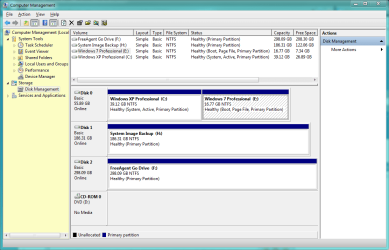
The system reserved partition needs shadow storage space. You can check this in Disk management (right click Computer>Manage>Disk Management) the system reserved (100MB) should be around 70% free. If you've got 50% free or more then this isn't your problem.
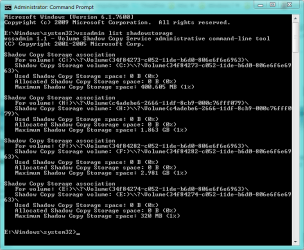
But you should also check the VSS space on the storage volume.
From an elevated command prompt
>vssadmin list shadowstorage
will show you the available shadow storage space on your backup volume. | My System Specs | | System Manufacturer/Model Number Own build (+ Recased Acer Aspire x1800) OS Windows 7x64 Home Premium SP1 x 2 CPU Intel i7 2600k Motherboard ASUS P8Z68 Deluxe Memory G.Skill Ripjaws (DDR3-1600) 2x4GB Graphics Card Nvidia GeForce GTS 450; Intel HD Graphics 3000(GT2+) Monitor(s) Displays Dell Ultrasharp IPS panel U2311H, Samsung SyncMaster P2350 Screen Resolution 1920x1080 Keyboard Logitech MK520 (wireless) Mouse Logitech MK520 PSU Seasonic M12II 520W Case Lian Li Lancool PC-K60 Cooling Case: 1x120mm, 3x140mm CPU: Hyper 212+ Hard Drives Crucial M4 128GB (000F), Seagates 1TB Barracuda ST31000528AS + Internet Speed 6-7 Mbps Antivirus Norton NIS, Malwarebytes on 2 (MSE on 3rd PC) Browser FireFox Other Info Audio: Logitech Z523 2.1 |
05 Mar 2011
|
#7 | | Windows 7 Home Premium 64 bit UK |

Quote: Originally Posted by mjf What is the precise error message? If it has a reference to "shadow..." then
The system reserved partition needs shadow storage space. You can check this in Disk management (right click Computer>Manage>Disk Management) the system reserved (100MB) should be around 70% free. If you've got 50% free or more then this isn't your problem.
But you should also check the VSS space on the storage volume.
From an elevated command prompt
>vssadmin list shadowstorage
will show you the available shadow storage space on your backup volume. Thanks, this may be a dumb question, but are you referring to the external HDD being more than 50%? (The C drive is only 46% I think). Because I'm afraid to even connect the external HDD now because of the problem mentioned above: ...error box; saying I will have to format the external HDD if I want to use it.
But it has everything from my old PC that I want to keep! (less than 200GB that's why I bought a 1TB ext hard drive). I'm assuming formatting will get rid of everything on it!
When I attempted the System Image, I got something mentioning the "Shadow..." I'll dig out the error screen shot I took.
Sorry but the last sentence in the box above doesn't even make sense to me. I must be thick, but I don't get it. I'm a lesdyxic (  ) visual learner, so diagrams are better than words (and numbers) for me.
But like I said, none of that makes any difference if the £100 external HDD I bought is gonna be formatted and I lose the last backup from my old PC!
That is my more pressing concern now, as this is a problem no matter what tool I use for backup, so anyone have any suggestions, other than buy another ext. HDD?
Thanks a lot | My System Specs | | System Manufacturer/Model Number iBuild™ custom PC OS Windows 7 Home Premium 64 bit CPU Intel® Core™ i5 650 Dual Core 2x 3.2Ghz 4MB Cache Motherboard ASUS P7H55-M 6x Rear USB 2.0 2x Front Memory Samsung 4GB (2x2GB) DDR3 1333MHz Graphics Card nvidia GT430 1GB Graphics Card Sound Card Built-in audio Monitor(s) Displays Videoseven CMC 17" AD Screen Resolution 1280 x 1024 Keyboard Packard Bell 9205 Mouse Microsoft IntelliMouse Optical PSU Corsair 500Watt PSU Case Gigabyte GZ-X2 Black ATX MIDI Tower Case Cooling Standard CPU Cooling Fan Hard Drives 250GB 7200RPM SATA II
Hitachi 1TB Serial ATA II 32MB cache Internet Speed 20mbps Other Info Also Windows 7 32 Bit on my Acer Laptop |
05 Mar 2011
|
#8 | | |
I'm about 99% sure it's the system reserved partition. The error message says for volumes under 500MB, you need at least 50MB free. Well, the System reserved partition is 100MB...and if you got less than 50MB of free space on it, you will get the error message that you see above.
Right click my computer, Manage, go to Disk Management. Right click on the System Reserved partition at the front. Choose change drive letter and path. Assign it a drive, like X. Then open My Computer and check the Free space. I'd bet a dollar to a donut that you have less than 50MB free.
Here is an article explaining this exact problem; http://answers.microsoft.com/en-us/w...4-efe2afa59b7c
In my case, the partition just magically cleaned itself up within a few hours and I was able to run backups. What caused it to drop for a period of time under 50MB is still a mystery to me. | My System Specs | | System Manufacturer/Model Number Self-Built in July 2009 OS Windows 7 Ultimate x64 CPU Intel Q9550 2.83Ghz OC'd to 3.40Ghz Motherboard Gigabyte GA-EP45-UD3R rev. 1.1, F12 BIOS Memory 8GB G.Skill PI DDR2-800, 4-4-4-12 timings Graphics Card EVGA 1280MB Nvidia GeForce GTX570 Sound Card Realtek ALC899A 8 channel onboard audio Monitor(s) Displays 23" Acer x233H Screen Resolution 1920x1080 Keyboard ABS M1 Mechanical Mouse Logitech G9 Laser Mouse PSU Corsair 620HX modular Case Antec P182 Cooling stock Hard Drives Intel X25-M 80GB Gen 2 SSD
Western Digital 1TB Caviar Black, 32MB cache. WD1001FALS Internet Speed 15/2 cable modem Other Info Windows and Linux enthusiast. Logitech G35 Headset. |
05 Mar 2011
|
#9 | | Windows 7 Professional 32-bit (6.1, Build 7600) A l a b a m a |

Quote: Originally Posted by pparks1 I'm about 99% sure it's the system reserved partition. The error message says for volumes under 500MB, you need at least 50MB free. Well, the System reserved partition is 100MB...and if you got less than 50MB of free space on it, you will get the error message that you see above.
Right click my computer, Manage, go to Disk Management. Right click on the System Reserved partition at the front. Choose change drive letter and path. Assign it a drive, like X. Then open My Computer and check the Free space. I'd bet a dollar to a donut that you have less than 50MB free.
Here is an article explaining this exact problem; Windows 7 Enterprise Backup Image Error 0x80780119 - Microsoft Answers
In my case, the partition just magically cleaned itself up within a few hours and I was able to run backups. What caused it to drop for a period of time under 50MB is still a mystery to me. And if one doesn't have a System Reserved Partition and gets this error, what would it be then? | My System Specs | | System Manufacturer/Model Number Averatec 6130HS-20 OS Windows 7 Professional 32-bit (6.1, Build 7600) CPU Intel(R) Pentium(R) 4 3.00 GHz HT Memory 2.0 GB Graphics Card ATI Mobility Radeon 9600 64MB Sound Card Realtek AC'97 Audio Screen Resolution 1280 x 800 Mouse Targus PAWM10 Wireless Optical Laptop Mouse Cooling 20 Inch Box Fan Hard Drives Seagate 96023A 60GB 7200RPM -
Seagate FreeAgentDesktop 250GB |
05 Mar 2011
|
#10 | | |

Quote: Originally Posted by Greg S And if one doesn't have a System Reserved Partition and gets this error, what would it be then? Perhaps a hidden recovery partition created by the manufacturer that is nearly full that they are unaware of. Again, you can check it just like I showed with the "System Reserved" partition.
I ran into this same issue when I first started using Windows 7. That's why I am always piping up saying, "hey check your System Reserved partition". It bit me once and confused me for awhile...until I really read through that error. I was positive my C and D drive had at least 1GB free and so did my external drive. So, I started looking elsewhere. | My System Specs | | System Manufacturer/Model Number Self-Built in July 2009 OS Windows 7 Ultimate x64 CPU Intel Q9550 2.83Ghz OC'd to 3.40Ghz Motherboard Gigabyte GA-EP45-UD3R rev. 1.1, F12 BIOS Memory 8GB G.Skill PI DDR2-800, 4-4-4-12 timings Graphics Card EVGA 1280MB Nvidia GeForce GTX570 Sound Card Realtek ALC899A 8 channel onboard audio Monitor(s) Displays 23" Acer x233H Screen Resolution 1920x1080 Keyboard ABS M1 Mechanical Mouse Logitech G9 Laser Mouse PSU Corsair 620HX modular Case Antec P182 Cooling stock Hard Drives Intel X25-M 80GB Gen 2 SSD
Western Digital 1TB Caviar Black, 32MB cache. WD1001FALS Internet Speed 15/2 cable modem Other Info Windows and Linux enthusiast. Logitech G35 Headset. Why is W7 Saying Not Enough Backup Space? problems? All times are GMT -5. The time now is 12:40 AM. | |