I just did a full backup of c: using macrium free, and all went well.
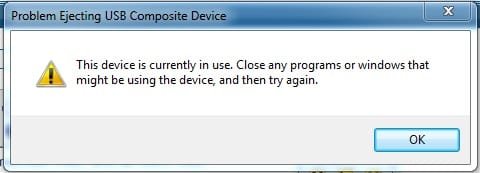
The image was stored to an external "My Book" drive and after closing macrium upon the image creation, I can't seem to safely eject the external. I get the following message:
I'm sure a reboot would allow me to eject it, but i'm curious what the proper way would be.
edit:
Macrium is fully closed
I don't see any processes running that are macrium related with "show processes from all users" used
The image was stored to an external "My Book" drive and after closing macrium upon the image creation, I can't seem to safely eject the external. I get the following message:
I'm sure a reboot would allow me to eject it, but i'm curious what the proper way would be.
edit:
Macrium is fully closed
I don't see any processes running that are macrium related with "show processes from all users" used
My Computer
At a glance
Windows 7 Ultimate x64Intel i5-2500k16GB2x Radeon HD7970 Crossfire
- Computer Manufacturer/Model Number
- Custom
- OS
- Windows 7 Ultimate x64
- CPU
- Intel i5-2500k
- Motherboard
- ASUS P8Z68-V Pro/GEN3
- Memory
- 16GB
- Graphics Card(s)
- 2x Radeon HD7970 Crossfire
- Sound Card
- On-Board / Logitech G930
- Monitor(s) Displays
- 3x Dell u2412m
- Screen Resolution
- 5760x1200
- Hard Drives
- Toshiba thns064gg2bbaa SSD
Seagate Barracuda 7200.12 ST31000528AS 1TB
Intel RST SSD caching enabled
- PSU
- Corsair AX850
- Case
- Corsair Obsidian 650D
- Cooling
- Corsair H100
- Keyboard
- Logitech Illuminated
- Mouse
- Logitech M510 Wireless
- Internet Speed
- 1Mb/s