| Windows 7: Can you restore an image to a "smaller" partition? |
04 Apr 2011
|
#1 | | Windows 7 64 Bit Home Premium SP1 In The Woods |
Can you restore an image to a "smaller" partition? Can you restore an drive image that was taken of 30GB of actual data originally on a 235GB partition to a resized partition of 100GB?
I think I know the answer, but I've got that nagging doubt going on. I've restored many images of drives that have not changed in size, but never as mentioned above.
I set up a laptop for someone last summer and when done took a "fresh" disk image of the C: drive and System Reserved partitions. At that time the C: drive was 235GB. The used space was only 30GB.
I just installed SP1 for the same laptop, and also re-sized the C: drive to 100GB. I took a new disk image, of course, after this.
But now I'm wondering: what would happen if I attempted to install that original image?
Using Acronis TI Home 11. | My System Specs |
| Computer type PC/Desktop System Manufacturer/Model Number Home Built - Jan 2013 OS Windows 7 64 Bit Home Premium SP1 CPU i7-3820 Motherboard Asus P9X79-PRO - Bios 3305 Memory GSkill F3-14900CL9Q - 16GB Graphics Card EVGA GeForce GTX660 - Driver 310.90 Sound Card On board Realtek ALC898 Monitor(s) Displays Acer S271HL Screen Resolution 1920 x 1080 Keyboard MS KC-0405 Mouse Intellimouse 5-button PSU Corsair CMPSU-850TX-V2 - 850 watt (by Seasonic) Case Corsair Obsidian 550D Cooling Standard 3 120mm case fans, Cooler Master Hyper 212 EVO Hard Drives #1- Samsung 840 Pro Series
#2- Western Digital WD1002FAEX Sata3 Black
#3- Western Digital WD1002FAEX Sata3 Black Internet Speed 25Mbits/Sec (on a good day) Antivirus Avast & Malwarebytes Browser Firefox Other Info Asus DVD - DRW-24B1ST 24X |
04 Apr 2011
|
#2 | | Windows 7 Ultimate x64 SP1, Windows 8 Pro x64 Florida, USA |
Yes you can do that with Acronis TI Home 2011. | My System Specs | | Computer type PC/Desktop System Manufacturer/Model Number Custom Built OS Windows 7 Ultimate x64 SP1, Windows 8 Pro x64 CPU INTEL Core i7 3820 LGA 2011 Motherboard Gigabyte GA X79 UD5 v1.0 F13s Memory 16 GB (4 X 4GB) G-Skill Ripjaws Z DDR3 2133 Quad Channel Graphics Card EVGA GTX 460 SC 1GB Sound Card Realtek Onboard ALC898 Monitor(s) Displays Samsung BX2431 Screen Resolution 1920x1080 Keyboard Logitech G15 Mouse Microsoft Wireless Explorer Mouse PSU Corsair HX1000W Case Thermaltake Armor+ Cooling INTEL BXRTS2011LC Liquid-cooled Hard Drives OCZ Vertex 4 120GB 2.5 in. SSD FW 1.5
3x OCZ Vertex 3 120GB 2.5 in. SSD FW 2.25
4 x WD 2002FAEX SATA
4xWD 7501AALS SATA Internet Speed 6.0 Mb/s |
04 Apr 2011
|
#3 | | Windows 7 64 Bit Home Premium SP1 In The Woods |
If you have done it, does it go without a peep, or do you get any warnings or messages? Just curious. | My System Specs | | Computer type PC/Desktop System Manufacturer/Model Number Home Built - Jan 2013 OS Windows 7 64 Bit Home Premium SP1 CPU i7-3820 Motherboard Asus P9X79-PRO - Bios 3305 Memory GSkill F3-14900CL9Q - 16GB Graphics Card EVGA GeForce GTX660 - Driver 310.90 Sound Card On board Realtek ALC898 Monitor(s) Displays Acer S271HL Screen Resolution 1920 x 1080 Keyboard MS KC-0405 Mouse Intellimouse 5-button PSU Corsair CMPSU-850TX-V2 - 850 watt (by Seasonic) Case Corsair Obsidian 550D Cooling Standard 3 120mm case fans, Cooler Master Hyper 212 EVO Hard Drives #1- Samsung 840 Pro Series
#2- Western Digital WD1002FAEX Sata3 Black
#3- Western Digital WD1002FAEX Sata3 Black Internet Speed 25Mbits/Sec (on a good day) Antivirus Avast & Malwarebytes Browser Firefox Other Info Asus DVD - DRW-24B1ST 24X |
04 Apr 2011
|
#4 | | |
Whenever I have restored a system image, a image of the boot drive along with the MBR (Master Boot Record), which you have to do if you want the PC to boot to the OS. Acronis, all version as far as I know, deletes any existing partitions and recreates the paritions as they were when the image was made.
With Win 7 when restoring you need to restore the System Reserve partition, the main partition (the one that has the OS install on it) and the MBR and any other partition on that physical drive. In other words the whole drive. That is if you want the OS to boot.
I'm going to do a test and post back in about 20 minutes. | My System Specs | | System Manufacturer/Model Number Built be Me OS Windows 7 Pro x64 CPU i5 760 Motherboard Asus P7P55D-E Pro Memory 16GB Graphics Card Nvidia GTS450 Sound Card On board Monitor(s) Displays Dell 2007WFP Dell 1800FP Screen Resolution 1680x1050 1280x1024 Keyboard IBM Mouse MS PSU Antec 750 Case In Win Cooling Cooler Master Hyper 212+ Hard Drives Seagate 250GB & 750GB
WD 1TB |
04 Apr 2011
|
#5 | | |
Just finished my test.
Connected another drive to my system. Booted from a Mustang PE boot USB stick with Acronis TI 2011 home with plus pack and Disk Director 11 on it.
My main system drive is a 250GB HDD with 3 partitions. 100MB Sys Reserve, 82GB BOOT C drive and a 149GB D partitions. the drive I connected is als the same with the same partitions on it.
I deleted the C partition and then made a new volume of 60GBs, 22GBs smaller then my normal C partition. Made another volume of the remaining 22GBs left over from resizing the C partition.
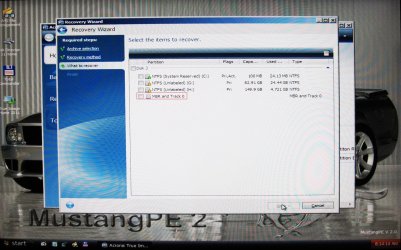
Close Disk Director and opened Ti 2011. Selected restore whole disk and partitions. When asked what to restore, it gives you the option to select the partitions and the MBR from the list of partitions in the image, I selected the 82GB C drive partition and the MBR. I had left the 100MB sys reserve and my D drive intact on the drive when in Disk director.
It then asks where do you want to restore the select items. I selected the new 60GB partition and for the MBR the ROOT of the drive.
Click OK and the image loaded.
When it was done I rebooted to a black screen with Windows Failed to start. Insert system disk to recover.
So as I stated above when restore the system you must restore the whole drive. All partitions and MBR.
Now you can restore the system drive to a smaller physical hard drive. What TI will do if you present system drive is all one partition with the smaller sys reserve partition is just create the sys reserve partition, 100MB, then use the rest of the drive as the other BOOT, OS, Pagefile partition.
And if you have another partitoin on the boot/system physical disk what TI will do is create the sys reserve, at the same size as on the image, the C boot partition of the same size as on the image then the rest of the drive as the other partition. That is if the new drive is smaller. If the new drive is bigger you will end up with Unallocated space at the end of the drive.
I hope all this is clear. | My System Specs | | System Manufacturer/Model Number Built be Me OS Windows 7 Pro x64 CPU i5 760 Motherboard Asus P7P55D-E Pro Memory 16GB Graphics Card Nvidia GTS450 Sound Card On board Monitor(s) Displays Dell 2007WFP Dell 1800FP Screen Resolution 1680x1050 1280x1024 Keyboard IBM Mouse MS PSU Antec 750 Case In Win Cooling Cooler Master Hyper 212+ Hard Drives Seagate 250GB & 750GB
WD 1TB |
04 Apr 2011
|
#6 | | Windows 7 64 Bit Home Premium SP1 In The Woods |
Wow. What great information (and what a lot of work!) Thank you very much for that.
And yes, I get the picture now, very clearly.
One other curiosity, maybe you know this (or maybe you answered this already):
If the hard drive has one 100MB SR partition, one 100GB system partition (C:, Boot (MBR), Page File, Yada-Yada), and one user files partition (D:, Extended)
And no partition sizing has changed.
And you restore the image of C: only (not the SR partition too), would the box boot?
Or do you have to restore both every time? | My System Specs | | Computer type PC/Desktop System Manufacturer/Model Number Home Built - Jan 2013 OS Windows 7 64 Bit Home Premium SP1 CPU i7-3820 Motherboard Asus P9X79-PRO - Bios 3305 Memory GSkill F3-14900CL9Q - 16GB Graphics Card EVGA GeForce GTX660 - Driver 310.90 Sound Card On board Realtek ALC898 Monitor(s) Displays Acer S271HL Screen Resolution 1920 x 1080 Keyboard MS KC-0405 Mouse Intellimouse 5-button PSU Corsair CMPSU-850TX-V2 - 850 watt (by Seasonic) Case Corsair Obsidian 550D Cooling Standard 3 120mm case fans, Cooler Master Hyper 212 EVO Hard Drives #1- Samsung 840 Pro Series
#2- Western Digital WD1002FAEX Sata3 Black
#3- Western Digital WD1002FAEX Sata3 Black Internet Speed 25Mbits/Sec (on a good day) Antivirus Avast & Malwarebytes Browser Firefox Other Info Asus DVD - DRW-24B1ST 24X |
04 Apr 2011
|
#7 | | Windows 7 Ultimate x64 SP1, Windows 8 Pro x64 Florida, USA |
You can restore only the C: partition. | My System Specs | | Computer type PC/Desktop System Manufacturer/Model Number Custom Built OS Windows 7 Ultimate x64 SP1, Windows 8 Pro x64 CPU INTEL Core i7 3820 LGA 2011 Motherboard Gigabyte GA X79 UD5 v1.0 F13s Memory 16 GB (4 X 4GB) G-Skill Ripjaws Z DDR3 2133 Quad Channel Graphics Card EVGA GTX 460 SC 1GB Sound Card Realtek Onboard ALC898 Monitor(s) Displays Samsung BX2431 Screen Resolution 1920x1080 Keyboard Logitech G15 Mouse Microsoft Wireless Explorer Mouse PSU Corsair HX1000W Case Thermaltake Armor+ Cooling INTEL BXRTS2011LC Liquid-cooled Hard Drives OCZ Vertex 4 120GB 2.5 in. SSD FW 1.5
3x OCZ Vertex 3 120GB 2.5 in. SSD FW 2.25
4 x WD 2002FAEX SATA
4xWD 7501AALS SATA Internet Speed 6.0 Mb/s |
04 Apr 2011
|
#8 | | W 7 64-bit Ultimate The Lowcountry |
If there is a System Reserved partition and that is the system volume where the "System" boot files are stored and that is not added and consequently restored, no the 'new' image will not boot. | My System Specs | | System Manufacturer/Model Number * BFK Customs * OS W 7 64-bit Ultimate CPU Intel Q9550 Yorkfield Motherboard ASUS P5Q Pro Memory 8GB Dominator 8500C5D Graphics Card ATI : XFX 5870 Sound Card Realtek HD Audio 7-1 Monitor(s) Displays 1x 47" LCD HDMI & 3x 26" LCD HDMI Screen Resolution 1920x1080P & 1920x1200 Keyboard Microsoft 500 Mouse Razer Diamondback 3G PSU Corsair 620HX Case Cooler Master RC-690 Cooling Tuniq Tower 120, 2x 140mm and 3x 120mm case fans Hard Drives 1x 80GB Intel X25-M G2 SSD : 1x 500GB & 1x 640GB WD Caviar Black(s) Internet Speed 14 Mb/s Other Info 1x Koutech 3Gb/s SATA HDD Hot Swap Rack |
04 Apr 2011
|
#9 | | Windows 7 64 Bit Home Premium SP1 In The Woods |
Thanks Bare Foot.
So whether imaging or restoring the rule is always: Both. | My System Specs | | Computer type PC/Desktop System Manufacturer/Model Number Home Built - Jan 2013 OS Windows 7 64 Bit Home Premium SP1 CPU i7-3820 Motherboard Asus P9X79-PRO - Bios 3305 Memory GSkill F3-14900CL9Q - 16GB Graphics Card EVGA GeForce GTX660 - Driver 310.90 Sound Card On board Realtek ALC898 Monitor(s) Displays Acer S271HL Screen Resolution 1920 x 1080 Keyboard MS KC-0405 Mouse Intellimouse 5-button PSU Corsair CMPSU-850TX-V2 - 850 watt (by Seasonic) Case Corsair Obsidian 550D Cooling Standard 3 120mm case fans, Cooler Master Hyper 212 EVO Hard Drives #1- Samsung 840 Pro Series
#2- Western Digital WD1002FAEX Sata3 Black
#3- Western Digital WD1002FAEX Sata3 Black Internet Speed 25Mbits/Sec (on a good day) Antivirus Avast & Malwarebytes Browser Firefox Other Info Asus DVD - DRW-24B1ST 24X |
04 Apr 2011
|
#10 | | W 7 64-bit Ultimate The Lowcountry |

Quote: Originally Posted by TVeblen Thanks Bare Foot.
So whether imaging or restoring the rule is always: Both.
You're welcome; correct, whatever partition has the "System" flag when viewed in Windows disk management must be included and restored. | My System Specs | | System Manufacturer/Model Number * BFK Customs * OS W 7 64-bit Ultimate CPU Intel Q9550 Yorkfield Motherboard ASUS P5Q Pro Memory 8GB Dominator 8500C5D Graphics Card ATI : XFX 5870 Sound Card Realtek HD Audio 7-1 Monitor(s) Displays 1x 47" LCD HDMI & 3x 26" LCD HDMI Screen Resolution 1920x1080P & 1920x1200 Keyboard Microsoft 500 Mouse Razer Diamondback 3G PSU Corsair 620HX Case Cooler Master RC-690 Cooling Tuniq Tower 120, 2x 140mm and 3x 120mm case fans Hard Drives 1x 80GB Intel X25-M G2 SSD : 1x 500GB & 1x 640GB WD Caviar Black(s) Internet Speed 14 Mb/s Other Info 1x Koutech 3Gb/s SATA HDD Hot Swap Rack Can you restore an image to a "smaller" partition? problems? All times are GMT -5. The time now is 05:11 AM. | |