| Windows 7: System Restore question (hopefully simple) |
25 Apr 2011
|
#1 | | |
System Restore question (hopefully simple) Hello- I've been on Google for an hour and checked 4 pages on here but do not see a duplicate thread so i'll post.
New system 64 bit. Why does system restore not create automatic restore points? I've had the system running out of the box for 3 weeks and installed many things - not 1 restore pt. created.
I did see where folks say "Scroll down until you see Volume Shadow copy and make sue it'd stated" I did that yesterday. Will SR 'kick in' or is this the way Windows 7 is designed?
I can create them fine manually BTW
TIA folks. | My System Specs |
| System Manufacturer/Model Number HP p6720f OS 64 bit CPU AMD Phenom II X4 840T 2.9Ghz Motherboard N-Alvorix-RS880-uATX (Alvorix) Memory Samsung DDR3 6 gig Graphics Card MSI N560GTX-Ti Sound Card Creative X-Fi Titanium Monitor(s) Displays LG- 42' LCD PSU Corsair 600 watt psw Hard Drives 1.5 TB Hitachi |
25 Apr 2011
|
#2 | | |
okay.. I just read "Windows 7 does not auto-create unless no other restore point set in last 7 days."
Does that mean now that I created 1 it will now start to do it auto.?
Thx | My System Specs | | System Manufacturer/Model Number HP p6720f OS 64 bit CPU AMD Phenom II X4 840T 2.9Ghz Motherboard N-Alvorix-RS880-uATX (Alvorix) Memory Samsung DDR3 6 gig Graphics Card MSI N560GTX-Ti Sound Card Creative X-Fi Titanium Monitor(s) Displays LG- 42' LCD PSU Corsair 600 watt psw Hard Drives 1.5 TB Hitachi |
25 Apr 2011
|
#3 | | Windows 7 SP1, Home Premium, 64-bit |
It's odd that you have done numerous app installs and no restore point was created. Most installs create one automatically.
Any significant Windows Update should create one also. Have you tried that?
I think the default is to create one weekly, but in the real world, doing what I do, I have 3 or 4 in an average week---none of which I create manually.
I'd give it some time and watch it for a week. | My System Specs | | System Manufacturer/Model Number Ignatz Special; 4 speed manual gearbox; factory air conditioning; one of one OS Windows 7 SP1, Home Premium, 64-bit CPU Intel Sandy Bridge i5-2500, not overclocked Motherboard Gigabyte H67A-UD3H-B3, full ATX Memory 4 GB Crucial DDR3-1333 Graphics Card none; graphics are integrated on CPU Sound Card onboard: Realtek ALC892; external: USB Behringer UF0-202 Monitor(s) Displays NEC 90GX2-BK 19" LCD Screen Resolution 800 x 640 Keyboard Leopold Tenkeyless with Cherry Blue switches, USB Mouse Logitech or Microsoft optical wired; either USB or PS 2 PSU Seasonic SS-560KM, modular Case Antec Solo II Cooling CPU: Scythe Big Shuriken; Case: Scythe Slipstream 800 & 500 Hard Drives System: Intel 320 Series SSD, 80 GB;
Data: Samsung Spinpoint 103SJ, 1 TB;
Backup: WD Caviar Green WD15EADS-00P8B0, 1.5TB Other Info Power consumption of this system, including monitor: 68 watts at idle; 144 watts at full load |
25 Apr 2011
|
#4 | | Windows 7 Professional 64bit SP1 |
If like many you find Windows a bit vague when it comes to automating restore points you may want to automate them according to your own requirements.
I came across this handy forum article recently and now have them scheduled every 12 hours. If you're dubious about downloading the file there, run your own virus/malware scans or upload it to Virus Total for peace of mind. | My System Specs | | System Manufacturer/Model Number COMPAQ CQ5115 OS Windows 7 Professional 64bit SP1 CPU Intel Core 2 Quad 2.33GHz Memory 8 GB Graphics Card Intel GMA 3100 Monitor(s) Displays HannsG HW191D 19" Widescreen LCD TFT Screen Resolution 1440 x 900 Keyboard Logitech UltraX Mouse Logitech MX400 Hard Drives 1x internal 500 GB
2x external 500 GB Internet Speed 35+ Mb/s |
25 Apr 2011
|
#5 | | |
Thx yea I read that already but was hoping to see if my OS is fooked somehow or this is the norm. Tons of threads in Google about Windows 7 and no auto. restores so I guess its normal.
I will wait a bit and see what happens and yep all Windows updates done but no restore point even when SP1 was installed.. | My System Specs | | System Manufacturer/Model Number HP p6720f OS 64 bit CPU AMD Phenom II X4 840T 2.9Ghz Motherboard N-Alvorix-RS880-uATX (Alvorix) Memory Samsung DDR3 6 gig Graphics Card MSI N560GTX-Ti Sound Card Creative X-Fi Titanium Monitor(s) Displays LG- 42' LCD PSU Corsair 600 watt psw Hard Drives 1.5 TB Hitachi |
25 Apr 2011
|
#6 | | Windows 7 Professional 64bit SP1 |
It seems very strange that you have installed various software and have accrued no automated restore points? Have you done any tweaking?
It may be stating the obvious though have you checked the Disk Space Usage allocated for the relevant drive, in System Protection > Protection Settings?
If it's set to the lowest level then it's possible it won't have enough space to create even a single restore point, even though the VSC service is started? | My System Specs | | System Manufacturer/Model Number COMPAQ CQ5115 OS Windows 7 Professional 64bit SP1 CPU Intel Core 2 Quad 2.33GHz Memory 8 GB Graphics Card Intel GMA 3100 Monitor(s) Displays HannsG HW191D 19" Widescreen LCD TFT Screen Resolution 1440 x 900 Keyboard Logitech UltraX Mouse Logitech MX400 Hard Drives 1x internal 500 GB
2x external 500 GB Internet Speed 35+ Mb/s |
25 Apr 2011
|
#7 | | Vista, Windows7, Mint Mate, Zorin, Windows 8 Florida in winter, Black Forest/Germany |
| My System Specs | | System Manufacturer/Model Number HP, Dell, Gateway, Toshiba - 4 laptops and 2 desktops OS Vista, Windows7, Mint Mate, Zorin, Windows 8 CPU from 1.6GHz Duo to i7 Monitor(s) Displays 2x HP w2207 Keyboard with trackball - no mices Mouse Trackball mice Hard Drives 5x HDD, 7x SSD, 12x Externals Internet Speed DSL 6000 |
26 Apr 2011
|
#8 | | |
Good points last 2 replies. I just found this on another forum. Seems like its a space issue because my slider is all the wayyy to the left. I'll have to try it when I get home.
I did check it this morning after making sure the Volume Shadow service was started and it did create a restore point at 2:45AM so I was pumped but when I closed SR it was gone! I created another one on the spot - closed SR and re-opened and bam it dissapered also. LOTS of problems with this on the net. Hopefully below will be the fix.
"My problem with disappearing restore points (Windows 7) is resolved. I chatted with ms Windows 7 support and they did two things:
(1) Made sure 'System Restore' (SR) had all the authority it needed: system restore icon-> right click-> properties->click to security tab and put checks in all auth columns
(2) gave SR all the space it wanted: within the 'Search programs and Files' of the START menu type 'create restore point' -> click on link found for 'create restore point' -> Custom->stretch slider ALL the WAY to right (max). apply, Reboot. Go back to 'create restore point' and create one and reboot. See i restore point is there. Mine was hope yours is.
Note: this is clearly a Windows problem. You should NOT have to specify all you available free space to this component or chage it's Auth. Both will surely come back and haunt you. If this solves it for many others then someone should open a bug under MS Windows 7."
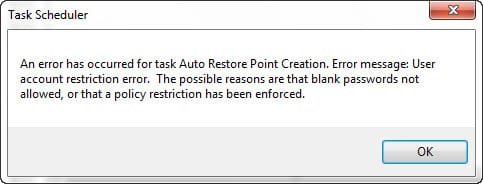
PS i'm now working on another issue when I open Task Scheduler "The selected task {0} no longer exists. To see the current tasks"
- ughhhh (But have found a fix for that I hope) I hope they correct this stuff with SP2! this is silly nonsense to be honest. | My System Specs | | System Manufacturer/Model Number HP p6720f OS 64 bit CPU AMD Phenom II X4 840T 2.9Ghz Motherboard N-Alvorix-RS880-uATX (Alvorix) Memory Samsung DDR3 6 gig Graphics Card MSI N560GTX-Ti Sound Card Creative X-Fi Titanium Monitor(s) Displays LG- 42' LCD PSU Corsair 600 watt psw Hard Drives 1.5 TB Hitachi |
26 Apr 2011
|
#9 | | |
And after some extensive reading Volume Shadow Copy should be left at Manual and not Automatic... | My System Specs | | System Manufacturer/Model Number HP p6720f OS 64 bit CPU AMD Phenom II X4 840T 2.9Ghz Motherboard N-Alvorix-RS880-uATX (Alvorix) Memory Samsung DDR3 6 gig Graphics Card MSI N560GTX-Ti Sound Card Creative X-Fi Titanium Monitor(s) Displays LG- 42' LCD PSU Corsair 600 watt psw Hard Drives 1.5 TB Hitachi |
26 Apr 2011
|
#10 | | Vista, Windows7, Mint Mate, Zorin, Windows 8 Florida in winter, Black Forest/Germany |
You should not put the slider all the way to the right. That will fill up your disk with shadows. I found, that the slider does not work very well anyhow. It is better to assign the space with Command Prompt. Open an elevated cmd (run as admin) and paste the following command - then hit Enter. vssadmin resize shadowstorage /for=C: /on=C: /maxsize=10GB
If you want a different size, just change the 10 to your number. But I would not go any larger than 10GBs. | My System Specs | | System Manufacturer/Model Number HP, Dell, Gateway, Toshiba - 4 laptops and 2 desktops OS Vista, Windows7, Mint Mate, Zorin, Windows 8 CPU from 1.6GHz Duo to i7 Monitor(s) Displays 2x HP w2207 Keyboard with trackball - no mices Mouse Trackball mice Hard Drives 5x HDD, 7x SSD, 12x Externals Internet Speed DSL 6000 System Restore question (hopefully simple) problems? All times are GMT -5. The time now is 06:30 AM. | |