Windows 7 Forums


Windows 7: Mysterious START Orb

13 May 2011   #1

windows7 Home Premium 64bit
 
 
Mysterious START Orb

I have a multi-page tutorial (from Windows Secrets), which says "Once you are ready..., simply click the Start orb, type backup in the Search programs and files box, and press Enter".
I have no idea where to look for Start orb, nor the rest of it.
Please help.

My System SpecsSystem Spec

13 May 2011   #2

Windows 7 Pro SP1 64-bit
England, Cheshire


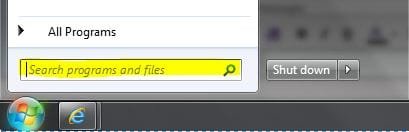
The 'Start Orb' is the round circle in the bottom left of your screen.

Something like:


Regards,
JDobbsy1987
My System SpecsSystem Spec
13 May 2011   #3

64-bit Windows 7 Ultimate SP1 & Windows 8 Enterprise
Texas


Hello Yuhr,

The tutorial below can help show you more about backup if needed.

Backup User and System Files

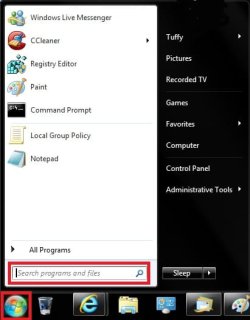
You would want to click on the Start button (orb), then type backup in the search box at the bottom of the Start Menu and press enter. I've boxed both in red below to help.

Mysterious START Orb-start_menu.jpg

Hope this helps,
Shawn
My System SpecsSystem Spec
.


14 May 2011   #4

windows7 Home Premium 64bit


Thanks a lot! Apparently, we have different versions of Windows 7: mine is Home Premium; there is no "Search programs and files", as it was in WinXP; there are only two options - "Search For files and folders..." and "Search For people...". Be as it may, I think I'll find "Backup". On the second thought, I've been happy with EASEUS Todo Home 2.0 , why change?
My System SpecsSystem Spec
14 May 2011   #5

Vista x64 / 7 X64


Yes, you are probably best sticking with something that you know works for you.
My System SpecsSystem Spec
14 May 2011   #6

Windows 7 64 bit SP1


Quote   Quote: Originally Posted by yuhr View Post
Thanks a lot! Apparently, we have different versions of Windows 7: mine is Home Premium; there is no "Search programs and files", as it was in WinXP; there are only two options - "Search For files and folders..." and "Search For people...". Be as it may, I think I'll find "Backup". On the second thought, I've been happy with EASEUS Todo Home 2.0 , why change?
That makes no sense. All versions of Windows 7 have the Search Programs and Files. Are you sure you're not using XP with a Windows 7 theme?
My System SpecsSystem Spec
14 May 2011   #7

Win7 Enterprise, Win7 x86 (Ult 7600), Win7 x64 Ult 7600, TechNet RTM on AMD x64 (2.8Ghz)
SomeWhere in the HOT Arizona Desert !


Did you install any custom themes ?
My System SpecsSystem Spec
14 May 2011   #8

windows7 Home Premium 64bit


Every time I turn on my PC, I see "Windows7 Home Premium". And I think it is - it's very different from WinXP.
My System SpecsSystem Spec
14 May 2011   #9

64-bit Windows 7 Ultimate SP1 & Windows 8 Enterprise
Texas


Yuhr,

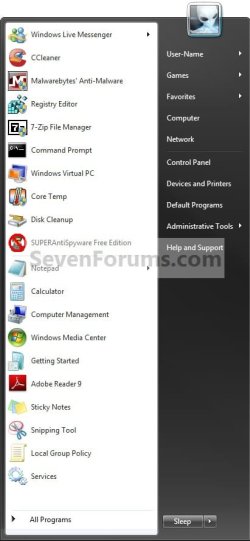
Check to see if your Start Menu looks like the one in the last example in this tutorial. If so, then use the same tutorial to make sure that you have Windows Seach checked in Windows Features to have it turned on.

Windows Search - Turn On or Off

Mysterious START Orb-search_removed_start_menu.jpg
My System SpecsSystem Spec
15 May 2011   #10

Windows 7 64 bit SP1


Quote   Quote: Originally Posted by yuhr View Post
Every time I turn on my PC, I see "Windows7 Home Premium". And I think it is - it's very different from WinXP.
Well, something isn't right, because the Windows Boot screen does not say Windows 7, it just says "Starting Windows". Or do you mean the login screen at the bottom?
My System SpecsSystem Spec
Reply

 Mysterious START Orb problems?


Thread Tools


Similar help and support threads for: Mysterious START Orb
Thread Forum
Solved Mysterious new service! Performance & Maintenance
Mysterious activity Network & Sharing
Mysterious Square General Discussion
Mysterious files General Discussion
The most mysterious 5.1 issue in W7... Sound & Audio


All times are GMT -5. The time now is 08:17 AM.


Seven Forums Android App Seven Forums IOS App Follow us on Facebook

Windows 7 Forums is an independent web site and has not been authorized,
sponsored, or otherwise approved by Microsoft Corporation.
"Windows 7" and related materials are trademarks of Microsoft Corp.
© Designer Media Ltd
  

1 2 3 4 5 6 7 8 9 10 11 12 13 14 15 16 17 18 19 20 21 22 23 24 25 26 27 28 29 30 31 32