| Windows 7: [Serious]Backup being skipped |
21 Jun 2011
|
#1 | | |
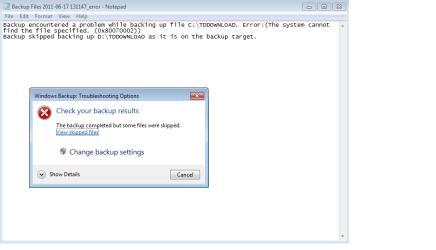
[Serious]Backup being skipped Here is my backup result,I tried to find the folder,but there were no such name of folder exist,so my backup always be skipped. So,I'm looking any advance user or those who have this issue experience to solve my problem.
When I use C:\TDDownload to located it,window explorer write cant find C:\TDDownload.Please check spelling and try again.
For optional,should I download the software which I installed before and it auto created this folder to stored the file I downloaded by use that software. | My System Specs |
| System Manufacturer/Model Number G31T-M7 OS Window 7 Starter x32 CPU Intel Pentium E5400 @ 2.70GHz Motherboard ECS G31T-M7 Memory 2.00 GB Single-Channel DDR2 Graphics Card ATI Radeon HD 4600 Series Monitor(s) Displays 1360x768 Screen Resolution 1360x768 Hard Drives 488GB Western Digital WDC WD5000AADS-00S9B0 ATA Device |
23 Jun 2011
|
#2 | | |
After I installed the program which create our this folder, I re backup it and the result is,Backup skipped backing up D:\TDDOWNLOAD as it is on the backup target. | My System Specs | | System Manufacturer/Model Number G31T-M7 OS Window 7 Starter x32 CPU Intel Pentium E5400 @ 2.70GHz Motherboard ECS G31T-M7 Memory 2.00 GB Single-Channel DDR2 Graphics Card ATI Radeon HD 4600 Series Monitor(s) Displays 1360x768 Screen Resolution 1360x768 Hard Drives 488GB Western Digital WDC WD5000AADS-00S9B0 ATA Device |
23 Jun 2011
|
#3 | | MS Windows 7 Ultimate SP1 64-bit Austin, Texas |
DarkSlayer,
A completed System Specs will be useful in determining a resolution for your problem. UPDATE YOUR SEVENFORUMS SYSTEM SPECS
User CP (3rd item in the top menu bar) |
in left-hand column,under Your Profile, Edit System Spec |
using Speccy - System Information - Free Download
and SIW to gather info, fill in the blanks.
Do me a favor and add the word laptop or desktop to the “system manufacturer” block.
Use the “Other Info” block for Optical Reader, Mouse, touchpad, wifi adapter, speakers, monitor
Scroll down and click on the SAVE CHANGES button.
--------------
thanks,
karl | My System Specs | | System Manufacturer/Model Number Toshiba Satellite S875D-S7239 laptop OS MS Windows 7 Ultimate SP1 64-bit CPU AMD A10-4600M Motherboard AMD Pumori (Socket FT1) Memory 6.00 GB Dual-Channel DDR3 @ 798MHz (11-11-12-28) Graphics Card AMD Radeon HD 7660G Sound Card High Definition Audio Device Monitor(s) Displays Generic PnP Monitor (1600x900@60Hz) Screen Resolution 1600x900@60Hz Keyboard Standard PS/2 Keyboard Mouse HP Wireless Optical Mobile Mouse Model FHA-3410 Hard Drives SSD 119GB Corsair CSSD-V128GB2 ATA Device Internet Speed What the local pub, local coffee shop offers. Other Info Optical Drive:MATSHITA BD-CMB UJ160B ATA Device
Also have an Asus ha1002xp netbook with Win 7 Ultimate installed. |
23 Jun 2011
|
#4 | | |
Alright,I updated my PC information. | My System Specs | | System Manufacturer/Model Number G31T-M7 OS Window 7 Starter x32 CPU Intel Pentium E5400 @ 2.70GHz Motherboard ECS G31T-M7 Memory 2.00 GB Single-Channel DDR2 Graphics Card ATI Radeon HD 4600 Series Monitor(s) Displays 1360x768 Screen Resolution 1360x768 Hard Drives 488GB Western Digital WDC WD5000AADS-00S9B0 ATA Device |
23 Jun 2011
|
#5 | | MS Windows 7 Ultimate SP1 64-bit Austin, Texas |
What drive(s) are you trying to backup to what destination drive?
What is TDDownload? | My System Specs | | System Manufacturer/Model Number Toshiba Satellite S875D-S7239 laptop OS MS Windows 7 Ultimate SP1 64-bit CPU AMD A10-4600M Motherboard AMD Pumori (Socket FT1) Memory 6.00 GB Dual-Channel DDR3 @ 798MHz (11-11-12-28) Graphics Card AMD Radeon HD 7660G Sound Card High Definition Audio Device Monitor(s) Displays Generic PnP Monitor (1600x900@60Hz) Screen Resolution 1600x900@60Hz Keyboard Standard PS/2 Keyboard Mouse HP Wireless Optical Mobile Mouse Model FHA-3410 Hard Drives SSD 119GB Corsair CSSD-V128GB2 ATA Device Internet Speed What the local pub, local coffee shop offers. Other Info Optical Drive:MATSHITA BD-CMB UJ160B ATA Device
Also have an Asus ha1002xp netbook with Win 7 Ultimate installed. |
23 Jun 2011
|
#6 | | |
I'm trying to backup local C,and backup destination is local D.When I want to do so,the folder which name TDDownload always being skipped,see the first post,the screen-shot show the error of the folder.
By the way,I try to install the download manager which auto created TDDownload folder to store file downloaded from network,and I tried the backup once again the result of backup is,Backup skipped backing up D:\TDDOWNLOAD as it is on the backup target. | My System Specs | | System Manufacturer/Model Number G31T-M7 OS Window 7 Starter x32 CPU Intel Pentium E5400 @ 2.70GHz Motherboard ECS G31T-M7 Memory 2.00 GB Single-Channel DDR2 Graphics Card ATI Radeon HD 4600 Series Monitor(s) Displays 1360x768 Screen Resolution 1360x768 Hard Drives 488GB Western Digital WDC WD5000AADS-00S9B0 ATA Device |
23 Jun 2011
|
#7 | | MS Windows 7 Ultimate SP1 64-bit Austin, Texas |
To be sure that I give you the correct answer, could you please use following procedure to post a pic of disk management output: HOW TO POST A SNAPSHOT OF DISK MANAGEMENT DISPLAY Run disk management: WIN | type DISKMGMT.MSC | ENTER WIN is the key with the wavy flag. Maximize the output of Disk Management: ALT-Spacebar key combo (this pops up a menu) | X key (selects Maximize) |
Drag the field separators (such as between Status and Capacity) to show entire field. This is very important, otherwise, needed info is not visible. Make a snapshot: WIN | type SNIPPING | ENTER
Click the New button.
Drag the cursor around the area you want to snip. File | Save as | select save location and name | Save button Post the snapshot:
thanks,
karl | My System Specs | | System Manufacturer/Model Number Toshiba Satellite S875D-S7239 laptop OS MS Windows 7 Ultimate SP1 64-bit CPU AMD A10-4600M Motherboard AMD Pumori (Socket FT1) Memory 6.00 GB Dual-Channel DDR3 @ 798MHz (11-11-12-28) Graphics Card AMD Radeon HD 7660G Sound Card High Definition Audio Device Monitor(s) Displays Generic PnP Monitor (1600x900@60Hz) Screen Resolution 1600x900@60Hz Keyboard Standard PS/2 Keyboard Mouse HP Wireless Optical Mobile Mouse Model FHA-3410 Hard Drives SSD 119GB Corsair CSSD-V128GB2 ATA Device Internet Speed What the local pub, local coffee shop offers. Other Info Optical Drive:MATSHITA BD-CMB UJ160B ATA Device
Also have an Asus ha1002xp netbook with Win 7 Ultimate installed. |
23 Jun 2011
|
#8 | | Windows 7 Pro-x64 South Texas |
Read your error message. Looks to me like you put "TDDownload" on the D drive instead of the C drive. Backup couldn't find the file on C and the second message says it's already on D.
Move the file from the D drive to C drive and try your backup again. | My System Specs | | Computer type PC/Desktop System Manufacturer/Model Number Built 2/11/2011 OS Windows 7 Pro-x64 CPU i7-2600 3.4GHz - 3.8GHz Turbo Motherboard Intel DH67BL-B3 Memory 8Gb - 2x4GB, Muskin 991770 PC3-1333 Graphics Card Integrated Intel HD 2000 Sound Card Integrated Intel 10.1 HD, RealTek ALC892 Monitor(s) Displays Asus LCD VH222H, Haier HL24XSL2a Screen Resolution 1920x1080, 1920x1080 Keyboard Logitech EX100 Wireless Mouse Logitech EX100 Wireless PSU Seasonic 650W 80+ Gold Modular Case Rosewill Defender Cooling Stock CPU, Four 120mm case fans, PCH fan added Hard Drives Crucial C300-128Gb,
Western Digital WD5002AALX - 500Gb,
Western Digital WD7501AALS - 750Gb Internet Speed 2.5/1.5 Mbs Antivirus Microsoft Security Essentials Browser Microsoft Internet Explorer 10 Other Info Antec Veris Premier-Multimedia IR Station,
Cyber Accoustics-3602 Speakers,
AFT XM-5U Card Reader,
Hauppauge TV-HVR-2250,
Sony LX300 USB Turntable |
23 Jun 2011
|
#9 | | |

Quote: Originally Posted by carwiz Read your error message. Looks to me like you put "TDDownload" on the D drive instead of the C drive. Backup couldn't find the file on C and the second message says it's already on D.
Move the file from the D drive to C drive and try your backup again.  Yes,I tried.
After I did,I receive the first post's screen-shot. | My System Specs | | System Manufacturer/Model Number G31T-M7 OS Window 7 Starter x32 CPU Intel Pentium E5400 @ 2.70GHz Motherboard ECS G31T-M7 Memory 2.00 GB Single-Channel DDR2 Graphics Card ATI Radeon HD 4600 Series Monitor(s) Displays 1360x768 Screen Resolution 1360x768 Hard Drives 488GB Western Digital WDC WD5000AADS-00S9B0 ATA Device |
23 Jun 2011
|
#10 | | Windows 7 Pro-x64 South Texas |

Quote: Originally Posted by DarkSlay3r 
Quote: Originally Posted by carwiz Read your error message. Looks to me like you put "TDDownload" on the D drive instead of the C drive. Backup couldn't find the file on C and the second message says it's already on D.
Move the file from the D drive to C drive and try your backup again.  Yes,I tried.
After I did,I receive the first post's screen-shot. That's not what I see. You must have your Cs and Ds confused. | My System Specs | | Computer type PC/Desktop System Manufacturer/Model Number Built 2/11/2011 OS Windows 7 Pro-x64 CPU i7-2600 3.4GHz - 3.8GHz Turbo Motherboard Intel DH67BL-B3 Memory 8Gb - 2x4GB, Muskin 991770 PC3-1333 Graphics Card Integrated Intel HD 2000 Sound Card Integrated Intel 10.1 HD, RealTek ALC892 Monitor(s) Displays Asus LCD VH222H, Haier HL24XSL2a Screen Resolution 1920x1080, 1920x1080 Keyboard Logitech EX100 Wireless Mouse Logitech EX100 Wireless PSU Seasonic 650W 80+ Gold Modular Case Rosewill Defender Cooling Stock CPU, Four 120mm case fans, PCH fan added Hard Drives Crucial C300-128Gb,
Western Digital WD5002AALX - 500Gb,
Western Digital WD7501AALS - 750Gb Internet Speed 2.5/1.5 Mbs Antivirus Microsoft Security Essentials Browser Microsoft Internet Explorer 10 Other Info Antec Veris Premier-Multimedia IR Station,
Cyber Accoustics-3602 Speakers,
AFT XM-5U Card Reader,
Hauppauge TV-HVR-2250,
Sony LX300 USB Turntable [Serious]Backup being skipped problems? All times are GMT -5. The time now is 05:03 AM. | |