| Windows 7: Restoring different partitions back to hard drive |
24 Jun 2011
|
#1 | | |
Restoring different partitions back to hard drive Good day everyone,
I need some advice on backing up HD on laptop (as images using Macrium Reflect) and restore back if needed.
Partitions on 500 GB hard drive
#1) system Reserved 100MB
#2) Windows 7 (C) 100GB
#3) Factory Image (D) 10GB
#4) Data (E) 320GB
#5) Misc (F) 30GB++ (remaining total of 500GB = 465.66[Actual capacity])
Assuming I've 5 partitions on a 500GB Hard drive.
a) First I create an image on all 5 partitions as 1 image (say I named it as Image1)
b) Create 1 image for partition# 4 and 5 every week (say I named it as Image2)
c) Create 1 image for partition# 2 if I've install/remove any new applications from this (say I named it as Image3)
My question is that, if my system crash, which images should I restore first.
I was thinking of restoring in the following sequence. (btw planning to use Macrium Reflect bootCD for this process)
1) restore Image1 (choose all partitions)
2) restore Image3 (choose partitions#4 and 5)
3) restore Image2 (choose partition#2)
Can these be done? or any alternate way?
When restoring, can I choose which partition that I wants to restore?
Sorry for all the noob questions. Appreciate your help.
Thanks you
Boon | My System Specs |
| |
24 Jun 2011
|
#2 | | Windows 7x64 Home Premium SP1 x 2 Australia |
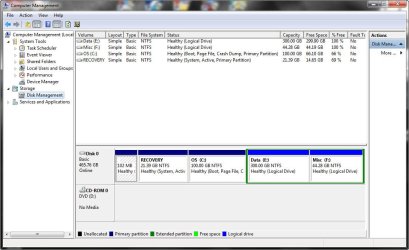
You should post a Disk management screen shot to confirm your partition types.
Assuming no linux partition you either have a dynamic disk (generally bad) or an extended partition with logical drives.
As a general answer to your question it depends on the nature of the "crash".
With Macrium Reflect free you restore one partition at a time.
Generally if your OS became unusable with Macrium you would try restoring just C: #2. Say no to MBR replace.
If you needed to replace the whole disk this is the order:
1) #1, System Reserved. Say yes to MBR replacement. Say No for subsequent partitions.
2) #2, C: OS.
3) Boot system. If system fails to boot try running repair up to 3 times from a system repair disk or install DVD.
4) Data Partitions
5) Factory image partition, D:.
Then go part way through a factory recover to ensure your recovery partition is working. Then exit. | My System Specs | | System Manufacturer/Model Number Own build (+ Recased Acer Aspire x1800) OS Windows 7x64 Home Premium SP1 x 2 CPU Intel i7 2600k Motherboard ASUS P8Z68 Deluxe Memory G.Skill Ripjaws (DDR3-1600) 2x4GB Graphics Card Nvidia GeForce GTS 450; Intel HD Graphics 3000(GT2+) Monitor(s) Displays Dell Ultrasharp IPS panel U2311H, Samsung SyncMaster P2350 Screen Resolution 1920x1080 Keyboard Logitech MK520 (wireless) Mouse Logitech MK520 PSU Seasonic M12II 520W Case Lian Li Lancool PC-K60 Cooling Case: 1x120mm, 3x140mm CPU: Hyper 212+ Hard Drives Crucial M4 128GB (000F), Seagates 1TB Barracuda ST31000528AS + Internet Speed 6-7 Mbps Antivirus Norton NIS, Malwarebytes on 2 (MSE on 3rd PC) Browser FireFox Other Info Audio: Logitech Z523 2.1 |
26 Jun 2011
|
#3 | | |

Quote: Originally Posted by mjf You should post a Disk management screen shot to confirm your partition types.
Assuming no linux partition you either have a dynamic disk (generally bad) or an extended partition with logical drives.
As a general answer to your question it depends on the nature of the "crash".
With Macrium Reflect free you restore one partition at a time.
Generally if your OS became unusable with Macrium you would try restoring just C: #2. Say no to MBR replace.
If you needed to replace the whole disk this is the order:
1) #1, System Reserved. Say yes to MBR replacement. Say No for subsequent partitions.
2) #2, C: OS.
3) Boot system. If system fails to boot try running repair up to 3 times from a system repair disk or install DVD.
4) Data Partitions
5) Factory image partition, D:.
Then go part way through a factory recover to ensure your recovery partition is working. Then exit.
Hi mjf,
Thanks for your reply and suggestions. Sorry for the late reply as I've just completed the backup, partitioning and installing apps on my laptop.
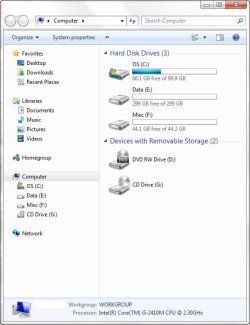
As you can see, I've 5 partitions on my laptop.
Partition#1 = System Reserved (102MB)
Partition#2 = Recovery (21.39GB)
Partition#3 = OS (100GB)
Partition#4 = Data (300GB)
Partition#5 = Misc (44.28GB)
Partition #4 and #5 are being Logical. I've tried to make #4 to primary and the system does not allow me to create more partitions. So, I changed the #4 to Logical. I'm ok with it with 3 primary partitions and the remaining as Logical.
In case I need to perform (Full) restore on the laptop. Are the following steps correct?
1) #1, System Reserved. Say yes to MBR replacement and choose active. Say No for subsequent partitions. [Do I need to execute the restore process before continue to next step?]
2) #3, C: OS.
3) #4, E: Data.
4) #5, F: Misc. Note: What about partition#2 as this is for Recovery from vendor and it's a "Active" partition
or
1) Restore all the partition at one go.
Eg.
#1, System Reserved. Say yes to MBR replacement and choose active
#3,4,5, mark as "Primary", No to MBR
Questions: In my case, for partition 4 and 5, it's created as "Logical". Do I still make these as "Primary" ?
Sorry for all the questions.
Thanks again. | My System Specs | | |
26 Jun 2011
|
#4 | | Windows 7 Ultimate SP1 X64/ linux in VM NW Florida |
I have a Dell that came set up similar. The 100mb partition is not system reserved, it is what they call an OEM partition and I really have no idea of it's function. The boot files usually found in a system reserved partition are in your case on the recovery partition. There can only be 1 active partition on a disk, and that is where the boot files reside. I back up my data with Microsoft SyncToy and occasionally by simply copy/paste. I don't image my data. That way I have a 1to1 copy of it. The other partitions, I image seperatly and then together. That way I can restore any way I need to. The reserved partition should not change and you should need only 1 good image of it.
There a lot of imaging stratigies and programs to use. Everyone has their own technique and preferred program(s) to use. I use at least 2 and usually 3 programs. Even the best programs can fail occasionally. If you asked 10 people on this forum what program they use and theur backup stratagy, you would get 10 different answers. And probably none of them would be wrong. You have to decide for yourself what program(s) you feel most comfortable with and develope your own stratagy. I would recommend however that you test whichever programs you decide to use. Backups are great, but you only know how good they are until you have to restore. You will find that some work for some people and not for others. If you haven't already, take a look at this tutorial. I hope I didn't confuse you. here are several backup tutorials to give you different stratagies and programs to consider. | My System Specs | | Computer type PC/Desktop System Manufacturer/Model Number Home Built- Always under construction OS Windows 7 Ultimate SP1 X64/ linux in VM CPU Intel i7-3770K Motherboard Asus Maximus V Extreme Z77 Memory 8GB G.Skill Ripjaws Z DDR3-2400 (2X4GB) Graphics Card EVGA GTX 670 SC 4GB Sound Card On Board Monitor(s) Displays Asus 24" LCD Screen Resolution 1920X1080 Keyboard Logitech G510 Mouse Logitech G500 PSU CORSAIR AX850 Case Cooler Master HAF X Cooling Custom Water Cooling Hard Drives Samsung 840 Pro 256 GB, Samsung 840 Pro 256 GB, Samsung 830 256GB, Samsung HD103SJ 1TB . External HD- Black X dock esata 1TB Samsung Spinpoint, Rosewill USB 3.0 dock 1TB Samsung Spinpoint Internet Speed carrier pigeon speed Antivirus MSE/MBAM Browser ie8 Other Info 2nd Rig,Windows 7 Ultimate SP1 X64, i7-2600K, Asrock P67 Extreme 4, 8GB DDR3-2133, HAF XM case, Noctua NH-D14, Gigabyte HD6950 OC 1GB, 2 X Crucial M4 128GB, Asus 24" LED.
Laptop- Samsung RF711-SO1 17" i5-2310M, 8GB DDR3-1333, Crucial M4 and OCZ vertex2, Nvidia GT540M.Win 7 HP X64 SP1. |
26 Jun 2011
|
#5 | | |
Hi essenbe,
Thanks for your comments and and some insight. Appreciate it.
I was planning to image the system partitions (in my case, #1, 2 and 3) seperately and for the data I'll do a normal cut/paste to an external drive.
My only concern is that, if I were to restore only 1 partition (the OS, partition#3). Do I only restore just partition#3 OR partition#1,2 and 3 together since my boot files are on the recovery partition (partition#2)
I've not much concern on the strategies or tools to be used. I just wants to understand the relations between all the partitions. I believe it's not as simple as restoring any partitions we like. Unless all the updated on the "OS partition, #3" are independent. Eg. If I install any new applications, all the updated on the registries will not be updated to where the partition has "Active" status or where the boot files reside. | My System Specs | | |
26 Jun 2011
|
#6 | | Windows 7 Ultimate SP1 X64/ linux in VM NW Florida |
If I'm wrong, I am sure MJF will correct me. It is my understanding that the boot files on the recovery do not change (or should not) The files and registry are on the C partition. When you start your computer the active boot partition begins the boot. It gets to a certain point and hands the boot process over to the C partition. In that process, the Boot files on the active partition should never change. The only thing that should change is the C partition. This is normal operation and there are exceptions. If you dual boot with another OS, the boot files will change to accomidate the other OS. But other than a situation like that, boot files never change. I operate that way. I just don't have the recovery partition. But, I normally only restore my C partition, unless you have some reason to believe the recovery has been corrupted. | My System Specs | | Computer type PC/Desktop System Manufacturer/Model Number Home Built- Always under construction OS Windows 7 Ultimate SP1 X64/ linux in VM CPU Intel i7-3770K Motherboard Asus Maximus V Extreme Z77 Memory 8GB G.Skill Ripjaws Z DDR3-2400 (2X4GB) Graphics Card EVGA GTX 670 SC 4GB Sound Card On Board Monitor(s) Displays Asus 24" LCD Screen Resolution 1920X1080 Keyboard Logitech G510 Mouse Logitech G500 PSU CORSAIR AX850 Case Cooler Master HAF X Cooling Custom Water Cooling Hard Drives Samsung 840 Pro 256 GB, Samsung 840 Pro 256 GB, Samsung 830 256GB, Samsung HD103SJ 1TB . External HD- Black X dock esata 1TB Samsung Spinpoint, Rosewill USB 3.0 dock 1TB Samsung Spinpoint Internet Speed carrier pigeon speed Antivirus MSE/MBAM Browser ie8 Other Info 2nd Rig,Windows 7 Ultimate SP1 X64, i7-2600K, Asrock P67 Extreme 4, 8GB DDR3-2133, HAF XM case, Noctua NH-D14, Gigabyte HD6950 OC 1GB, 2 X Crucial M4 128GB, Asus 24" LED.
Laptop- Samsung RF711-SO1 17" i5-2310M, 8GB DDR3-1333, Crucial M4 and OCZ vertex2, Nvidia GT540M.Win 7 HP X64 SP1. |
26 Jun 2011
|
#7 | | Windows 7x64 Home Premium SP1 x 2 Australia |

Quote: Originally Posted by boon1 My only concern is that, if I were to restore only 1 partition (the OS, partition#3). Do I only restore just partition#3 OR partition#1,2 and 3 together since my boot files are on the recovery partition (partition#2)
I've not much concern on the strategies or tools to be used. I just wants to understand the relations between all the partitions. Given your machine is a Dell and the Partition structure, the Recovery partition performs the dual roles of the system active (reserved) and Factory recovery.
So similar advice applies, except the recovery (system, active) partition along with the OS partition is required before you can boot.
Normally I would restore and image the OS (#3) more often. Keep some images of #1 and #3. They will be needed if those partitions get corrupted or you need to install a new main HDD.
In terms of relationship between partitions etc. this may help reflect updates
PS: Just seen essenbe's comments - I agree. | My System Specs | | System Manufacturer/Model Number Own build (+ Recased Acer Aspire x1800) OS Windows 7x64 Home Premium SP1 x 2 CPU Intel i7 2600k Motherboard ASUS P8Z68 Deluxe Memory G.Skill Ripjaws (DDR3-1600) 2x4GB Graphics Card Nvidia GeForce GTS 450; Intel HD Graphics 3000(GT2+) Monitor(s) Displays Dell Ultrasharp IPS panel U2311H, Samsung SyncMaster P2350 Screen Resolution 1920x1080 Keyboard Logitech MK520 (wireless) Mouse Logitech MK520 PSU Seasonic M12II 520W Case Lian Li Lancool PC-K60 Cooling Case: 1x120mm, 3x140mm CPU: Hyper 212+ Hard Drives Crucial M4 128GB (000F), Seagates 1TB Barracuda ST31000528AS + Internet Speed 6-7 Mbps Antivirus Norton NIS, Malwarebytes on 2 (MSE on 3rd PC) Browser FireFox Other Info Audio: Logitech Z523 2.1 |
27 Jun 2011
|
#8 | | |
Hi mjf and essenbe,
Thank you so much for the explanations. It's clearer to me now.
Since I've created a full backup (all 5 partitions) on 1 image, I'll do another set of individual images for partition#1, 2 and 3. Subsequently, I'll only backup for Os (#3) often. In case I need to restore, I'll use image OS (#3)
I wish I've another machine to play around
Thanks again guys
Boon | My System Specs | | |
27 Jun 2011
|
#9 | | Windows 7 Ultimate SP1 X64/ linux in VM NW Florida |
You are more than welcome. Glad you have it sorted out. | My System Specs | | Computer type PC/Desktop System Manufacturer/Model Number Home Built- Always under construction OS Windows 7 Ultimate SP1 X64/ linux in VM CPU Intel i7-3770K Motherboard Asus Maximus V Extreme Z77 Memory 8GB G.Skill Ripjaws Z DDR3-2400 (2X4GB) Graphics Card EVGA GTX 670 SC 4GB Sound Card On Board Monitor(s) Displays Asus 24" LCD Screen Resolution 1920X1080 Keyboard Logitech G510 Mouse Logitech G500 PSU CORSAIR AX850 Case Cooler Master HAF X Cooling Custom Water Cooling Hard Drives Samsung 840 Pro 256 GB, Samsung 840 Pro 256 GB, Samsung 830 256GB, Samsung HD103SJ 1TB . External HD- Black X dock esata 1TB Samsung Spinpoint, Rosewill USB 3.0 dock 1TB Samsung Spinpoint Internet Speed carrier pigeon speed Antivirus MSE/MBAM Browser ie8 Other Info 2nd Rig,Windows 7 Ultimate SP1 X64, i7-2600K, Asrock P67 Extreme 4, 8GB DDR3-2133, HAF XM case, Noctua NH-D14, Gigabyte HD6950 OC 1GB, 2 X Crucial M4 128GB, Asus 24" LED.
Laptop- Samsung RF711-SO1 17" i5-2310M, 8GB DDR3-1333, Crucial M4 and OCZ vertex2, Nvidia GT540M.Win 7 HP X64 SP1. Restoring different partitions back to hard drive problems? All times are GMT -5. The time now is 05:33 AM. | |