| Windows 7: Resize Recovery Partition? |
05 Jul 2011
|
| | Windows 7 X64 Professional 302 posts Eagle River, AK |
Resize Recovery Partition? This is probably a little OCD but, that's kinda how I am so, bare with me.
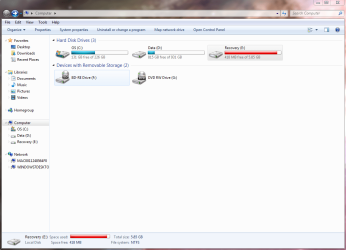
When I first got my Maingear computer, I could've sworn the recovery partition in system view was blue. Now it's red, meaning close to full. I know this partition doesn't move files on or off it so, how did it go from blue to red?
I guess my real question is, can I re-size the recovery partition enough to make it blue again or, should I seek counseling for my OCD? | My System Specs |
| System Manufacturer/Model Number Dell XPS 400 OS Windows 7 X64 Professional CPU Intel® Pentium D Dual Core 3.6GHZ Motherboard DELL Dimension 9150 MotherBoard DXP051 XPS400 FJ030 Memory 4GB DDR2 PC2-5300 Graphics Card GeForce GT 440 (Fermi) 2GB 128-bit DDR3 PCI Express 2.0 x16 Sound Card ASUS XONAR DG 5.1 Channels PCI Interface Xonar DG Monitor(s) Displays 2 X 23" Apple Cinema Display Screen Resolution 1920 X 1200p Keyboard Logitech Illuminated Keyboard Mouse Logitech M705 Marathon PSU 375 Watt Dell Case Dell XPS 400 BTX Case Cooling Dell XPS 400 Air Cooling Hard Drives 250GB Intel® 510 Series SSD SATA 6G (w/TRIM) [500MB/s Reads]
1.0TB Western Digital Caviar Black SATA 6G 7200rpm 64MB Cache Internet Speed +/- 9929 Kbps Other Info This machine was given to me when my dad bought a new computer. I keep throwing upgrades at it and it keeps on ticking. Think I've done everything to it that can be done outside a PSU upgrade so I can run an even BETTER GPU. |
05 Jul 2011
|
| | Windows 7 x64 pro/ Windows 7 x86 Pro/ XP SP3 x86 5,148 posts |
Sometimes the recovery partition gets written to though its not meant to be. The culprit could be system restore points or windows backups. You can check both for the backup location.
As far as the recovery partition is concerned, you need to check whether its usable now. Try launching recovery (dont go through it though). If you made recovery disks earlier, you're fine even if the recovery partition is hosed. If you didnt, you can try ordering them from the vendor- OEMs like HP, Dell etc. do provide an extra set for a nominal charge.
Even if nothing works, dont worry. Just image your current windows install using macrium or acronis or whatever you prefer, you can just restore the image if things go out of hand. For that matter, you can even clean install windows and activate with the sticker key. | My System Specs | | System Manufacturer/Model Number Too many to describe... OS Windows 7 x64 pro/ Windows 7 x86 Pro/ XP SP3 x86 |
05 Jul 2011
|
| | Vista, Windows7, Mint Mate, Zorin, Windows 8 17,868 posts Florida in winter, Black Forest/Germany |
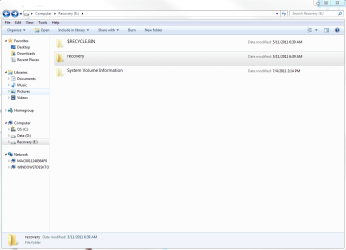
Resizing the recovery partition is not a valid option in my book. You should find out how it got stuffed. Open the recovery partition and have a look. As Bill mentioned, the main culprit is usually the data backup because that assumes D as default. | My System Specs | | System Manufacturer/Model Number HP, Dell, Gateway, Toshiba - 4 laptops and 2 desktops OS Vista, Windows7, Mint Mate, Zorin, Windows 8 CPU from 1.6GHz Duo to i7 Monitor(s) Displays 2x HP w2207 Keyboard with trackball - no mices Mouse Trackball mice Hard Drives 5x HDD, 7x SSD, 12x Externals Internet Speed DSL 6000 |
05 Jul 2011
|
| | Windows 7x64 Home Premium SP1 x 2 4,012 posts Australia |
You should leave the recovery (factory restore) partition alone and so should everything else I think. Dell seem to use it to double as system active but this is small stuff and shouldn't significantly changing the size of the partition.
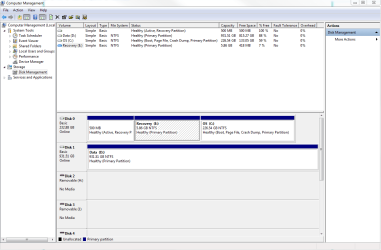
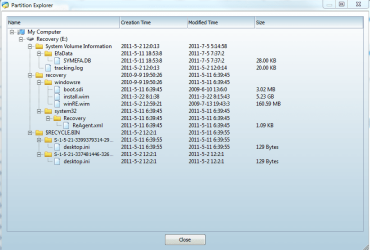
You could provide 2 pieces of information if you want more feedback:
1) screenshot from Disk Management
2) screen shot of the contents using the free Partition Wizard Mini Tool. Use the "Explore Partition" option.
As far as resizing the recovery/restore partition I definitely would not. Factory restores should impose the original partition structure. | My System Specs | | System Manufacturer/Model Number Own build (+ Recased Acer Aspire x1800) OS Windows 7x64 Home Premium SP1 x 2 CPU Intel i7 2600k Motherboard ASUS P8Z68 Deluxe Memory G.Skill Ripjaws (DDR3-1600) 2x4GB Graphics Card Nvidia GeForce GTS 450; Intel HD Graphics 3000(GT2+) Monitor(s) Displays Dell Ultrasharp IPS panel U2311H, Samsung SyncMaster P2350 Screen Resolution 1920x1080 Keyboard Logitech MK520 (wireless) Mouse Logitech MK520 PSU Seasonic M12II 520W Case Lian Li Lancool PC-K60 Cooling Case: 1x120mm, 3x140mm CPU: Hyper 212+ Hard Drives Crucial M4 128GB (000F), Seagates 1TB Barracuda ST31000528AS + Internet Speed 6-7 Mbps Antivirus Norton NIS, Malwarebytes on 2 (MSE on 3rd PC) Browser FireFox Other Info Audio: Logitech Z523 2.1 |
05 Jul 2011
|
| | Windows 7 Ultimate SP1 64-Bit 446 posts Peterborough, England |

Quote: Originally Posted by Bill2 Sometimes the recovery partition gets written to though its not meant to be. The culprit could be system restore points or windows backups. You can check both for the backup location.
As far as the recovery partition is concerned, you need to check whether its usable now. Try launching recovery (dont go through it though). If you made recovery disks earlier, you're fine even if the recovery partition is hosed. If you didnt, you can try ordering them from the vendor- OEMs like HP, Dell etc. do provide an extra set for a nominal charge.
Even if nothing works, dont worry. Just image your current windows install using macrium or acronis or whatever you prefer, you can just restore the image if things go out of hand. For that matter, you can even clean install windows and activate with the sticker key. I think Bill's advice is sound and you should consider going with the options he suggested. | My System Specs | | System Manufacturer/Model Number HP Pavilion Elite 495UK OS Windows 7 Ultimate SP1 64-Bit CPU Intel Core i7 870 @ 2.93GHz Motherboard MSI 2A9C (CPU1) Memory 8Gb Dual-Channel DDR3 @ 664MHz Graphics Card nVidia GeForce GTX 460 1024MB dedicated RAM Sound Card Realtek HD Audio Monitor(s) Displays HP2310i Screen Resolution 1920 x 1080 Keyboard Logitech K750 solar-powered keyboard Mouse Logitech Wireless M180 mouse PSU 460W Case HP Elite Cooling Air cooled Hard Drives 1x1954GB Hitachi HDS22020ALA 330 (RAID), 1x1954GB Hitachi External for backup and storage Internet Speed 2Mb Other Info Pure Avanti Flow Internet Radio with iPod Dock, 64Gb iPod, HP USB Speakers, Sony MDR-V500 Headphones, Sony Vaio F-Series Laptop |
05 Jul 2011
|
| | Windows 7 X64 Professional 302 posts Eagle River, AK |
Thanks for the replies. I'm at work and can't take the suggestions at the moment. I'll look into things when I get home.
I guess now would be a good time to come clean. The partition in question (as with the whole Windows 7 OS) is on a SSD. I didn't know I wasn't supposed to but, I tried a defrag about 2 weeks after I got the system. It was after that that I noticed it went from blue to red. Everything seems to be working great. In fact, this is the most awesome machine I have ever had. I just don't like "red" things when they're not supposed to be.
All my data (music, pictures, documents, etc.) are on a separate, conventional HDD. I'm not affraid to re-install although, I'd rather not. A long time ago, on a different machine, I tried the "imaging" thing and it didn't work and I had to re-install anyhow. I imagine there's a tutorial on this site that is recommended for imaging?
When I get home I'll provide some of the info that was asked for. Hopefully, I can resolve this without imaging or a re-install...
Thanks. | My System Specs | | System Manufacturer/Model Number Dell XPS 400 OS Windows 7 X64 Professional CPU Intel® Pentium D Dual Core 3.6GHZ Motherboard DELL Dimension 9150 MotherBoard DXP051 XPS400 FJ030 Memory 4GB DDR2 PC2-5300 Graphics Card GeForce GT 440 (Fermi) 2GB 128-bit DDR3 PCI Express 2.0 x16 Sound Card ASUS XONAR DG 5.1 Channels PCI Interface Xonar DG Monitor(s) Displays 2 X 23" Apple Cinema Display Screen Resolution 1920 X 1200p Keyboard Logitech Illuminated Keyboard Mouse Logitech M705 Marathon PSU 375 Watt Dell Case Dell XPS 400 BTX Case Cooling Dell XPS 400 Air Cooling Hard Drives 250GB Intel® 510 Series SSD SATA 6G (w/TRIM) [500MB/s Reads]
1.0TB Western Digital Caviar Black SATA 6G 7200rpm 64MB Cache Internet Speed +/- 9929 Kbps Other Info This machine was given to me when my dad bought a new computer. I keep throwing upgrades at it and it keeps on ticking. Think I've done everything to it that can be done outside a PSU upgrade so I can run an even BETTER GPU. |
05 Jul 2011
|
| | Windows 7 Ultimate SP1 64-Bit 446 posts Peterborough, England |
You're very welcome.
Our resident tutor, Brink, has produced an excellent write-up for creating a system image: Backup Complete Computer - Create an Image Backup
If ever you're not sure of anything, feel free to click the Tutorials link at the top of the page. Chances are, Brink and his colleagues will have covered it.
However, like yourself, I have all my docs, photos, music etc. on a separate hard drive, which in backed up on an incremental basis to an external hard drive. If ever Windows goes walkabout, I just re-install it.
As ever, it's a matter of personal choice as to which method you choose, but not backing up is not an option in my book. | My System Specs | | System Manufacturer/Model Number HP Pavilion Elite 495UK OS Windows 7 Ultimate SP1 64-Bit CPU Intel Core i7 870 @ 2.93GHz Motherboard MSI 2A9C (CPU1) Memory 8Gb Dual-Channel DDR3 @ 664MHz Graphics Card nVidia GeForce GTX 460 1024MB dedicated RAM Sound Card Realtek HD Audio Monitor(s) Displays HP2310i Screen Resolution 1920 x 1080 Keyboard Logitech K750 solar-powered keyboard Mouse Logitech Wireless M180 mouse PSU 460W Case HP Elite Cooling Air cooled Hard Drives 1x1954GB Hitachi HDS22020ALA 330 (RAID), 1x1954GB Hitachi External for backup and storage Internet Speed 2Mb Other Info Pure Avanti Flow Internet Radio with iPod Dock, 64Gb iPod, HP USB Speakers, Sony MDR-V500 Headphones, Sony Vaio F-Series Laptop |
05 Jul 2011
|
| | Vista, Windows7, Mint Mate, Zorin, Windows 8 17,868 posts Florida in winter, Black Forest/Germany |
If you want to do yourself a favor I recommend not to use Windows7 imaging - or at least not use it as the only option. Windows 7 imaging can be very iffy - many people had problems with it including myself. You are probably better off using the free Macrium or free Paragon which have a lot more function, are easier to use (especially Macrium) and are reliable. | My System Specs | | System Manufacturer/Model Number HP, Dell, Gateway, Toshiba - 4 laptops and 2 desktops OS Vista, Windows7, Mint Mate, Zorin, Windows 8 CPU from 1.6GHz Duo to i7 Monitor(s) Displays 2x HP w2207 Keyboard with trackball - no mices Mouse Trackball mice Hard Drives 5x HDD, 7x SSD, 12x Externals Internet Speed DSL 6000 |
05 Jul 2011
|
| | Windows 7 X64 Professional 302 posts Eagle River, AK |

Quote: Originally Posted by whs If you want to do yourself a favor I recommend not to use Windows7 imaging - or at least not use it as the only option. Windows 7 imaging can be very iffy - many people had problems with it including myself. You are probably better off using the free Macrium or free Paragon which have a lot more function, are easier to use (especially Macrium) and are reliable. Thanks for the suggestion. I was wondering just that as I read over the how-to. Looks a little overwhelming. I'm not even sure yet what I'm going to need to do. However, I am glad I have Seven Forums as a resource. | My System Specs | | System Manufacturer/Model Number Dell XPS 400 OS Windows 7 X64 Professional CPU Intel® Pentium D Dual Core 3.6GHZ Motherboard DELL Dimension 9150 MotherBoard DXP051 XPS400 FJ030 Memory 4GB DDR2 PC2-5300 Graphics Card GeForce GT 440 (Fermi) 2GB 128-bit DDR3 PCI Express 2.0 x16 Sound Card ASUS XONAR DG 5.1 Channels PCI Interface Xonar DG Monitor(s) Displays 2 X 23" Apple Cinema Display Screen Resolution 1920 X 1200p Keyboard Logitech Illuminated Keyboard Mouse Logitech M705 Marathon PSU 375 Watt Dell Case Dell XPS 400 BTX Case Cooling Dell XPS 400 Air Cooling Hard Drives 250GB Intel® 510 Series SSD SATA 6G (w/TRIM) [500MB/s Reads]
1.0TB Western Digital Caviar Black SATA 6G 7200rpm 64MB Cache Internet Speed +/- 9929 Kbps Other Info This machine was given to me when my dad bought a new computer. I keep throwing upgrades at it and it keeps on ticking. Think I've done everything to it that can be done outside a PSU upgrade so I can run an even BETTER GPU. |
05 Jul 2011
|
| | W 7 64-bit Ultimate 24,328 posts The Lowcountry |
You should still get counseling, it seems to be helping me! | My System Specs | | System Manufacturer/Model Number * BFK Customs * OS W 7 64-bit Ultimate CPU Intel Q9550 Yorkfield Motherboard ASUS P5Q Pro Memory 8GB Dominator 8500C5D Graphics Card ATI : XFX 5870 Sound Card Realtek HD Audio 7-1 Monitor(s) Displays 1x 47" LCD HDMI & 3x 26" LCD HDMI Screen Resolution 1920x1080P & 1920x1200 Keyboard Microsoft 500 Mouse Razer Diamondback 3G PSU Corsair 620HX Case Cooler Master RC-690 Cooling Tuniq Tower 120, 2x 140mm and 3x 120mm case fans Hard Drives 1x 80GB Intel X25-M G2 SSD : 1x 500GB & 1x 640GB WD Caviar Black(s) Internet Speed 14 Mb/s Other Info 1x Koutech 3Gb/s SATA HDD Hot Swap Rack Resize Recovery Partition? problems? All times are GMT -5. The time now is 02:09 AM. | |