|  | | |
29 Jul 2011
|
#1 | | Windows 7 Home Premium 64-bit, SP1 |
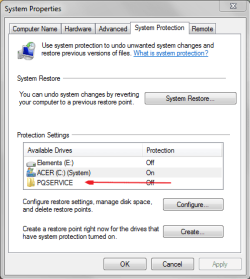
Pqservice What is PQSERVICE and what is it doing in System Properties ?
Thank you. | My System Specs |
| System Manufacturer/Model Number Acer Aspire 7741Z OS Windows 7 Home Premium 64-bit, SP1 CPU Intel Pentium P6200, Cores 2, 2.13 GHz Memory 4 GB Graphics Card Intel HD Sound Card unknown Monitor(s) Displays 17.3 inches Screen Resolution 1600 x 900 Hard Drives 640 GB, 5400 PRM |
29 Jul 2011
|
#2 | | Windows 7 x64 pro/ Windows 7 x86 Pro/ XP SP3 x86 |
PQservice is the Acer factory recovery partition, check in disk management- it may also be the active partition meaning boot files are located there. | My System Specs | | System Manufacturer/Model Number Too many to describe... OS Windows 7 x64 pro/ Windows 7 x86 Pro/ XP SP3 x86 |
29 Jul 2011
|
#3 | | Windows 7 Home Premium 64-bit, SP1 |

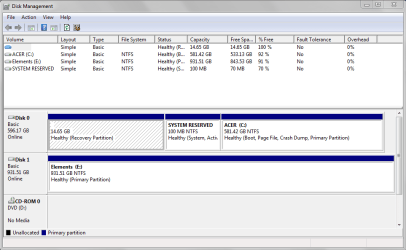
Quote: Originally Posted by Bill2 PQservice is the Acer factory recovery partition, check in disk management- it may also be the active partition meaning boot files are located there. From my disk management, it looks like a recovery partition.
Thank you.
Speaking of which, I meant to ask for a while......
Why is my Recovery partition empty ?
It says 14.65GB Capacity, 14.65 GB Free Spa..
I did a set of Factory Default discs ( 4 in total ).
If the recovery partition is empty, where in blazes did it get the data from to create 4 discs for me ? | My System Specs | | System Manufacturer/Model Number Acer Aspire 7741Z OS Windows 7 Home Premium 64-bit, SP1 CPU Intel Pentium P6200, Cores 2, 2.13 GHz Memory 4 GB Graphics Card Intel HD Sound Card unknown Monitor(s) Displays 17.3 inches Screen Resolution 1600 x 900 Hard Drives 640 GB, 5400 PRM |
29 Jul 2011
|
#4 | | Windows 7 x64 pro/ Windows 7 x86 Pro/ XP SP3 x86 |
Hmm..that does appear strange. How can we check? Try making a set of recovery disks again (if it gives the option to save as iso, accept cos that'll save you a disk). The other way is to try launch recovery (but not go through). | My System Specs | | System Manufacturer/Model Number Too many to describe... OS Windows 7 x64 pro/ Windows 7 x86 Pro/ XP SP3 x86 |
29 Jul 2011
|
#5 | | Windows 7x64 Home Premium SP1 x 2 Australia |
PQService is ACER's recovery partition. It is not the active partition but does contain all the required boot files (Bootmgr, Boot folder containing the BCD).
Although not normally required, you can boot directly into it by making the partition active or using the Hirens Boot CD to boot directly into it. This can be useful in some difficult factory restore situations.
Hirens can bypass the MBR and avoid the need to make the PQService partition active. The significance of the active status only means something to the MBR boot code.
So PQService just sits there until needed and should be left alone. It doesn't play a dual system reserved role (like Dell or is it HP). | My System Specs | | System Manufacturer/Model Number Own build (+ Recased Acer Aspire x1800) OS Windows 7x64 Home Premium SP1 x 2 CPU Intel i7 2600k Motherboard ASUS P8Z68 Deluxe Memory G.Skill Ripjaws (DDR3-1600) 2x4GB Graphics Card Nvidia GeForce GTS 450; Intel HD Graphics 3000(GT2+) Monitor(s) Displays Dell Ultrasharp IPS panel U2311H, Samsung SyncMaster P2350 Screen Resolution 1920x1080 Keyboard Logitech MK520 (wireless) Mouse Logitech MK520 PSU Seasonic M12II 520W Case Lian Li Lancool PC-K60 Cooling Case: 1x120mm, 3x140mm CPU: Hyper 212+ Hard Drives Crucial M4 128GB (000F), Seagates 1TB Barracuda ST31000528AS + Internet Speed 6-7 Mbps Antivirus Norton NIS, Malwarebytes on 2 (MSE on 3rd PC) Browser FireFox Other Info Audio: Logitech Z523 2.1 |
29 Jul 2011
|
#6 | | Windows 7 Home Premium 64-bit, SP1 |

Quote: Originally Posted by mjf PQService is ACER's recovery partition. It is not the active partition but does contain all the required boot files (Bootmgr, Boot folder containing the BCD).
Although not normally required, you can boot directly into it by making the partition active or using the Hirens Boot CD to boot directly into it. This can be useful in some difficult factory restore situations.
Hirens can bypass the MBR and avoid the need to make the PQService partition active. The significance of the active status only means something to the MBR boot code.
So PQService just sits there until needed and should be left alone. It doesn't play a dual system reserved role (like Dell or is it HP). Thank you.
That still does not explain why it ( recovery partition ) appears to be " empty " ??? | My System Specs | | System Manufacturer/Model Number Acer Aspire 7741Z OS Windows 7 Home Premium 64-bit, SP1 CPU Intel Pentium P6200, Cores 2, 2.13 GHz Memory 4 GB Graphics Card Intel HD Sound Card unknown Monitor(s) Displays 17.3 inches Screen Resolution 1600 x 900 Hard Drives 640 GB, 5400 PRM |
29 Jul 2011
|
#7 | | Windows 7 Home Premium 64-bit, SP1 |

Quote: Originally Posted by Bill2 Hmm..that does appear strange. How can we check? Try making a set of recovery disks again (if it gives the option to save as iso, accept cos that'll save you a disk). The other way is to try launch recovery (but not go through). 
Quote: Originally Posted by mjf PQService is ACER's recovery partition. It is not the active partition but does contain all the required boot files (Bootmgr, Boot folder containing the BCD).
Although not normally required, you can boot directly into it by making the partition active or using the Hirens Boot CD to boot directly into it. This can be useful in some difficult factory restore situations.
Hirens can bypass the MBR and avoid the need to make the PQService partition active. The significance of the active status only means something to the MBR boot code.
So PQService just sits there until needed and should be left alone. It doesn't play a dual system reserved role (like Dell or is it HP).
A little background history.
This is a 2 months old computer.
Also first time I use a Windows 7 OS. I used Vista for 4 years.
One day while " testing " the new OS, I chose to run a system restore just to see how it ran. It was stuck in a phase and couldn't get out. I turned off the power, but unable to reboot again. Without actually having done it before, I managed to get into factory settings option ( either F12 or Alt + F10 ). It went well and I was back to factory settings. Ran a sfc and it found a faulty dll, fixed it, no more problem doing system restore.
Now that I saw the partition as being empty, I just could not figure out how did I manage to restore it back to factory settings month and a half ago.
As to testing the Factory Default disc without actually going through it... I am reluctant to do so.
Besides I have ....
A repair disc with SP1
A Bootable DVD ( using IMburn ) non SP1 Home Premium 64-bit
System Image Backup once a week on ext. hard drive.
I think I am well covered even if the Factory Default discs fail me. | My System Specs | | System Manufacturer/Model Number Acer Aspire 7741Z OS Windows 7 Home Premium 64-bit, SP1 CPU Intel Pentium P6200, Cores 2, 2.13 GHz Memory 4 GB Graphics Card Intel HD Sound Card unknown Monitor(s) Displays 17.3 inches Screen Resolution 1600 x 900 Hard Drives 640 GB, 5400 PRM |
29 Jul 2011
|
#8 | | Windows 7 x64 pro/ Windows 7 x86 Pro/ XP SP3 x86 |
I agree. So let it be, when required try to launch recovery from that partition, if it works fine otherwise use the disks. To be safe, make a second copy of the disks or save iso's. | My System Specs | | System Manufacturer/Model Number Too many to describe... OS Windows 7 x64 pro/ Windows 7 x86 Pro/ XP SP3 x86 |
29 Jul 2011
|
#9 | | Windows 7x64 Home Premium SP1 x 2 Australia |

Quote: Originally Posted by t-4-2 
Quote: Originally Posted by mjf PQService is ACER's recovery partition. It is not the active partition but does contain all the required boot files (Bootmgr, Boot folder containing the BCD).
Although not normally required, you can boot directly into it by making the partition active or using the Hirens Boot CD to boot directly into it. This can be useful in some difficult factory restore situations.
Hirens can bypass the MBR and avoid the need to make the PQService partition active. The significance of the active status only means something to the MBR boot code.
So PQService just sits there until needed and should be left alone. It doesn't play a dual system reserved role (like Dell or is it HP). Thank you.
That still does not explain why it ( recovery partition ) appears to be " empty " ??? (1)
It's a hidden partition and it's a quirk of Windows Disk Management that shows it empty. Extremely unlikely it is empty!
Use Partition Wizard (see free programs link) to view your partitions. You will see that that partition will have ~8GB of stuff. Use PW's "explore partition" to safely browse within that partition and system reserved if you want. There is no need to assign letters etc.
(2)
You can launch e-Recovery (under programs) and see the option to do a factory restore which uses said partion. Obviously exit before going all the way - you get plenty of opportunities.
I think that answers it all???? | My System Specs | | System Manufacturer/Model Number Own build (+ Recased Acer Aspire x1800) OS Windows 7x64 Home Premium SP1 x 2 CPU Intel i7 2600k Motherboard ASUS P8Z68 Deluxe Memory G.Skill Ripjaws (DDR3-1600) 2x4GB Graphics Card Nvidia GeForce GTS 450; Intel HD Graphics 3000(GT2+) Monitor(s) Displays Dell Ultrasharp IPS panel U2311H, Samsung SyncMaster P2350 Screen Resolution 1920x1080 Keyboard Logitech MK520 (wireless) Mouse Logitech MK520 PSU Seasonic M12II 520W Case Lian Li Lancool PC-K60 Cooling Case: 1x120mm, 3x140mm CPU: Hyper 212+ Hard Drives Crucial M4 128GB (000F), Seagates 1TB Barracuda ST31000528AS + Internet Speed 6-7 Mbps Antivirus Norton NIS, Malwarebytes on 2 (MSE on 3rd PC) Browser FireFox Other Info Audio: Logitech Z523 2.1 |

29 Jul 2011
|
#10 | | Windows 7 Home Premium 64-bit, SP1 |

Quote: Originally Posted by mjf 
Quote: Originally Posted by t-4-2 
Quote: Originally Posted by mjf PQService is ACER's recovery partition. It is not the active partition but does contain all the required boot files (Bootmgr, Boot folder containing the BCD).
Although not normally required, you can boot directly into it by making the partition active or using the Hirens Boot CD to boot directly into it. This can be useful in some difficult factory restore situations.
Hirens can bypass the MBR and avoid the need to make the PQService partition active. The significance of the active status only means something to the MBR boot code.
So PQService just sits there until needed and should be left alone. It doesn't play a dual system reserved role (like Dell or is it HP). Thank you.
That still does not explain why it ( recovery partition ) appears to be " empty " ??? (1)
It's a hidden partition and it's a quirk of Windows Disk Management that shows it empty. Extremely unlikely it is empty!
Use Partition Wizard (see free programs link) to view your partitions. You will see that that partition will have ~8GB of stuff. Use PW's "explore partition" to safely browse within that partition and system reserved if you want. There is no need to assign letters etc.
(2)
You can launch e-Recovery (under programs) and see the option to do a factory restore which uses said partion. Obviously exit before going all the way - you get plenty of opportunities.
I think that answers it all???? Thank you.
I'll go find that Partition Wizard and see for myself.
t-4-2
Must have given you rep not too long ago.... within the last 16 people. Because I am not allowed to re you this time. | My System Specs | | System Manufacturer/Model Number Acer Aspire 7741Z OS Windows 7 Home Premium 64-bit, SP1 CPU Intel Pentium P6200, Cores 2, 2.13 GHz Memory 4 GB Graphics Card Intel HD Sound Card unknown Monitor(s) Displays 17.3 inches Screen Resolution 1600 x 900 Hard Drives 640 GB, 5400 PRM All times are GMT -5. The time now is 02:49 AM. | |