Windows 7 Forums Search
Welcome to Windows 7 Forums. Our forum is dedicated to helping you find solutions with any problems, errors or issues you are experiencing with Windows 7. The Windows 7 forum also covers news and updates and has an extensive Windows 7 tutorial section that covers a wide range of tips and tricks.


Windows 7 - System Restore How far back is ok?

 
08-02-2011   #1
bru


Win 7 Home Premium x64


System Restore How far back is ok?

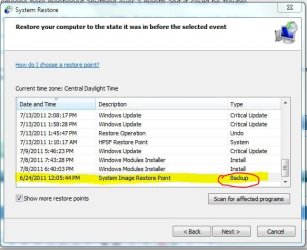
I have a system restore point from 24-June. It shows the restore point but that is also from when my system image was taken so not sure which would take precedence.

I would first try system restore rather than reinstalling the image. Is it safe to restore from that far back? Someone here mentioned anything over a month and it could be trouble.

I am still trying to figure out my folder displaying contents wacky behavior

Folders on desktop not showing what's inside

More questions about how folders contents are displayed

and that is as far back as I can (maybe) restore. XP used to have months of restore points but I guess my allotted space limits it to about a month.

Attached Thumbnails
System Restore How far back is ok?-res.jpg  
My System SpecsSystem Spec
08-02-2011   #2


Windows 7 Ultimate x64 SP1


Hello Bru,

It just really depends on how far back you need to go to undo whatever issue you are having before it happened.

You could use step 9 in the tutorial below to see what drivers and programs would be affected and needed to be reinstalled if you were to finish the system restore. Windows updates that were installed after the date of the restore point would also need to be reinstalled through Windows Updates again.

The contents of your user folders will not be affected though.

System Restore

Hope this helps some,
Shawn
My System SpecsSystem Spec
08-02-2011   #3


Windows 7 Ultimate x64


If space is an issue, you can always increase it: change system protection disk space usage.
My System SpecsSystem Spec
.


08-02-2011   #4


Windows 7 Ultimate SP1 64-Bit


Some useful answers in this link, but as Brink says you could be faced with re-installing any programs that were installed after the backup you created in June.

System Restore: frequently asked questions
My System SpecsSystem Spec
08-02-2011   #5
bru


Win 7 Home Premium x64


I did the Sys Restore and AFAICT it didn't solve my issue. I wanted to undo it but it didn't give the undo option which I thought was strange. So I restored it to the undo point which I suppose is the same thing.

I have to say WIn 7 has not been kind to me. I think I've used System Restore more times in six months than I did in six years with XP.

Why my folders are acting this way is really frustrating. Beyond frustrating. Essentially I don't get one of the main functionalities of Win 7. I'm a MSFT supporter, even have owned their stock for over a decade to the point of losing quite a lot of it's value. But this experience has really disappointed me. I'm sure it is probably something stupid, something ticked when it shouldn't or vice versa. But I can't keep stressing over it. Time to move on. I really only use my computer for the Internet and Music. I don't do 1% of what most here do. But I can't even get my music folders to display properly and it makes me sad. Rant off.
My System SpecsSystem Spec
Reply

 System Restore How far back is ok? problems?


Thread Tools


Similar Threads for: System Restore How far back is ok?
Thread Forum
System crash - Image Restore - Lost initial Files - How to get back? Backup and Restore
Cannot restore system image to back up. Error 0x80070002 Backup and Restore
Can't turn System Restore back on Backup and Restore
Back Up and system restore problems Backup and Restore
Use System Restore to go from Windows 7 back to Vista? Backup and Restore


All times are GMT -5. The time now is 08:34 AM.


Windows 7 Forums is an independent web site and has not been authorized,
sponsored, or otherwise approved by Microsoft Corporation.
"Windows 7" and related materials are trademarks of Microsoft Corp.
© Designer Media Ltd
  

1 2 3 4 5 6 7 8 9 10 11 12 13 14 15 16 17 18 19 20 21 22 23 24 25 26 27 28 29 30