
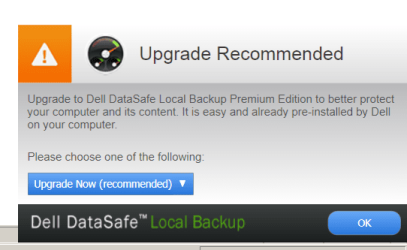
| Windows 7: Dell Datasafe annoying upgrade window |
09 Sep 2011
|
#1 | | Windows 7 Home Premium x64 SP 1 Florida |
Dell Datasafe annoying upgrade window Every so often I get this popup window on my laptop (Dell Studio 15). How do I prevent its appearance (without upgrading!)? Thanks. | My System Specs |
| Computer type PC/Desktop System Manufacturer/Model Number Dell Studio XPS 8100 OS Windows 7 Home Premium x64 SP 1 CPU Intel Core i7 860 @ 2.8 GHz Motherboard Dell 0T568R (CPU1) Memory 8.0 GB Dual Channel DDR3 @ 664 MHz (9-9-9-24) Graphics Card nVidia GeForce GTS 240 Sound Card M-Audio Delta Audiophile 2496 Monitor(s) Displays Dell 2407WFP Screen Resolution 1920x1200 Hard Drives 977 GB Western Digital WDC WD1001FAES-75W7A0 (SCSI) Antivirus MSE, MalwareBytes Anti-Malware Browser Firefox Other Info Microsoft Security Essentials, Mozilla Firefox, Mozilla Thunderbird. M-Audio Keystation 88es (keyboard controller), Western Digital Passport 250 GB external HD, Logitech Z2300 speaker system, two Mushkin Enhanced Mulholland 16GB USB flash drives, AKG K240 Studio headphones. |
09 Sep 2011
|
#2 | | Windows 7 Ultimate 64 bit Steve Ballmer Signature Edition So Cal (I.E.) |

Quote: Originally Posted by gogreen Every so often I get this popup window on my laptop (Dell Studio 15). How do I prevent its appearance (without upgrading!)? Thanks. One of the first things I do with nearly every Dell I support, or setup, is to remove all Dell branded sw! I know you can get rid of the data safe... Have you tried removing it/them via control panels Programs icon? | My System Specs | | System Manufacturer/Model Number Homebrew PC - "Alpha_Dawg" OS Windows 7 Ultimate 64 bit Steve Ballmer Signature Edition CPU Intel Core 2 Quad - Q9550 - 2.83GHz stock - OC'd to 3.6GHz Motherboard Gigabyte EP45-UD3P Memory 4GB DDR2 800MHz (PC6400) OCZ Reaper Graphics Card Nvidia GE Force 8800 GTS Sound Card Asus Xonar DX Monitor(s) Displays Samsung SyncMaster 2333HD Screen Resolution 1920 x 1080 Keyboard MS Natural Wireless KB Mouse MS Wireless Mouse PSU PC Power & Cooling Silencer 750 Case Gigabyte 3D Aurora Cooling Case is Air - 5ea. 120mm fans (mix of Arctic and Xigmatec) Hard Drives WD Caviar Black 750GB - 7200RPM - 32MB cache
WD Caviar Green 1.5TB - 5400RPM - 64MB cache
WD Caviar Green 2.0TB - 5400RPM - 64MB cache Internet Speed 50 mbps down/5 mbps up Other Info AVerMedia - AVerTVHD G2 Dual Tuner Card |
09 Sep 2011
|
#3 | | Windows 7 x64 pro/ Windows 7 x86 Pro/ XP SP3 x86 |
I wouldnt recommend uninstalling datasafe because its tied to various factory recovery options. Look in msconfig- startup tab and locate entries that are from SUPPORTSOFT, try unchecking those. There should also be an entry in Services, set its startup type to disabled or manual. | My System Specs | | System Manufacturer/Model Number Too many to describe... OS Windows 7 x64 pro/ Windows 7 x86 Pro/ XP SP3 x86 |
09 Sep 2011
|
#4 | | Windows 7 Ultimate 64 bit Steve Ballmer Signature Edition So Cal (I.E.) |
Really?? You prefer the Dell options over those in Windows 7? Curious as what exactly is better...
I've never taken the time to learn it or bother, as if I encounter a bad Dell I can use any dell restore CD to fix it! Just my opinion... I like Dell's HW... not a fan of their SW! | My System Specs | | System Manufacturer/Model Number Homebrew PC - "Alpha_Dawg" OS Windows 7 Ultimate 64 bit Steve Ballmer Signature Edition CPU Intel Core 2 Quad - Q9550 - 2.83GHz stock - OC'd to 3.6GHz Motherboard Gigabyte EP45-UD3P Memory 4GB DDR2 800MHz (PC6400) OCZ Reaper Graphics Card Nvidia GE Force 8800 GTS Sound Card Asus Xonar DX Monitor(s) Displays Samsung SyncMaster 2333HD Screen Resolution 1920 x 1080 Keyboard MS Natural Wireless KB Mouse MS Wireless Mouse PSU PC Power & Cooling Silencer 750 Case Gigabyte 3D Aurora Cooling Case is Air - 5ea. 120mm fans (mix of Arctic and Xigmatec) Hard Drives WD Caviar Black 750GB - 7200RPM - 32MB cache
WD Caviar Green 1.5TB - 5400RPM - 64MB cache
WD Caviar Green 2.0TB - 5400RPM - 64MB cache Internet Speed 50 mbps down/5 mbps up Other Info AVerMedia - AVerTVHD G2 Dual Tuner Card |
10 Sep 2011
|
#5 | | Windows 7 x64 pro/ Windows 7 x86 Pro/ XP SP3 x86 |

Quote: Originally Posted by Darryl Licht Really?? You prefer the Dell options over those in Windows 7? Curious as what exactly is better...
I've never taken the time to learn it or bother, as if I encounter a bad Dell I can use any dell restore CD to fix it! Just my opinion... I like Dell's HW... not a fan of their SW! Lol, this isnt about me. Advising people to get rid of safety nets in a hurry wouldnt be a responsible thing to do. Plus one doesnt need a hammer to kill a mosquito. | My System Specs | | System Manufacturer/Model Number Too many to describe... OS Windows 7 x64 pro/ Windows 7 x86 Pro/ XP SP3 x86 |
10 Sep 2011
|
#6 | | Windows 7 Ultimate 64 bit Steve Ballmer Signature Edition So Cal (I.E.) |
That's the beauty of IT... we all can have our opinions. I respect your opinion and your position too. But what you call "killing a mosquito with a hammer", I call getting rid of useless OEM Bloatware! I wasnt criticizing your position, I merely asked why you prefer it, what is better about it... do you have any specifics? For the benefit of the OP, other posters, and myself???
Personally, as I said earlier, I never leave OEM manufacturers SW (AKA: Bloatware) on any branded machines I support unless it is to support a specific piece of HW (such as Dell webcam sw on their lappys). I have had issues in the past with OEM sw, mainly they stop their support way too early. So I figure, why bother in the first place. And I have not had any issues doing so in over 15 years of consulting and supporting many, many networks. Most of my clients are running Dells or HP's! We also do exactly the same thing in the IT department at the school I teach at. All brand new Pc's are wiped of all manufacturers sw and clean fresh copies of only Windows 7, needed apps, and drivers are installed.
PS - I am an equal opportunity hater of all bloatware as I also do the same on HP's, Toshibas, Acers, etc. | My System Specs | | System Manufacturer/Model Number Homebrew PC - "Alpha_Dawg" OS Windows 7 Ultimate 64 bit Steve Ballmer Signature Edition CPU Intel Core 2 Quad - Q9550 - 2.83GHz stock - OC'd to 3.6GHz Motherboard Gigabyte EP45-UD3P Memory 4GB DDR2 800MHz (PC6400) OCZ Reaper Graphics Card Nvidia GE Force 8800 GTS Sound Card Asus Xonar DX Monitor(s) Displays Samsung SyncMaster 2333HD Screen Resolution 1920 x 1080 Keyboard MS Natural Wireless KB Mouse MS Wireless Mouse PSU PC Power & Cooling Silencer 750 Case Gigabyte 3D Aurora Cooling Case is Air - 5ea. 120mm fans (mix of Arctic and Xigmatec) Hard Drives WD Caviar Black 750GB - 7200RPM - 32MB cache
WD Caviar Green 1.5TB - 5400RPM - 64MB cache
WD Caviar Green 2.0TB - 5400RPM - 64MB cache Internet Speed 50 mbps down/5 mbps up Other Info AVerMedia - AVerTVHD G2 Dual Tuner Card |
10 Sep 2011
|
#7 | | Windows 7 Home Premium x64 SP 1 Florida |
Thanks, all.
After I posted my message, I just went into system configuration > Services and unchecked the Dell-related items. These items are sometimes called other things than Dell this or Dell that, so I had to look some up to see that they were actually Dell items. I know I have the option to uninstall Dell resources, but I chose not to do that--yet. I think I got most of them, so now I'll see what happens.
Thanks again. | My System Specs | | Computer type PC/Desktop System Manufacturer/Model Number Dell Studio XPS 8100 OS Windows 7 Home Premium x64 SP 1 CPU Intel Core i7 860 @ 2.8 GHz Motherboard Dell 0T568R (CPU1) Memory 8.0 GB Dual Channel DDR3 @ 664 MHz (9-9-9-24) Graphics Card nVidia GeForce GTS 240 Sound Card M-Audio Delta Audiophile 2496 Monitor(s) Displays Dell 2407WFP Screen Resolution 1920x1200 Hard Drives 977 GB Western Digital WDC WD1001FAES-75W7A0 (SCSI) Antivirus MSE, MalwareBytes Anti-Malware Browser Firefox Other Info Microsoft Security Essentials, Mozilla Firefox, Mozilla Thunderbird. M-Audio Keystation 88es (keyboard controller), Western Digital Passport 250 GB external HD, Logitech Z2300 speaker system, two Mushkin Enhanced Mulholland 16GB USB flash drives, AKG K240 Studio headphones. |
10 Sep 2011
|
#8 | | Windows 7 x64 pro/ Windows 7 x86 Pro/ XP SP3 x86 |
Just discussing with Darryl....dell datasafe local backup is a good solution for backup and restore of both system and data. The basic version that comes preinstalled of course offers the same functionality as the other OEMs- restore to factory state and create recovery DVDs. Though in newer recovery software on other OEMs, there are additional features like minimized image recovery (kind of inbuilt decrapifier) etc.
For those of not comfortable with clean installs and driver hunting, these things are a cozy way of refreshing and more importantly disaster recovery. I can vouch we get numerous SOS posts here asking for help where OEM recovery options are a godsend. Where does the OP get hold of a disk to clean install? "My sticker is not readable!! and so on.
From a different perspective, theres also good bloatware. E.g. on a recent HP purchase, theres this bloat called 3d driveguard. It claims to park the disk head if it detects sudden movements- in other words it'll save your hard disk if you drop it from the sofa. Of course I dont intend to test it, might cost me a lot of money lol. But I intend to keep it installed. | My System Specs | | System Manufacturer/Model Number Too many to describe... OS Windows 7 x64 pro/ Windows 7 x86 Pro/ XP SP3 x86 |
10 Sep 2011
|
#9 | | Windows 7 Home Premium x64 SP 1 Florida |
When I got my computer, I immediately made a recovery disk. Dell's urging to do so was good advice. I just don't want to see the upgrade window every so often--I also think it's a good idea for me not to remove the software. Good advice, Bill2. Thanks. | My System Specs | | Computer type PC/Desktop System Manufacturer/Model Number Dell Studio XPS 8100 OS Windows 7 Home Premium x64 SP 1 CPU Intel Core i7 860 @ 2.8 GHz Motherboard Dell 0T568R (CPU1) Memory 8.0 GB Dual Channel DDR3 @ 664 MHz (9-9-9-24) Graphics Card nVidia GeForce GTS 240 Sound Card M-Audio Delta Audiophile 2496 Monitor(s) Displays Dell 2407WFP Screen Resolution 1920x1200 Hard Drives 977 GB Western Digital WDC WD1001FAES-75W7A0 (SCSI) Antivirus MSE, MalwareBytes Anti-Malware Browser Firefox Other Info Microsoft Security Essentials, Mozilla Firefox, Mozilla Thunderbird. M-Audio Keystation 88es (keyboard controller), Western Digital Passport 250 GB external HD, Logitech Z2300 speaker system, two Mushkin Enhanced Mulholland 16GB USB flash drives, AKG K240 Studio headphones. |
29 Sep 2012
|
#10 | | Windows 7 Home Premium SP1 64bit Singapore |
Actually, you can just go right click the taskbar > properties > customise (under "notification area") > select "Hide icons and notifications" for Dell Datasafe [img]http://s7.**************/58tufxa47/Presentation1.jpg[/img] | My System Specs | | System Manufacturer/Model Number Dell/N4050 OS Windows 7 Home Premium SP1 64bit Memory 4GB 1 DIMM (4GB x1) DDR3 1333Mhz Graphics Card AMD Radeon HD 6470M – 1GB Hard Drives 500GB3 SATA hard drive Internet Speed 35.89 Mbps Dell Datasafe annoying upgrade window problems? All times are GMT -5. The time now is 05:58 AM. | |