Windows 7 Forums


Windows 7: I cant get System Restore to work.

25 Sep 2011   #1
MGM

Win 7 Home Prem 64bit
England
 
 
I cant get System Restore to work.

Hi All,


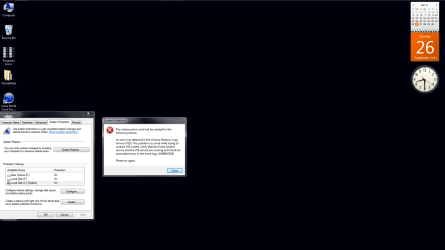
Im having a problem getting System Restore to work.

When i try to execute the operation i get this error code appearing

I cant get System Restore to work.-untitled.png

Any help will be greatful
My System SpecsSystem Spec

25 Sep 2011   #2

Windows 7 Home Premium 64 bit. SP-1
Northern Ohio


This may or may not help but it can't hurt.
sfc /scannow for the cmd prompt as admin.
It is a system file checker. If it finds a problem in Windows 7 files it will fix it. If it finds many problems it might not be able to fix them all at once. Run it two more times booting after each time.
Have you turned off any services?
My System SpecsSystem Spec
25 Sep 2011   #3

Windows 7 Enterprise Trial 32-bit SP1


c:/properties/general/disk cleanup/more options/"system restore and shadow copies"/cleanup

Disk Cleanup - Open and Use

Last edited by Brink; 26 Sep 2011 at 01:27 PM.. Reason: added link
My System SpecsSystem Spec
.


26 Sep 2011   #4
MGM

Win 7 Home Prem 64bit
England


Hi Layback Bear and Roncerr,

Ive carried out the sfc scan twice and rebooted on both occasions,and also done the clean up as advised by Roncerr but to no avail.

Ive even run my Windows 7 disk on the clean up mode,and tried the system repair on that,also gave it a shot in safe mode,but still no joy..

Do you guys have anymore suggestions,i really dont want to do a clean install of my operating system..
My System SpecsSystem Spec
26 Sep 2011   #5

Windows 7 Ultimate SP1 64-Bit
Peterborough, England


It may be that you don't have enough disk space being allocated to shadow storage so that restore points are either being deleted or not created in the first place.

Run these commands from a command prompt with elevated privileges to try and pin down what is happening.

Vssadmin Resize ShadowStorage /For=C: /On=C: /MaxSize=20GB
Reduces shadow storage to specified amount, MaxSize is a figure decided by you

Vssadmin List ShadowStorage
Lists maximum storage allocated for restore points

Vssadmin List Shadows
Lists all restore points already written

Vssadmin List Allocated
Lists used storage to date
My System SpecsSystem Spec
26 Sep 2011   #6
Ich

Win 7 HP 32bit - sp1
Caledonia
 
 
I cant get System Restore to work.

MGM Do you have any third party “Tune-up” programs installed on your system. It has been known for users to blindly optimise their systems using these programs without checking the consequences of their actions beforehand, disabling VSS for example. On the other hand go to My Computer, system protection link, highlight C:, check protection is “on” then hit configure. Check space usage, I think default may be around 10%, if you have a high figure then it may not be possible for your disc to create another point, as previously mentioned. Anyway get back to us if you find a solution. Cheers. Ich
My System SpecsSystem Spec
26 Sep 2011   #7
MGM

Win 7 Home Prem 64bit
England


Hi Seavixen32,
here is the results of my operation following your instructions
I cant get System Restore to work.-untitled.png

I hope this helps.

Hi Ich, the only third party software ive got is CCleaner.
Ive gone into system link and the space was 36%,but i think that was due to the operation that i carried out for Seavixen32 suggestions,ive now adjusted it to 10%.

I will give it another go...
My System SpecsSystem Spec
26 Sep 2011   #8
MGM

Win 7 Home Prem 64bit
England


Sorry guys,still not working

When i try to create a restore point i get this

I cant get System Restore to work.-untitled2.png

Last edited by MGM; 26 Sep 2011 at 02:36 PM.. Reason: more info
My System SpecsSystem Spec
26 Sep 2011   #9

Windows 7 Ultimate SP1 64-Bit
Peterborough, England


I found this solution that worked for Windows Vista, so I'm hoping it'll work for Windows 7.

Go to Device Manager and under the View Menu choose "Show Hidden Devices".

Expand Storage Volume Shadow Copies.

I cant get System Restore to work.-shadow.jpg

Right-click each Generic Shadow Volume Copy and select Uninstall.

Restart your computer and wait a couple of minutes while Windows recreates Generic Volume Shadow Copies.

Create a new System Restore Point and you should be good to go.
My System SpecsSystem Spec
27 Sep 2011   #10
MGM

Win 7 Home Prem 64bit
England
 
 
no Storage Volume Shadow Copies

Hi Seavixen32,

In my Device Manager,i dont seem to have Storage Volume Shadow Copies,
checkout my screenshot below

I cant get System Restore to work.-untitled.png..

Anymore advice
My System SpecsSystem Spec
Reply

 I cant get System Restore to work. problems?


Thread Tools


Similar help and support threads for: I cant get System Restore to work.
Thread Forum
Dell XPS Crashes .System repair,system restore ,safe mode don't work BSOD Help and Support
System restore wont work. Backup and Restore
system restore does not work Backup and Restore
System Restore doesn't work Backup and Restore
System Restore will not Work. Backup and Restore


All times are GMT -5. The time now is 02:14 PM.


Seven Forums Android App Seven Forums IOS App Follow us on Facebook

Windows 7 Forums is an independent web site and has not been authorized,
sponsored, or otherwise approved by Microsoft Corporation.
"Windows 7" and related materials are trademarks of Microsoft Corp.
© Designer Media Ltd
  

1 2 3 4 5 6 7 8 9 10 11 12 13 14 15 16 17 18 19 20 21 22 23 24 25 26 27 28 29 30 31 32