System Image backup seems to have stalled after 36 hours
After restoring my computer for 3 days (lots of software) due to a bad sector on the C harddisk, I decided to create a System Image using Windows (I have Windows Home Premium x64). First I encountered the problem with the boot partition being full (100MB - 100% used) and thus not allowing to create the volume shadow copy. I managed to solve this (thanks to info on forums) with Easeus Partition Manager - increased the size of the partition to 300MB- about 75% free space.
Then I started the System Image Backup on Thursday night around 11:30pm. By the next morning the backup still wasn't finished (I think it did about 40%) and the free space on the external hard disk on which I am making the backup reads 118GB free of 931GB. The backup is about 230GB and when I started there was about 330GB free on this disk.
On Friday night 9pm and the backup seems to be at about 55%. Harddisk still reads 118GB free of 931GB.Boot partition is still 137MB used - 162MB free. Size of the backup on the external drive is 214GB.
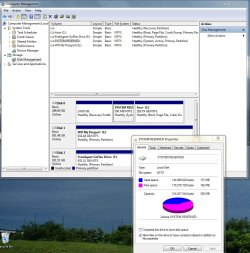
Next day Saturday at 1pm (or 36hours after launching the backup) progress seems to show about 75% but the external drive still reads 118GB free of 931GB.Boot partition is still 137MB used - 162MB free. Size of the backup on the external drive is still 214GB.I abort the backup since it does not seem to write anything. I would appreciate if somebody from Microsoft would tell me what I did wrong and how to make a succesful system image backup. Attached are screenshots of the eventviewer and the boot partition status, as well as a txt file with VSS log data.
I would appreciate if somebody from Microsoft would tell me what I did wrong and how to make a succesful system image backup.
Nobody here is from Microsoft. We are all volunteers.
There are other free imaging applications that are known to be less fussy than the built-in imaging tool. I'd use one of them unless I had an strong and over-riding reason to use the built-in tool.
System Manufacturer/Model Number Ignatz Special; 4 speed manual gearbox; factory air conditioning; one of one OS Windows 7 SP1, Home Premium, 64-bit CPU Intel Sandy Bridge i5-2500, not overclocked Motherboard Gigabyte H67A-UD3H-B3, full ATX Memory 4 GB Crucial DDR3-1333 Graphics Card none; graphics are integrated on CPU Sound Card onboard: Realtek ALC892; external: USB Behringer UF0-202 Monitor(s) Displays NEC 90GX2-BK 19" LCD Screen Resolution 800 x 640
Keyboard Leopold Tenkeyless with Cherry Blue switches, USB Mouse Logitech or Microsoft optical wired; either USB or PS 2 PSU Seasonic SS-560KM, modular Case Antec Solo II Cooling CPU: Scythe Big Shuriken; Case: Scythe Slipstream 800 & 500 Hard Drives System: Intel 320 Series SSD, 80 GB;
Data: Samsung Spinpoint 103SJ, 1 TB;
Backup: WD Caviar Green WD15EADS-00P8B0, 1.5TB Other Info Power consumption of this system, including monitor: 68 watts at idle; 144 watts at full load
Also, you shouldn't be using the 100 MB System Reserved partition for shadow copies and I've no doubt that's where your problem lies. The System Reserved partition does what it says on the tin - it is a container for the operating system's master boot record and shouldn't be used for anything else.
System restore is configured to use a percentage of your hard drive for shadow copies.
System Manufacturer/Model Number HP Pavilion Elite 495UK OS Windows 7 Ultimate SP1 64-Bit CPU Intel Core i7 870 @ 2.93GHz Motherboard MSI 2A9C (CPU1) Memory 8Gb Dual-Channel DDR3 @ 664MHz Graphics Card nVidia GeForce GTX 460 1024MB dedicated RAM Sound Card Realtek HD Audio Monitor(s) Displays HP2310i Screen Resolution 1920 x 1080
Keyboard Logitech K750 solar-powered keyboard Mouse Logitech Wireless M180 mouse PSU 460W Case HP Elite Cooling Air cooled Hard Drives 1x1954GB Hitachi HDS22020ALA 330 (RAID), 1x1954GB Hitachi External for backup and storage Internet Speed 2Mb Other Info Pure Avanti Flow Internet Radio with iPod Dock, 64Gb iPod, HP USB Speakers, Sony MDR-V500 Headphones, Sony Vaio F-Series Laptop
It's probably easy for a newcomer to the forum to think we are MS employees because the people give so much of their free time - don't worry.
Some people do have problems with the inbuilt Windows Imaging. I use it all the time and it hasn't let me down. I also use Macrium Reflect (free) as a safeguard. This is excellent software and highly regarded on this forum. Give it a go.
Suggestion: Don't make big images. Try to keep your OS and installed programs (including page file) on one partition. Put your data on a separate partition.
Make sure you have a backup strategy for your data partition of course BUT your OS partition will be the one most likely to get fouled up and require a reimage. This will typically be ~50GB or less and imaging/reimaging times on a USB2 external ~40 min. This is a convenient timeframe to keep multiple images and easily get yourself out of trouble quickly.
You can make a 4th primary data partition and a useful tool is Partition Wizard (see free program list). DON'T try to make more than 4 primaries.
Thank you to all of you for the excellent suggestions. I have started using Macrium in the meantime. I like mjf's suggestion to create a seperate partition for the data. I keep most of my data on an external drive but still keep some on the C drive for when I want to use the computer without an external drive attached. This is mainly for music applications when I need the USB ports for controllers. I will create a seperate data partition which I then can exclude from the Macrium system backup.
To Seavixen32: the problem with the shadow copy was actually debated elsewhere on this forum and the only simple solution seemed to be to extend the system reserved partition. As far as I can see, there is no setting that allows you to define where the shadow copy is being made. This being said I will shrink it again to close to 100MB since I have no intention of using windows system image backup again.
Just for general information: I used Genie backup manager before and while it is good for data backups it has failed me now twice with the System Recovery.
This is a nice first experience with this forum. You guys are better than MS support and certainy a hell of a lot faster! I hope I will be able to contribute a little too.
System Manufacturer/Model Number HP Pavilion Elite 495UK OS Windows 7 Ultimate SP1 64-Bit CPU Intel Core i7 870 @ 2.93GHz Motherboard MSI 2A9C (CPU1) Memory 8Gb Dual-Channel DDR3 @ 664MHz Graphics Card nVidia GeForce GTX 460 1024MB dedicated RAM Sound Card Realtek HD Audio Monitor(s) Displays HP2310i Screen Resolution 1920 x 1080
Keyboard Logitech K750 solar-powered keyboard Mouse Logitech Wireless M180 mouse PSU 460W Case HP Elite Cooling Air cooled Hard Drives 1x1954GB Hitachi HDS22020ALA 330 (RAID), 1x1954GB Hitachi External for backup and storage Internet Speed 2Mb Other Info Pure Avanti Flow Internet Radio with iPod Dock, 64Gb iPod, HP USB Speakers, Sony MDR-V500 Headphones, Sony Vaio F-Series Laptop
@Mangoa
I doubt that you will have problems with Macrium.
Other suggestions:
Test the Macrium recovery disc linux and pe disks. Hirens Boot CD is a very extensive utility package which also includes a Macrium pe capability in the mini XP environment. Download and look at it is the best way.
I'd tend to leave your system reserved at its current 300MB setting rather than reduce it again.
You're more likely to get different approaches to a problem on this forum rather than wrong advice.
One last question: when I did the system image backup with Macrium, I backed up the PQSERVICE partition, the system reserved partition and the C partition which now only contains Windows and programs. Next I time I have to restore my system, do I restore all three of these partitions? Or do I leave out the PQSERVICE partition which seems to contain a clean factory set-up for my laptop?
You definitely should leave out the PQService for routine reimages since this is the factory restore partition. Very good to keep one or two copies of this partition image. You do not want or need to routinely image it or replace it to a working HDD.
BUT when you replace your HDD (eg it fails) then you include PQService when you reimage to the new HDD.
Thanks mjf. I made 3 versions of system images with Macrium: one PQservice only, one system reserved partition plus C: (windows+programs), and one PQservice plus system reserved + C:. That should cover all scenarios I would think.