| Windows 7: Problem recoverying from backup via USB 3.0 external drive |
02 Nov 2011
|
| | |
Problem recoverying from backup via USB 3.0 external drive Hi, I tried to backup and recovery in win 7 via USB 3.0 external drive but it always says it can't find the system image. Is that because Win 7 does not load USB 3.0 driver during startup? I have tried many systems with USB 3.0 port but they are all the same. If I plug the extension drive to a USB 2.0 port just after the message below pop up, the recovery will see the system image. It's like the USB 3.0 port is not working at all. Pls help. | My System Specs |
| |
02 Nov 2011
|
| | Windows 7 SP1, Home Premium, 64-bit 7,566 posts |
Where is the system image?
I think Windows Backup likes it to be in the root of the drive and with the original name---not relocated. | My System Specs | | System Manufacturer/Model Number Ignatz Special; 4 speed manual gearbox; factory air conditioning; one of one OS Windows 7 SP1, Home Premium, 64-bit CPU Intel Sandy Bridge i5-2500, not overclocked Motherboard Gigabyte H67A-UD3H-B3, full ATX Memory 4 GB Crucial DDR3-1333 Graphics Card none; graphics are integrated on CPU Sound Card onboard: Realtek ALC892; external: USB Behringer UF0-202 Monitor(s) Displays NEC 90GX2-BK 19" LCD Screen Resolution 800 x 640 Keyboard Leopold Tenkeyless with Cherry Blue switches, USB Mouse Logitech or Microsoft optical wired; either USB or PS 2 PSU Seasonic SS-560KM, modular Case Antec Solo II Cooling CPU: Scythe Big Shuriken; Case: Scythe Slipstream 800 & 500 Hard Drives System: Intel 320 Series SSD, 80 GB;
Data: Samsung Spinpoint 103SJ, 1 TB;
Backup: WD Caviar Green WD15EADS-00P8B0, 1.5TB Other Info Power consumption of this system, including monitor: 68 watts at idle; 144 watts at full load |
02 Nov 2011
|
| | Windows 7x64 Home Premium SP1 x 2 4,012 posts Australia |
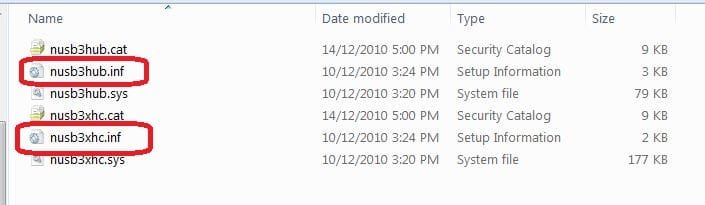
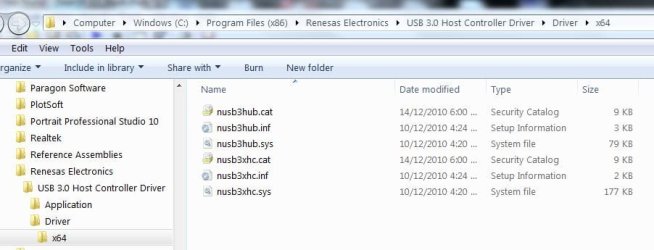
You need to load the USB 3 Host Controller and Hub drivers at the beginning of the restore process. Then the reimage software should see the disk and image.
With Windows imaging you go to the load driver option and select the 2 appropriate *.inf files. 
Also,
I use WD MyBook Essentials usb2/3 HDDs. Even when the drivers are installed, you may need to wake the HDD up by physically disconnecting HDD power and USB the plugging back in.
It is a bit annoying with this fiddling but Windows will locate the image. The speed of the USB 3 reimage more than makes up for the nuisance.
----Store the drivers anywhere convenient. I have them on my Boot utility flash drive. | My System Specs | | System Manufacturer/Model Number Own build (+ Recased Acer Aspire x1800) OS Windows 7x64 Home Premium SP1 x 2 CPU Intel i7 2600k Motherboard ASUS P8Z68 Deluxe Memory G.Skill Ripjaws (DDR3-1600) 2x4GB Graphics Card Nvidia GeForce GTS 450; Intel HD Graphics 3000(GT2+) Monitor(s) Displays Dell Ultrasharp IPS panel U2311H, Samsung SyncMaster P2350 Screen Resolution 1920x1080 Keyboard Logitech MK520 (wireless) Mouse Logitech MK520 PSU Seasonic M12II 520W Case Lian Li Lancool PC-K60 Cooling Case: 1x120mm, 3x140mm CPU: Hyper 212+ Hard Drives Crucial M4 128GB (000F), Seagates 1TB Barracuda ST31000528AS + Internet Speed 6-7 Mbps Antivirus Norton NIS, Malwarebytes on 2 (MSE on 3rd PC) Browser FireFox Other Info Audio: Logitech Z523 2.1 |
02 Nov 2011
|
| | |
mjf!!! YOU ARE THE MAN!!!!!! IT WORKS!!!! THANKS!! :-) | My System Specs | | |
21 Nov 2011
|
| | Windows 7 home premium 26 posts |
I don't think windows 7 backups are restorable. I had a recent hd crash. Had a valid recovery boot disk and a valid USB 2.0 system back up and system image. The thing would not restore my system to a new HD. Same error, no system image found. Unable to restore system. So much for that. The best way is to clone the HD with Clonezilla and keep the clone in a safe place to use when the other one crashes. Redo it every few months to reflect updated system. | My System Specs | | System Manufacturer/Model Number Compaq HP/ Presario CQ50 OS Windows 7 home premium CPU Athlon X2 Motherboard Nvidia Memory 4gig Graphics Card Nvidia Sound Card Built in Monitor(s) Displays TFT Hard Drives 500gig Samsung |
21 Nov 2011
|
| | Windows 7x64 Home Premium SP1 x 2 4,012 posts Australia |
@Pazooza,
Windows images do restore to existing HDDs. I've done this so many times I've lost count. I've restored to new HDDs a few times with no problems.
I would never say it works for all system configurations all the time - I believe it doesn't so you're not alone.
You don't need to clone though. In my opinion imaging is a far more efficient and flexible way to restore to an existing or a new HDD.
I would recommend you give free Macrium Reflect a go. I along with many forum members use it. It's good solid software and perhaps more reliable in general. | My System Specs | | System Manufacturer/Model Number Own build (+ Recased Acer Aspire x1800) OS Windows 7x64 Home Premium SP1 x 2 CPU Intel i7 2600k Motherboard ASUS P8Z68 Deluxe Memory G.Skill Ripjaws (DDR3-1600) 2x4GB Graphics Card Nvidia GeForce GTS 450; Intel HD Graphics 3000(GT2+) Monitor(s) Displays Dell Ultrasharp IPS panel U2311H, Samsung SyncMaster P2350 Screen Resolution 1920x1080 Keyboard Logitech MK520 (wireless) Mouse Logitech MK520 PSU Seasonic M12II 520W Case Lian Li Lancool PC-K60 Cooling Case: 1x120mm, 3x140mm CPU: Hyper 212+ Hard Drives Crucial M4 128GB (000F), Seagates 1TB Barracuda ST31000528AS + Internet Speed 6-7 Mbps Antivirus Norton NIS, Malwarebytes on 2 (MSE on 3rd PC) Browser FireFox Other Info Audio: Logitech Z523 2.1 |
10 Mar 2012
|
| | Windows 7 Professional 64-bit 1 posts |
I just wanted to chime in that installing the USB 3 drivers fixed my problem too. I had to download them from the Lenovo website, burn them to a CD, boot from the Windows 7 repair disk, and then insert my CD with the drivers. Then I was able to load the drivers using the Advanced... button. After I loaded all of the drivers (...\x64\nusb3hub.inf, ..\x64\nusb3xhc.inf, a total of 7 drivers for me), I was able to see my external HDD in the USB port. System Recovery saw the backup image at that point, and I was able to continue on. | My System Specs | | System Manufacturer/Model Number Lenovo ThinkPad W520 OS Windows 7 Professional 64-bit Memory 16 GB |
10 Mar 2012
|
| | Windows 7x64 Home Premium SP1 x 2 4,012 posts Australia |
It's nice when you can actually use the speed of the USB3 interface (the HDD is basically a Sata HDD after all).
It can be easier to just stick the USB3 drivers on a USB2 flash drive (a bit or irony there). I think Windows 8 will recognize USB3 by default. | My System Specs | | System Manufacturer/Model Number Own build (+ Recased Acer Aspire x1800) OS Windows 7x64 Home Premium SP1 x 2 CPU Intel i7 2600k Motherboard ASUS P8Z68 Deluxe Memory G.Skill Ripjaws (DDR3-1600) 2x4GB Graphics Card Nvidia GeForce GTS 450; Intel HD Graphics 3000(GT2+) Monitor(s) Displays Dell Ultrasharp IPS panel U2311H, Samsung SyncMaster P2350 Screen Resolution 1920x1080 Keyboard Logitech MK520 (wireless) Mouse Logitech MK520 PSU Seasonic M12II 520W Case Lian Li Lancool PC-K60 Cooling Case: 1x120mm, 3x140mm CPU: Hyper 212+ Hard Drives Crucial M4 128GB (000F), Seagates 1TB Barracuda ST31000528AS + Internet Speed 6-7 Mbps Antivirus Norton NIS, Malwarebytes on 2 (MSE on 3rd PC) Browser FireFox Other Info Audio: Logitech Z523 2.1 |
11 Mar 2012
|
| | Windows 7 64 bit SP1 1,465 posts |
^This The problems arise because Windows 7 has not native support for USB3.0. Windows 8 will. | My System Specs | | Computer type PC/Desktop System Manufacturer/Model Number Home built (GeneO industries)/Model 3 OS Windows 7 64 bit SP1 CPU i5 2500k @ 4.5 GHz, 1.264V 124 GFlop (IBT with AVX) Motherboard ASUS P8Z68-V PRO/GEN3 Memory 16GB (4GBx4) 1600MHz G.skill Ripjaws X 8-8-8-24 Graphics Card MSI GTX 660 Ti PE/OC, 2GB 7160 MHz DDR5 clock, 1228 Mhz Core Sound Card Onboard Realtek HD Monitor(s) Displays NEC Spectraview 2490WUXi-SV Screen Resolution 1920 x 1200 Keyboard HP Wireless Mouse HP wireless PSU Seasonic X-850 (2012 KM3 model) Case Fractal Design "Define R3" Cooling CM TPC 812 push/pull, 3 120mm, 2 TY-140 case fans Hard Drives Samsung 128GB 840 Pro SSD (System), Crucial 128GB M4 SSD, 2x WD Caviar 1TB Black internal (data), 1x WD Blue 6Gb/s 1TB Internal, 1x 2TB eSata WD20EARS Green, 2x 500GB Seagate external USB, 1x 350GB exte Internet Speed 27.8 Mb/s down, 5.6 Mb/s up Other Info USB 3.0 x4 , SATA III x4, eSATA x3, SATA II x4, USB 2.0 x8. 2 Samsung DVD R/W drives.
WEI: CPU 7.7, Memory 7.8, Graphics 7.9, Disk 7.9 Problem recoverying from backup via USB 3.0 external drive problems? All times are GMT -5. The time now is 10:06 PM. | |