
You are using an out of date browser. It may not display this or other websites correctly.
You should upgrade or use an alternative browser.
You should upgrade or use an alternative browser.
Backup to External drive
- Thread starter qim
- Start date

- Local time
- 2:13 PM
- Messages
- 5,915
Welcome to SevenForums.
Which program do you use for backing up? Keep your data in a seperate partition and backups in a seperate partition on your external drive.
( I use Paragon Hard Disk Manager Suite 11 to back up to an external drive partition exclusively earmarked for Backups. That way I can monitor and ensure that there is always sufficient space for backups.
I also keep a copy of the most recent backup on a seperate partition (not on the System Partition C drive) in the internal drive and run the WinPE Rescue CD from my bootable pendrive to restore should there be a need, without connecting the external drive.)
Which program do you use for backing up? Keep your data in a seperate partition and backups in a seperate partition on your external drive.
( I use Paragon Hard Disk Manager Suite 11 to back up to an external drive partition exclusively earmarked for Backups. That way I can monitor and ensure that there is always sufficient space for backups.
I also keep a copy of the most recent backup on a seperate partition (not on the System Partition C drive) in the internal drive and run the WinPE Rescue CD from my bootable pendrive to restore should there be a need, without connecting the external drive.)
My Computer
At a glance
Windows 7 Home Premium 32 bit
- OS
- Windows 7 Home Premium 32 bit
Well. I was going to use the program that came with the Samsung laptop which I assume is part of Windows 7. My external hard drive is NOT partitioned. Does that mnean that if I backup to it I lose the data already there?
Thanks
qim
Thanks
qim
My Computer
At a glance
windows 7 Home premium 64 bit
- OS
- windows 7 Home premium 64 bit

If you use the native windows backup program your data will not be deleted. Make sure there is enough free space to accommodate your backup though. - http://www.sevenforums.com/tutorials/615-backup-user-system-files.html
It may be worth creating a separate partition on your external though purely for backups -
http://www.sevenforums.com/tutorials/2672-partition-volume-shrink.html
http://www.sevenforums.com/tutorials/2674-partition-volume-create-new.html
Danny
It may be worth creating a separate partition on your external though purely for backups -
http://www.sevenforums.com/tutorials/2672-partition-volume-shrink.html
http://www.sevenforums.com/tutorials/2674-partition-volume-create-new.html
Danny
My Computer
At a glance
Windows 7 Home Premium x64 SP1intel(R)core(TM)2 duo CPU T6600 @ 2.20GHz3 gb ddr3ati radeon hd4570/512mb
- Computer Manufacturer/Model Number
- acer aspire 5935g
- OS
- Windows 7 Home Premium x64 SP1
- CPU
- intel(R)core(TM)2 duo CPU T6600 @ 2.20GHz
- Motherboard
- intel gm45/gm47 revision 07
- Memory
- 3 gb ddr3
- Graphics Card(s)
- ati radeon hd4570/512mb
- Monitor(s) Displays
- lop156wh2-tle1 15.3 flat
- Screen Resolution
- 1366x768
- Hard Drives
- OCZ-Agility3 60gig ssd
320gig external hdd
500gig external hdd
- Mouse
- Optical
- Internet Speed
- 30Mbps Down/30Mbps Up
- Local time
- 2:13 PM
- Messages
- 5,915
No, it will not erase your data. But it is always better that you create a seperate partition on your external drive for backups.
But before you create partitions on your external drive, back up any data on it to another hard disk and copy them back after creating the partitions.
But before you create partitions on your external drive, back up any data on it to another hard disk and copy them back after creating the partitions.
My Computer
At a glance
Windows 7 Home Premium 32 bit
- OS
- Windows 7 Home Premium 32 bit
Thanks Danny
Is it possible to create a new partition in my external drive WITHOUT deleting the existing data?
Thanks
qim
Use the first link I posted to shrink the existing partition down then you will be able to create a second partition out of the free space (if there is enough available).
If you like post a screenshot or your disk management screen showing how the drive is set up at present and we can take a look at it for you. - How to Use the Snipping Tool in Vista - Vista Forums
http://www.sevenforums.com/general-...ed-method-uploading-posting-screen-shots.html
Danny
My Computer
At a glance
Windows 7 Home Premium x64 SP1intel(R)core(TM)2 duo CPU T6600 @ 2.20GHz3 gb ddr3ati radeon hd4570/512mb
- Computer Manufacturer/Model Number
- acer aspire 5935g
- OS
- Windows 7 Home Premium x64 SP1
- CPU
- intel(R)core(TM)2 duo CPU T6600 @ 2.20GHz
- Motherboard
- intel gm45/gm47 revision 07
- Memory
- 3 gb ddr3
- Graphics Card(s)
- ati radeon hd4570/512mb
- Monitor(s) Displays
- lop156wh2-tle1 15.3 flat
- Screen Resolution
- 1366x768
- Hard Drives
- OCZ-Agility3 60gig ssd
320gig external hdd
500gig external hdd
- Mouse
- Optical
- Internet Speed
- 30Mbps Down/30Mbps Up
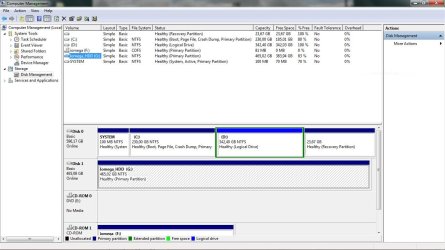
Ok qim
There is 83% free space on that drive so use this - http://www.sevenforums.com/tutorials/2672-partition-volume-shrink.html to shrink the single partition down then this - http://www.sevenforums.com/tutorials/2674-partition-volume-create-new.html to create yourself a new partition for your backups.
Danny
There is 83% free space on that drive so use this - http://www.sevenforums.com/tutorials/2672-partition-volume-shrink.html to shrink the single partition down then this - http://www.sevenforums.com/tutorials/2674-partition-volume-create-new.html to create yourself a new partition for your backups.
Danny
My Computer
At a glance
Windows 7 Home Premium x64 SP1intel(R)core(TM)2 duo CPU T6600 @ 2.20GHz3 gb ddr3ati radeon hd4570/512mb
- Computer Manufacturer/Model Number
- acer aspire 5935g
- OS
- Windows 7 Home Premium x64 SP1
- CPU
- intel(R)core(TM)2 duo CPU T6600 @ 2.20GHz
- Motherboard
- intel gm45/gm47 revision 07
- Memory
- 3 gb ddr3
- Graphics Card(s)
- ati radeon hd4570/512mb
- Monitor(s) Displays
- lop156wh2-tle1 15.3 flat
- Screen Resolution
- 1366x768
- Hard Drives
- OCZ-Agility3 60gig ssd
320gig external hdd
500gig external hdd
- Mouse
- Optical
- Internet Speed
- 30Mbps Down/30Mbps Up
Thanks Danny
Before I go ahead, is it really becessary to shrink the existing data in the external drive, as I have so much free space? I am worried about losing any of the data.
qim
Before I go ahead, is it really becessary to shrink the existing data in the external drive, as I have so much free space? I am worried about losing any of the data.
qim
My Computer
At a glance
windows 7 Home premium 64 bit
- OS
- windows 7 Home premium 64 bit
Honestly its your choice.
You have plenty of free space on that drive. The backup just creates 2 folders like below and your backup is all kept in zip folders inside these.

So you could either just save it to that one large partition or shrink it down and create another purpose made backup partition.
The shrink will only shrink the size of the partition not the data but is dependant on where the files are located on the disk as to how far it will shrink.
So its whatever you feel more comfortable with.
Danny
You have plenty of free space on that drive. The backup just creates 2 folders like below and your backup is all kept in zip folders inside these.
So you could either just save it to that one large partition or shrink it down and create another purpose made backup partition.
The shrink will only shrink the size of the partition not the data but is dependant on where the files are located on the disk as to how far it will shrink.
So its whatever you feel more comfortable with.
Danny
My Computer
At a glance
Windows 7 Home Premium x64 SP1intel(R)core(TM)2 duo CPU T6600 @ 2.20GHz3 gb ddr3ati radeon hd4570/512mb
- Computer Manufacturer/Model Number
- acer aspire 5935g
- OS
- Windows 7 Home Premium x64 SP1
- CPU
- intel(R)core(TM)2 duo CPU T6600 @ 2.20GHz
- Motherboard
- intel gm45/gm47 revision 07
- Memory
- 3 gb ddr3
- Graphics Card(s)
- ati radeon hd4570/512mb
- Monitor(s) Displays
- lop156wh2-tle1 15.3 flat
- Screen Resolution
- 1366x768
- Hard Drives
- OCZ-Agility3 60gig ssd
320gig external hdd
500gig external hdd
- Mouse
- Optical
- Internet Speed
- 30Mbps Down/30Mbps Up
The shrink will only shrink the size of the partition
Fine. That's what I had not understood. Will go ahead with the partition as per your suggestion.
Many thanks for your help and patience.
qim
My Computer
At a glance
windows 7 Home premium 64 bit
- OS
- windows 7 Home premium 64 bit
The shrink will only shrink the size of the partition
Fine. That's what I had not understood. Will go ahead with the partition as per your suggestion.
Many thanks for your help and patience.
qim
Post back with any questions/results

My Computer
At a glance
Windows 7 Home Premium x64 SP1intel(R)core(TM)2 duo CPU T6600 @ 2.20GHz3 gb ddr3ati radeon hd4570/512mb
- Computer Manufacturer/Model Number
- acer aspire 5935g
- OS
- Windows 7 Home Premium x64 SP1
- CPU
- intel(R)core(TM)2 duo CPU T6600 @ 2.20GHz
- Motherboard
- intel gm45/gm47 revision 07
- Memory
- 3 gb ddr3
- Graphics Card(s)
- ati radeon hd4570/512mb
- Monitor(s) Displays
- lop156wh2-tle1 15.3 flat
- Screen Resolution
- 1366x768
- Hard Drives
- OCZ-Agility3 60gig ssd
320gig external hdd
500gig external hdd
- Mouse
- Optical
- Internet Speed
- 30Mbps Down/30Mbps Up
Sorry to be back so soon, but the backup does not seem to have worked. Although I have folders in the new partition I got a message saying that the backup did not complete successfully due to i/o problem.
Help...
qim
Help...
qim
My Computer
At a glance
windows 7 Home premium 64 bit
- OS
- windows 7 Home premium 64 bit
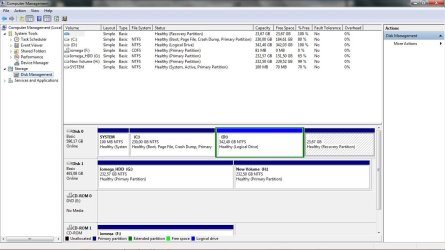
Ok first post a screenshot of your new disk management screen again. How long into the backup did the error occur. Did you assign the new partition a drive letter and also choose that letter when setting the backup.
Danny
Danny
My Computer
At a glance
Windows 7 Home Premium x64 SP1intel(R)core(TM)2 duo CPU T6600 @ 2.20GHz3 gb ddr3ati radeon hd4570/512mb
- Computer Manufacturer/Model Number
- acer aspire 5935g
- OS
- Windows 7 Home Premium x64 SP1
- CPU
- intel(R)core(TM)2 duo CPU T6600 @ 2.20GHz
- Motherboard
- intel gm45/gm47 revision 07
- Memory
- 3 gb ddr3
- Graphics Card(s)
- ati radeon hd4570/512mb
- Monitor(s) Displays
- lop156wh2-tle1 15.3 flat
- Screen Resolution
- 1366x768
- Hard Drives
- OCZ-Agility3 60gig ssd
320gig external hdd
500gig external hdd
- Mouse
- Optical
- Internet Speed
- 30Mbps Down/30Mbps Up
It seems to have stopped half-way through. I tried it a second time, and just now a third, with the same result. I accepted theletter assigment as suggested by the prog, and the back up did go to the right new partition. The problem is that I have no idea if it is any good. According to the box that popped-up, it is not. I am attaching screen shpts.
qim
qim
Attachments

My Computer
At a glance
windows 7 Home premium 64 bit
- OS
- windows 7 Home premium 64 bit
Ok the partition you created is all fine with plenty of space, the error is to do with the backup only not anything to do with the new partitions.
I've done some searching and if I'm not wrong the blame seems to lie with shadow copies and system restore. Turn off system restore on all partitions and apply to delete all restore points. Then turn it back on for your windows partition only and manually create a restore point so you have one available - http://www.sevenforums.com/tutorials/81499-system-restore-configuration-enable-disable.html
After a reboot try again this time configure your backup only to do your user files (ie uncheck the box for system image during the configuration) as this can be done on its own later.

See if that works, post back and I will get some more help with the error if it doesn't fix it.
Regards Danny
I've done some searching and if I'm not wrong the blame seems to lie with shadow copies and system restore. Turn off system restore on all partitions and apply to delete all restore points. Then turn it back on for your windows partition only and manually create a restore point so you have one available - http://www.sevenforums.com/tutorials/81499-system-restore-configuration-enable-disable.html
After a reboot try again this time configure your backup only to do your user files (ie uncheck the box for system image during the configuration) as this can be done on its own later.
See if that works, post back and I will get some more help with the error if it doesn't fix it.
Regards Danny
My Computer
At a glance
Windows 7 Home Premium x64 SP1intel(R)core(TM)2 duo CPU T6600 @ 2.20GHz3 gb ddr3ati radeon hd4570/512mb
- Computer Manufacturer/Model Number
- acer aspire 5935g
- OS
- Windows 7 Home Premium x64 SP1
- CPU
- intel(R)core(TM)2 duo CPU T6600 @ 2.20GHz
- Motherboard
- intel gm45/gm47 revision 07
- Memory
- 3 gb ddr3
- Graphics Card(s)
- ati radeon hd4570/512mb
- Monitor(s) Displays
- lop156wh2-tle1 15.3 flat
- Screen Resolution
- 1366x768
- Hard Drives
- OCZ-Agility3 60gig ssd
320gig external hdd
500gig external hdd
- Mouse
- Optical
- Internet Speed
- 30Mbps Down/30Mbps Up
I''m afraid the problem subsists, even after doing as you suggested. By the way, I turned off/deleted all restore points, and when I created new ones I did it for the 3 drives (C, G, H). Does that mean that if, one day, I need to restore it applies to all these drives, or can I choose onbly the one I need?
Qim
Qim
My Computer
At a glance
windows 7 Home premium 64 bit
- OS
- windows 7 Home premium 64 bit
It would only be the one you do the restore on. Usually you would only use system restore on your windows drive personally I would turn it off on your external as its a backup/data drive.
Please run this - http://www.sevenforums.com/tutorials/1538-sfc-scannow-command-system-file-checker.html and report any results.Try the backup again after.
Other Reading - http://support.microsoft.com/kb/973455#workaroundissue12
Windows backup can be temperamental at time you may consider using this instead - http://www.macrium.com/reflectfree.aspx
Please run this - http://www.sevenforums.com/tutorials/1538-sfc-scannow-command-system-file-checker.html and report any results.Try the backup again after.
Other Reading - http://support.microsoft.com/kb/973455#workaroundissue12
Windows backup can be temperamental at time you may consider using this instead - http://www.macrium.com/reflectfree.aspx
My Computer
At a glance
Windows 7 Home Premium x64 SP1intel(R)core(TM)2 duo CPU T6600 @ 2.20GHz3 gb ddr3ati radeon hd4570/512mb
- Computer Manufacturer/Model Number
- acer aspire 5935g
- OS
- Windows 7 Home Premium x64 SP1
- CPU
- intel(R)core(TM)2 duo CPU T6600 @ 2.20GHz
- Motherboard
- intel gm45/gm47 revision 07
- Memory
- 3 gb ddr3
- Graphics Card(s)
- ati radeon hd4570/512mb
- Monitor(s) Displays
- lop156wh2-tle1 15.3 flat
- Screen Resolution
- 1366x768
- Hard Drives
- OCZ-Agility3 60gig ssd
320gig external hdd
500gig external hdd
- Mouse
- Optical
- Internet Speed
- 30Mbps Down/30Mbps Up
Well, now I am havinbg problems with scannow. If I enter the commands in the 'Run' nothing seems to happen and ceratinly I get no results. If I open the Dos window it tells me that I am not an administrator. I am!
The computer is new (two weeks old) and I would be surprised if there is any corruption already.
qim
The computer is new (two weeks old) and I would be surprised if there is any corruption already.
qim
My Computer
At a glance
windows 7 Home premium 64 bit
- OS
- windows 7 Home premium 64 bit
Similar threads
- Replies
- 1
- Views
- 787

- Replies
- 2
- Views
- 604
- Replies
- 9
- Views
- 6K

- Replies
- 1
- Views
- 2K
