| Windows 7: How do I restore desktop? |
24 Jan 2012
|
#1 | | windows 7 home premium 32 bit |
How do I restore desktop? I did a complete backup of my C drive and now am trying to restore them.
I selected the folders I wanted to restore and clicked to restore them to the original location C. I assumed that I'd then be able to operate as I had previously but on clicking My Documents, for instance, the folder is empty.
And the desktop remains devoid of any of the icons that were there previously.
How can I restore everything to where it was before? | My System Specs |
| OS windows 7 home premium 32 bit |
24 Jan 2012
|
#2 | | Win 7 Pro 64-bit South Central Texas |
Hello tathraman and welcome to Seven Forums. Some things you could check:
1. Do your desktop icons appear under C:\Users\%USERPROFILE%\Desktop? If "yes", copy the files to the desktop.
2. Several internet searches for missing icons show that a 3rd party software called InfraRecorder is set by default to not show the icons. If you're using this software it might be to blame.
3. You could try rebuilding your icon cache and restoring default icons to your folders. Icon Cache - Rebuild User Folders - Restore Default Icon
4. You could also see this tutorial for gadgets if they're also affected: Gadgets - Turn On or Off
5. And if you changed your theme, especially to a 3rd party theme, that could affect if your icons appear or not. Theme - Change or Save
6. You could try to right click desktop > view > show desktop items or right click desktop > personalization > change desktop icons > restore default > ok.
7. I also think I remember reading that if User Account Control is turned off there can be issues with gadgets showing and customizing folder icons. If this is also an issue you might check if UAC is turned off. If it is, try using the least invasive setting. User Account Control - UAC - Change Notification Settings
Appreciate it if you'd post back to let us know if anything helped or not. Others with similar problems could benefit from your results. | My System Specs | | Computer type Laptop System Manufacturer/Model Number Sony Vaio VPCEB47GM Laptop OS Win 7 Pro 64-bit CPU Intel i5 2.4 Ghz Memory 8GB DDR3 Graphics Card Intel HD 3000 Sound Card IDT High Definition Monitor(s) Displays 15.6 WGXA Anti-Glare LED Screen Resolution 1280x800 Hard Drives 640Gb 7200rpm Antivirus MSE Browser Opera (primary) with IE9 backup |
24 Jan 2012
|
#3 | | windows 7 home premium 32 bit |
How do I restore desktop Thanks for your welcome and your detailed reply. I fear it's a bit over my head!
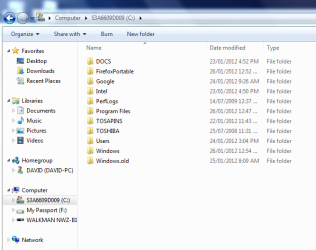
> Do your desktop icons appear under C:\Users\%USERPROFILE%\Desktop?
No.
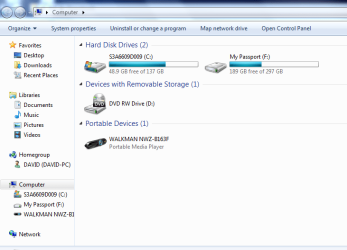
When I click computer it shows Hard disc drives (2) *********(C) - I expect this has some significance?
I wonder if I were to restore my system to before I tried to restore the backup and then tried again - would that be a good idea? | My System Specs | | OS windows 7 home premium 32 bit |
24 Jan 2012
|
#4 | | Vista, Windows7, Mint Mate, Zorin, Windows 8 Florida in winter, Black Forest/Germany |
How did you originally produce this backup. Is that an image, e.g. from Windows7 imaging ?? | My System Specs | | System Manufacturer/Model Number HP, Dell, Gateway, Toshiba - 4 laptops and 2 desktops OS Vista, Windows7, Mint Mate, Zorin, Windows 8 CPU from 1.6GHz Duo to i7 Monitor(s) Displays 2x HP w2207 Keyboard with trackball - no mices Mouse Trackball mice Hard Drives 5x HDD, 7x SSD, 12x Externals Internet Speed DSL 6000 |
24 Jan 2012
|
#5 | | windows 7 home premium 32 bit |
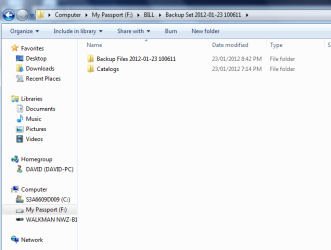
How did you originally produce this backup I used Windows Backup and Restore to an external hard drive. | My System Specs | | OS windows 7 home premium 32 bit |
24 Jan 2012
|
#6 | | Vista, Windows7, Mint Mate, Zorin, Windows 8 Florida in winter, Black Forest/Germany |

Quote: Originally Posted by tathraman I used Windows Backup and Restore to an external hard drive. This is still not clear. Did you backup data folders or did you make an image of your system. | My System Specs | | System Manufacturer/Model Number HP, Dell, Gateway, Toshiba - 4 laptops and 2 desktops OS Vista, Windows7, Mint Mate, Zorin, Windows 8 CPU from 1.6GHz Duo to i7 Monitor(s) Displays 2x HP w2207 Keyboard with trackball - no mices Mouse Trackball mice Hard Drives 5x HDD, 7x SSD, 12x Externals Internet Speed DSL 6000 |
24 Jan 2012
|
#7 | | windows 7 home premium 32 bit |
Restore desktop I think it was 'create a system image' | My System Specs | | OS windows 7 home premium 32 bit |
24 Jan 2012
|
#8 | | Vista, Windows7, Mint Mate, Zorin, Windows 8 Florida in winter, Black Forest/Germany |
That's what I figured. You are the 4th victim of Windows imaging today. That thing is just a pain because it does not work as one would expect.
As a first step let's mount the VHD and see whether it can be recovered.
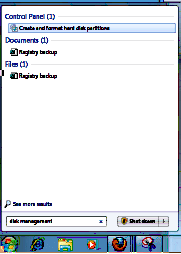
1. Open Disk Management (type disk management into start/search and hit enter)
2. Go to the top left next to File and click on Action - then on Attach VHD 3. Click Browse and navigate to your image on your external disk
4. The image is in the root of your external disk and is called WindowsImageBackup 5. Open that folder and the subsequent folders that are called Your PC name, Backup with a date
6. The last one (the big one) is the VHD, double click on that and say OK in disk mgmt
Now go out of Disk Management and into Computer
1. Double click on the mounted VHD and you should see your system
2. Double click on Users and then on your name
3. Check in e.g. Documents whether your files are there. Check the other folders too.
Post back and report what you saw. | My System Specs | | System Manufacturer/Model Number HP, Dell, Gateway, Toshiba - 4 laptops and 2 desktops OS Vista, Windows7, Mint Mate, Zorin, Windows 8 CPU from 1.6GHz Duo to i7 Monitor(s) Displays 2x HP w2207 Keyboard with trackball - no mices Mouse Trackball mice Hard Drives 5x HDD, 7x SSD, 12x Externals Internet Speed DSL 6000 |
24 Jan 2012
|
#9 | | windows 7 home premium 32 bit |
Glad to know it's not just me. Attached is screenshot of window when I try disk management.... | My System Specs | | OS windows 7 home premium 32 bit |
24 Jan 2012
|
#10 | | Vista, Windows7, Mint Mate, Zorin, Windows 8 Florida in winter, Black Forest/Germany |
I see nothing wrong. Just hit Enter | My System Specs | | System Manufacturer/Model Number HP, Dell, Gateway, Toshiba - 4 laptops and 2 desktops OS Vista, Windows7, Mint Mate, Zorin, Windows 8 CPU from 1.6GHz Duo to i7 Monitor(s) Displays 2x HP w2207 Keyboard with trackball - no mices Mouse Trackball mice Hard Drives 5x HDD, 7x SSD, 12x Externals Internet Speed DSL 6000 How do I restore desktop? problems? All times are GMT -5. The time now is 02:44 PM. | |