
| Windows 7: Daily System Imaging |
24 Jan 2012
|
#1 | | |
Daily System Imaging Hii..
I have setup a daily system imaging. The first time I did this it took around 1 hour or so. However nowadays, it takes only ~10 mins or so. I had this idea that during a system image backup, the computer does a full backup, rather than incremental backups.
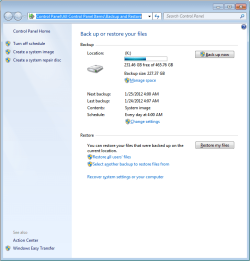
As you can see it took only 7 mins last time. Because I want to set it up and sort of forget it, I want to make sure that the system is being imaged as I intend it too. However I cannot really know whether the system has been imaged, without doing a full restore.
Is there a way to confirm that this is ok?
Also do the restore points remain preserved in the system image? If not, is there a way to ensure that? | My System Specs |
| OS Windows 7 Enterprise x64 |
24 Jan 2012
|
#2 | | Vista, Windows7, Mint Mate, Zorin, Windows 8 Florida in winter, Black Forest/Germany |
Too bad you are using Windows7 imaging. As far as I can see the reports, half of the time people are not able to recover from those images. So I think you are taking your chances. Have a look at this thread where it took me more than 1 week to get this man back on track.
Use a robust imaging program - anything is better than Windows7 imaging. | My System Specs | | System Manufacturer/Model Number HP, Dell, Gateway, Toshiba - 4 laptops and 2 desktops OS Vista, Windows7, Mint Mate, Zorin, Windows 8 CPU from 1.6GHz Duo to i7 Monitor(s) Displays 2x HP w2207 Keyboard with trackball - no mices Mouse Trackball mice Hard Drives 5x HDD, 7x SSD, 12x Externals Internet Speed DSL 6000 |
24 Jan 2012
|
#3 | | |
System Image .bat script - allow multiple images - WindowsImageBackup
Click on the above link and at the bottom of the 1st post, download the sysimage.bat OR the sysimage.txt and RENAME to sysimage.BAT.
From a DOS prompt and IN the directory to which you just downloaded the file:
NOTE: have any drive mounted that has system images upon it PRIOR to running.
sysimage.bat /I Y
This will provide everything you wanted to know about your system image backups. Including whether they are incremental and whether they have system state. | My System Specs | | System Manufacturer/Model Number Custom OS Windows 7 CPU AMD Phenom II X2 (dual-core) Motherboard GA-MA785GM-US2H Memory 4G Graphics Card integrated ATI HD 4200 Sound Card integrated Monitor(s) Displays Samsung 24" Screen Resolution 1920x1080 Keyboard Microsoft Digital Media Pro Mouse Logitech WIRED! PSU Ultra X4 500W Case Ultra X-blaster Hard Drives 1 SATA (750GB, 32MB cache, 7200 RPM)
1 IDE (80GB, 8MB cache, 7200 RPM)
1 SSD (Intel 320, 120GB, installed but not activated) Internet Speed 15 Mbps FIOS |
25 Jan 2012
|
#4 | | Windows 7 Pro with SP1 32bit Gurgaon, India |
Doesn't the native Windows 7 System Imaging Program verify that the created image is good and in order like most third party programs do?
However I strongly support the advise given by whs to use a System Imaging Program other that the one native in Windows 7 so that you don't come to grief when restoring an image. | My System Specs | | System Manufacturer/Model Number Custom Built OS Windows 7 Pro with SP1 32bit Motherboard Intel D845GVS1 X86-based PC Memory 2 gigs of RAM Graphics Card Intel(R) 82845G/GL/GE/PE/GV Graphics Controller Sound Card Realtek AC'97 Audio Monitor(s) Displays Samsung SyncMaster 931BF Black 19" LCD Monitor Screen Resolution 1280X960 Keyboard COMPAQ Standard PS/2 Keyboard Mouse iBall Laser Precise Speedster Hard Drives 1. SAMSUNG SP0822N ATA Device ~ 80 GigaBytes
2. Seagate FreeAgent Go USB Device ~ 500 GigaBytes Internet Speed 4 mb/sec System Manufacturer/Model Number Compaq desktop OS Windows 7 x64 SP1 CPU Athlon II x2 215 Memory 4.0 GB Graphics Card Onboard Sound Card Creative SB X-Fi Titanium HD (nice) Monitor(s) Displays 24" Dell LCD Screen Resolution 1900 x 1200 Keyboard USB Mouse USB PSU 430w Hard Drives 320 GB, 500 GB and 750 GB 7200 rpm Internet Speed approx 10 Mbps |
25 Jan 2012
|
#6 | | Vista, Windows7, Mint Mate, Zorin, Windows 8 Florida in winter, Black Forest/Germany |
My C: partition (which is on a Crucial M4) is appr. 30GBs - and that includes the Ubuntu virtual machine. Imaging that to an internal HDD or the eSata external takes 10 to 12 minutes. But to the USB2 attached external it takes more like 25 minutes. I always take full images with Macrium.
I have tried differentials with Paragon which are a lot faster after the (longer) initial image. But I really prefer full images. They are easier to manage. | My System Specs | | System Manufacturer/Model Number HP, Dell, Gateway, Toshiba - 4 laptops and 2 desktops OS Vista, Windows7, Mint Mate, Zorin, Windows 8 CPU from 1.6GHz Duo to i7 Monitor(s) Displays 2x HP w2207 Keyboard with trackball - no mices Mouse Trackball mice Hard Drives 5x HDD, 7x SSD, 12x Externals Internet Speed DSL 6000 |
25 Jan 2012
|
#7 | | Windows 7 Pro with SP1 32bit Gurgaon, India |
With Acronis, that I use, the image is created copying sector by sector. That means that if the drive has been defragmented and the files moved around then their is not much difference in size between a differential and full image. Therefore I too prefer to take the full image each time.
It takes 25 to 30 minutes to create and verify the image and between 8 to 10 minutes to restore with all the third party programs in place. Since I have started imaging, I have developed greater confidence in fiddling with applications and files because there is always an image to fall back upon and never the need to reinstall Windows or the Third Party Programs. | My System Specs | | System Manufacturer/Model Number Custom Built OS Windows 7 Pro with SP1 32bit Motherboard Intel D845GVS1 X86-based PC Memory 2 gigs of RAM Graphics Card Intel(R) 82845G/GL/GE/PE/GV Graphics Controller Sound Card Realtek AC'97 Audio Monitor(s) Displays Samsung SyncMaster 931BF Black 19" LCD Monitor Screen Resolution 1280X960 Keyboard COMPAQ Standard PS/2 Keyboard Mouse iBall Laser Precise Speedster Hard Drives 1. SAMSUNG SP0822N ATA Device ~ 80 GigaBytes
2. Seagate FreeAgent Go USB Device ~ 500 GigaBytes Internet Speed 4 mb/sec |
25 Jan 2012
|
#8 | | Vista, Windows7, Mint Mate, Zorin, Windows 8 Florida in winter, Black Forest/Germany |
The restore time is really short. With Macrium, it is more like 20 to 25 minutes. | My System Specs | | System Manufacturer/Model Number HP, Dell, Gateway, Toshiba - 4 laptops and 2 desktops OS Vista, Windows7, Mint Mate, Zorin, Windows 8 CPU from 1.6GHz Duo to i7 Monitor(s) Displays 2x HP w2207 Keyboard with trackball - no mices Mouse Trackball mice Hard Drives 5x HDD, 7x SSD, 12x Externals Internet Speed DSL 6000 Daily System Imaging problems? All times are GMT -5. The time now is 07:33 PM. | |