Windows 7 Forums


Windows 7: My data partition is Active?

30 Jan 2012   #1

Windows 7 x64 RC1, Vista Ultimate, XP Pro
AZ
 
 
My data partition is Active?

When I restored my Image to a clean partition (A clean drive with 2 partitions) I ended up with Recycle.Bin, Boot, System Volume Information, and bootmgr on my Data drive. I'm not sure what to do about this?

My System SpecsSystem Spec

30 Jan 2012   #2

Windows 7 SP1, Home Premium, 64-bit


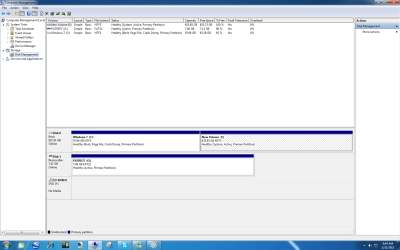
Post a picture of Disk Management.

The tools I'd look at would be Diskpart and Partition Wizard, but show us the pic first.
My System SpecsSystem Spec
30 Jan 2012   #3

Windows 7 Ultimate SP1 64-Bit
Peterborough, England


My System SpecsSystem Spec
.


30 Jan 2012   #4
whs

Vista, Windows7, Mint Mate, Zorin, Windows 8
Florida in winter, Black Forest/Germany


Guys, you are wasting your time with this OP. He should have done what he was told in this thread: Can't delete my data partition or format it
My System SpecsSystem Spec
30 Jan 2012   #5
mjf

Windows 7x64 Home Premium SP1 x 2
Australia


Being a non MCCA member I need to contribute more so I'll give it another go. Post a Disk Management screenshot.
My System SpecsSystem Spec
30 Jan 2012   #6
whs

Vista, Windows7, Mint Mate, Zorin, Windows 8
Florida in winter, Black Forest/Germany


You are funny Michael. Have fun.
My System SpecsSystem Spec
31 Jan 2012   #7

Windows 7 Pro with SP1 32bit
Gurgaon, India


Tried to figure for a long time but I failed. What does an OP stand for? The word keeps cropping up frequently and I guess I understand in context what it means.

Quote   Quote: Originally Posted by whs View Post
Guys, you are wasting your time with this OP. He should have done what he was told in this thread: Can't delete my data partition or format it
My System SpecsSystem Spec
31 Jan 2012   #8

Windows 7 Pro with SP1 32bit
Gurgaon, India


If your computer is working fine, as it seems, then please leave it alone and let it do its job for at least a fortnight before tinkering any further.


Quote   Quote: Originally Posted by lostsoul62 View Post
When I restored my Image to a clean partition (A clean drive with 2 partitions) I ended up with Recycle.Bin, Boot, System Volume Information, and bootmgr on my Data drive. I'm not sure what to do about this?
My System SpecsSystem Spec
31 Jan 2012   #9

Windows 7 Ultimate SP1 64-Bit
Peterborough, England


Quote   Quote: Originally Posted by wanchoo View Post
Tried to figure for a long time but I failed. What does an OP stand for? The word keeps cropping up frequently and I guess I understand in context what it means.

Quote   Quote: Originally Posted by whs View Post
Guys, you are wasting your time with this OP. He should have done what he was told in this thread: Can't delete my data partition or format it
OP means, quite simply, original poster.
My System SpecsSystem Spec
31 Jan 2012   #10

Windows 7 x64 RC1, Vista Ultimate, XP Pro
AZ


My data partition is Active?-disk-management.png

Can I just cut and paste these hidden system files from my Data partition to the C drive?
My System SpecsSystem Spec
Reply

 My data partition is Active? problems?


Thread Tools


Similar help and support threads for: My data partition is Active?
Thread Forum
No active Partition? Installation & Setup
Solved How to change active partition without removing data from partition? General Discussion
Solved Please help me change the active partition Installation & Setup
Mystery Partition - Accidentally Put Data on System Partition?? Performance & Maintenance
Windows 7 + Active Directory + Roaming Data Network & Sharing


All times are GMT -5. The time now is 09:54 AM.


Seven Forums Android App Seven Forums IOS App Follow us on Facebook

Windows 7 Forums is an independent web site and has not been authorized,
sponsored, or otherwise approved by Microsoft Corporation.
"Windows 7" and related materials are trademarks of Microsoft Corp.
© Designer Media Ltd
  

1 2 3 4 5 6 7 8 9 10 11 12 13 14 15 16 17 18 19 20 21 22 23 24 25 26 27 28 29 30 31 32