Windows 7 Forums Search
Welcome to Windows 7 Forums. Our forum is dedicated to helping you find solutions with any problems, errors or issues you are experiencing with Windows 7. The Windows 7 forum also covers news and updates and has an extensive Windows 7 tutorial section that covers a wide range of tips and tricks.


Windows 7 - Can't create backup ( Windows 7 x64 )

 
02-20-2012   #1


Windows 7 Ultimate X64


Can't create backup ( Windows 7 x64 )

Hello.

I would like to install OpenSUSE on my computer , but before i do that i wanted to create a backup from my Windows, so i can do a system restore if anything goes wrong with the GRUB .

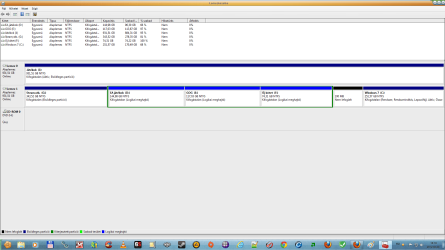
Unfortunately Windows can't let me to do a backup on my second hard drive ( on partiton I ) . I got an error message ( sorry , using Google translator for this one ) :

Quote:
The images are not saved to disk in a drive that a computer system at boot time, and where Windows is installed
I have two hard drives .

Disk 1 : Samsung HD103UJ Ata Device ( online )

partitions :

C ( it contains the OS , active, primary partition )
D , E , F ( logical drives )
G ( primary partition )

Disk 0 : WDC WD10EALS-00Z8A0 ATA device ( online )

partitions :

I (active , primary partiton )

I see BOOTSECT , bootmgr files on both partition C and I . They also both contain a boot folder .

EasyBCD

Windows Boot Manager : partiton I
Windows Boot Loader : partition C

Now i'm confused .

Attached Thumbnails
Can't create backup ( Windows 7 x64 )-nevtelen.png  
My System SpecsSystem Spec
02-20-2012   #2


Microsoft Windows 7 Home Premium 64-bit 7601 Multiprocessor Free Service Pack 1


It's not an answer to your backup problem which you need to get sorted but have you considered using VirtualBox to create a VM with OpenSuse. I have and it works well. https://www.virtualbox.org/

If you do don't use the suggested virtual disk size it is too small use 30GB.
My System SpecsSystem Spec
02-20-2012   #3


Windows 7 Ultimate X64


Quote   Quote: Originally Posted by kado897 View Post
It's not an answer to your backup problem which you need to get sorted but have you considered using VirtualBox to create a VM with OpenSuse. I have and it works well. https://www.virtualbox.org/

If you do don't use the suggested virtual disk size it is too small use 30GB.
Isn't any OS slow in VirtualBox ?
My System SpecsSystem Spec
.


02-20-2012   #4


Microsoft Windows 7 Home Premium 64-bit 7601 Multiprocessor Free Service Pack 1


It is slower than running native as it shares CPU cycles and allocates memory from the host but is usable for occasional use.

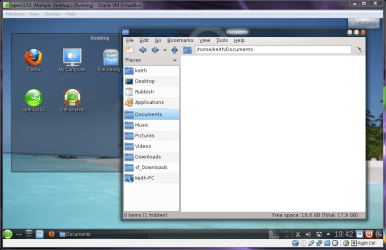
This is an image of my openSUSE VM which I created last week.

Can't create backup ( Windows 7 x64 )-screenshot118_2012-02-20.png
My System SpecsSystem Spec
02-20-2012   #5
whs


Vista and Windows7, sometimes Ubuntu and Fedora


1. My Ubuntu runs just as fast in Virtual box as nativ. Just give the vBox enough RAM - e.g. 2GB. The beauty is that I can run Windows7 and Ubuntu in paralell - that means that I can use some of the Windows 7 tools when in Ubuntu (e.g. Snipping Tool)

2. If Windows 7 Imaging gives you trouble, use another imaging program - e.g. this one: Imaging with free Macrium
My System SpecsSystem Spec
02-20-2012   #6


Microsoft Windows 7 Home Premium 64-bit 7601 Multiprocessor Free Service Pack 1


I've used Ubuntu too and that also runs well. I changed because I absolutely hate the Unity desktop.
My System SpecsSystem Spec
02-20-2012   #7
whs


Vista and Windows7, sometimes Ubuntu and Fedora


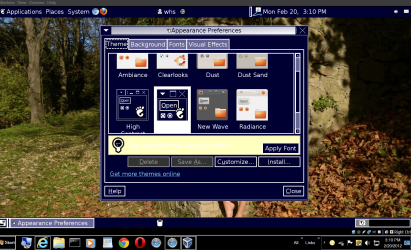
Keith, what's wrong with the desktop. I just changed it.
Attached Thumbnails
Can't create backup ( Windows 7 x64 )-2012-02-20_1510.png  
My System SpecsSystem Spec
02-20-2012   #8


Windows 7 Ultimate X64


Quote   Quote: Originally Posted by whs View Post

2. If Windows 7 Imaging gives you trouble, use another imaging program - e.g. this one: Imaging with free Macrium
Can you restore / repair the boot sequence with the free version ?
My System SpecsSystem Spec
02-20-2012   #9
whs


Vista and Windows7, sometimes Ubuntu and Fedora


The boot sequence you can change with EasyBCD. An imaging program cannot do that.
My System SpecsSystem Spec
02-20-2012   #10


Microsoft Windows 7 Home Premium 64-bit 7601 Multiprocessor Free Service Pack 1


Quote   Quote: Originally Posted by whs View Post
Keith, what's wrong with the desktop. I just changed it.
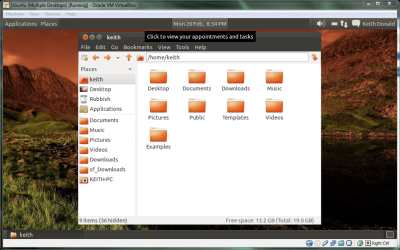
The latest version of Ubuntu doesn't give you any choice unless you also install the Gnome 3 desktop in which case you get a Classic option which is similar except it doesn't have the System dropdown. You have to dig through the applications to find the functions.

Can't create backup ( Windows 7 x64 )-screenshot119_2012-02-20.png
My System SpecsSystem Spec
Reply

 Can't create backup ( Windows 7 x64 ) problems?


Thread Tools


Similar Threads for: Can't create backup ( Windows 7 x64 )
Thread Forum
Backup Complete Computer - Create an Image Backup Tutorials
Solved How to create a fully bootable backup of Windows 7? Backup and Restore
Manage Windows Backup Disk Space - Create Shortcut Tutorials
Backup - Make a "Create New Backup" Shortcut Tutorials
Backup - Make a "Create Incremental Backup" Shortcut Tutorials


All times are GMT -5. The time now is 09:25 AM.


Windows 7 Forums is an independent web site and has not been authorized,
sponsored, or otherwise approved by Microsoft Corporation.
"Windows 7" and related materials are trademarks of Microsoft Corp.
© Designer Media Ltd
  

1 2 3 4 5 6 7 8 9 10 11 12 13 14 15 16 17 18 19 20 21 22 23 24 25 26 27 28 29 30