
cannot find “Manage space” in the “Backup and restore” section
hi
I have WIN7 Prof. 64-bit and cannot find “Manage space” in the “Backup and restore” section like here:
How to manage hard drive space in windows 7 backup and restore
Is it missing in WIN 7 Prof. 64-bit or not there?
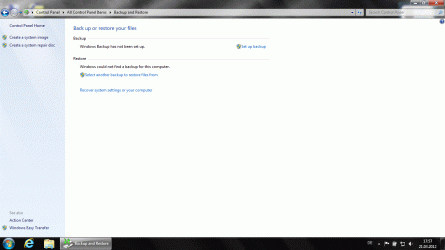
hi
I have WIN7 Prof. 64-bit and cannot find “Manage space” in the “Backup and restore” section like here:
How to manage hard drive space in windows 7 backup and restore
Is it missing in WIN 7 Prof. 64-bit or not there?
Last edited by a moderator:
My Computer
At a glance
Windows7 64bitIntel(R) Core(TM) i7-2600S CPU @ 2.80GHz8.00 GBIntel HD Graphics 2000 (Sandy Bridge GT1) 217...
- Computer type
- PC/Desktop
- Computer Manufacturer/Model Number
- ThinkCentre Edge 71 (1578E1G)
- OS
- Windows7 64bit
- CPU
- Intel(R) Core(TM) i7-2600S CPU @ 2.80GHz
- Motherboard
- LENOVO To be filled by O.E.M.
- Memory
- 8.00 GB
- Graphics Card(s)
- Intel HD Graphics 2000 (Sandy Bridge GT1) 2172 MBytes
- Sound Card
- RealTek ALC662
- Monitor(s) Displays
- DELL E197FP
- Screen Resolution
- 1280 x 1024 x 32 bits (4294967296 colors) @ 75 Hz
- Hard Drives
- WDC WD5003ABYX-01WER SCSI Disk Device
- PSU
- PC9059, 180W
- Case
- Desktop
- Cooling
- Noiseblocker BlackSilent XLP Rev. 3.00
- Keyboard
- DELL SK-8125 Keyboard
- Mouse
- Logitech USB Optical Mouse
- Internet Speed
- cable 75Mbps
- Antivirus
- McAfee VSE 8.8 SP2
- Browser
- SeaMonkey 2.24


