Windows 7 Forums


Windows 7: Can I Pause/Turn off System Restore WITHOUT losing restore points?

18 Apr 2012   #1

XP, Vista, W7, all flavors
 
 
Can I Pause/Turn off System Restore WITHOUT losing restore points?

I work with a large software suite. The installer for this suite is really just a collection of many stand-alone installers.

If SR is on when I run the installation, it takes a very long time. Additionally, since this is a collection of other installers, SR is somewhat useless to use as a roll-back, since all of my RPs get replaced with intermediate points from the uber-installer.

The company itself suggests turning off SR so that things won't take so long.

Last time I installed this, something went wrong. I was unable to use or uninstall this software, and I was unable to roll-back the system since the SRs were gone.


Currently, my method is to create a full system backup before I run this installer. A pain in the neck.

Is there a way to save my RPs and then turn off SR while I run this? If something goes wrong, I could then apply the saved RP? Mainly, I am concerned about customer systems where I won't be able to create this backup.

Also, while I appreciate any comments or suggestions about the pain-in-the-neck software suite, there is truly nothing I can do about that. They are getting better with each release, but in the meantime I am stuck with it.

Thanks!
My System SpecsSystem Spec

18 Apr 2012   #2

Windows 7 Ultimate SP1 64-Bit
Peterborough, England


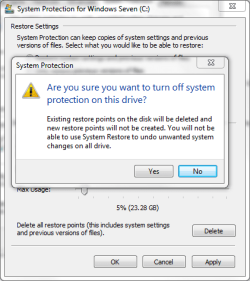
If you turn off system restore you will lose all restore points.

Can I Pause/Turn off System Restore WITHOUT losing restore points?-sys.png

As far as I know there is no way of saving them and reinstating them if you switch system restore back on.
My System SpecsSystem Spec
18 Apr 2012   #3

Windows 7 Pro with SP1 32bit
Gurgaon, India


I think that when you turn off the Restore Points, Windows clears and releases the space that it has reserved for Restoration. Therefore as Seavixen32 has pointed out there is no way to keep the Restore Points after turning off System Restore. But you do gain a lot of reserved space for your use on the HDD.

Last edited by wanchoo; 19 Apr 2012 at 03:45 AM..
My System SpecsSystem Spec
.


19 Apr 2012   #4

MS Windows 7 Ultimate SP1 64-bit
Austin, Texas


ultralame,

The quick answer is: YES, you will lose your restore points.

The long answer:
Do NOT turn off System Restore. This is Win 7 and not XP or Vista.

The extra time is of no consequence. The extra space if not that much. You can verify this by first checking the amount of space used before and install and then checking the amount of space after.

WIN | type RESTORE POINT | ENTER |
CONFIGURE
button | Current Usage shows the amount used
WIN=key with Microsoft logo on top
My System SpecsSystem Spec
19 Apr 2012   #5

Windows 7 Pro with SP1 32bit
Gurgaon, India


It would be quite proper to turn off System Restore if you back-up with drive images. Wouldn't it?

In fact I have kept System Restore turned off since I started backing up with drive images about 5 years back. And there has been no repercussions at all.
My System SpecsSystem Spec
19 Apr 2012   #6

MS Windows 7 Ultimate SP1 64-bit
Austin, Texas


wanchoo,
System restore is painless and not time-consuming. I use both system restore points and system images. They both have their function and uses. The fluidity of my system has resulted in restore points being extremely useful. I'm glad to hear that your needs are met by system imaging.
My System SpecsSystem Spec
19 Apr 2012   #7

Windows 7 Ultimate SP1 64-Bit
Peterborough, England


System restore has got me out of trouble on more than one occasion and with today's large hard drives I see no point in turning it off just to save a relatively small amount of drive space.

I also have system image backups, which I've never had occasion to use.

It comes down to a matter of choice really. Both have their merits and I believe both should be used.
My System SpecsSystem Spec
19 Apr 2012   #8

Windows 7 home premium x64


Or just as a thought, create an image of the system drive now, kept somewhere safe, check it then turn off system restore. Yes if things go wrong you have to restore the image, but you wont loose anything.
My System SpecsSystem Spec
19 Apr 2012   #9

Microsoft Windows 7 Home Premium 64-bits 7601 Multiprocessor Free Service Pack 1
SecretCity


To rollback use to restore point of uber-installer so th oldest one. you can't pause system restore, because restore points contain the OLD information (for rollback purposes). It doesn't use a lot of space because only later overwritten blocks are saved. Actually it's only remapped to the restore point. It isn't a degrade in performace as well!!

Only initializing a restore point takes some time. It's the way it is! But making an image backup takes much longer to create!

How many subinstallers do you have?
------------------
If you disable system restore, access disk form winxp, access disk from linux...... restore points are invalid so deleted automatically.
My System SpecsSystem Spec
Reply

 Can I Pause/Turn off System Restore WITHOUT losing restore points? problems?


Thread Tools


Similar help and support threads for: Can I Pause/Turn off System Restore WITHOUT losing restore points?
Thread Forum
System Restore Fail on all available restore points Backup and Restore
System Restore only shows limited restore points Backup and Restore
Solved System Restore not showing more restore points after clicking the box Backup and Restore
Windows 7 System restore problem no restore points Backup and Restore
System Restore not creating automatic restore points Backup and Restore


All times are GMT -5. The time now is 08:50 PM.


Seven Forums Android App Seven Forums IOS App Follow us on Facebook

Windows 7 Forums is an independent web site and has not been authorized,
sponsored, or otherwise approved by Microsoft Corporation.
"Windows 7" and related materials are trademarks of Microsoft Corp.
© Designer Media Ltd
  

1 2 3 4 5 6 7 8 9 10 11 12 13 14 15 16 17 18 19 20 21 22 23 24 25 26 27 28 29 30 31 32