| Windows 7: System Image backup fails - not enough space for Volume Shadow Copy |
01 May 2012
|
| | Win 7 Home Premium and Win XP/SP3 Home 32 bit (desktop); Win 7 x64 Home Premium (laptop) 99 posts |
System Image backup fails - not enough space for Volume Shadow Copy Had a 50gb Win 7 (x64) system image on a 66gb partition. It was a good image, because I had to use it to restore once. Decided to do a new one, so in setting up the new backup I deleted the old one first within the Win backup process. Then I ran the new one and it fails for lack of space to create the Volume Shadow Copy. The partition currently has 65gb free. Just to check, I tried on another partition with much more free space and got the same result. Where might the hang up be? Thanks, | My System Specs |
| OS Win 7 Home Premium and Win XP/SP3 Home 32 bit (desktop); Win 7 x64 Home Premium (laptop) CPU AMD Phenom II X3 720 Black Edition (unlocked) Motherboard Gigabyte GA-MA790X-UD4P (rev. 1.0) - version F9 BIOS Memory 6 GB Graphics Card XFX Radeon HD 5670 Monitor(s) Displays Dell U2412M PSU Corsair VX450 Case Cooler Master Cooling front/back fans, CPU/PSU stock Hard Drives Corsair Force 3 SSD 60 GB
Seagate ST31000528AS - 1T
WD7500AAKS - 750GB
WD1600JBRTL - 160 GB |
01 May 2012
|
| | Microsoft Windows 7 Home Premium 64-bits 7601 Multiprocessor Free Service Pack 1 6,925 posts SecretCity |

Quote: Originally Posted by highstream Had a 50gb Win 7 (x64) system image on a 66gb partition. It was a good image, because I had to use it to restore once. Decided to do a new one, so in setting up the new backup I deleted the old one first within the Win backup process. Then I ran the new one and it fails for lack of space to create the Volume Shadow Copy. The partition currently has 65gb free. Just to check, I tried on another partition with much more free space and got the same result. Where might the hang up be? Thanks, Goto system properties and then system security. Configure it. Is it enabled? How many percent and disk space? | My System Specs | | Computer type Laptop System Manufacturer/Model Number ACER ASPIRE 5742G OS Microsoft Windows 7 Home Premium 64-bits 7601 Multiprocessor Free Service Pack 1 CPU Intel(R) Core(TM) i3 CPU M 370 @ 2.40GHz Motherboard Acer Aspire 5742G Memory 4,00 GB Graphics Card ATI Mobility Radeon HD 5400 Series Sound Card (1) AMD High Definition Audio Device (2) Realtek High Defi Screen Resolution 1366 x 768 x 32 bits (4294967296 colors) @ 60 Hz Hard Drives WDC WD5000BEVT-22ZAT0 |
01 May 2012
|
| | Windows 7 Professional SP1 64-bit 397 posts Alabama |
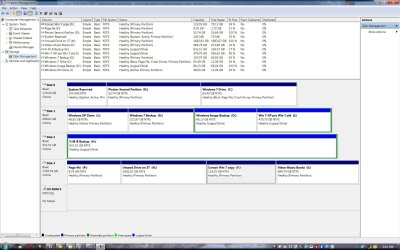
Would you Post a Screenshot of the Disk Management window maximized. Screenshots and Files - Upload and Post in Seven Forums | My System Specs | | Computer type PC/Desktop System Manufacturer/Model Number Dell Inspiron 530 OS Windows 7 Professional SP1 64-bit CPU Intel Core 2 Duo Processor E8300 @ 2.83GHz Motherboard Dell Inc. 0RY007 (Socket 775) Memory 4.00 GB Dual-Channel DDR2 @ 332MHz (5-5-5-15) Graphics Card Intel(R) G33/G31 Express Chipset Family Sound Card Integrated 7.1 Channel Audio Monitor(s) Displays Acer G245HQL 23.6" LED(1920x1080@60Hz) Screen Resolution 1920 x 1080 Keyboard Dell USB Keyboard Mouse Dell Optical USB Mouse Hard Drives Disk 0 HITACHI 1TB OS Installed - Disk 1 HITACHI 1TB For Backups Internet Speed DSL 1.5 meg Antivirus Symantec(SEP) Browser Firefox |
01 May 2012
|
| | Win 7 Home Premium and Win XP/SP3 Home 32 bit (desktop); Win 7 x64 Home Premium (laptop) 99 posts |
Disk Mgt screenshot attached. O is the designated image backup drive and C is the system drive (the XP clone drive is a leftover, not active). Note that since posting I enlarged C drive to 65gb, but that only 53gb is actually in use currently. | My System Specs | | OS Win 7 Home Premium and Win XP/SP3 Home 32 bit (desktop); Win 7 x64 Home Premium (laptop) CPU AMD Phenom II X3 720 Black Edition (unlocked) Motherboard Gigabyte GA-MA790X-UD4P (rev. 1.0) - version F9 BIOS Memory 6 GB Graphics Card XFX Radeon HD 5670 Monitor(s) Displays Dell U2412M PSU Corsair VX450 Case Cooler Master Cooling front/back fans, CPU/PSU stock Hard Drives Corsair Force 3 SSD 60 GB
Seagate ST31000528AS - 1T
WD7500AAKS - 750GB
WD1600JBRTL - 160 GB |
01 May 2012
|
| | Win 7 Home Premium and Win XP/SP3 Home 32 bit (desktop); Win 7 x64 Home Premium (laptop) 99 posts |
Follow up: I just ran it again and it worked. Since I had tried a larger drive earlier, it's hard to believe that resizing C was the difference. My guess is that it had to do with permissions, per Kaktussoft's hint. This is a single Admin/User system, but I noticed that the Users line didn't have full permissions, so I changed that. Could that have been the difference? I'm not sure why, because it wasn't any different last time I imaged. Otherwise, I don't know.
Btw, what does "Apply these permissions to objects and/or containers within this container only" mean? Thanks, | My System Specs | | OS Win 7 Home Premium and Win XP/SP3 Home 32 bit (desktop); Win 7 x64 Home Premium (laptop) CPU AMD Phenom II X3 720 Black Edition (unlocked) Motherboard Gigabyte GA-MA790X-UD4P (rev. 1.0) - version F9 BIOS Memory 6 GB Graphics Card XFX Radeon HD 5670 Monitor(s) Displays Dell U2412M PSU Corsair VX450 Case Cooler Master Cooling front/back fans, CPU/PSU stock Hard Drives Corsair Force 3 SSD 60 GB
Seagate ST31000528AS - 1T
WD7500AAKS - 750GB
WD1600JBRTL - 160 GB |
01 May 2012
|
| | Microsoft Windows 7 Home Premium 64-bits 7601 Multiprocessor Free Service Pack 1 6,925 posts SecretCity |

Quote: Originally Posted by highstream Follow up: I just ran it again and it worked. Since I had tried a larger drive earlier, it's hard to believe that resizing C was the difference. My guess is that it had to do with permissions, per Kaktussoft's hint. This is a single Admin/User system, but I noticed that the Users line didn't have full permissions, so I changed that. Could that have been the difference? I'm not sure why, because it wasn't any different last time I imaged. Otherwise, I don't know.
Btw, what does "Apply these permissions to objects and/or containers within this container only" mean? Thanks, I didn't mean permissions at all! I meant space reserved for "system restore" and shadow sets. You have only one system image backup now?
Please post output from Elevated Command Prompt Code:
vssadmin list shadowstorage /for=X: Replace X with actual drive letter. Do it for all partitions you wanna backup. And for Output partition as well. Please post output | My System Specs | | Computer type Laptop System Manufacturer/Model Number ACER ASPIRE 5742G OS Microsoft Windows 7 Home Premium 64-bits 7601 Multiprocessor Free Service Pack 1 CPU Intel(R) Core(TM) i3 CPU M 370 @ 2.40GHz Motherboard Acer Aspire 5742G Memory 4,00 GB Graphics Card ATI Mobility Radeon HD 5400 Series Sound Card (1) AMD High Definition Audio Device (2) Realtek High Defi Screen Resolution 1366 x 768 x 32 bits (4294967296 colors) @ 60 Hz Hard Drives WDC WD5000BEVT-22ZAT0 |
01 May 2012
|
| | Microsoft Windows 7 Home Premium 64-bits 7601 Multiprocessor Free Service Pack 1 6,925 posts SecretCity |

Quote: Originally Posted by highstream Btw, what does "Apply these permissions to objects and/or containers within this container only" mean? Thanks, It means the permissions are only set for objects in that container (so in that folder). So only for files and folders within that folder. So NOT for files and folders in subfolders | My System Specs | | Computer type Laptop System Manufacturer/Model Number ACER ASPIRE 5742G OS Microsoft Windows 7 Home Premium 64-bits 7601 Multiprocessor Free Service Pack 1 CPU Intel(R) Core(TM) i3 CPU M 370 @ 2.40GHz Motherboard Acer Aspire 5742G Memory 4,00 GB Graphics Card ATI Mobility Radeon HD 5400 Series Sound Card (1) AMD High Definition Audio Device (2) Realtek High Defi Screen Resolution 1366 x 768 x 32 bits (4294967296 colors) @ 60 Hz Hard Drives WDC WD5000BEVT-22ZAT0 |
01 May 2012
|
| | Microsoft Windows 7 Home Premium 64-bits 7601 Multiprocessor Free Service Pack 1 6,925 posts SecretCity |
| My System Specs | | Computer type Laptop System Manufacturer/Model Number ACER ASPIRE 5742G OS Microsoft Windows 7 Home Premium 64-bits 7601 Multiprocessor Free Service Pack 1 CPU Intel(R) Core(TM) i3 CPU M 370 @ 2.40GHz Motherboard Acer Aspire 5742G Memory 4,00 GB Graphics Card ATI Mobility Radeon HD 5400 Series Sound Card (1) AMD High Definition Audio Device (2) Realtek High Defi Screen Resolution 1366 x 768 x 32 bits (4294967296 colors) @ 60 Hz Hard Drives WDC WD5000BEVT-22ZAT0 |
01 May 2012
|
| | Windows 7 Ultimate x64 8,025 posts |
^ I have experienced this issue before. For me, it was because my hidden "System Reserved" partition dropped to less than 50MB free. This volume seems to change automagically within Windows and when I tried to run the backup, and it was less than 50MB, I would get this error. Once it cleared space on it's own, the system backup would work again. | My System Specs | | System Manufacturer/Model Number Self-Built in July 2009 OS Windows 7 Ultimate x64 CPU Intel Q9550 2.83Ghz OC'd to 3.40Ghz Motherboard Gigabyte GA-EP45-UD3R rev. 1.1, F12 BIOS Memory 8GB G.Skill PI DDR2-800, 4-4-4-12 timings Graphics Card EVGA 1280MB Nvidia GeForce GTX570 Sound Card Realtek ALC899A 8 channel onboard audio Monitor(s) Displays 23" Acer x233H Screen Resolution 1920x1080 Keyboard ABS M1 Mechanical Mouse Logitech G9 Laser Mouse PSU Corsair 620HX modular Case Antec P182 Cooling stock Hard Drives Intel X25-M 80GB Gen 2 SSD
Western Digital 1TB Caviar Black, 32MB cache. WD1001FALS Internet Speed 15/2 cable modem Other Info Windows and Linux enthusiast. Logitech G35 Headset. |
01 May 2012
|
| | Win 7 Home Premium and Win XP/SP3 Home 32 bit (desktop); Win 7 x64 Home Premium (laptop) 99 posts |
Hmmm..interesting thought. Can't the System Reserved partition be set somewhere within Windows?
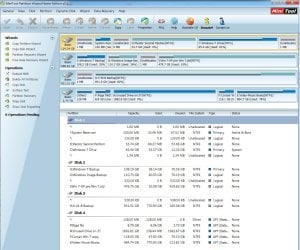
A different tho related problem for me in terms of system images has to do with freeing up space - deleting unneeded files - on a partition that I want to merge with another afterward, instead of just merging the two whole, which takes many hours longer. In a partition manager I've tried Wipe and Format, but both times Win 7 wouldn't start and I had to use the system image to get back on line. That suggests to me that I'm deleting something that's throwing off the system drive (mbr?). In the screenshot earlier, there's an inactive XP clone partition whose contents that I'd like to eliminate and then merge the partition with another on that HDD (or resize the other, which is even simpler). What's the most efficient way to do this w/o wrecking havoc again? Thanks, | My System Specs | | OS Win 7 Home Premium and Win XP/SP3 Home 32 bit (desktop); Win 7 x64 Home Premium (laptop) CPU AMD Phenom II X3 720 Black Edition (unlocked) Motherboard Gigabyte GA-MA790X-UD4P (rev. 1.0) - version F9 BIOS Memory 6 GB Graphics Card XFX Radeon HD 5670 Monitor(s) Displays Dell U2412M PSU Corsair VX450 Case Cooler Master Cooling front/back fans, CPU/PSU stock Hard Drives Corsair Force 3 SSD 60 GB
Seagate ST31000528AS - 1T
WD7500AAKS - 750GB
WD1600JBRTL - 160 GB System Image backup fails - not enough space for Volume Shadow Copy problems? All times are GMT -5. The time now is 10:39 PM. | |