| Windows 7: Failed backup - yet again |
08 May 2012
|
#1 | | Windows 7 Home Premium 64-bit California |
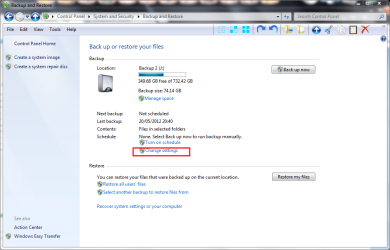
Failed backup - yet again Every time I attempt to back up files, which takes forever, at the very end I always get a message: backup completed but some files were skipped! What files? What does skipped mean? Is this a valid backup? If files are skipped, does this compromise backup? As usual, MS does not provide any help or direction after that error message which is done in RED which would indicate that this is serious and dire! No fixes, no suggestions, no ideas where to go to resolve this matter (why am I not surprised?).
So, dear Forum, can anyone please help me with this. As I said, it is an ongoing and continuing issues.
Many thanks ... | My System Specs |
| OS Windows 7 Home Premium 64-bit |
08 May 2012
|
#2 | | |
I no longer use MS backup as it failed once too often. The files it FAILED to back up were jpg files. It backed up the folders but not the pictures although other documents were ok. Fortunately I had the Raw images backed up elsewhere.
I suggest you use a third party product. I use EaseUS Todo Backup Free | My System Specs | | System Manufacturer/Model Number HP OS Windows 7 Home Premium |
09 May 2012
|
#3 | | Microsoft Windows 7 Home Premium 64-bit 7601 Multiprocessor Free Service Pack 1 Hertfordshire |
Hi speedyfastcat and welcome to Seven Forums. The usual cause of this is deleting a folder that is specified in the backup. The cure for it is to go through the Backup Configuration again. | My System Specs | | Computer type PC/Desktop System Manufacturer/Model Number Hewlett-Packard/G62-107SA Notebook OS Microsoft Windows 7 Home Premium 64-bit 7601 Multiprocessor Free Service Pack 1 CPU Intel(R) Core(TM) i3 CPU M 330 @ 2.13GHz Motherboard Hewlett-Packard 1425 Memory 8 GB DDR3 Graphics Card Intel(R) HD Graphics Sound Card Realtek High Definition Audio Monitor(s) Displays Builtin Screen Resolution 1366 x 768 x 32 bits (4294967296 colors) @ 60 Hz Mouse Microsoft Bluetooth Notebook Mouse 5000 Hard Drives 250 GB SATA Hard Disk Drive 7200 rpm
2TB Seagate GoFlex USB 2 Drive
1TB Iomega Prestige USB 2 Drive
1.5TB Iomega Prestige USB 2 Drive (Samsung)
1TB Iomega NAS. Internet Speed 60 Mbs download 3 Mbs upload Antivirus Norton 360 Browser Chrome |
26 May 2012
|
#4 | | Windows 7 Home Premium 64-bit California |
Sorry for delay in responding.
I may have neglected to have replies emailed to me.
What is a backup configuration?
Who is deleting folder?
Why?
What folder is being deleted?
Is this folder important?
Who specifies this folder in the backup?
Why?
Thanks ... | My System Specs | | OS Windows 7 Home Premium 64-bit |
26 May 2012
|
#5 | | Windows 7 SP1, Home Premium, 64-bit |

Quote: Originally Posted by speedyfastcat Sorry for delay in responding.
I may have neglected to have replies emailed to me.
What is a backup configuration?
Who is deleting folder?
Why?
What folder is being deleted?
Is this folder important?
Who specifies this folder in the backup?
Why?
Thanks ... One thing at a time.
What are you trying to back up? Windows? Personal data? "Everything"?
Generally speaking: you have control over what is backed up--the backup configuration.
I'm guessing you are using the built-in Windows Backup? There are simpler and more easily understood alternatives. Many would say they are superior as well.
If you don't understand the application you are using, it may be time to quit using it. | My System Specs | | System Manufacturer/Model Number Ignatz Special; 4 speed manual gearbox; factory air conditioning; one of one OS Windows 7 SP1, Home Premium, 64-bit CPU Intel Sandy Bridge i5-2500, not overclocked Motherboard Gigabyte H67A-UD3H-B3, full ATX Memory 4 GB Crucial DDR3-1333 Graphics Card none; graphics are integrated on CPU Sound Card onboard: Realtek ALC892; external: USB Behringer UF0-202 Monitor(s) Displays NEC 90GX2-BK 19" LCD Screen Resolution 800 x 640 Keyboard Leopold Tenkeyless with Cherry Blue switches, USB Mouse Logitech or Microsoft optical wired; either USB or PS 2 PSU Seasonic SS-560KM, modular Case Antec Solo II Cooling CPU: Scythe Big Shuriken; Case: Scythe Slipstream 800 & 500 Hard Drives System: Intel 320 Series SSD, 80 GB;
Data: Samsung Spinpoint 103SJ, 1 TB;
Backup: WD Caviar Green WD15EADS-00P8B0, 1.5TB Other Info Power consumption of this system, including monitor: 68 watts at idle; 144 watts at full load |
26 May 2012
|
#6 | | Windows 7 Home Premium 64-bit California |
I'm sorry you didn't read my earlier query.
Factory restore backup, including Windows, has been made.
Scheduled backup is for files and data.
What do you mean by "everything"?
I am doing a basic back-up under Backup and Restore.
I do know how to back-up, your sarcasm to the contrary, but I will admit that the instructions to do the MS backup leave a lot to be desired. I haven't been able to locate a partial vs. complete backup instructions. I'm sure it's there; it is very difficult to maneuver around MS.
Thank you for that very helpful statement that it may be time for me to stop using a particular application since I clearly don't understand it!
If you are able to disclose the names of these simpler applications, more easily understood, and superior (always a good thing) alternatives you are referring to, it would greatly be appreciated. After all, those of us who are in need of simplicity and easy to comprehend applications would find those alternatives to be ever so helpful.
Thank you. | My System Specs | | OS Windows 7 Home Premium 64-bit |
26 May 2012
|
#7 | | |
If you are trying to backup files and folders ( not an image of your drive), you can't do better than Karen's Replicator | My System Specs | | OS Vista x64 / 7 X64 CPU E8400 Motherboard ASRock 1333 GLAN R2.0 Memory 2x1 gb 800mhz Graphics Card 9500gt 1gb Case Coolermaster Cooling Winpower 500w Hard Drives Maxtor 160gb-2mb cache |
26 May 2012
|
#8 | | Windows 7 SP1, Home Premium, 64-bit |
Speedy:
I was not being sarcastic in the least. The MS tool is a first generation tool and is not refined or well-presented to the user.
Simpler applications to back up Windows (eg, your C partition):
Macrium would be my first choice. It's a free download.
Acronis would be my second choice. It is free if you have a Western Digital or Seagate hard drive.
Easiest to backup personal data files (as opposed to Windows), not using an "image":
Synctoy or Karen's Replicator or Second Copy. The first 2 are free. The last one is free for 30 days and $30 if you want to use it thereafter.
I would urge you not to rely on images to back up your personal data, but images are the only way to back up Windows per se.
I'd also advise you to not rely on an automated schedule. Do it manually. Maybe daily for your data and weekly, monthly, or quarterly for Windows itself. Manual backups keep you from being complacent and keep your head in the game.
And make full images rather than incrementals. | My System Specs | | System Manufacturer/Model Number Ignatz Special; 4 speed manual gearbox; factory air conditioning; one of one OS Windows 7 SP1, Home Premium, 64-bit CPU Intel Sandy Bridge i5-2500, not overclocked Motherboard Gigabyte H67A-UD3H-B3, full ATX Memory 4 GB Crucial DDR3-1333 Graphics Card none; graphics are integrated on CPU Sound Card onboard: Realtek ALC892; external: USB Behringer UF0-202 Monitor(s) Displays NEC 90GX2-BK 19" LCD Screen Resolution 800 x 640 Keyboard Leopold Tenkeyless with Cherry Blue switches, USB Mouse Logitech or Microsoft optical wired; either USB or PS 2 PSU Seasonic SS-560KM, modular Case Antec Solo II Cooling CPU: Scythe Big Shuriken; Case: Scythe Slipstream 800 & 500 Hard Drives System: Intel 320 Series SSD, 80 GB;
Data: Samsung Spinpoint 103SJ, 1 TB;
Backup: WD Caviar Green WD15EADS-00P8B0, 1.5TB Other Info Power consumption of this system, including monitor: 68 watts at idle; 144 watts at full load |
26 May 2012
|
#9 | | Windows 7 Professional x64 Nottingham, England |
| My System Specs | | System Manufacturer/Model Number Dell Dimension 9200 (XPS 410) OS Windows 7 Professional x64 CPU Intel Core 2 Quad Q6600 2.4Ghz Motherboard Intel P965 Express Chipset - Dell Inc. 0CT017 Memory 4GB - HYMP512U64CP8-Y5 Graphics Card nVidia GeForce 8600GTS Monitor(s) Displays DELL 22" E228WFP Screen Resolution 1680x1050 Keyboard Logitech Cordless Desktop MX3000 Mouse Logitech Laser Mouse MX3000 Hard Drives 2x Western Digital WD3200AAKS
Intel Raid 0
Seagate Expansion 1TB - External Other Info Phoenix ROM BIOS PLUS Version 1.10 2.5.3 - Dell Inc.
Broadcom 802.11g Wireless Network Adapter
Sony Optiarc DVD RW AD-7241S
Lite-On BD-RE iHBS112
TEAC CA-200 19-in-1 Media Card Reader
HP Photosmart 8450 Printer |
26 May 2012
|
#10 | | Windows 7 Home Premium 64-bit California |
Thanks for your reply.
Why do you recommend this product? | My System Specs | | OS Windows 7 Home Premium 64-bit Failed backup - yet again problems? All times are GMT -5. The time now is 03:20 AM. | |