Windows 7 Forums


Windows 7: Hello people, I have several questions(Back up related)

07 Jun 2012   #1

Windows 7 Ultimate x86
 
 
Hello people, I have several questions(Back up related)

Alright, my computer broke recently and I finally understood the time backups can save, I'm sort of inexperience but have some basic/high level understanding of the system, so I need some assistance from the kind experts here!

Question 1:

If you create a disk image and back up your harddisk, which has a size of 1TB, can the image be backed up to a harddisk of 1.5TB without side-effects?

What's actually going on when you restore a disc image?
What happens with the empty space as old partitions only uses the size you've set?

Question 2:


Although I've read that creating a disc image is like a 100% clone of your hard disk entirely, is this true?

Question 3:

If I've used tools such as those disc alignment/advance format tools on my harddrive, will this affect the backup in anyway should I restore a disc image to a hardrdrive that doesn't support advance format?


These questions are really hard to google so I decided to ask them here, I'm really grateful for any amount of support I'll get!
My System SpecsSystem Spec

07 Jun 2012   #2

Microsoft Windows 7 Home Premium 64-bit 7601 Multiprocessor Free Service Pack 1
Hertfordshire


Hi Questions and welcome to Seven Forums.

To answer your questions.

1. Yes proveided there is sufficient free space on the 1.5 TB HDD. An image will normally take between 50-60% of the size of the data you are backing up. That is the used data not the size of the disk. The restore will return your disk to the state it was when you took the image.

2. It is not truly a clone as it doesn't normally back up unused storage but in effect it is a clone of all the data that is on your drive.

3. You don't need to worry about that. The image is just a file or files that contain enough information to put everything back the way it was when you do a restore.
My System SpecsSystem Spec
07 Jun 2012   #3

Windows 7 Ultimate x86


Alright, thanks for the assistance!

Right after you answered me, I bravely plugged in the docking station and attempted to created a disc image, only be to greeted by an error along the lines of:

There is not enough space to create the volume shadow copy... etc

The harddisk in the docking station has 1 partition of 1.5TB, none of which is used, is this error talking about space that isn't partitioned instead?
My System SpecsSystem Spec
.


07 Jun 2012   #4

Microsoft Windows 7 Home Premium 64-bit 7601 Multiprocessor Free Service Pack 1
Hertfordshire


I think we have seen this problem before. I don't think it refers to the space on your external HDD but to the space on one of the partitions on your internal drive.

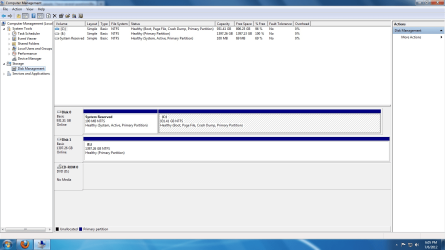
Could you post a screen shot of your disk management screen. Type disk management into the start menu search box and select the entry Create and format disk partitions. Maximize the display and follow this tutorial to post the screen shot. Screenshots and Files - Upload and Post in Seven Forums
My System SpecsSystem Spec
07 Jun 2012   #5

Windows 7 Ultimate x86


Size problem, give me a couple of minutes
Attached Images
File Type: jpg Error.jpg (241.1 KB, 14 views)
File Type: jpg Disks.jpg (244.7 KB, 8 views)
My System SpecsSystem Spec
07 Jun 2012   #6

Microsoft Windows 7 Home Premium 64-bit 7601 Multiprocessor Free Service Pack 1
Hertfordshire


I'm sorry. for some reason your images are corrupted.
My System SpecsSystem Spec
07 Jun 2012   #7

Windows 7 Ultimate x86


Finally got it to work, this forum doesn't like jpegs I think.

Hello people, I have several questions(Back up related)-error.png

Hello people, I have several questions(Back up related)-disks.png
My System SpecsSystem Spec
07 Jun 2012   #8

Microsoft Windows 7 Home Premium 64-bit 7601 Multiprocessor Free Service Pack 1
Hertfordshire


Yes that would be ok.
My System SpecsSystem Spec
07 Jun 2012   #9

Win 7 Pro 64-bit
South Central Texas


Quote   Quote: Originally Posted by kado897 View Post
I think we have seen this problem before. I don't think it refers to the space on your external HDD but to the space on one of the partitions on your internal drive.

Could you post a screen shot of your disk management screen. Type disk management into the start menu search box and select the entry Create and format disk partitions. Maximize the display and follow this tutorial to post the screen shot. Screenshots and Files - Upload and Post in Seven Forums
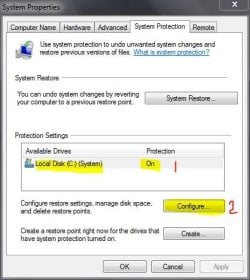
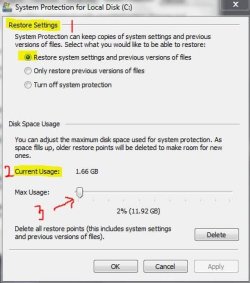
Keith I think you're on to something. As I always tell people, I'm not an expert at anything and my one remaining brain cell doesn't always work. But I seem to recall that the System Reserved partition needs a certain amount of free space in order for a VSS to be created. Likewise, if System Protection is turned off or doesn't have enough space allocated, the VSS can't be created. Does this sound familiar to you?

EDIT: Found this Technet forum thread. NehaaMSFT says the System Reserved partition needs 40MB free space. And jimg43 says he had to turn on System Protection and allocate a couple of GB free space. Yes, it's an older thread but I think the parameters still apply.

Windows 7 RC Backup fails - Errorcode 0x81000019
My System SpecsSystem Spec
07 Jun 2012   #10

Microsoft Windows 7 Home Premium 64-bit 7601 Multiprocessor Free Service Pack 1
Hertfordshire


That was my thinking Lee.
My System SpecsSystem Spec
Reply

 Hello people, I have several questions(Back up related) problems?


Thread Tools


Similar help and support threads for: Hello people, I have several questions(Back up related)
Thread Forum
Backup/Restore Questions (Apple user switching back to Windows) Backup and Restore
is there any way to reward people who answer your questions Chillout Room
A few general network-related questions, some focusing on Windows 7 Network & Sharing
How to bring all related windows back to size General Discussion
a few pen related questions, please help Hardware & Devices


All times are GMT -5. The time now is 10:15 PM.


Seven Forums Android App Seven Forums IOS App Follow us on Facebook

Windows 7 Forums is an independent web site and has not been authorized,
sponsored, or otherwise approved by Microsoft Corporation.
"Windows 7" and related materials are trademarks of Microsoft Corp.
© Designer Media Ltd
  

1 2 3 4 5 6 7 8 9 10 11 12 13 14 15 16 17 18 19 20 21 22 23 24 25 26 27 28 29 30 31 32