Trouble moving backup files from external drive to computer
I backed up using an external drive prior to resetting HP desktoop to factory settings.
When I tried to restore the files I couldn't find them in any of the libraries. Where did they go? I did reinstall programs like Microsoft Office 2003.
How do I find them & put them back in the right place? Running Windows 7 64 bit
Home Premium Edition.
Thank you
I backed up using an external drive prior to resetting HP desktoop to factory settings.
When I tried to restore the files I couldn't find them in any of the libraries. Where did they go? I did reinstall programs like Microsoft Office 2003.
How do I find them & put them back in the right place? Running Windows 7 64 bit
Home Premium Edition.
Thank you
If you actually backed up the files to the external drive, you should see them there. If they aren't there, you may have a made a mistake when you did the backup. Really need more details to help further. How you backed up, etc.
System Manufacturer/Model Number Home Built OS Windows 7 Ultimate x64 CPU QuadCore Intel Core i7 920, 2666 MHz (20 x 133) Motherboard Asus P6T Memory 6134 MB (DDR3-1333 DDR3 SDRAM) Graphics Card (2 - SLI) NVIDIA GeForce GTS 250 (1024 MB) Sound Card Onboard Realtek ALC888/1200 @ Intel 82801JB IC Monitor(s) Displays HDMII Screen Resolution 1280 x 800
PSU Corsair 550 Case iStarUSA S-10000BL Black Hard Drives Crucial M4 (64 GB SSD)
WD Caviar Blacks
WD5001AALS-00J7B1 ATA Device (465 GB)
WD5001AALS-00L3B2 ATA Device (465 GB)
WD Elements USB External (250 GB)
Trouble moving backup files from external drive to computer
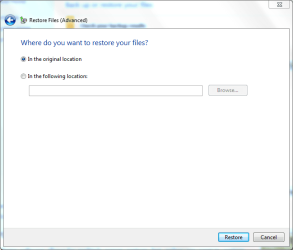
Thank you for the reply. Here is more detail on the backup. I used the backup through the control panel prior to the retore.After the restore I went back to the control panel. when asked "Where do you want to restore your files - I chose "In the original location". There are two backups listed that were made prior to the restore. I chose one listed as Backup set 2012-06-30.
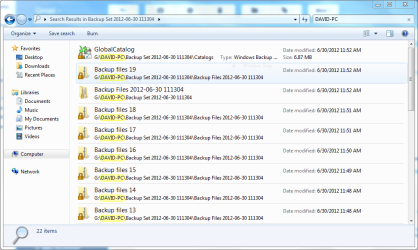
Looking at the backup I founf 19 files. I couldn't decipher which ones contained the files I needed most.
I also tried restoring to another location C:\C. The backups are still on the external drive. What should I try next? Thanks again for your help.
Sorry for the delay. I'm still not clear on how you did the backup. Please provide screen prints of what you used, and screen prints of your backup files.
If you used the Win 7 backup/restore there are options (system only, for example) that might not have backed up what you thought you were backing up.
There are others here more familiar with the Win 7 backup/restore process than me. If you provide the screen prints and more description of exactly what you did, I'm sure they will jump in to clear things up.
System Manufacturer/Model Number Home Built OS Windows 7 Ultimate x64 CPU QuadCore Intel Core i7 920, 2666 MHz (20 x 133) Motherboard Asus P6T Memory 6134 MB (DDR3-1333 DDR3 SDRAM) Graphics Card (2 - SLI) NVIDIA GeForce GTS 250 (1024 MB) Sound Card Onboard Realtek ALC888/1200 @ Intel 82801JB IC Monitor(s) Displays HDMII Screen Resolution 1280 x 800
PSU Corsair 550 Case iStarUSA S-10000BL Black Hard Drives Crucial M4 (64 GB SSD)
WD Caviar Blacks
WD5001AALS-00J7B1 ATA Device (465 GB)
WD5001AALS-00L3B2 ATA Device (465 GB)
WD Elements USB External (250 GB)
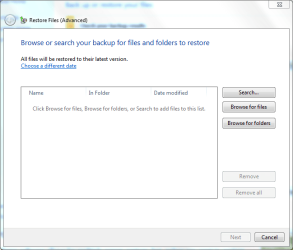
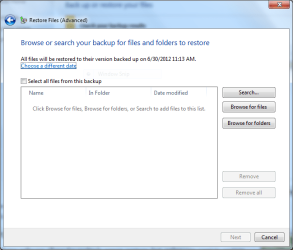
Victor, thank you for the reply. Attached are screen shots of the steps I took to create the backup. Also, the last screen is what I see when I look at what is in the backup file on the external drive. There is also one other backup that was made prior to the one in question on the drive.
David, I'm totally unfamiliar with those screens. I only use Power Desk synch and Synchtoy to backup data.
If those screens are from the backup function of Win 7, maybe somebody who uses that will jump in here. If they don't do so soon, I recommend starting another thread here called "Win 7 backup data - Help!" or something along those lines.
You really should be able to get help here, and I expect you will. Sorry I can't help you. But don't give up.
System Manufacturer/Model Number Home Built OS Windows 7 Ultimate x64 CPU QuadCore Intel Core i7 920, 2666 MHz (20 x 133) Motherboard Asus P6T Memory 6134 MB (DDR3-1333 DDR3 SDRAM) Graphics Card (2 - SLI) NVIDIA GeForce GTS 250 (1024 MB) Sound Card Onboard Realtek ALC888/1200 @ Intel 82801JB IC Monitor(s) Displays HDMII Screen Resolution 1280 x 800
PSU Corsair 550 Case iStarUSA S-10000BL Black Hard Drives Crucial M4 (64 GB SSD)
WD Caviar Blacks
WD5001AALS-00J7B1 ATA Device (465 GB)
WD5001AALS-00L3B2 ATA Device (465 GB)
WD Elements USB External (250 GB)
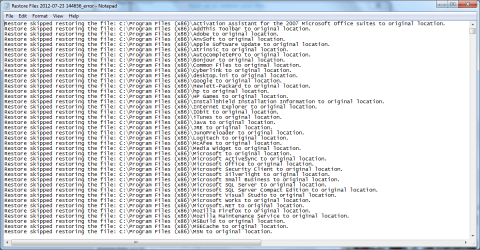
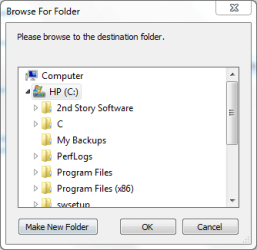
After the restore, the screen message reads in part "some files were skipped, try a new location". Also in viewing the link to view the skipped files (there are 500-800 files) in notepad. It reads "Restore skipped restoring the file C:Program files(x86)\.... If I run the restore again, how do I choose the right location?
System Manufacturer/Model Number Home Built OS Windows 7 Ultimate x64 CPU QuadCore Intel Core i7 920, 2666 MHz (20 x 133) Motherboard Asus P6T Memory 6134 MB (DDR3-1333 DDR3 SDRAM) Graphics Card (2 - SLI) NVIDIA GeForce GTS 250 (1024 MB) Sound Card Onboard Realtek ALC888/1200 @ Intel 82801JB IC Monitor(s) Displays HDMII Screen Resolution 1280 x 800
PSU Corsair 550 Case iStarUSA S-10000BL Black Hard Drives Crucial M4 (64 GB SSD)
WD Caviar Blacks
WD5001AALS-00J7B1 ATA Device (465 GB)
WD5001AALS-00L3B2 ATA Device (465 GB)
WD Elements USB External (250 GB)
Computer type PC/Desktop System Manufacturer/Model Number Hewlett-Packard/G62-107SA Notebook OS Microsoft Windows 7 Home Premium 64-bit 7601 Multiprocessor Free Service Pack 1 CPU Intel(R) Core(TM) i3 CPU M 330 @ 2.13GHz Motherboard Hewlett-Packard 1425 Memory 8 GB DDR3 Graphics Card Intel(R) HD Graphics Sound Card Realtek High Definition Audio Monitor(s) Displays Builtin Screen Resolution 1366 x 768 x 32 bits (4294967296 colors) @ 60 Hz
Mouse Microsoft Bluetooth Notebook Mouse 5000 Hard Drives 250 GB SATA Hard Disk Drive 7200 rpm
2TB Seagate GoFlex USB 2 Drive
1TB Iomega Prestige USB 2 Drive
1.5TB Iomega Prestige USB 2 Drive (Samsung)
1TB Iomega NAS. Internet Speed 60 Mbs download 3 Mbs upload Antivirus Norton 360 Browser Chrome