Create OS image only for re installation from Partitioned Hard drive

sicex

New member
Back up OS image need info/help

Not exactly sure how to explain or even exactly what im looking for but basically I had an older laptop running windows 7 home premium that allowed me from the boot menu to re install windows & home premium w/o key or anything. It was placed on a partition of my hard drive. I would like to do this again but im not sure what exactly im looking for or how to search for it in shorter terms. It was an MSI Intel duel core laptop. I would like to put it on my toshiba quad core. Im familiar with partitioning software and image restoration but not sure what exactly i should be looking for to do this. Just a clean Reinstallation of my OS without needing keys i dont care to back up any information except my os which is a clean install.
Update Toshiba has this HDD recovery but i am not sure if this is what i need/want. MSI had a MSI recovery which did what i want. Is this the same/similar?
 
Last edited:

My Computer

OS
windows 7 premium 64bit
Post a screen shot of Windows Disk Management for the laptop in question.

The old laptop presumably had a "recovery' partition, which allows restoration to factory specifications---not to be confused with a clean install of Windows. As far as I know, the use of a recovery partition does not require the user to enter a Product Key.

If the laptop in question does not have such a partition and you do not have burned or purchased recovery disks, you may be forced to do a true clean install. You can easily download and burn a clean installation disc.

Why is your Product Key not available?

You can of course make an image of any current installation and later restore it, but I assume you are looking for some other method? An image restoration from an image file is not a clean installation either.
 

My Computer

Computer type
PC/Desktop
Computer Manufacturer/Model Number
Ignatz Special; 4 speed manual gearbox; factory air conditioning; one of one
OS
Windows 7 Home Premium SP1, 64-bit
CPU
Intel Skylake i5-6600K, not overclocked
Motherboard
AsRock Z170M Extreme 4, micro ATX
Memory
8 GB HyperX DDR4-2666 (2 x 4 GB)
Graphics Card(s)
none; graphics are integrated on CPU
Sound Card
onboard: Realtek ALC1150; external: USB Behringer UF0-202
Monitor(s) Displays
Dell S2340M 23 inch IPS
Screen Resolution
1600 x 900
Hard Drives
System: Crucial MX100 series SSD, 128 GB;
Data: Samsung Spinpoint 103SJ, 1 TB;
Backup: WD Caviar Green WD30EZRX-00D8PB0, 3 TB
PSU
Rosewill SilentNight 500 watt fanless, semi-modular
Case
Antec Solo II
Cooling
Noctua NH-U12S; Noctua F12 intake, Noctua S12A exhaust
Keyboard
Microsoft 200 6JH-00001 USB
Mouse
Dell or Microsoft optical wired; USB
Antivirus
Microsoft Security Essentials and Malwarebytes Premium
Browser
Pale Moon
Other Info
All fans PWM; speeds at idle: CPU circa 500 rpm; intake circa 600 rpm; exhaust circa 600 rpm; CPU temps 27 idle and 47 C load in a warm room (27 C/81 F) when running Intel Extreme Tuning Utility stress test.
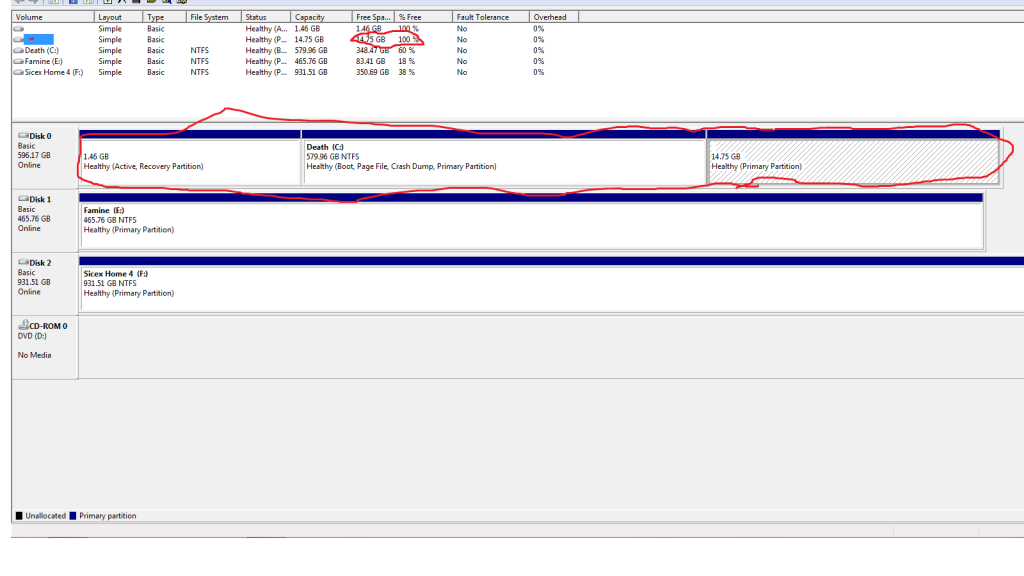
Here it is. I accidentally deleted it on my other laptop but it said 100% free space so it did nothing... My product key is available(sticker under my pc) and i dont need to use it if i use a generic windows home premium copy HOWEVER i lose all my drivers and so on. Its a pain if you have other computer available to you to download and transfer the data for the drivers. Im trying to keep the drivers and so on bloat ware as well if i have to

Untitled-2.png
 

My Computer

OS
windows 7 premium 64bit
That picture shows a 1.46 GB recovery partition on the left.

You should be able to use it to restore your PC to factory specifications.

Is that what you want?

If not, what do you want?
 

My Computer

Computer type
PC/Desktop
Computer Manufacturer/Model Number
Ignatz Special; 4 speed manual gearbox; factory air conditioning; one of one
OS
Windows 7 Home Premium SP1, 64-bit
CPU
Intel Skylake i5-6600K, not overclocked
Motherboard
AsRock Z170M Extreme 4, micro ATX
Memory
8 GB HyperX DDR4-2666 (2 x 4 GB)
Graphics Card(s)
none; graphics are integrated on CPU
Sound Card
onboard: Realtek ALC1150; external: USB Behringer UF0-202
Monitor(s) Displays
Dell S2340M 23 inch IPS
Screen Resolution
1600 x 900
Hard Drives
System: Crucial MX100 series SSD, 128 GB;
Data: Samsung Spinpoint 103SJ, 1 TB;
Backup: WD Caviar Green WD30EZRX-00D8PB0, 3 TB
PSU
Rosewill SilentNight 500 watt fanless, semi-modular
Case
Antec Solo II
Cooling
Noctua NH-U12S; Noctua F12 intake, Noctua S12A exhaust
Keyboard
Microsoft 200 6JH-00001 USB
Mouse
Dell or Microsoft optical wired; USB
Antivirus
Microsoft Security Essentials and Malwarebytes Premium
Browser
Pale Moon
Other Info
All fans PWM; speeds at idle: CPU circa 500 rpm; intake circa 600 rpm; exhaust circa 600 rpm; CPU temps 27 idle and 47 C load in a warm room (27 C/81 F) when running Intel Extreme Tuning Utility stress test.
well yes the reason i want ask though is the TOSHIBA recovery HDD service never works i did the process then it simply started windows normally.
 

My Computer

OS
windows 7 premium 64bit
so im looking for an alternative. I did i a guide regarding some software that takes the WIndows files off a CD and onto a hard drive partition and you can boot from there. But this thing made it so i could not access my original win 7 OS i had to reinstall windows in order to get to the (old windows) file and restore them. But this version of windows had no drivers installed so it became a pretty nice paper weight till i found the drivers i needed >.> using another PC
 

My Computer

OS
windows 7 premium 64bit
I'm not sure I have heard of a way to make your own "recovery partition", but there may be something out there like that.

I assume you know how to access and use that Toshiba partition and will take your word for it that it does not work.

In your shoes, I would consider either of the following:

Contacting Toshiba directly and asking them to send you a set of recovery CDs. These disks would serve the same purpose as a recovery partition. They might charge you for the disks.

Give up on the idea of a recovery partition and instead use imaging, probably with the Macrium application.
 

My Computer

Computer type
PC/Desktop
Computer Manufacturer/Model Number
Ignatz Special; 4 speed manual gearbox; factory air conditioning; one of one
OS
Windows 7 Home Premium SP1, 64-bit
CPU
Intel Skylake i5-6600K, not overclocked
Motherboard
AsRock Z170M Extreme 4, micro ATX
Memory
8 GB HyperX DDR4-2666 (2 x 4 GB)
Graphics Card(s)
none; graphics are integrated on CPU
Sound Card
onboard: Realtek ALC1150; external: USB Behringer UF0-202
Monitor(s) Displays
Dell S2340M 23 inch IPS
Screen Resolution
1600 x 900
Hard Drives
System: Crucial MX100 series SSD, 128 GB;
Data: Samsung Spinpoint 103SJ, 1 TB;
Backup: WD Caviar Green WD30EZRX-00D8PB0, 3 TB
PSU
Rosewill SilentNight 500 watt fanless, semi-modular
Case
Antec Solo II
Cooling
Noctua NH-U12S; Noctua F12 intake, Noctua S12A exhaust
Keyboard
Microsoft 200 6JH-00001 USB
Mouse
Dell or Microsoft optical wired; USB
Antivirus
Microsoft Security Essentials and Malwarebytes Premium
Browser
Pale Moon
Other Info
All fans PWM; speeds at idle: CPU circa 500 rpm; intake circa 600 rpm; exhaust circa 600 rpm; CPU temps 27 idle and 47 C load in a warm room (27 C/81 F) when running Intel Extreme Tuning Utility stress test.
Here it is. I accidentally deleted it on my other laptop but it said 100% free space so it did nothing...
When Windows Disk Management reports an OEM's recovery partition which is 100% free never believe it. I believe it is a bug in Windows Disk Management. Check it with other utilities like Partition Wizard.
You may be able to purchase recovery disks from Toshiba. I'm not sure if they would regenerate a Toshiba recovery partition.
 

My Computer

Computer type
PC/Desktop
Computer Manufacturer/Model Number
Own build
OS
Windows 7x64 Home Premium SP1
CPU
Intel i7 2600k
Motherboard
ASUS P8Z68 Deluxe
Memory
G.Skill Ripjaws (DDR3-1600) 2x4GB
Graphics Card(s)
Nvidia GeForce GTS 450; Intel HD Graphics 3000(GT2+)
Monitor(s) Displays
Dell Ultrasharp IPS panel U2311H, Samsung SyncMaster P2350
Screen Resolution
1920x1080
Hard Drives
Samsung 850 Pro SSD 256GB, Samsung SSD 840 120GB, Seagates 1TB Barracuda ST31000528AS x2
PSU
Seasonic M12II 520W
Case
Lian Li Lancool PC-K60
Cooling
Case: 1x120mm, 3x140mm CPU: Hyper 212+
Keyboard
Logitech MK520 (wireless)
Mouse
Logitech MK520
Internet Speed
6-7 Mbps
Antivirus
Norton Security Premium, Malwarebytes on 2 (MSE on 3rd PC)
Browser
FireFox
Other Info
Audio: Logitech Z523 2.1
yeah that would make sense lol would also explain why the HDD recovery didnt work. I had (Re-purposed that 14gb extra space) hmm another pain is not being able to copy windows old to replace the current windows files
 

My Computer

OS
windows 7 premium 64bit
Back
Top