| Windows 7: New external hard drive 2TB-won't backup-says not enough space |
07 Sep 2012
|
#1 | | Windows 7 Home Premium 64 bit |
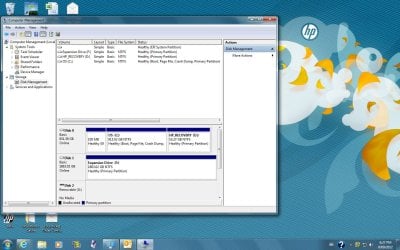
New external hard drive 2TB-won't backup-says not enough space Hi all, new to the forum so please forgive me if I don't get terminology right or ask really dumb questions. I have a new desktop pc -HP pavilion p6-2203a- pre installed with windows 7 home premium service pack 1. I have a new 2tb Seagate Expansion external drive. Apparently on the hd I have 1.76tb of space, yet the system will not do a backup as it says there is not enough space. When I check through ''disk management'' the whole bar is blue, I thought if it wasn't used it should be black? Today I have spoken to hp, seagate, and microsoft who all say it isn't their problem and tell me to call one of the others. This pc is only a fortnight old and I have already had no end of trouble with it!
I have also tried to save a copy of the ''system image'', but it won't let me do that either.
Sorry for such a long post but has been a reeeaaaalllly long day trying to fix this and just about ready to throw this thing.... | My System Specs |
| System Manufacturer/Model Number HP p6-2203a OS Windows 7 Home Premium 64 bit Hard Drives External Seagate 2Tb |
07 Sep 2012
|
#2 | | Windows 7 Home Premium 32bit |
Maybe the backup programs are not ready for very large partitions.
I try splitting it into two partitions. Use one for backups and the other for images. | My System Specs | | System Manufacturer/Model Number CCL Online OEM OS Windows 7 Home Premium 32bit CPU Intel Core 2 2.4GHz Motherboard Foxconn 946GZ7MA Memory 4GB Graphics Card ATI Radeon 4850 Sound Card Realtek HD Audio Monitor(s) Displays Prolite E2407HDS Screen Resolution 1920x1080 Keyboard Microsoft Digital Media Mouse Optical Wheel Mouse Cooling Fan Hard Drives 2 x WDC 500 GB Internet Speed 14Mb/sec Other Info Internet ISP: Plusnet |
07 Sep 2012
|
#3 | | Windows 7 SP1, Home Premium, 64-bit |
Post a screen shot of what you see in Disk Management.
What software are you using to do this backup?
Have you installed any of the Seagate software that likely came with the external drive? My first inclination would be to not do that. | My System Specs | | System Manufacturer/Model Number Ignatz Special; 4 speed manual gearbox; factory air conditioning; one of one OS Windows 7 SP1, Home Premium, 64-bit CPU Intel Sandy Bridge i5-2500, not overclocked Motherboard Gigabyte H67A-UD3H-B3, full ATX Memory 4 GB Crucial DDR3-1333 Graphics Card none; graphics are integrated on CPU Sound Card onboard: Realtek ALC892; external: USB Behringer UF0-202 Monitor(s) Displays NEC 90GX2-BK 19" LCD Screen Resolution 800 x 640 Keyboard Leopold Tenkeyless with Cherry Blue switches, USB Mouse Logitech or Microsoft optical wired; either USB or PS 2 PSU Seasonic SS-560KM, modular Case Antec Solo II Cooling CPU: Scythe Big Shuriken; Case: Scythe Slipstream 800 & 500 Hard Drives System: Intel 320 Series SSD, 80 GB;
Data: Samsung Spinpoint 103SJ, 1 TB;
Backup: WD Caviar Green WD15EADS-00P8B0, 1.5TB Other Info Power consumption of this system, including monitor: 68 watts at idle; 144 watts at full load |
08 Sep 2012
|
#4 | | Windows 7 Home Premium 64 bit |
Hi all, thanks for responding.
I am just using the windows back up and restore to do the backup. Same for trying to do the system image. No software with the Seagate (plug n play)
and I would just like to say that I LOVE the way the people on this forum set everything out so even a beginner can follow the instructions...(tutorial to take snapshot)
Liz | My System Specs | | System Manufacturer/Model Number HP p6-2203a OS Windows 7 Home Premium 64 bit Hard Drives External Seagate 2Tb |
08 Sep 2012
|
#5 | | Windows 7 SP1, Home Premium, 64-bit |
Liz:
I can't help a lot because I don't use Windows built-in Backup and Restore.
How much space is occupied on that 915 GB C partition?
But-----in the back of my brain, I seem to recall reading something to the effect that Backup and Restore has some sort of limitation on the size of the partition to be backed up---over 900 GB in your case. That may be part of your problem.
At any rate, have you considered shrinking that C partition to maybe 100 GB and making another partition of 800 GB from that saved space? And then putting your personal files on the new partition, rather than C? That's a common practice on this forum that can simplify backups, images, and reinstallation. If you did that, you would have a much smaller C partition to back up.
In such a case, you would back up the newly created 800 GB partition containing data with some other program.
But----I do not know if that would solve your immediate problem. Wait for more comments on that from someone with more experience with the Windows program you are using.
For that matter, you could try another program without changing your partition structure and avoid the Windows program altogether. | My System Specs | | System Manufacturer/Model Number Ignatz Special; 4 speed manual gearbox; factory air conditioning; one of one OS Windows 7 SP1, Home Premium, 64-bit CPU Intel Sandy Bridge i5-2500, not overclocked Motherboard Gigabyte H67A-UD3H-B3, full ATX Memory 4 GB Crucial DDR3-1333 Graphics Card none; graphics are integrated on CPU Sound Card onboard: Realtek ALC892; external: USB Behringer UF0-202 Monitor(s) Displays NEC 90GX2-BK 19" LCD Screen Resolution 800 x 640 Keyboard Leopold Tenkeyless with Cherry Blue switches, USB Mouse Logitech or Microsoft optical wired; either USB or PS 2 PSU Seasonic SS-560KM, modular Case Antec Solo II Cooling CPU: Scythe Big Shuriken; Case: Scythe Slipstream 800 & 500 Hard Drives System: Intel 320 Series SSD, 80 GB;
Data: Samsung Spinpoint 103SJ, 1 TB;
Backup: WD Caviar Green WD15EADS-00P8B0, 1.5TB Other Info Power consumption of this system, including monitor: 68 watts at idle; 144 watts at full load |
09 Sep 2012
|
#6 | | Windows 7 Home Premium 64 bit |
ok, I am trying to back up to the Expansion file (F drive). Can I format this into partitions, if I understand what you are saying, is that windows doesn't like the size of the partition?
If I don't want to change the partition on the F drive, what program would you recommend to backup and restore, and create system image?
Thanks
Liz | My System Specs | | System Manufacturer/Model Number HP p6-2203a OS Windows 7 Home Premium 64 bit Hard Drives External Seagate 2Tb |
09 Sep 2012
|
#7 | | Windows 7 SP1, Home Premium, 64-bit |

Quote: Originally Posted by jizlim94 ok, I am trying to back up to the Expansion file (F drive). Can I format this into partitions, if I understand what you are saying, is that windows doesn't like the size of the partition?
If I don't want to change the partition on the F drive, what program would you recommend to backup and restore, and create system image?
Thanks
Liz I assume you are trying to backup the the C drive onto the F drive.
I suggested making the C drive smaller, but that may not help.
You could split the F drive into 2 partitions as pjhutch mentions, but I don't know if that would help either. It wouldn't hurt to try that.
Macrium Reflect Free Edition is the most commonly mentioned substitute for Windows Backup and Restore. It's an excellent application, but there may be something else going on that would prevent it from working properly as well. It's probably easier to understand and it wouldn't hurt to try it either.
You are using an external drive for the backups and that can complicate things.
Or you could wait for more comments. | My System Specs | | System Manufacturer/Model Number Ignatz Special; 4 speed manual gearbox; factory air conditioning; one of one OS Windows 7 SP1, Home Premium, 64-bit CPU Intel Sandy Bridge i5-2500, not overclocked Motherboard Gigabyte H67A-UD3H-B3, full ATX Memory 4 GB Crucial DDR3-1333 Graphics Card none; graphics are integrated on CPU Sound Card onboard: Realtek ALC892; external: USB Behringer UF0-202 Monitor(s) Displays NEC 90GX2-BK 19" LCD Screen Resolution 800 x 640 Keyboard Leopold Tenkeyless with Cherry Blue switches, USB Mouse Logitech or Microsoft optical wired; either USB or PS 2 PSU Seasonic SS-560KM, modular Case Antec Solo II Cooling CPU: Scythe Big Shuriken; Case: Scythe Slipstream 800 & 500 Hard Drives System: Intel 320 Series SSD, 80 GB;
Data: Samsung Spinpoint 103SJ, 1 TB;
Backup: WD Caviar Green WD15EADS-00P8B0, 1.5TB Other Info Power consumption of this system, including monitor: 68 watts at idle; 144 watts at full load |
10 Sep 2012
|
#8 | | Windows 7 Home Premium 64 bit |
ok, just a quick update. I split the hard drive into 2 partitions and tried to backup to the new one. Still no joy.
Will now try the Macrium software.
Liz | My System Specs | | System Manufacturer/Model Number HP p6-2203a OS Windows 7 Home Premium 64 bit Hard Drives External Seagate 2Tb |
10 Sep 2012
|
#9 | | Windows 7 SP1, Home Premium, 64-bit |
Your C partition is 915 GB.
How much of that 915 GB is occupied? | My System Specs | | System Manufacturer/Model Number Ignatz Special; 4 speed manual gearbox; factory air conditioning; one of one OS Windows 7 SP1, Home Premium, 64-bit CPU Intel Sandy Bridge i5-2500, not overclocked Motherboard Gigabyte H67A-UD3H-B3, full ATX Memory 4 GB Crucial DDR3-1333 Graphics Card none; graphics are integrated on CPU Sound Card onboard: Realtek ALC892; external: USB Behringer UF0-202 Monitor(s) Displays NEC 90GX2-BK 19" LCD Screen Resolution 800 x 640 Keyboard Leopold Tenkeyless with Cherry Blue switches, USB Mouse Logitech or Microsoft optical wired; either USB or PS 2 PSU Seasonic SS-560KM, modular Case Antec Solo II Cooling CPU: Scythe Big Shuriken; Case: Scythe Slipstream 800 & 500 Hard Drives System: Intel 320 Series SSD, 80 GB;
Data: Samsung Spinpoint 103SJ, 1 TB;
Backup: WD Caviar Green WD15EADS-00P8B0, 1.5TB Other Info Power consumption of this system, including monitor: 68 watts at idle; 144 watts at full load |
10 Sep 2012
|
#10 | | |
I think this is usually a problem with not enough space to make a shadow copy on the 100MB reserved system partition. I don't know how to fix it but you might google for this condition. | My System Specs | | Computer type PC/Desktop System Manufacturer/Model Number Home built (GeneO industries)/Model 3 OS Windows 7 64 bit SP1 CPU i5 2500k @ 4.5 GHz, 1.264V 124 GFlop (IBT with AVX) Motherboard ASUS P8Z68-V PRO/GEN3 Memory 16GB (4GBx4) 1600MHz G.skill Ripjaws X 8-8-8-24 Graphics Card MSI GTX 660 Ti PE/OC, 2GB 7160 MHz DDR5 clock, 1228 Mhz Core Sound Card Onboard Realtek HD Monitor(s) Displays NEC Spectraview 2490WUXi-SV Screen Resolution 1920 x 1200 Keyboard HP Wireless Mouse HP wireless PSU Seasonic X-850 (2012 KM3 model) Case Fractal Design "Define R3" Cooling CM TPC 812 push/pull, 3 120mm, 2 TY-140 case fans Hard Drives Samsung 128GB 840 Pro SSD (System), Crucial 128GB M4 SSD, 2x WD Caviar 1TB Black internal (data), 1x WD Blue 6Gb/s 1TB Internal, 1x 2TB eSata WD20EARS Green, 2x 500GB Seagate external USB, 1x 350GB exte Internet Speed 27.8 Mb/s down, 5.6 Mb/s up Other Info USB 3.0 x4 , SATA III x4, eSATA x3, SATA II x4, USB 2.0 x8. 2 Samsung DVD R/W drives.
WEI: CPU 7.7, Memory 7.8, Graphics 7.9, Disk 7.9 New external hard drive 2TB-won't backup-says not enough space problems? All times are GMT -5. The time now is 09:43 PM. | |