| Windows 7: When does System Restore delete "old" System Restore Points? |
10 Oct 2012
|
#1 | | Windows Home Premium (64) Surrey, UK |
When does System Restore delete "old" System Restore Points? When does System Restore delete "old" System Restore Points?
A few days ago, there were 3-4 SR points in the list.
Today there is only 1. Nothing significant has changed on the system. | My System Specs |
| System Manufacturer/Model Number Scan 3XS P55 liteDAW OS Windows Home Premium (64) CPU Intel Core i7 860 Motherboard Gigabyte GA-P55A-UD4 Memory 8GB (4x2GB) Corsair TwinX XMS3 Graphics Card 1GB Gainward 9500 GT Sound Card M-Audio Delta 66 Monitor(s) Displays Acer v223wBBd Screen Resolution 1680 x 1050 Keyboard Microsoft Digital Media Pro Mouse Belkin Optical Ergo PSU Enermax EMD625AWT II - 625W Enermax Modu82+ II Case Fractal Design Define R2 Black Cooling Prolima Megahalems Super 6 Heatpipe Tower Cooler Hard Drives 1 x 500 GB WD Barracuda (OS+Docs)
2 x 1TB Samsung Spinpoint F3 (Data) Internet Speed 8 Mbps nominal (11.2 achieved !) Other Info Digital Audio Workstation |
10 Oct 2012
|
#2 | | Windows 7 Home Premium 64 bit. SP-1 Northern Ohio |
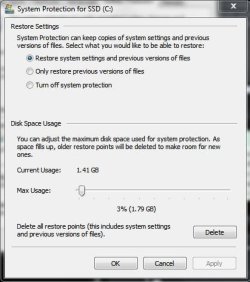
I have no idea on the timing. This might give you a better idea how things work. System Protection - Change Disk Space Usage | My System Specs | | Computer type PC/Desktop System Manufacturer/Model Number Home made Desktop OS Windows 7 Home Premium 64 bit. SP-1 CPU Intel i7-960-3.2 @ 4.25 Motherboard ASUS P6X58D-E Memory KINGSTON KHX2000C9, Hyper X,12 GIGS Graphics Card MSI/Nvidia/460GTX-Cyclone 1GD5/OC Monitor(s) Displays DYNEX 40 IN. Screen Resolution 1920-1080 or 1280-720 HDMI Keyboard M/S 3000 v 2.0 wireless Mouse M/S 5000 wireless PSU Corsair AX-850 Plus Gold Case Corsair 600T (Black) + side panel with 2 140 mm Noctua fans Cooling Corsair H50/2 Noctua NF-P12 (120 mm) Push/Pull- Hard Drives INTEL SSD 120GB-SER 510
Seagate 1TB SATA 600 7200 rpm Hard Drive Internet Speed 3.0 mb Antivirus Microsoft Security Eesentials Browser I.E. 10 default/Firefox Other Info LG BluRay-Read/Write
Sound system
KLipsch-THX
Asus Router RTN-12
2 Noctua 140 added on top of 600t case
Malwarebytes Anti Malware Professional
Windows 7 Firewall |
10 Oct 2012
|
#3 | | |

Quote: Originally Posted by DarkStar GT When does System Restore delete "old" System Restore Points?
A few days ago, there were 3-4 SR points in the list.
Today there is only 1. Nothing significant has changed on the system.
Have you done any defragmenting and if so, with what defragmenter? | My System Specs | | Computer type PC/Desktop System Manufacturer/Model Number Home built (GeneO industries)/Model 3 OS Windows 7 64 bit SP1 CPU i5 2500k @ 4.5 GHz, 1.264V 124 GFlop (IBT with AVX) Motherboard ASUS P8Z68-V PRO/GEN3 Memory 16GB (4GBx4) 1600MHz G.skill Ripjaws X 8-8-8-24 Graphics Card MSI GTX 660 Ti PE/OC, 2GB 7160 MHz DDR5 clock, 1228 Mhz Core Sound Card Onboard Realtek HD Monitor(s) Displays NEC Spectraview 2490WUXi-SV Screen Resolution 1920 x 1200 Keyboard HP Wireless Mouse HP wireless PSU Seasonic X-850 (2012 KM3 model) Case Fractal Design "Define R3" Cooling CM TPC 812 push/pull, 3 120mm, 2 TY-140 case fans Hard Drives Samsung 128GB 840 Pro SSD (System), Crucial 128GB M4 SSD, 2x WD Caviar 1TB Black internal (data), 1x WD Blue 6Gb/s 1TB Internal, 1x 2TB eSata WD20EARS Green, 2x 500GB Seagate external USB, 1x 350GB exte Internet Speed 27.8 Mb/s down, 5.6 Mb/s up Other Info USB 3.0 x4 , SATA III x4, eSATA x3, SATA II x4, USB 2.0 x8. 2 Samsung DVD R/W drives.
WEI: CPU 7.7, Memory 7.8, Graphics 7.9, Disk 7.9 |
10 Oct 2012
|
#4 | | Windows 7 Home Premium x64 SP1 |

Quote: Originally Posted by DarkStar GT When does System Restore delete "old" System Restore Points? Hi Darkstar,
Open control panel, open system, click on the system protection tab, then the configure button under protection settings. Then you'll see how much memory system restore has used. You can set it to whatever you want to. It also mentions that as space fills up older restore points will be deleted to make room for new ones.
I have no idea where your missing restore points have gone, but here's how I manage mine.
Last edited by cmmtch; 10 Oct 2012 at 09:13 PM..
Reason: spelling
| My System Specs | | Computer type PC/Desktop System Manufacturer/Model Number Self/Custom Build OS Windows 7 Home Premium x64 SP1 CPU 3G AMD AthlonII 640x4 Propus Motherboard ASUSTeK M5A88-V EVO Memory G.SKILL Ripjaws Series 8G (2x4G) DDR3 Graphics Card ATI Radeon HD 4250 (Onboard) Sound Card Realtek® ALC 892 8-Channel (Onboard) Monitor(s) Displays Acer S200HLAbd Black 20" Screen Resolution 1600 x 900 Mouse MS Optical Wheel Mouse (USB) PSU Corsair CX500 500W ATX12V v2.3 80 Plus Bronze Active PFC Case Unknown Cooling CPU-stock cooling fan, 1 extra 80mm case fan Hard Drives Crucial M4 CT064M4SSD2 2.5" 64GB SATA III SSD (Win7)
WD Blue 500G SATA 6G WDBAAX5000ENC-NRSN (Backup/Storage) Internet Speed ATT Uverse (internet only) 18M down/2M up Antivirus MSE Browser IE10 and Waterfox |
10 Oct 2012
|
#5 | | |

Quote: Originally Posted by DarkStar GT When does System Restore delete "old" System Restore Points?
A few days ago, there were 3-4 SR points in the list.
Today there is only 1. Nothing significant has changed on the system. Restore points can get large if you have save old versions of file enabled. Also if you have large video files. When I'm getting ready to defrag I either delete or park any video files on my system disk to an external. Then I'll make a new restore point. I use CCleaner to delete all but that new one. Then defrag. If video files are under one of the folders that restore backs up, you can get some really large restore points. If the disk space usage setting is conservative then the system may delete them to make room for the new one. | My System Specs | | System Manufacturer/Model Number HP Media Center OS Windows 7 32 bit CPU AMD 5200+ dual core Memory 2 GB Graphics Card NVidia GeForce 6150SE 128 MB Monitor(s) Displays CRT Screen Resolution 1280x1024 Keyboard PS/2 Mouse PS/2 Wheel Mouse Hard Drives 500 GB Sata internal :
SIIG USB 3.0 docking stations w/WD Caviar Black 6 Gb/s drives Other Info SIIG USB 3.0 PCIexpress card. |
11 Oct 2012
|
#6 | | Windows Home Premium (64) Surrey, UK |
Thanks, guys. 
Quote: Originally Posted by GeneO Have you done any defragmenting and if so, with what defragmenter? Nope, no defragging. I have NIS 2012 but "Insight Optimizer" (which calls Windows Defrag) is disabled 
Quote: Originally Posted by cmmtch Open control panel, open system, click on the system protection tab, then the configure button under protection settings. Then you'll see how much memory system restore has used. You can set it to whatever you want to. It also mentions that as space fills up older restore points will be deleted to make room for new ones.
I have no idea where your missing restore points have gone, but here's how I manage mine. Yep, I had already checked that, which is where I initially saw that the sapce used had decreased. 
Quote: Originally Posted by MilesAhead Restore points can get large if you have save old versions of file enabled. Also if you have large video files. When I'm getting ready to defrag I either delete or park any video files on my system disk to an external. Then I'll make a new restore point. I use CCleaner to delete all but that new one. Then defrag. If video files are under one of the folders that restore backs up, you can get some really large restore points. If the disk space usage setting is conservative then the system may delete them to make room for the new one. No new large files, as far as I can see. Where do I see if "old versions" is enabled and turn it off? Similarly for "conservative" disk space usage? | My System Specs | | System Manufacturer/Model Number Scan 3XS P55 liteDAW OS Windows Home Premium (64) CPU Intel Core i7 860 Motherboard Gigabyte GA-P55A-UD4 Memory 8GB (4x2GB) Corsair TwinX XMS3 Graphics Card 1GB Gainward 9500 GT Sound Card M-Audio Delta 66 Monitor(s) Displays Acer v223wBBd Screen Resolution 1680 x 1050 Keyboard Microsoft Digital Media Pro Mouse Belkin Optical Ergo PSU Enermax EMD625AWT II - 625W Enermax Modu82+ II Case Fractal Design Define R2 Black Cooling Prolima Megahalems Super 6 Heatpipe Tower Cooler Hard Drives 1 x 500 GB WD Barracuda (OS+Docs)
2 x 1TB Samsung Spinpoint F3 (Data) Internet Speed 8 Mbps nominal (11.2 achieved !) Other Info Digital Audio Workstation |
11 Oct 2012
|
#7 | | |
The "save old versions of files" may not be in the settings on Home Premium. But you may be able to recover some old versions of files using Shadow Explorer free program. Windows must save the files by default for Shadow Explorer to work. I guess it amounts to on Ultimate(or whatever Windows flavors support that setting) you can turn it off to make smaller restore points.
Also there may be some command line method to override settings missing in the Gui. Like in Vista there's no setting controlling the percentage of the disk space reserved for restore points. But you can set it from the command line. For example, I use this on my Vista64 system to set it to 24 GB max:
vssadmin Resize ShadowStorage /For=C: /On=C: /Maxsize=24GB
You probably need to run such commands from an administrative command prompt. I'm sure there's an article in the Tutorials how to open an Admin Command Prompt. Just search if you need directions. | My System Specs | | System Manufacturer/Model Number HP Media Center OS Windows 7 32 bit CPU AMD 5200+ dual core Memory 2 GB Graphics Card NVidia GeForce 6150SE 128 MB Monitor(s) Displays CRT Screen Resolution 1280x1024 Keyboard PS/2 Mouse PS/2 Wheel Mouse Hard Drives 500 GB Sata internal :
SIIG USB 3.0 docking stations w/WD Caviar Black 6 Gb/s drives Other Info SIIG USB 3.0 PCIexpress card. |
12 Oct 2012
|
#8 | | Win 7 Pro x64 SP1, Win 7 Ult x86 SP1 NC, USA |
October "Patch Tuesday" was a few days ago.
Did you apply the updates for this?
You can look in Windows Update History to see if/when these updates were installed. | My System Specs | | Computer type PC/Desktop System Manufacturer/Model Number home built OS Win 7 Pro x64 SP1, Win 7 Ult x86 SP1 CPU AMD Athlon II x4 620 Motherboard Gigabyte GA-MA785G-UD3H Memory 6GB GSkill DDR2 800 Graphics Card AMD 4670 GPU + AMD 4200 IGP Sound Card on board Realtek ALC889A Monitor(s) Displays RCA 40" LCD TV, Insignia 32" LCD TV, HP 15" LCD monitor Screen Resolution 1680 x 1050... Keyboard Gyration wireless, Logitech wireless, Dell USB wired Mouse Gyration wireless, Logitech wireless, V7 USB wired PSU Corsair 500 W Case Rosewill mid tower Cooling CM 90mm Tower Hard Drives OCZ Vertex 3 120GB,
Samsung F3 1TB (3),
Several others - WD, Seagate, Hitachi, ... Internet Speed Uverse - 12Mbps D / 1.5Mbps U Antivirus Avast free OR MSE. (+ MBAM Pro). Browser 1-Firefox, 2-IE. (Chrome and Opera for testing) Other Info 2 PCs: Primary: dual-boot, Test: triple-boot.
Mainly HTPC/Gen purpose (no gaming).
Trendnet USB KVM.
LG DVD burner/Blue Ray Player.
Tray system for removable SATA backup drives.
Not currently OCd, under-volted.
I use Hybrid sleep, rarely re-boot or shutdown.
Hauppauge HD-PVR, Avermedia PCIe TV Tuner, Hauppauge PCI TV Tuner. |
12 Oct 2012
|
#9 | | Windows 7 Home Premium 64 bit. SP-1 Northern Ohio |
In post #6 Insight Optimizer Been doing a little Goggling and it seem that Norton's Insight Optimizer is still some what a mystery. It could be removing some restore points to optimize your system. I defrag using the CMD Prompt. Just type in defrag and you will get various options to pick from. I use this defrag C: /U /V
I know of no optimizer no mater what brand needed or wanted by Windows 7. | My System Specs | | Computer type PC/Desktop System Manufacturer/Model Number Home made Desktop OS Windows 7 Home Premium 64 bit. SP-1 CPU Intel i7-960-3.2 @ 4.25 Motherboard ASUS P6X58D-E Memory KINGSTON KHX2000C9, Hyper X,12 GIGS Graphics Card MSI/Nvidia/460GTX-Cyclone 1GD5/OC Monitor(s) Displays DYNEX 40 IN. Screen Resolution 1920-1080 or 1280-720 HDMI Keyboard M/S 3000 v 2.0 wireless Mouse M/S 5000 wireless PSU Corsair AX-850 Plus Gold Case Corsair 600T (Black) + side panel with 2 140 mm Noctua fans Cooling Corsair H50/2 Noctua NF-P12 (120 mm) Push/Pull- Hard Drives INTEL SSD 120GB-SER 510
Seagate 1TB SATA 600 7200 rpm Hard Drive Internet Speed 3.0 mb Antivirus Microsoft Security Eesentials Browser I.E. 10 default/Firefox Other Info LG BluRay-Read/Write
Sound system
KLipsch-THX
Asus Router RTN-12
2 Noctua 140 added on top of 600t case
Malwarebytes Anti Malware Professional
Windows 7 Firewall When does System Restore delete "old" System Restore Points? problems? All times are GMT -5. The time now is 04:45 AM. | |