Hi,
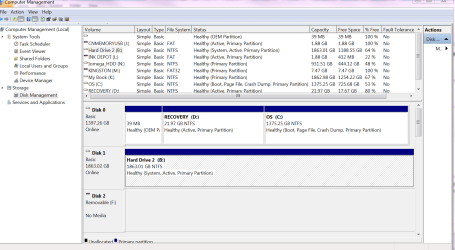
I recently did a system restore and it has created an extra hard drive RECOVERY (D Does anyone know how I can get rid of this, there does not seem to be any up to date info on it, only these,
Dell - Recovery - Temp - tmp and ResSys
I used to do a system image every night to my second hard drive - Hard Drive2 (B now when I go to back and restore settings this drive no longer appears and I am unable to do my system image. The drive appears everywhere else, my computer, windows explorer etc.
Please, can anyone one help me out,
many thanks,
Chris.
I recently did a system restore and it has created an extra hard drive RECOVERY (D
Does anyone know how I can get rid of this, there does not seem to be any up to date info on it, only these,Dell - Recovery - Temp - tmp and ResSys
I used to do a system image every night to my second hard drive - Hard Drive2 (B
now when I go to back and restore settings this drive no longer appears and I am unable to do my system image. The drive appears everywhere else, my computer, windows explorer etc.Please, can anyone one help me out,
many thanks,
Chris.
My Computer
At a glance
Windows 7 Ultimate x64
- OS
- Windows 7 Ultimate x64