Windows 7 Forums


Windows 7: Unsupported disc format?

10 Nov 2012  
bonesy

Windows 7 Home Premium 64bit, SP1
27 posts
 
 
Unsupported disc format?

I am running Windows 7. So i went out and purchased some DVD's in order to create some back up disks. Now the dvd's i purchased are DVD+R Double Layer and when i insert them into the dvd drive i get the following message:

Unsupported disc format. Please insert a blank DVD disk and press OK to continue.

Does this mean that i have to go out once again and purchase even more DVD's? Or is there a way i could reformat the disks i already have and be able to use them?

And here's me thinking a dvd is a dvd no matter what brand you purchase.
must be getting old. lol

My System SpecsSystem Spec

10 Nov 2012  
DavidW7ncus

Win 7 Pro x64 SP1, Win 7 Ult x86 SP1
1,908 posts
NC, USA


My first guess is your DVD burner does not support Double Layer disc's.
If that's true, you may need to go and buy some Single Layer disc's.

What is the make and model of your DVD burner/drive (hardware)?
Make sure your DVD burner supports the DVD disc format before purchasing blank disc's.

You should fill in your SF System specs - here is one method to get that info:
System Info - See Your System Specs

Quote:
And here's me thinking a dvd is a dvd no matter what brand you purchase.
Unfortunately that's not true
My System SpecsSystem Spec
10 Nov 2012  
bonesy

Windows 7 Home Premium 64bit, SP1
27 posts


Hi DavidW7ncus
I did try System Info but when i clicked on Edit System Spec it kept throwing an error?
so i did it manually.
My System SpecsSystem Spec
.


10 Nov 2012  
DavidW7ncus

Win 7 Pro x64 SP1, Win 7 Ult x86 SP1
1,908 posts
NC, USA


Hi bonesy,

I couldn't find any technical info for a "V5-571-32368GsoMas" so i can't be sure what DVD drive you have.
I thought you might have a very old system, but that doesn't seem to be the case as you have an I3 CPU.
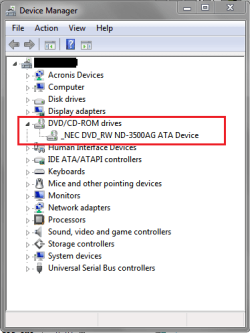
Look in Device Manager and see what it shows for your DVD drive.

Unsupported disc format?-dmsp01.png
My System SpecsSystem Spec
10 Nov 2012  
bonesy

Windows 7 Home Premium 64bit, SP1
27 posts


Don't know what i put in my last reply but have now followed your suggestion and looked in Task Manager and have came up with this:

DVD/CD-ROM
HL-DT-ST DVDRAM GU61N
My System SpecsSystem Spec
10 Nov 2012  
DavidW7ncus

Win 7 Pro x64 SP1, Win 7 Ult x86 SP1
1,908 posts
NC, USA


I haven't been able to find any specs/info for this.
Probably easiest to just buy a small pack of Single Layer DVD's and see if they are recognized.
Or maybe get one from a friend if you know someone that burn's DVD's.
My System SpecsSystem Spec
Reply

 Unsupported disc format? problems?


Thread Tools


Similar help and support threads for: Unsupported disc format?
Thread Forum
Mastered file disc format? General Discussion
Cannot format DVD - R (want to create boot disc) General Discussion
unsupported video format Graphic Cards
Can't Figure Out How To Format A Disc?? General Discussion
How to Format PC Using F-Disc General Discussion


All times are GMT -5. The time now is 09:16 PM.


Windows 7 Forums is an independent web site and has not been authorized,
sponsored, or otherwise approved by Microsoft Corporation.
"Windows 7" and related materials are trademarks of Microsoft Corp.
© Designer Media Ltd