| Windows 7: Does my system image to a new hard drive make it bootable? |
14 Nov 2012
|
#1 | | windows 7 home premium 64 bit |
Does my system image to a new hard drive make it bootable? I used Macrium to make a system image of my existing drive onto a new hard drive and I made the system rescue boot disk too. (HP all-in-one desktop)
I'm not certain about the next step. Do I just replace the old drive with the new one and boot up? It is a system image, so why not? What is boot disk for? | My System Specs |
| OS windows 7 home premium 64 bit |
14 Nov 2012
|
#2 | | Windows 7 Home Premium 32-Bit - Build 7600 SP1 Houston, Texas |

Quote: Originally Posted by drezzle I used Macrium to make a system image of my existing drive onto a new hard drive and I made the system rescue boot disk too. (HP all-in-one desktop)
I'm not certain about the next step. Do I just replace the old drive with the new one and boot up? It is a system image, so why not? What is boot disk for? That should work fine. | My System Specs | | System Manufacturer/Model Number Custom Build OS Windows 7 Home Premium 32-Bit - Build 7600 SP1 CPU Intel Core i3-2120 3.30Ghz Motherboard Asus P8Z68-V LX Intel Z68 Socket H2 ATX Memory Kingston 4 GB DDR3 1333 mhz Graphics Card Zotac GeForce 9400 GT 512MB Sound Card Sound Blaster Audigy SE 24-Bit Monitor(s) Displays Samsung Sync Master 940 = 19 inch Screen Resolution 1440 X 900 Keyboard Microsoft Natural 4000 Mouse Microsoft Custom Optical 3000 PSU 500 watt Case NZXT Apollo - Silver with Clear Side Panel Cooling Three 120 mm Fans Hard Drives OCZ Vertex 3 120 GB Sata 3 SSD ==
Western Digital 160 GB Caviar Blue 7200 RPM ==
Western Digital 500 GB Caviar Green 7200 RPM == Internet Speed AT&T Fiber Optic Wireless Network Other Info 120 mm Blue LED Fan -- Three Blue LED Lazer Light Sticks |
15 Nov 2012
|
#3 | | windows 7 home premium 64 bit |
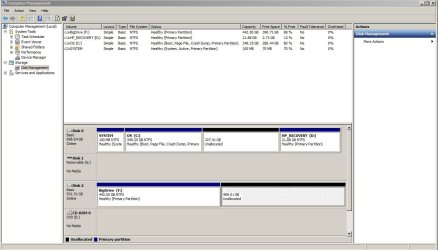
Thank you for your response. I hope you're right. I just checked it on dskmgmt and it's not an exact image since it isn't partitioned into the system, OS and recovery parts. It is also inactive.
I guess I should mark it as active before replacing the currently old active drive? | My System Specs | | OS windows 7 home premium 64 bit |
15 Nov 2012
|
#4 | | Windows 7 Ultimate X64 SP1 Mt. Crumpit/Whoville |
If you put the image on the new drive it won't work. You would have to restore the image to a drive and it should all be fine. The Boot disk would be for booting into Advance Startup Options. | My System Specs | | Computer type PC/Desktop System Manufacturer/Model Number Home Built Desktop By DataTech OS Windows 7 Ultimate X64 SP1 CPU Intel i5-2550K, Differing ~4.4-4.8GHz No built in GPU Motherboard ASUS P8Z68-V PRO/GEN3 Memory 16GB G.Skill Sniper 2133MHz 4x4GB Graphics Card ASUS ENGTX460 DirectCU/2DI/1GD5 GeForce GTX 460 Sound Card Onboard Realtek 5-1 Monitor(s) Displays Samsung P2570HD Screen Resolution 1920x1080 Keyboard Old, beat-up Dell USB From 10 yrs Ago Mouse Gigabyte m6900 wired PSU Corsair HX650W Case Inwin Dragon Rider Cooling Hyper 212 EVO w/two Noctua fans, push-pull, @1300 RPM Hard Drives Crucial M4 128GB for OS, 750GB Seagate MomentusXT for data, 500GB Seagate Constellation for storage Internet Speed 8-19 Mbs down, 3-4 Mbs up Comcast Cable Antivirus Norton Internet Security Browser IE 9, Opera when needed Other Info 4 case fans, LG BluRay-RE, ASUS DVD-RW, Mr. Fusion power generator with flux capacitor, 1.21 gigawatts. |
15 Nov 2012
|
#5 | | windows 7 home premium 64 bit |
To restore the image I put onto the new drive would then involve buying another drive? Did I understand that correctly? My old hard drive is dying (slowly I hope), so I bought a new drive and made a system image on it. How do I restore that without buying another new drive? I think I'm missing something basic and have been reading the forum but I'm still a little confused.
The image is over 80GB. | My System Specs | | OS windows 7 home premium 64 bit |
15 Nov 2012
|
#6 | | Windows 7 Home Premium 32-Bit - Build 7600 SP1 Houston, Texas |

Quote: Originally Posted by drezzle To restore the image I put onto the new drive would then involve buying another drive? Did I understand that correctly? My old hard drive is dying (slowly I hope), so I bought a new drive and made a system image on it. How do I restore that without buying another new drive? I think I'm missing something basic and have been reading the forum but I'm still a little confused.
The image is over 80GB. Sorry I told you wrong. I did not realize you were going to boot from the actual image. The image is compressed and would not boot on its own. You would have to restore it to another HDD. If there is room on the old HDD, make another partition that is big enough and make the image on it. You can then restore from there to the new HDD. | My System Specs | | System Manufacturer/Model Number Custom Build OS Windows 7 Home Premium 32-Bit - Build 7600 SP1 CPU Intel Core i3-2120 3.30Ghz Motherboard Asus P8Z68-V LX Intel Z68 Socket H2 ATX Memory Kingston 4 GB DDR3 1333 mhz Graphics Card Zotac GeForce 9400 GT 512MB Sound Card Sound Blaster Audigy SE 24-Bit Monitor(s) Displays Samsung Sync Master 940 = 19 inch Screen Resolution 1440 X 900 Keyboard Microsoft Natural 4000 Mouse Microsoft Custom Optical 3000 PSU 500 watt Case NZXT Apollo - Silver with Clear Side Panel Cooling Three 120 mm Fans Hard Drives OCZ Vertex 3 120 GB Sata 3 SSD ==
Western Digital 160 GB Caviar Blue 7200 RPM ==
Western Digital 500 GB Caviar Green 7200 RPM == Internet Speed AT&T Fiber Optic Wireless Network Other Info 120 mm Blue LED Fan -- Three Blue LED Lazer Light Sticks |
15 Nov 2012
|
#7 | | windows 7 home premium 64 bit |
Thanks Bigmck! There's some nice simple explanations on this forum which is better than most -- or maybe I'm slower than I should be when it comes to computers.
So now I know I'll have to do a clean install -- just finished making the disc and printing the instructions -- or partition and make another system image somewhere.
I already made the system image onto my old, old hard drive, but I didn't partition to do it -- just put it in with the XP windows system, and someone told me they'd kill each other. This failing hard drive I'm on -- I got this HP computer 1 year and 1 month ago -- so right after the warranty expires, I get hard drive failure notices following on the heels of their continued notices to purchase their extended warranty. I thought they must be joking. But then I started to hear those gentle clicking noises.
Since it's a 750 SATA hard drive and I only use about 1/10 of that, I unallocated over half of it thinking that would improve the chances of the bad sectors being put out to pasture. At least the click noises went away.
Can someone give me a hint about what is the easiest and fastest way to partition a disc? It's not in the disc management section on windows. I'm sure there are 1000s of threads here about how to partition your hard drive.............aaahhhh
___________________________________________________
So I found what to do in disc management which is right click on the unallocated space -- good enough! Then there's a warning not to make it dynamic. What's dynamic mean?

Last edited by drezzle; 15 Nov 2012 at 11:29 AM..
Reason: Follow-up
| My System Specs | | OS windows 7 home premium 64 bit |
15 Nov 2012
|
#8 | | windows 7 home premium 64 bit |
Another question of a different sort -- I'm trying to remove the cables from my enclosed external (soon to be new internal drive) and I can't make them budge -- it's like they are set in concrete. Is it suppose to be that difficult. I'm worried I might break something if I use my handy pliers. | My System Specs | | OS windows 7 home premium 64 bit |
15 Nov 2012
|
#9 | | Windows 7 Ultimate 64-bit SP1 New Jersey |
The boot disc is what is used to do the reimage operation.
Don`t mess with your external, you will break it. | My System Specs | | Computer type PC/Desktop System Manufacturer/Model Number Custom Built by Me ! OS Windows 7 Ultimate 64-bit SP1 CPU Intel Core i5 3570k @ 4.0 GHz Motherboard MSI Z77A-G45 Memory 16GB Corsair Vengeance @ 1600 MHz 10-10-10-27 Graphics Card MSI GTX660 Twin Frozr3 OC Sound Card Realtek HD Monitor(s) Displays Dell 19" HP 23" Sony Bravia 40" Screen Resolution 1920 x 1080 Keyboard Fellowes KWD 855 Mouse Microsoft Wireless PSU Corsair HX750 80+Gold Case Corsair Vengeance Series C70 Gun Metal Black Cooling Cooler Master Hyper N520, Arctic Alumina Thermal Compound Hard Drives OCZ Vertex 4 119GB SSD,
WD Black 500, Blue 500, Caviar SE 320 x 2 Internet Speed Download 25.81 Mbps Upload 5.07 Mbps Antivirus MSE MBAM Browser Chromium Other Info Boston BA745 2.1 Speaker System, Lightscribe Dual Layer DVD Burner |
15 Nov 2012
|
#10 | | Windows 7 Home Premium 32-Bit - Build 7600 SP1 Houston, Texas |

Quote: Originally Posted by drezzle Can someone give me a hint about what is the easiest and fastest way to partition a disc? It's not in the disc management section on windows. I'm sure there are 1000s of threads here about how to partition your hard drive.............aaahhhh
___________________________________________________
So I found what to do in disc management which is right click on the unallocated space -- good enough! Then there's a warning not to make it dynamic. What's dynamic mean? Go to this site Free download Magic Partition Manager Software, partition magic alternative, free partition magic, partition magic Windows 7 and server partition software - Partition Wizard Online and drop down to the bottom of the page and you will see Free Download Bootable CD Now!
Download that and burn on to a DVD at 4x. You can make partitions without any trouble. == As far as Dynamic Disks, just remember that means TROUBLE. You never want those. If you make more than four Primary Partitions on one HDD you will get Dynamic Disks and your PC won't boot. | My System Specs | | System Manufacturer/Model Number Custom Build OS Windows 7 Home Premium 32-Bit - Build 7600 SP1 CPU Intel Core i3-2120 3.30Ghz Motherboard Asus P8Z68-V LX Intel Z68 Socket H2 ATX Memory Kingston 4 GB DDR3 1333 mhz Graphics Card Zotac GeForce 9400 GT 512MB Sound Card Sound Blaster Audigy SE 24-Bit Monitor(s) Displays Samsung Sync Master 940 = 19 inch Screen Resolution 1440 X 900 Keyboard Microsoft Natural 4000 Mouse Microsoft Custom Optical 3000 PSU 500 watt Case NZXT Apollo - Silver with Clear Side Panel Cooling Three 120 mm Fans Hard Drives OCZ Vertex 3 120 GB Sata 3 SSD ==
Western Digital 160 GB Caviar Blue 7200 RPM ==
Western Digital 500 GB Caviar Green 7200 RPM == Internet Speed AT&T Fiber Optic Wireless Network Other Info 120 mm Blue LED Fan -- Three Blue LED Lazer Light Sticks Does my system image to a new hard drive make it bootable? problems? All times are GMT -5. The time now is 07:33 AM. | |