Solved How do I Backup, now that I have Win7 on SSD?

adamwilli

New member
Local time
1:40 AM
Messages
4
I have Win 7 on C:, a SSD and my Libraries on E: my old HDD. How do I backup my libraries on F:, a HDD?
 

My Computer My Computer

At a glance

Windows 7 Home PremiumAMD Phenom II X6 1090T16Gnone
Computer Manufacturer/Model Number
homebuilt
OS
Windows 7 Home Premium
CPU
AMD Phenom II X6 1090T
Motherboard
Giga Bit 880GA-UD3H USB3 SATA3
Memory
16G
Graphics Card(s)
none
Sound Card
none
Monitor(s) Displays
ASUS A238
Hard Drives
C: 120G SSD, E: 2T Seagate, F: 2T Hitachi
PSU
LSI 600W
Case
Apevia (aspire)
Cooling
3x 120mm
Hello Adam and welcome to Seven Forums.

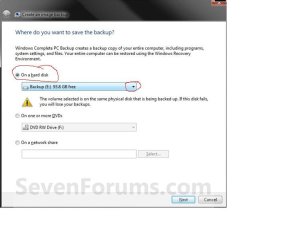
From your specs it looks like you have three separate drives ... the SSD, a 2TB Seagate, and a 2TB Hitachi. Using the native Windows 7 backup and imaging utility as an example, click Start > Control Panel > Backup and Restore > Create a system image. You should see a dialog box open up that asks "Where do you want to save the backup?" Select "On a hard disk" and use the small drop down arrow to select F:

save backup.JPG

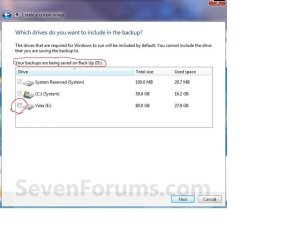
You should next see a dialog box that asks, "Which drives do you want to include in the backup?" It will let you select the drives you want to backup and it will confirm on which drive the backup will be saved.

which drives.JPG

Other imaging software like Macrium, Paragon, EaseUS Todo, etc have similar prompts. If you'd rather use a different imaging software instead of the native Windows 7, folks can help guide you thorugh those as well.

http://www.sevenforums.com/tutorials/663-backup-complete-computer-create-image-backup.html
 

My Computer My Computer

At a glance

Win 7 Pro 64-bitIntel i5 2.4 Ghz8GB DDR3Intel HD 3000
Computer type
Laptop
Computer Manufacturer/Model Number
Sony Vaio VPCEB47GM Laptop
OS
Win 7 Pro 64-bit
CPU
Intel i5 2.4 Ghz
Memory
8GB DDR3
Graphics Card(s)
Intel HD 3000
Sound Card
IDT High Definition
Monitor(s) Displays
15.6 WGXA Anti-Glare LED
Screen Resolution
1280x800
Hard Drives
640Gb 7200rpm
Antivirus
MSE
Browser
Opera (primary) with IE9 backup
Thanks for getting back to me so quickly marsmimar. I'll give that a try.
 

My Computer My Computer

At a glance

Windows 7 Home PremiumAMD Phenom II X6 1090T16Gnone
Computer Manufacturer/Model Number
homebuilt
OS
Windows 7 Home Premium
CPU
AMD Phenom II X6 1090T
Motherboard
Giga Bit 880GA-UD3H USB3 SATA3
Memory
16G
Graphics Card(s)
none
Sound Card
none
Monitor(s) Displays
ASUS A238
Hard Drives
C: 120G SSD, E: 2T Seagate, F: 2T Hitachi
PSU
LSI 600W
Case
Apevia (aspire)
Cooling
3x 120mm
If you use Windows7 imaging, your libraries will automatically be included into the image. Win7 imaging rounds up all partitions that contain system files and puts them on the image - in your case that would be at least the System Partition, C and E. Sometimes that is inconvenient because it may make the image very big. In that case you have to use an OEM imaging program to split things.
 

My Computer My Computer

At a glance

Vista, Windows7, Mint Mate, Zorin, Windows 8from 1.6GHz Duo to i7
Computer Manufacturer/Model Number
HP, Dell, Gateway, Toshiba - 4 laptops and 2 desktops
OS
Vista, Windows7, Mint Mate, Zorin, Windows 8
CPU
from 1.6GHz Duo to i7
Monitor(s) Displays
2x HP w2207
Hard Drives
5x HDD, 7x SSD, 12x Externals
Keyboard
with trackball - no mices
Mouse
Trackball mice
Internet Speed
DSL 6000
Hi Guys, thanks for responding. But let me be more clear. I am a big fan of cloning my hhd's. Then you don't have to play with any other hw/sw issues. Windows 7 uses Acronys for backup, but you still have to buy the verision with cloning, I think. So, I use cloning for one method of backups. Cloning also allows for seperate, unplugged storage. I alsu use Seagate GoFlex external hdds...
 

My Computer My Computer

At a glance

Windows 7 Home PremiumAMD Phenom II X6 1090T16Gnone
Computer Manufacturer/Model Number
homebuilt
OS
Windows 7 Home Premium
CPU
AMD Phenom II X6 1090T
Motherboard
Giga Bit 880GA-UD3H USB3 SATA3
Memory
16G
Graphics Card(s)
none
Sound Card
none
Monitor(s) Displays
ASUS A238
Hard Drives
C: 120G SSD, E: 2T Seagate, F: 2T Hitachi
PSU
LSI 600W
Case
Apevia (aspire)
Cooling
3x 120mm
Back
Top