| Windows 7: getting a error Element not found 0x80070490 error! |
28 Dec 2012
|
#1 | | |
getting a error Element not found 0x80070490 error! hi!
I am trying to do a backup.But i get a error 0x80070490 element not found.I ran chkdsk in safe mode and also went to the msconfig.exe and performed the following
In the System Configuration Utility dialog box, click Selective Startup on the General tab.
Click to clear the Load Startup Items check box.
Note The Use Original Boot.ini check box is unavailable.
Click the Services tab.
Click to select the Hide All Microsoft Services check box.
Click Disable All, and then click OK.
When you are prompted, click Restart.
I did all this but to no avail.
Help would be appreciated.
Thanks
Mahesh | My System Specs |
| System Manufacturer/Model Number DELL INSPIRION Desktop 545S OS windows7 64 bit CPU Intel core 2 DUO 8400@3GHZ Motherboard DELL INC OT287N SOCKET 775 Memory 4GB Graphics Card ATI RADEON 4350 512 MB Ram Sound Card Realtek HIGH definition Audio Monitor(s) Displays DELL TFT monitor dell 1910N Screen Resolution 1366*768 pixels Hard Drives SATA Hard drive came with the system Internet Speed 512 MBPS broad band connection |
30 Dec 2012
|
#2 | | Windows 7 Home Premium x64 SP1 Bay Area Peninsula |
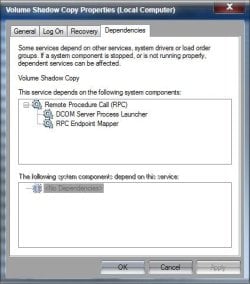
Confirm the Volume Shadow Copy service is set to Automatic Start> In search box type services.msc> Enter> Scroll down to Volume Shadow Copy, make sure it is set to automatic
If not, change it to automatic. If it is already set to automatic, make sure the dependencies in the screen shot are also set to Automatic and Started
A Guy | My System Specs | | OS Windows 7 Home Premium x64 SP1 CPU INTEL Core i5-750 Quad-Core 3.37GHz Motherboard ASUS P7P55D Memory KINGSTON 4GB (2 x 2GB) HyperX PC3-12800 DDR3 1600MHz CL8 Graphics Card MSI N240GT-MD1G/D5 GeForce GT 240 1GB 128-bit GDDR5 Monitor(s) Displays Samsung SyncMaster B2430H 24" Screen Resolution 1920 x 1080 PSU ANTEC TruePower New TP-550, 80 PLUS, 550W Case ANTEC Three Hundred Illusion Cooling COOLER MASTER Hyper 212 Plus, 4 x 120mm 1 x 140mm Noctua's Hard Drives Intel X25M Gen2 80GB, SEAGATE 500GB Barracudaź 7200.12, SATA 3 Gb/s, 7200 RPM, 16MB cache Internet Speed 20 + Mbps Antivirus Avast Browser Opera |
31 Dec 2012
|
#3 | | |
hi!
there are no dependencies and the volume shadow copy is et to automatic.
Do i have to reload windows again?
thanks
mahesh | My System Specs | | System Manufacturer/Model Number DELL INSPIRION Desktop 545S OS windows7 64 bit CPU Intel core 2 DUO 8400@3GHZ Motherboard DELL INC OT287N SOCKET 775 Memory 4GB Graphics Card ATI RADEON 4350 512 MB Ram Sound Card Realtek HIGH definition Audio Monitor(s) Displays DELL TFT monitor dell 1910N Screen Resolution 1366*768 pixels Hard Drives SATA Hard drive came with the system Internet Speed 512 MBPS broad band connection |
31 Dec 2012
|
#4 | | Windows 7 Home Premium 32 bit |
Try this:
Run sfc /scannow.
Review the CBS.log and uninstall any patches/updates with missing assemblies if indicated therein.
Reinstall the patches/updates. SFC /SCANNOW Command - System File Checker
NOTE: This may or may not have a direct bearing on the problem. In any case running a system file check will help repair/replace any corrupt system files including the missing assemblies - if any. | My System Specs | | OS Windows 7 Home Premium 32 bit |
01 Jan 2013
|
#5 | | Windows 7 Home Premium x64 SP1 Bay Area Peninsula |
Hmmm, no dependencies is odd. I believe those dependencies should be the same for any Windows 7 system. See what jumanji's suggestion does, and post the sfcdetails.txt here if any problems are found. A Guy | My System Specs | | OS Windows 7 Home Premium x64 SP1 CPU INTEL Core i5-750 Quad-Core 3.37GHz Motherboard ASUS P7P55D Memory KINGSTON 4GB (2 x 2GB) HyperX PC3-12800 DDR3 1600MHz CL8 Graphics Card MSI N240GT-MD1G/D5 GeForce GT 240 1GB 128-bit GDDR5 Monitor(s) Displays Samsung SyncMaster B2430H 24" Screen Resolution 1920 x 1080 PSU ANTEC TruePower New TP-550, 80 PLUS, 550W Case ANTEC Three Hundred Illusion Cooling COOLER MASTER Hyper 212 Plus, 4 x 120mm 1 x 140mm Noctua's Hard Drives Intel X25M Gen2 80GB, SEAGATE 500GB Barracudaź 7200.12, SATA 3 Gb/s, 7200 RPM, 16MB cache Internet Speed 20 + Mbps Antivirus Avast Browser Opera |
02 Jan 2013
|
#6 | | |
hi!
I ran the following code
findstr /c:"[SR]" %windir%\Logs\CBS\CBS.log >"%userprofile%\Desktop\sfcdetails.txt"and gave me a message that it cannot open the CBSlog file.Please advise me as to how to open this file?It says as access denied when i tried to open the file by going to the directory.Please advise me as to how to change the permissions so that i can paste the log here.
thanks mahesh | My System Specs | | System Manufacturer/Model Number DELL INSPIRION Desktop 545S OS windows7 64 bit CPU Intel core 2 DUO 8400@3GHZ Motherboard DELL INC OT287N SOCKET 775 Memory 4GB Graphics Card ATI RADEON 4350 512 MB Ram Sound Card Realtek HIGH definition Audio Monitor(s) Displays DELL TFT monitor dell 1910N Screen Resolution 1366*768 pixels Hard Drives SATA Hard drive came with the system Internet Speed 512 MBPS broad band connection |
02 Jan 2013
|
#7 | | |
hi!
I was able to create the sfcscandetails.txt.I am attaching the file.Please advise me as to what to do next.
Thanks
mahesh | My System Specs | | System Manufacturer/Model Number DELL INSPIRION Desktop 545S OS windows7 64 bit CPU Intel core 2 DUO 8400@3GHZ Motherboard DELL INC OT287N SOCKET 775 Memory 4GB Graphics Card ATI RADEON 4350 512 MB Ram Sound Card Realtek HIGH definition Audio Monitor(s) Displays DELL TFT monitor dell 1910N Screen Resolution 1366*768 pixels Hard Drives SATA Hard drive came with the system Internet Speed 512 MBPS broad band connection |
02 Jan 2013
|
#9 | | Windows 7 Home Premium x64 SP1 Bay Area Peninsula |
I know your VSS service shows no dependencies, but do you have the services in my screenshot, and are they set to automatic and started? We never asked, were you able to do backups before, and only this last attempt failed? A Guy | My System Specs | | OS Windows 7 Home Premium x64 SP1 CPU INTEL Core i5-750 Quad-Core 3.37GHz Motherboard ASUS P7P55D Memory KINGSTON 4GB (2 x 2GB) HyperX PC3-12800 DDR3 1600MHz CL8 Graphics Card MSI N240GT-MD1G/D5 GeForce GT 240 1GB 128-bit GDDR5 Monitor(s) Displays Samsung SyncMaster B2430H 24" Screen Resolution 1920 x 1080 PSU ANTEC TruePower New TP-550, 80 PLUS, 550W Case ANTEC Three Hundred Illusion Cooling COOLER MASTER Hyper 212 Plus, 4 x 120mm 1 x 140mm Noctua's Hard Drives Intel X25M Gen2 80GB, SEAGATE 500GB Barracudaź 7200.12, SATA 3 Gb/s, 7200 RPM, 16MB cache Internet Speed 20 + Mbps Antivirus Avast Browser Opera |
03 Jan 2013
|
#10 | | |
hi!
I have set the volume shadow copy to automatic and there are no dependencies and i have the services in your screen shot.Tell me how to set the services to automatic as the vss is set to automatic i do not know if the services is set to automatic.
I was able to take backups without any problems but i ran the spybot and deleted some malware which were there in my system and i started getting this problem that is element not found error.There is some malware in my registry and in order to delete it ineed to take a back up of my system and follow the malware removal procedure.
Please advise as to what to do? | My System Specs | | System Manufacturer/Model Number DELL INSPIRION Desktop 545S OS windows7 64 bit CPU Intel core 2 DUO 8400@3GHZ Motherboard DELL INC OT287N SOCKET 775 Memory 4GB Graphics Card ATI RADEON 4350 512 MB Ram Sound Card Realtek HIGH definition Audio Monitor(s) Displays DELL TFT monitor dell 1910N Screen Resolution 1366*768 pixels Hard Drives SATA Hard drive came with the system Internet Speed 512 MBPS broad band connection getting a error Element not found 0x80070490 error! problems? All times are GMT -5. The time now is 05:57 PM. | |