Windows 7 Forums


Windows 7: BCD missing status:0xc000000f & Diskpart won't list my main partition

06 Jan 2013   #1

Windows 7 Ultimate 64bit
 
 
BCD missing status:0xc000000f & Diskpart won't list my main partition

My pc won't boot up cause i made some software changes but didn't save things properly. It's running Windows 7 Ultimate 64bit. I checked online and found i could boot up from an installation disc and repair it. But the recovery tools didn't work and I found that I could rebuild the BCD folder.

I was trying to rebuild my BCD file using some online instructions (http://support.microsoft.com/kb/2004518)… i was using method 2.But I accidentally typed in Bcdedit /export C:\BCD instead of Bcdedit /export C:\BCD_Backup and pressed ENTER. And it said the command was completed. I thought i would correct the error by typing in Bcdedit /export C:\BCD_Backup and the rest of the commands. they all completed successfully so I thought it was alright.

However when i restarted the pc I got an error at startup that says: status: 0xc000000f. apparently my boot folder is missing. SoI searched for some more solutions online and most said i've to go to the partition with the boot folder and OS using diskpart.

But when i run diskpart and run the command to list partition or list volume my original C partition isn't listed. It shows my System Reserved partition with the C letter assigned to it. Originally it was assigned letter E. And it shows that its active. I've tried running bootrec commands and restarting the pc but it's still not fixed.

I've tried searching for a solutions online but I can't find any. Please help. Thanks for all the help.

I've tried running RECOVER and RESCAN commands in diskpart but they don't show the partition. I've tried getting more solutions but I can't find 1 that works. Been working on this for a half a day now. I need help asap. Thanks for taking the time to help out.

My System SpecsSystem Spec

06 Jan 2013   #2
mjf

Windows 7x64 Home Premium SP1 x 2
Australia


Quote   Quote: Originally Posted by tisungeni View Post
But I accidentally typed in Bcdedit /export C:\BCD instead of Bcdedit /export C:\BCD_Backup and pressed ENTER. And it said the command was completed.
I can't see how this could be the cause of your problem.

Have you carried out either:
A) Run startup repair from a system repair disc (3 times rebooting each time)
or
B)
>bootrec /scanos
This should come back and identify the Windows 7 OS partition.
then
rebuild the MBR
>bootrec /fixmbr
then
Fix the Partition Boot Record/Boot sector.
>bootrec /fixboot
then
importantly, rebuild the BCD
>Bootrec /rebuildbcd


If so then I suggest you make a Partition Boot CD (using another PC of course) and have a closer look at your HDD particularly the "C" partition. Note that letter assignments like C are given by Windows. Boot discs, including the system repair disk, don't know this and assign arbitrary letters.
My System SpecsSystem Spec
06 Jan 2013   #3

Windows 7 Ultimate 64bit


I don't have a system repair disc. But I'll try the option B. I did try the fixmbr, fixboot and rebuildbcd. and it didn't work. I'll also tried running startup repair more than 3 times consecutively. That Didn't work either.

If option B fails I'll try making da Partition Boot CD. Thanks for all the help. I will update the results.
My System SpecsSystem Spec
.


07 Jan 2013   #4

Windows 7 Ultimate 64bit


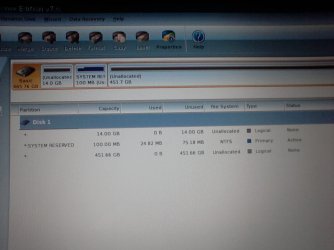
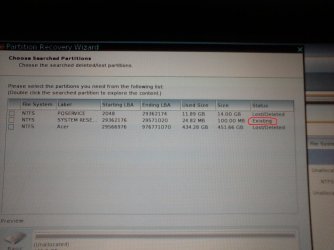
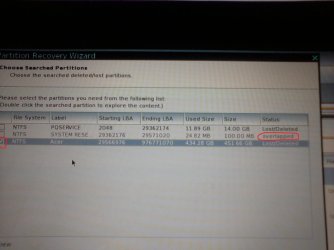
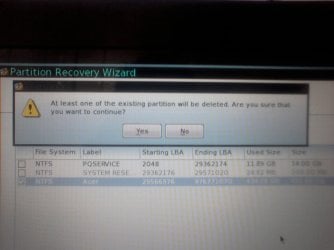
I tried option B and it didn't work. So I got MIniTool Partition Home Edition and burned it and booted up. I can see my disk and its showing 3 partitions. @ of those are "Unallocated" and the not labelled. The System Reserved is active. I run Rebuild MBR but that didn't solve the problem. So I ran partition recovery wizard and did a full scan and quick scan. IT listed 3 partitions; system reserved and the other 2 which are labelled PQSERVICE and ACER. Apparently PQSERVICE is a hidden partition with factory settings in it created by Acer. I tried to select all 3 but when I select the ACER partition, the SYSTEM RESERVED becomes inaccessible. The status changes from "Existing" to "Overlapped". And if I continue to the next step, the recovery wizard tells me that the existing partition would have to be deleted. I don't know if I should continue. Isn't SYSTEM RESERVED supposed to be a sort of backup to the main partition? What will happen if I go ahead and delete it? Is it important that I keep it?

Thanks for all the help so far.
My System SpecsSystem Spec
07 Jan 2013   #5
mjf

Windows 7x64 Home Premium SP1 x 2
Australia


PQSERVICE is the ACER factory restore partition. This enables you to restore the PC to its initial state like it was when you first turned the PC on. The ACER partition is probably the Windows OS partition. If there is another unallocated partition it is probably a user data partition.
My old ACER partitions like this:
PQService (hidden); System Reserved (active); ACER (Windows OS) ; Data

I'm puzzled how your last 2 partitions became unallocated???
However, I would select the unallocated ACER partition and run the partition Recovery Wizard just on it. Do not fiddle with the PQService partition.

If all else fails you will need to do a factory restore. Have you also made your Factory Restore DVDs?
Let us know what you decide to do.
My System SpecsSystem Spec
07 Jan 2013   #6

Windows 7 Ultimate 64bit


My concern is on the System Reserved partition because once I select the Acer partition its status changes form "exisitng" to "overlapped" and I can't select it anymore. Which mean if I go ahead and recover Acer partitino it will be deleted.

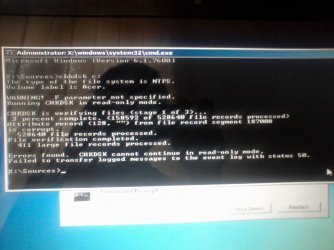
Image1 is how partition wizard list my disk when it boots upBCD missing status:0xc000000f & Diskpart won't list my main partition-image-1.jpg
Then the rest is what i'm trying to explain.BCD missing status:0xc000000f & Diskpart won't list my main partition-image-2.jpg
BCD missing status:0xc000000f & Diskpart won't list my main partition-image-3.jpg
BCD missing status:0xc000000f & Diskpart won't list my main partition-image-4.jpg
My System SpecsSystem Spec
07 Jan 2013   #7
mjf

Windows 7x64 Home Premium SP1 x 2
Australia


Your ACER partition structure appears to be
PQService; System Reserved; ACER Windows OS
I don't know what you have done previously to the PC but I wouldn't guarantee PQService or ACER (C) hasn't been damaged. However, the size of the contents looks ok.
I think PQService and ACER should be primary not logical. Did you change them accidentally?
You could try using Partition Wizard to change ACER from logical to primary and see what the partition recovery wizard says when you select ACER. This may be cause of the overlapping partition message.

I would also try setting PQService to primary and see if recovery wizard allows its recovery.

Last edited by mjf; 07 Jan 2013 at 04:02 PM..
My System SpecsSystem Spec
08 Jan 2013   #8

Windows 7 Ultimate 64bit


I just went ahead and recovered my ACER partition. The SYSTEM RESERVED partition was deleted. I then ran the recovery wizard again and recover the SYSTEM RESERVED partition. So they are all back. I set the ACER and SYSYTEM RESERVED as primary and left the PQSERVICE as logical.

I started up my pc and it still couldn't boot but now it says BOOTMGR is missing PRESS Ctrl+Atl+del. So i tried to rebuild the BCD using bootrec and bcdedit commands like before and all the commands worked. It even showed the installed windows os and i added it to the bcd store. but when i restarted it gave save error.

I tried running the commands again. the first three commands complete successfully. but i run into a problem at the fourth command for attributes.

bcdedit /export c:\bcd_backup
c:
cd boot
attrib bcd-s-h-r (here it says file not found)
ren c:\boot\bcd bcd.old (here it says a duplicate files exists)
bootrec /rebuildbcd ( here it scans but doesn't find any windows installations)
My System SpecsSystem Spec
08 Jan 2013   #9

Microsoft Windows 7 Home Premium 64-bits 7601 Multiprocessor Free Service Pack 1
SecretCity


Code:
diskpart
list vol
exit
system reserved=C? your acer partition with Windows 7 is called D? PQSERVICE is called E?

Code:
diskpart
sel vol c
det part
sel vol d
det part
sel part e
det part
Which partition is active?
My System SpecsSystem Spec
08 Jan 2013   #10

Microsoft Windows 7 Home Premium 64-bits 7601 Multiprocessor Free Service Pack 1
SecretCity


Quote   Quote: Originally Posted by tisungeni View Post
bcdedit /export c:\bcd_backup
c:
cd boot
attrib bcd-s-h-r (here it says file not found)
ren c:\boot\bcd bcd.old (here it says a duplicate files exists)
bootrec /rebuildbcd ( here it scans but doesn't find any windows installations)
You did export bcd store succesfully.

attrib bcd-s-h-r should be: attrib -h -s -r bcd

ren c:\boot\bcd bcd.old should be: ren c:\boot\bcd bcd.old2
if bcd.old alreadyy exists. Those commands are not needed at all btw!! No reason (yet) to beleive bcd store is corrupt.
My System SpecsSystem Spec
Reply

 BCD missing status:0xc000000f & Diskpart won't list my main partition problems?


Thread Tools


Similar help and support threads for: BCD missing status:0xc000000f & Diskpart won't list my main partition
Thread Forum
BCD missing and the partition with OS and BCD not listed in Diskpart General Discussion
cant boot into windows 7 status: 0xc000000f Installation & Setup
Status 0xc000000f And no repair disc. BSOD Help and Support
No bootable OS, status: 0xc000000f Installation & Setup
Status 0xc000000f I'm stuck and don't know anything about computers!!! BSOD Help and Support


All times are GMT -5. The time now is 07:30 PM.


Seven Forums Android App Seven Forums IOS App Follow us on Facebook

Windows 7 Forums is an independent web site and has not been authorized,
sponsored, or otherwise approved by Microsoft Corporation.
"Windows 7" and related materials are trademarks of Microsoft Corp.
© Designer Media Ltd
  

1 2 3 4 5 6 7 8 9 10 11 12 13 14 15 16 17 18 19 20 21 22 23 24 25 26 27 28 29 30 31 32