Windows 7 Forums


Windows 7: ? about choosing which files/folders to back up

08 Jan 2013   #1

Windows 7 Ultimate 64-bit
 
 
? about choosing which files/folders to back up

If I am pretty sure that my documents and such have been stored where they're supposed to be, would backing up C:\Users\Username take care of backing up everything I need if my system crashed? I'm not concerned about where software is installed, but I don't want to miss any data files from the programs I use.


I hope this makes sense.

Thanks!
My System SpecsSystem Spec

08 Jan 2013   #2

Win 7 Pro 64-bit
South Central Texas


If you're not 100% sure where all of your data files are located, rather than backing up individual files and folders and possibly missing something important, why not do a system image of the entire hard drive? You could use the native Windows 7 imaging tool or another free product like Macrium, Paragon, or EaseUS Todo to name just a few.

Macrium

Paragon

EaseUS Todo
My System SpecsSystem Spec
08 Jan 2013   #3

Windows 7 Ultimate X64 SP1
Mt. Crumpit/Whoville


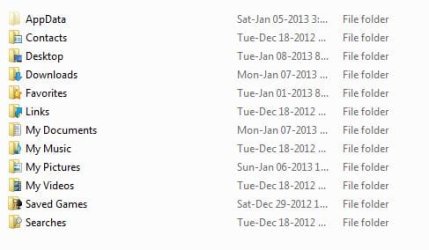
If you back up C:\Users\yourusername here is what you will have:

? about choosing which files/folders to back up-users.jpg
My System SpecsSystem Spec
.


Reply

 ? about choosing which files/folders to back up problems?


Thread Tools


Similar help and support threads for: ? about choosing which files/folders to back up
Thread Forum
Solved How do I hide/unhide specific files of my choosing? General Discussion
Why do I need to keep choosing a programme to open files with? Performance & Maintenance
all the folders icons changed and cant restore back Backup and Restore
Can you Back Up folders in Outlook? Microsoft Office
Libraries sub-folders deleted...need to get them back! General Discussion


All times are GMT -5. The time now is 01:47 PM.


Seven Forums Android App Seven Forums IOS App Follow us on Facebook

Windows 7 Forums is an independent web site and has not been authorized,
sponsored, or otherwise approved by Microsoft Corporation.
"Windows 7" and related materials are trademarks of Microsoft Corp.
© Designer Media Ltd
  

1 2 3 4 5 6 7 8 9 10 11 12 13 14 15 16 17 18 19 20 21 22 23 24 25 26 27 28 29 30 31 32