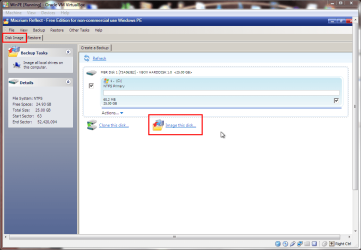
What's wrong with installing Macrium Reflect FREE?? You're going to need it installed in order to be able to run it to produce the "image" backup anyway.
The standalone boot CD (from that ISO) is simply a standalone bootable way to get to the WinPE recovery program version of Macrium Reflect which can then RESTORE one of these "image" backups you've taken, assuming you have it available on some external media (like a USB drive) which is accessible to WinPE when you boot from the CD.
Macrium Reflect also can add itself to the Boot Manager menu of your standard Windows, so that when you boot your machine normally you will see it as a boot option (just like one of multiple OS choices might be on your Boot Manager menu). That's a nice flexibility from installing the product for real. This way you don't need to use the standalone bootable CD if you don't have to... i.e. if your hard drive has not physically crashed but you just want to restore Windows from some "image". In this case, just boot to Reflect from the Boot Manager menu off of the hard drive, select the "image" to be restored, and go. The same internal/external hardware which is available to your regular Windows will also be available to Reflect booted this way, from the Boot Manager menu.
With the standalone boot CD, if you have unique external drive or USB 3.0 adapter etc. which requires some special driver (only if the device is not already supported by WinPE) then you'll need to make the required driver available at boot time for the standalone WinPE. With Macrium Reflect STANDARD (not free, but very reasonable price) any such drivers can be automatically placed onto that bootable standalone WinPE CD built by the "create recovery media" wizard of the product. This makes it easier for you to use that standalone boot CD, since all drivers needed for your hardware are already in the WinPE... same as with the Reflect run via the Boot Manager menu off of the hard drive.
Personally, I think Macrium Reflect is an excellent product from an excellent software vendor who actively maintains and improves their products. I prefer their STANDARD version since it also supports "space management" (i.e. automatically purging old generations, so that you don't have to manually maintain your backup repository manually yourself) which is enough to make me pay for it. STANDARD also supports "data backups" (i.e. folders and files), rather than just "image" backups as is provided by the FREE product as its only feature.
Anyway, it must be installed on your PC in order to TAKE A BACKUP. The standalone WinPE boot CD is only for RESTORE of an image backup, as a failsafe bootable media in case you can't boot from the hard drive using the Boot Manager option... to the same WinPE in either case.
As far as IMGBURN goes, just let it use its own defaults. It verifies after burning, so you can't go wrong.