- Local time
- 12:47 AM
- Messages
- 16,796
The download page is not as clear as it might be:
There is new version v1.1
That is still only about 14mb and is the one on the left.
http://www.aomeitech.com/download.html
To make it easier, direct link here:
Download AOMEI Data BackuperBuilt-in Windows PE Bootable Disc Builder(Size: 14MB)
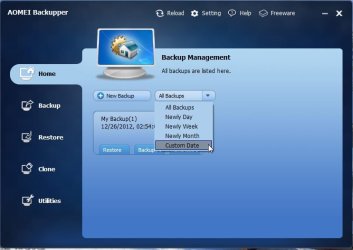
If you don't know it already, it is an excellent free disk/partition imaging /file backup program. It also does scheduling and incremental/differential.
If you running win7/8, it can make bootable winpe recovery media without needing to download WAIK/WADK or anything else.
For those running earlier operating systems, you cannot create winpe bootable media in that way.
Therefore they have released Linux based recovery media for those users.
You can d/l the Linux based recovery disk here:
Download AOMEI Linux Bootable Disc
You need to put that in Aoemei Backuper installation directory so it can burn it for you - or just burn it using any iso image burner you may have.
Or you can d/l both the Aomei Backuper v1.1 and the Linux based recovery media here:
Download AOMEI Data BackuperBuilt-in Windows PE Bootable Disc Builder And Linux Bootable Disc (52MB)
There is new version v1.1
That is still only about 14mb and is the one on the left.
http://www.aomeitech.com/download.html
To make it easier, direct link here:
Download AOMEI Data BackuperBuilt-in Windows PE Bootable Disc Builder(Size: 14MB)
If you don't know it already, it is an excellent free disk/partition imaging /file backup program. It also does scheduling and incremental/differential.
If you running win7/8, it can make bootable winpe recovery media without needing to download WAIK/WADK or anything else.
For those running earlier operating systems, you cannot create winpe bootable media in that way.
Therefore they have released Linux based recovery media for those users.
You can d/l the Linux based recovery disk here:
Download AOMEI Linux Bootable Disc
You need to put that in Aoemei Backuper installation directory so it can burn it for you - or just burn it using any iso image burner you may have.
Or you can d/l both the Aomei Backuper v1.1 and the Linux based recovery media here:
Download AOMEI Data BackuperBuilt-in Windows PE Bootable Disc Builder And Linux Bootable Disc (52MB)
My Computers
-
At a glance
7 X64i5 84002x8gb 3200mhz- Computer type
- PC/Desktop
- OS
- 7 X64
- CPU
- i5 8400
- Motherboard
- gigabyte b365m ds3h
- Memory
- 2x8gb 3200mhz
- Hard Drives
- various
- PSU
- pure power 11 400w cm
- Case
- Coolermaster
- Cooling
- cryorig m9i
-
At a glance
7x64g54008gb ddr4 2400- Computer type
- PC/Desktop
- OS
- 7x64
- CPU
- g5400
- Motherboard
- ga b365m ds3h
- Memory
- 8gb ddr4 2400
- PSU
- xfx pro 450w