| Windows 7: Why can't I do an image backup on second internal hard drive? |
09 Mar 2013
|
#1 | | Windows 7 premium Penzance |
Why can't I do an image backup on second internal hard drive? Hi, I've tried to set up an image backup on my second internal hard drive but it says: " A system image cannot be saved on a drive that your computer boots from or that Windows is installed on"
My windows is on my SSD drive and I'm trying to backup to a sata drive. Please help !
Thanks | My System Specs |
| |
09 Mar 2013
|
#2 | | Win 7 Pro 64-bit South Central Texas |
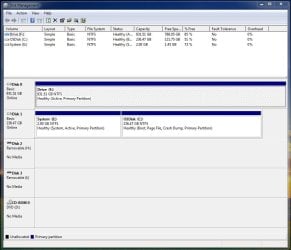
It's possible that the drive is configured in such a way that it's not recognized as being available to store a system image. Perhaps it once contained an operating system and needs to be formatted. If you could post a screenshot of your Disk Managment it will probably give a clue as to what's wrong. Disk Management - Post a Screen Capture Image | My System Specs | | Computer type Laptop System Manufacturer/Model Number Sony Vaio VPCEB47GM Laptop OS Win 7 Pro 64-bit CPU Intel i5 2.4 Ghz Memory 8GB DDR3 Graphics Card Intel HD 3000 Sound Card IDT High Definition Monitor(s) Displays 15.6 WGXA Anti-Glare LED Screen Resolution 1280x800 Hard Drives 640Gb 7200rpm Antivirus MSE Browser Opera (primary) with IE9 backup |
09 Mar 2013
|
#3 | | Windows 7 Pro x64 (1), Win7 Pro X64 / WinXP Pro x86 on (2) |

Quote: Originally Posted by brother Hi, I've tried to set up an image backup on my second internal hard drive but it says: " A system image cannot be saved on a drive that your computer boots from or that Windows is installed on"
My windows is on my SSD drive and I'm trying to backup to a sata drive. Please help !
Thanks As was suggested, if your SATA drive was originally your one internal hard drive and you upgraded to add the SSD, depending on how you did that re-install of Windows 7 it's possible your BIOS is still pointing to the SATA drive as the "boot drive", so the Windows 7 install put the 100MB "system reserved" partition on that drive, and then installed the OS itself on the SSD when you pointed there as the target for the Windows 7 install.
The boot manager files are always placed on the "boot drive" as set by your BIOS settings, and from there Boot Manager can load the OS from any other drive.
If you can look at DISKMGMT.MSC, the "active" partition (one one of your two drives) is where that "boot manager" was installed (typically in the 100MB "system reserved", but it could actually be in yet another partition coming from some old WinXP or even Win98 environment, when boot manager files were placed in that very same partition). So if your SATA drive has a partition which shows as "active", then that is why it is considered part of the boot process and cannot be used to hold a system image.
As was requested, posting the expanded full-screen output from DISKMGMT.MSC with columns spread so that we can read all the text in each field would let us help you further.
Also, please look in your BIOS setup and determine which of your two drives is considered that "boot drive", i.e. "hard disk #1" or something like that in "boot sequence". | My System Specs | | System Manufacturer/Model Number Home-built, two systems (1) and (2) OS Windows 7 Pro x64 (1), Win7 Pro X64 / WinXP Pro x86 on (2) CPU i5-3350p 3.1Ghz/6MB-cache (1); E8400 3.0Ghz/6MB-cache (2) Motherboard ASUS P8Z77-V Pro (1); ASUS P5Q3 (2) Memory 8GB PC3-12800 DDR3 (1); 4GB PC3-10600 DDR3 (2) Graphics Card ATI HD5770 dual-DVI (1), (see TV cards); ATI HD4850 (2) Sound Card Realtek ALC892 HD Audio (1); Realtek ALC1200 HD Audio (2) Monitor(s) Displays Eizo HD2441W LCD, Eizo S2433W (1); Eizo 24" S2433W (2) Screen Resolution 1920x1200, 1920x1200 (1); 1920x1200 (2) Keyboard IBM PS/2 (1) and (2) Mouse Logitech MX Revolution wireless (1); Microsoft wired (2) PSU Nesteq ECS-6001 600W (1); Nesteq ECS-5001 500W (2) Case Acousti-Case 360 (1) and (2) Cooling Noctua NH-U12P SE2 for CPU, 2x120mm case fans (1) and (2) Hard Drives (1) 1TB SATA-II (7200RPM), 2TB SATA-II (7200RPM), 2TB SATA-III (7200RPM), 250GB SATA-III (10000RPM) for OS;
(2) 320GB SATA-II (7200RPM), 750GB SATA-II (7200RPM), 150GB SATA-II (10000RPM) for OS Internet Speed 15mbps down / 2mbps up Other Info Ceton InfiniTV 4-tuner cablecard-enabled TV card as well as Hauppauge HVR-2250 OTA/ATSC 2-tuner TV card in (1), running under Win7 WMC |
10 Mar 2013
|
#4 | | Windows 7 premium Penzance |
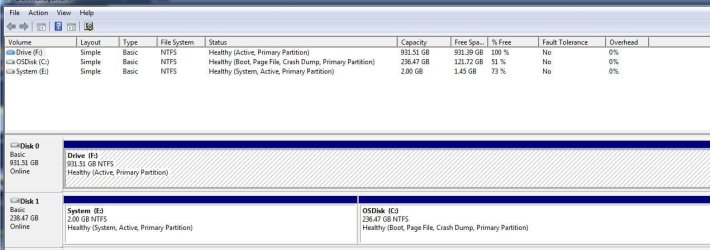
Image of my disk management | My System Specs | | |
10 Mar 2013
|
#5 | | Windows 7 premium Penzance |
The operating system was originally on the 1Tb SATA drive. I cloned it using acronis to the SSD.
There is a second partion "E:system" which was cloned at the same time. I'm not sure what this is? I think it may be some sort of recovery partition disk that my computer manufacturer put on there.
I've just formatted drive "F" but it made no difference, I still can't backup an image to it. | My System Specs | | |
10 Mar 2013
|
#7 | | Windows 7 Pro x64 (1), Win7 Pro X64 / WinXP Pro x86 on (2) |
You didn't tell us what your BIOS says is your "boot drive"... the SSD or the SATA?
But since you say you just formatted F (SATA), and yet you can still boot, I'm guessing that the SSD drive is actually your "boot drive" in the BIOS, since formatting F would have obviously erased the boot manager files if they were there. So they're not there. They must be on that E partition which got created by Acronis, since that is marked as the "active" partition on the SSD drive. Your operating system got cloned onto what is your C partition also on the SSD drive.
But your F partition on the SATA drive is still marked as "active", even though there is nothing on it any longer that is bootable... especially now that you just formatted it. I'm guessing that's what prevents system image from being written to it.
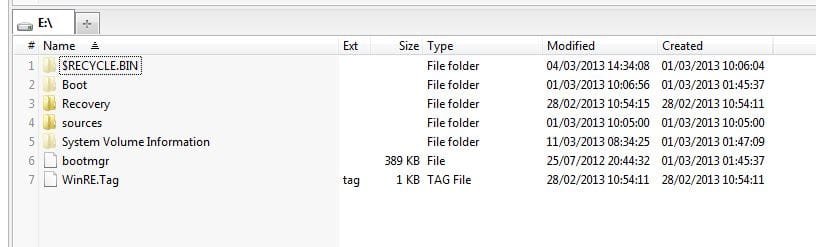
So, in my opinion, your "boot drive" must be set in the BIOS to be the SSD drive. And the "active partition" on that drive is E (which at 2GB is certainly much larger than it needs to be for just Boot Manager, but it doesn't hurt), which is obviously where Acronis placed the Boot Manager files. A real Windows install would have built a 100MB "system reserved" partition instead of the 2GB E partition built by Acronis, and not assigned any drive letter to that little "system reserved" partition. Boot Manager would have been placed in that un-lettered "active" 100MB partition, and the rest of the drive would have been given to C (unless you changed that allocation to be smaller, but you could also have shrunk C after Windows got installed using a program like Partition Wizard).
Nevertheless, apparently the cloning by Acronis gave you what you now have, with the 2GB E partition on SSD drive set as "active", and having a letter E, and also containing Boot Manager. The real Windows partition is over on C on the SSD drive. This is all fine. Remember, at machine boot time the BIOS goes to the "active" partition on the "boot drive" to pick up the boot files to launch, i.e. Boot Manager.
It is simply that residually your F partition (on SATA drive) is still marked as "active", but for no reason any longer. If you UN-ACTIVE that F partition I'll bet you will then be able to write a system image to it.
Free Partition Wizard can do that for you in 3 seconds. | My System Specs | | System Manufacturer/Model Number Home-built, two systems (1) and (2) OS Windows 7 Pro x64 (1), Win7 Pro X64 / WinXP Pro x86 on (2) CPU i5-3350p 3.1Ghz/6MB-cache (1); E8400 3.0Ghz/6MB-cache (2) Motherboard ASUS P8Z77-V Pro (1); ASUS P5Q3 (2) Memory 8GB PC3-12800 DDR3 (1); 4GB PC3-10600 DDR3 (2) Graphics Card ATI HD5770 dual-DVI (1), (see TV cards); ATI HD4850 (2) Sound Card Realtek ALC892 HD Audio (1); Realtek ALC1200 HD Audio (2) Monitor(s) Displays Eizo HD2441W LCD, Eizo S2433W (1); Eizo 24" S2433W (2) Screen Resolution 1920x1200, 1920x1200 (1); 1920x1200 (2) Keyboard IBM PS/2 (1) and (2) Mouse Logitech MX Revolution wireless (1); Microsoft wired (2) PSU Nesteq ECS-6001 600W (1); Nesteq ECS-5001 500W (2) Case Acousti-Case 360 (1) and (2) Cooling Noctua NH-U12P SE2 for CPU, 2x120mm case fans (1) and (2) Hard Drives (1) 1TB SATA-II (7200RPM), 2TB SATA-II (7200RPM), 2TB SATA-III (7200RPM), 250GB SATA-III (10000RPM) for OS;

(2) 320GB SATA-II (7200RPM), 750GB SATA-II (7200RPM), 150GB SATA-II (10000RPM) for OS Internet Speed 15mbps down / 2mbps up Other Info Ceton InfiniTV 4-tuner cablecard-enabled TV card as well as Hauppauge HVR-2250 OTA/ATSC 2-tuner TV card in (1), running under Win7 WMC |
10 Mar 2013
|
#8 | | Windows 7 Ultimate X64 SP1 Mt. Crumpit/Whoville |
Try this Partition - Mark as Inactive and then you should be able to place the image on the F:\ Partition. Being marked Active Windows 7 considers it a system drive. | My System Specs | | Computer type PC/Desktop System Manufacturer/Model Number Home Built Desktop By DataTech OS Windows 7 Ultimate X64 SP1 CPU Intel i5-2550K, Differing ~4.4-4.8GHz No built in GPU Motherboard ASUS P8Z68-V PRO/GEN3 Memory 16GB G.Skill Sniper 2133MHz 4x4GB Graphics Card ASUS ENGTX460 DirectCU/2DI/1GD5 GeForce GTX 460 Sound Card Onboard Realtek 5-1 Monitor(s) Displays Samsung P2570HD Screen Resolution 1920x1080 Keyboard Old, beat-up Dell USB From 10 yrs Ago Mouse Gigabyte m6900 wired PSU Corsair HX650W Case Inwin Dragon Rider Cooling Hyper 212 EVO w/two Noctua fans, push-pull, @1300 RPM Hard Drives Crucial M4 128GB for OS, 750GB Seagate MomentusXT for data, 500GB Seagate Constellation for storage Internet Speed 8-19 Mbs down, 3-4 Mbs up Comcast Cable Antivirus Norton Internet Security Browser IE 9, Opera when needed Other Info 4 case fans, LG BluRay-RE, ASUS DVD-RW, Mr. Fusion power generator with flux capacitor, 1.21 gigawatts. |
11 Mar 2013
|
#9 | | Windows 7 premium Penzance |
Still can't understand it!
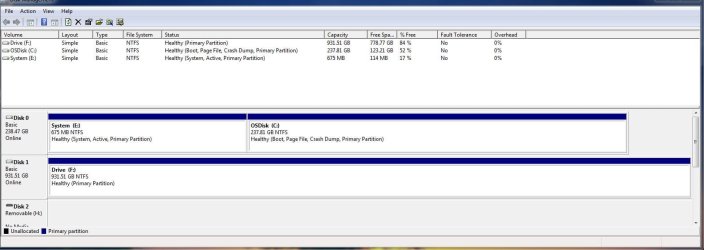
I used Partition Wizard to make the "F" drive un-active and I still can't save a backup image to it.
I've used the Partition Wizard to claim back a little of the 2gb on the "E" drive though.
I have also checked the bios and disabled the "F" drive from the boot sequence. | My System Specs | | |
11 Mar 2013
|
#10 | | Windows 7 Ultimate X64 SP1 Mt. Crumpit/Whoville |
How are you trying to make a back-up, that is what software? | My System Specs | | Computer type PC/Desktop System Manufacturer/Model Number Home Built Desktop By DataTech OS Windows 7 Ultimate X64 SP1 CPU Intel i5-2550K, Differing ~4.4-4.8GHz No built in GPU Motherboard ASUS P8Z68-V PRO/GEN3 Memory 16GB G.Skill Sniper 2133MHz 4x4GB Graphics Card ASUS ENGTX460 DirectCU/2DI/1GD5 GeForce GTX 460 Sound Card Onboard Realtek 5-1 Monitor(s) Displays Samsung P2570HD Screen Resolution 1920x1080 Keyboard Old, beat-up Dell USB From 10 yrs Ago Mouse Gigabyte m6900 wired PSU Corsair HX650W Case Inwin Dragon Rider Cooling Hyper 212 EVO w/two Noctua fans, push-pull, @1300 RPM Hard Drives Crucial M4 128GB for OS, 750GB Seagate MomentusXT for data, 500GB Seagate Constellation for storage Internet Speed 8-19 Mbs down, 3-4 Mbs up Comcast Cable Antivirus Norton Internet Security Browser IE 9, Opera when needed Other Info 4 case fans, LG BluRay-RE, ASUS DVD-RW, Mr. Fusion power generator with flux capacitor, 1.21 gigawatts. Why can't I do an image backup on second internal hard drive? problems? All times are GMT -5. The time now is 11:21 AM. | |