| Windows 7: Image your system with free Macrium |
30 Nov 2009
|
#1 | | Vista, Windows7, Mint Mate, Zorin, Windows 8 Florida in winter, Black Forest/Germany |
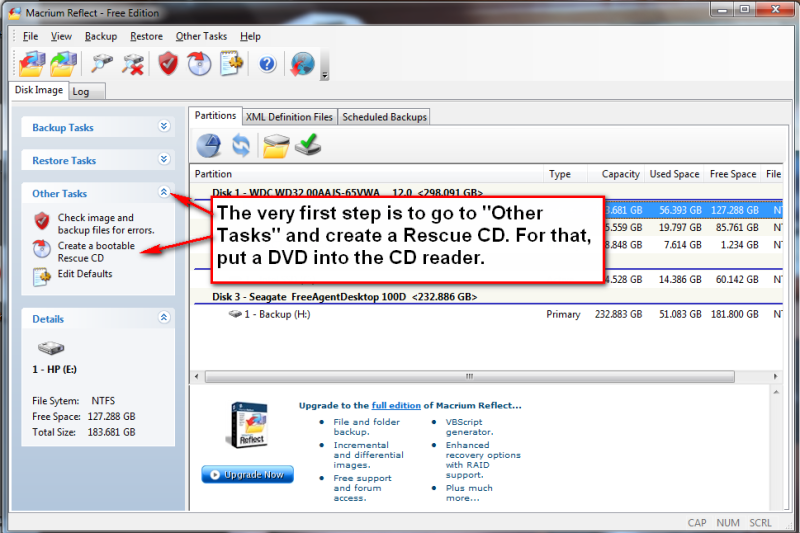
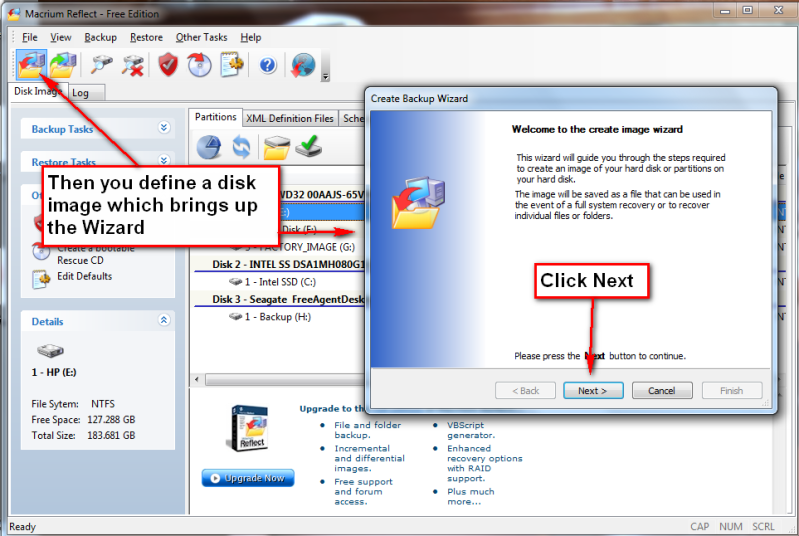
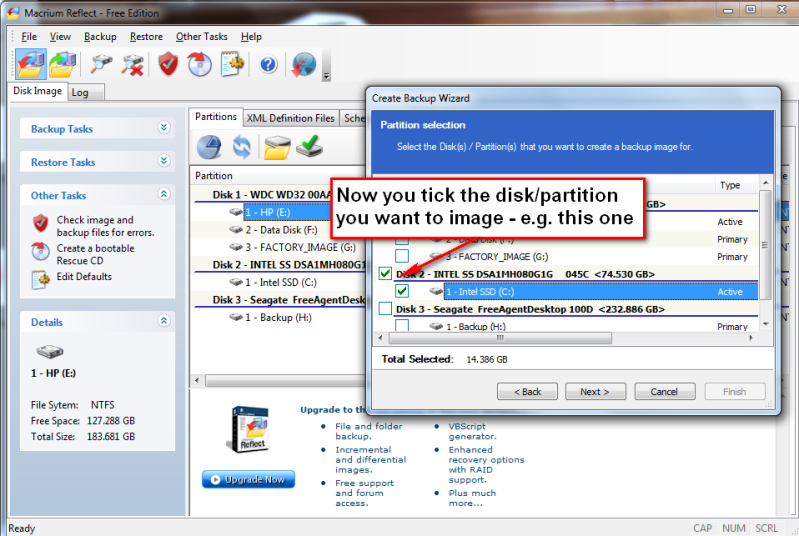
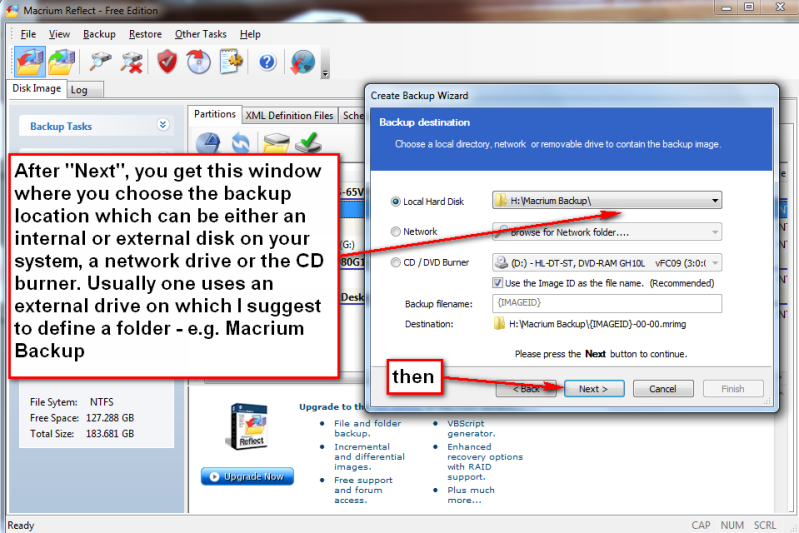
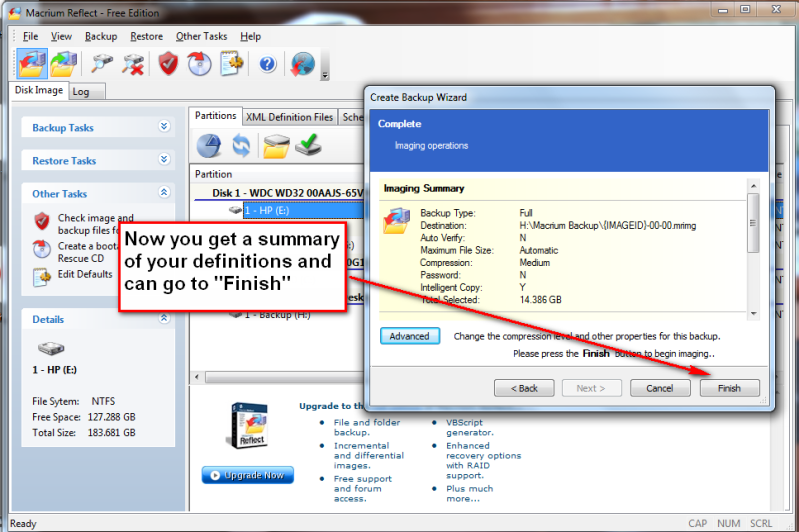
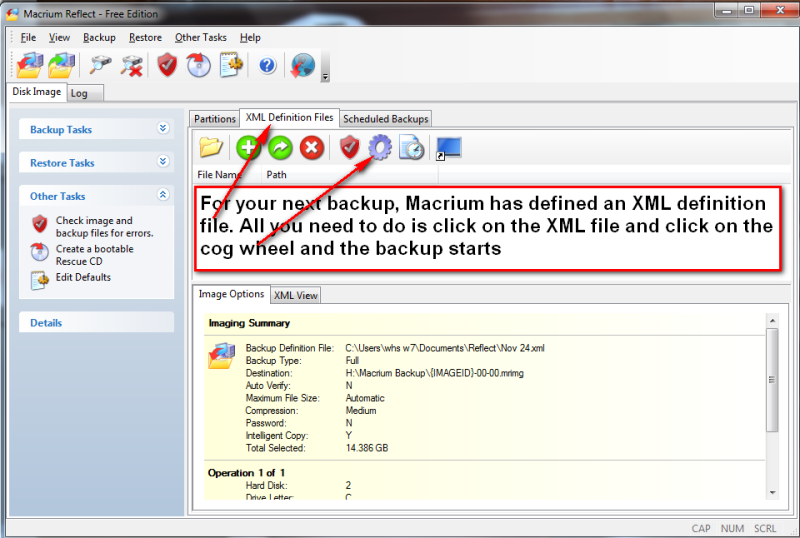
Image your system with free Macrium I posted this on the Vista forum. But since it works just as well on Windows7, I post it here too. Image your system with free Macrium Over the years I have experimented with different imaging programs. I started out with Norton Ghost which works very well, but is quite heavy handed. Backup and restore cycles are usually approximately one hour and it takes quite some time before you understand the intricacies of the product. I have also used Paragon and Acronis true Image. Both of those are in the same league as Ghost. They do provide though a large collection of function – which, I guess, is part of the reason why they are complex and slow. One that is easy is the Maxtor One Touch Manager that comes with the Maxtor One Touch Disks. My wife loves it because once it is set up, all you have to do is push the button on the One Touch Disk and off it goes. Not quite the same but very easy is Macrium. Below you find the four steps to set it up and the one step to run it thereafter. You will notice that the handling of Macrium is as easy as can be. To download the free Macrium, you go to this site: http://www.macrium.com/reflectfree.asp There is also a paid version with more functions. But for the normal backup/restore, the free version is sufficient. I did not document the restore function, in part, because I cannot take any screenshots during that phase. But it is very simple and self explanatory. All you need to do is set your BIOS boot sequence to boot from your CD reader, put the CD in (the one you burnt – see the first picture) and off it goes. The CD loads a Linux based Wizard that will guide you thru a few simple questions. Performance when you take the image should be in the 10 minute range for an average system. Restore is about 20 minutes without prior image verification and twice as long with prior image verification | My System Specs |
| System Manufacturer/Model Number HP, Dell, Gateway, Toshiba - 4 laptops and 2 desktops OS Vista, Windows7, Mint Mate, Zorin, Windows 8 CPU from 1.6GHz Duo to i7 Monitor(s) Displays 2x HP w2207 Keyboard with trackball - no mices Mouse Trackball mice Hard Drives 5x HDD, 7x SSD, 12x Externals Internet Speed DSL 6000 |
01 Dec 2009
|
#2 | | Windows 7 Ultimate x64 (Retail) Honolulu, HI, USA |
I have never used Macrium, but if it's a true clone, there should be no need to restore anything. One simply installs or swaps the clone drive into the spot where the C: disk resides and fire up the machine and you should be up and running as if nothing happened.
Last edited by harpua; 01 Dec 2009 at 04:36 AM..
| My System Specs | | System Manufacturer/Model Number HP DV8t quad OS Windows 7 Ultimate x64 (Retail) CPU i7-Q 720 Motherboard Motherboard Chipset Intel Ibex Peak-M PM55, Intel Lynnfield Memory 6 GB Graphics Card nVidia GeForce GT 230M (1GB) Sound Card IDT High Definition Audio CODEC Monitor(s) Displays 18.4 inch HP Infinity FHD (Samsung 184HT03-001) Screen Resolution 1920 x 1080 Keyboard laptop Mouse Logitech VX Revolution Cooling Zalman NC-2000 notebook cooling pad Hard Drives Hitachi 500GB 7200 rpm (x2)
Seagate FreeAgent 1.5 TB External USB (x2)
Thermaltake BlacX eSATA/USB 2.0 3.5/2.5 HD dock Other Info Backup Unit: Lenovo T61p |
01 Dec 2009
|
#3 | | Windows 7 SP1, Home Premium, 64-bit |
As far as I know, Macrium Free does not clone. It makes images and restores them, but has no cloning feature like Acronis. But it has the best (uncluttered, user-friendly) interface of any imaging tool I have examined. | My System Specs | | System Manufacturer/Model Number Ignatz Special; 4 speed manual gearbox; factory air conditioning; one of one OS Windows 7 SP1, Home Premium, 64-bit CPU Intel Sandy Bridge i5-2500, not overclocked Motherboard Gigabyte H67A-UD3H-B3, full ATX Memory 4 GB Crucial DDR3-1333 Graphics Card none; graphics are integrated on CPU Sound Card onboard: Realtek ALC892; external: USB Behringer UF0-202 Monitor(s) Displays NEC 90GX2-BK 19" LCD Screen Resolution 800 x 640 Keyboard Leopold Tenkeyless with Cherry Blue switches, USB Mouse Logitech or Microsoft optical wired; either USB or PS 2 PSU Seasonic SS-560KM, modular Case Antec Solo II Cooling CPU: Scythe Big Shuriken; Case: Scythe Slipstream 800 & 500 Hard Drives System: Intel 320 Series SSD, 80 GB;
Data: Samsung Spinpoint 103SJ, 1 TB;
Backup: WD Caviar Green WD15EADS-00P8B0, 1.5TB Other Info Power consumption of this system, including monitor: 68 watts at idle; 144 watts at full load |
01 Dec 2009
|
#4 | | Vista, Windows7, Mint Mate, Zorin, Windows 8 Florida in winter, Black Forest/Germany |
Right, the free Macrium is an imaging facility. It is a no frills, easy to use way for anybody who wants a safeguard of his/her system. And it can be used often because it takes very little time to image (and restore) - as compared to the big guys like Ghost. It also compresses by about a factor 3 so that you need relatively little space on the backup volume. | My System Specs | | System Manufacturer/Model Number HP, Dell, Gateway, Toshiba - 4 laptops and 2 desktops OS Vista, Windows7, Mint Mate, Zorin, Windows 8 CPU from 1.6GHz Duo to i7 Monitor(s) Displays 2x HP w2207 Keyboard with trackball - no mices Mouse Trackball mice Hard Drives 5x HDD, 7x SSD, 12x Externals Internet Speed DSL 6000 |
01 Dec 2009
|
#5 | | |
If you have a Seagate or Maxtor hard drive, (internal or external), you can use either Disk Wizard or Maxblast. They both utilize a striped down version of Acronis's True Image and they are both are a free way to image your hard drive. DiscWizard | Seagate MaxBlast 5 | Seagate | My System Specs | | |
01 Dec 2009
|
#6 | | |
I'm using clonezilla Clonezilla Open source and free.
I use it to clone my drives as a backup. Takes 1 hour to clone a 320 gig drive. | My System Specs | | System Manufacturer/Model Number Built by Mark OS Windows 7 x64 CPU Intel Core i7 930 Motherboard Gigabyte GA-X58A-UD3R Bios F5 Memory OCZ 6GBkit OCZ3G1600LV6GK 8-8-8-24-2T 1.65V Graphics Card (2) HIS ATI Radeon HD 5770 CROSSFIRE (H577QT1GD) Sound Card On board Realtek HD Monitor(s) Displays Samsung SyncMaster 2343 22" Wide Screen Screen Resolution 2048x1152 Keyboard Logitech Mouse Logitech MX310 PSU Corsiar 750 watts TX750W Case Antec NINE Hundred Two (air filters & adjustable fan speed) Cooling Cooler Master Hyper 212 Plus CPU cooler Hard Drives Two Western Digital 320 Gig Blue series WDC WD3200AAKS-00L9A0 Internet Speed 20 meg down/ 5 meg up Other Info Hewlett Packard Deskjet 932C printer
Epson 4990 Photo scanner |
01 Dec 2009
|
#7 | | |
Windows 7 7 does actually do this as part of its backup offer. How it compares I don't know. But snce this is a Windows 7 forum, this needs to be said. | My System Specs | | System Manufacturer/Model Number Mesh PC OS Win 7 CPU Intel core 2 duo Memory 4 gig Mouse MS lasermouse 5000 -'cos it scrolls smoothly, no wheel click Hard Drives 1 x250 gig
1 x 500 gig Internet Speed 10mb - cable Other Info The mouse took most research. I hate that click on the wheel, this one has the old fashioned smooth wheel. There aren't many about. |
01 Dec 2009
|
#8 | | Vista, Windows7, Mint Mate, Zorin, Windows 8 Florida in winter, Black Forest/Germany |

Quote: Originally Posted by tbernstein 7 does actually do this as part of its backup offer. How it compares I don't know. But snce this is a Windows 7 forum, this needs to be said. True, I have not tried it yet but some people reported problems with it. Maybe someone who has used it and actually done a recovery can give us an update. With Macrium I have done the whole cycle. It was easy, fast and without any problems - especially if I compare it to my Ghost which is big, complicated and VERY slow. | My System Specs | | System Manufacturer/Model Number HP, Dell, Gateway, Toshiba - 4 laptops and 2 desktops OS Vista, Windows7, Mint Mate, Zorin, Windows 8 CPU from 1.6GHz Duo to i7 Monitor(s) Displays 2x HP w2207 Keyboard with trackball - no mices Mouse Trackball mice Hard Drives 5x HDD, 7x SSD, 12x Externals Internet Speed DSL 6000 |
01 Dec 2009
|
#9 | | Vista, Windows7, Mint Mate, Zorin, Windows 8 Florida in winter, Black Forest/Germany |

Quote: Originally Posted by jeadams If you have a Seagate or Maxtor hard drive, (internal or external), you can use either Disk Wizard or Maxblast. They both utilize a striped down version of Acronis's True Image and they are both are a free way to image your hard drive. DiscWizard | Seagate MaxBlast 5 | Seagate
Yes, my wife uses it on a Maxtor One Touch. Now after I set it up for her she only has to touch the button on the disk - she loves it. And it works on my Seagate also - but no button (I guess because they are the same company since about a year). | My System Specs | | System Manufacturer/Model Number HP, Dell, Gateway, Toshiba - 4 laptops and 2 desktops OS Vista, Windows7, Mint Mate, Zorin, Windows 8 CPU from 1.6GHz Duo to i7 Monitor(s) Displays 2x HP w2207 Keyboard with trackball - no mices Mouse Trackball mice Hard Drives 5x HDD, 7x SSD, 12x Externals Internet Speed DSL 6000 |
01 Dec 2009
|
#10 | | Windows 7 Ultimate x64 (Retail) Honolulu, HI, USA |
Several people have reported success with the Windows backup and restore utility in 7. Unfortunately it gave an error for me when I tried to restore an image I made with it which made me hesitant to rely on it. But if one tests it by attempting to restore an image made with it and the restore works, and if one is satisfied with the feature set and options available, then it's probably a great way to go. | My System Specs | | System Manufacturer/Model Number HP DV8t quad OS Windows 7 Ultimate x64 (Retail) CPU i7-Q 720 Motherboard Motherboard Chipset Intel Ibex Peak-M PM55, Intel Lynnfield Memory 6 GB Graphics Card nVidia GeForce GT 230M (1GB) Sound Card IDT High Definition Audio CODEC Monitor(s) Displays 18.4 inch HP Infinity FHD (Samsung 184HT03-001) Screen Resolution 1920 x 1080 Keyboard laptop Mouse Logitech VX Revolution Cooling Zalman NC-2000 notebook cooling pad Hard Drives Hitachi 500GB 7200 rpm (x2)
Seagate FreeAgent 1.5 TB External USB (x2)
Thermaltake BlacX eSATA/USB 2.0 3.5/2.5 HD dock Other Info Backup Unit: Lenovo T61p Image your system with free Macrium problems? All times are GMT -5. The time now is 10:37 AM. | |