| | Welcome to Windows 7 Forums. Our forum is dedicated to helping you find solutions with any problems, errors or issues you are experiencing with Windows 7. The Windows 7 forum also covers news and updates and has an extensive Windows 7 tutorial section that covers a wide range of tips and tricks. | Windows 7 - Macrium users: have you tried an image restore??
|
12-10-2009
|
#1 | | Windows 7 SP1, Home Premium, 64-bit |
Macrium users: have you tried an image restore?? Yesterday I had a near disaster trying to upgrade to Thunderbird 3.0 email. System restore was no help and I thought I would have to restore a Macrium Reflect image.
I started the process and chose my C partition as the destination for the restore.
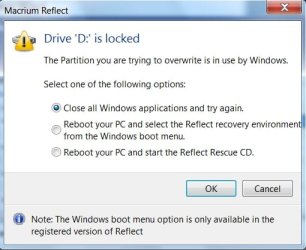
I got an error message saying the C partition was locked. My choices at that point were:
1: Reboot and select the C partition from a special menu
2: Exit and reboot using my previously made Macrium rescue disc to bypass Windows.
I tried the first choice and no menu came up--the system booted into Windows normally.
My only remaining choice was to use the rescue disk.
I didn't do that and was able to resolve my problem in other ways.
Is this normal behavior for Macrium restore attempts--being locked out of the C drive when in Windows and then not having access to the referred to menu when rebooting???
If so, I am skeptical about using this product over the long term.
| My System Specs | | System Manufacturer/Model Number Ignatz Special; 4 speed manual gearbox; factory air conditioning; one of one OS Windows 7 SP1, Home Premium, 64-bit CPU Intel Sandy Bridge i5-2500, not overclocked Motherboard Gigabyte H67A-UD3H-B3, full ATX Memory 4 GB Crucial DDR3-1333 Graphics Card none; graphics are integrated on CPU Sound Card onboard: Realtek ALC892; external: USB Behringer UF0-202 Monitor(s) Displays NEC 90GX2-BK 19" LCD Screen Resolution 800 x 640 Keyboard HP PS 2 Mouse Logitech or Microsoft optical wired; either USB or PS 2 PSU Seasonic SS-560KM, modular Case Compucase LX-6A19, ATX mid-tower Cooling CPU: Scythe Big Shuriken; Case: Scythe Slipstream 800 & 500 Hard Drives System: Intel 320 Series SSD, 80 GB;
Data: Samsung Spinpoint 103SJ, 1 TB;
Backup: WD Caviar Green WD15EADS-00P8B0, 1.5TB Other Info Power consumption of this system, including monitor: 68 watts at idle; 144 watts at full load |
12-10-2009
|
#2 | | |
Interesting that, because I downloaded Macrium last week and tried a system backup. It got most of the way through then crashed giving me some error message or other. Macrium then got backed up - straight into the bin | My System Specs | | System Manufacturer/Model Number Mesh 955 XGS OS Windows 7 64 bit CPU Athlon X4 955 Black edition Motherboard ASUS M4A78 Pro Memory 8GB DDR2 Graphics Card 1x Radeon 4890 Monitor(s) Displays IIyama ProLite E2208HDS Screen Resolution 1920X1080p Keyboard MS wireless 6000 Mouse MS wireless laser 7000 PSU 600 watt Cooling Standard Hard Drives 2x 1TB Samsung SATA2
1x 320GB IDE Internet Speed Not as fast as it should be...... |
12-10-2009
|
#3 | | |
2 times i've use macrium:
-once to back up and restore an xp (home, 32bit) image to a larger capacity hard drive -- success.
-another time to back up and restore a vista (home premium, 64bit) image to a larger capacity hard drive -- failure
haven't used it since.
but, i've found that if you own a western digital hard drive and register it with western digital, you have access to a slimmed down version of acronis to help with drive to drive image migration. (haven't had to use it yet, so no comment on how good or not it is) | My System Specs | | System Manufacturer/Model Number Rig 1 OS Windows 7 Ultimate x64 CPU AMD Phenom II X4 940 Black Edition @ 3.4GHz (AM2+) Motherboard Gigabyte GA-MA790X-UD4P (AM2+) Memory Corsair CM2X4096-8500C5 (4 X 2GB) Graphics Card XFX Radeon HD 5770 / Diamond Radeon HD 5770 CrossFireX Sound Card Asus Xonar DS (PCI) Monitor(s) Displays Samsung SyncMaster 932bw+ (3) Screen Resolution 4320x900 Keyboard Logitech Desktop Wave Mouse Logitech LX8 Laser PSU Corsair CMPSU-750TX Case Cooler Master HAF 932 Cooling Corsair Hydro Series H50 Hard Drives OCZ Vertex 2 80 GB - Windows 7 System --
WD Caviar Black 1TB - Music, Movies, Vids, Pics --
WD Caviar Black 640GB - User Profiles & Games --
WD My Book 320GB external Internet Speed 20 down / 2 up Other Info LG GGC-H20L Blu-Ray / HDDVD combo --
Hauppauge HVR-1250 --
Silverstone MFP-51 --
Logitech Webcam C600 |
12-10-2009
|
#4 | | Windows 7 SP1, Home Premium, 64-bit |
Yeah, I have that free WD version of Acronis and have made an image with it, just like I did with Macrium.
But I have not attempted an Acronis restore. For all I know, it will fail as well. I can live with them all failing, but I'd like to know if others have any Macrium issues similar to what I experienced. It may have worked if I used the rescue disk, but I didn't go that far. | My System Specs | | System Manufacturer/Model Number Ignatz Special; 4 speed manual gearbox; factory air conditioning; one of one OS Windows 7 SP1, Home Premium, 64-bit CPU Intel Sandy Bridge i5-2500, not overclocked Motherboard Gigabyte H67A-UD3H-B3, full ATX Memory 4 GB Crucial DDR3-1333 Graphics Card none; graphics are integrated on CPU Sound Card onboard: Realtek ALC892; external: USB Behringer UF0-202 Monitor(s) Displays NEC 90GX2-BK 19" LCD Screen Resolution 800 x 640 Keyboard HP PS 2 Mouse Logitech or Microsoft optical wired; either USB or PS 2 PSU Seasonic SS-560KM, modular Case Compucase LX-6A19, ATX mid-tower Cooling CPU: Scythe Big Shuriken; Case: Scythe Slipstream 800 & 500 Hard Drives System: Intel 320 Series SSD, 80 GB;
Data: Samsung Spinpoint 103SJ, 1 TB;
Backup: WD Caviar Green WD15EADS-00P8B0, 1.5TB Other Info Power consumption of this system, including monitor: 68 watts at idle; 144 watts at full load |
12-10-2009
|
#5 | | |
Since Windows 7 Backup imaging hasn't failed me yet in a half dozen reimages for our computers here, I think I"ll stick with it.
Macrium looks impressive because I'd like to be able to select partitions and not be forced to image the whole HD. At least Windows 7 Imaging allows me to uncheck the primary partition where I store an image on each machine.
I also have Acronis which saved an XP install a few times. But I prefer the built-in Windows 7 imaging until it lets me down. The only hitch so far was a bad block on my external, but I was able to send a backup over the network which reimaged perfectly. | My System Specs | | |
12-10-2009
|
#6 | | |
Hi Ig,
If I understand correctly, you were trying to restore the partition you were booted into at the time.
No image app. can do that from within the same partition.
You need to boot into another o/s partition , where the image app. is also installed, and restore the image of the other partition from there.
Some apps will allow you to create a separate bootable partition - Macrium paid version is one of those, but you have to use the app. to create the bootable partition , before you can actually boot into it.
Sounds like you didn't do that, which is why there no boot menu option for it.
OR you need to go into some kind of "boot time" mode.
That is usually done using a bootable cd, or sometimes, an app can flip itself into "boot time".
There is no particular advantage in the latter, except you don't have to have the cd to hand.
Macrium works great for me. Suggest you use the bootable cd to restore - it is only 6.5mb and loads very quickly. | My System Specs | | OS Vista x64 / 7 X64 CPU E8400 Motherboard ASRock 1333 GLAN R2.0 Memory 2x1 gb 800mhz Graphics Card 9500gt 1gb Case Coolermaster Cooling Winpower 500w Hard Drives Maxtor 160gb-2mb cache |
12-11-2009
|
#7 | | Windows 7 SP1, Home Premium, 64-bit |
SIW2:
Thanks for the response.
I typed in an answer and was about to post it when I had a rare moment of clarity--for which I am grateful. Without it, I'd have made an even bigger fool of myself.
Here are my revised comments:
I have made maybe 15 images in the last 10 years, dating back to Drive Image, but never had to actually restore. So I am likely weak on restore details.
A couple of weeks ago, I made an image of C with Macrium Reflect Free and stored it in C:\images and later ran a backup program which copied that image file to D.
I made the images by simply running the Macrium wizard. It did the job in 4 or 5 minutes and I thought everything was cool--until I attempted the restore.
I have 2 partitions: C for apps and OS; D for data; Macrium is installed in C:\program files.
I was booted into C (Windows 7 Home Premium) when I attempted to restore.
In my near panic, I honestly don't know whether I pointed the Macrium restore wizard at the image file in C:\images or the copy on D.
I do have a Macrium rescue disk, but frankly would have assumed Macrium would tell me that C was locked, and then force me to reboot and automatically drop into a restore to my chosen destination, which is C. The on screen menu said as much, but rebooting led to Windows.
With this additional info, can you refine your comments?
Do you mean I need some special partition--which I don't recall reading about in Macrium help and which the wizard didn't refer to?
Or is the critical issue whether I pointed the restore wizard at C:\images or D?
Or am I forced to use the rescue disk, despite the on screen reference to rebooting to a menu? | My System Specs | | System Manufacturer/Model Number Ignatz Special; 4 speed manual gearbox; factory air conditioning; one of one OS Windows 7 SP1, Home Premium, 64-bit CPU Intel Sandy Bridge i5-2500, not overclocked Motherboard Gigabyte H67A-UD3H-B3, full ATX Memory 4 GB Crucial DDR3-1333 Graphics Card none; graphics are integrated on CPU Sound Card onboard: Realtek ALC892; external: USB Behringer UF0-202 Monitor(s) Displays NEC 90GX2-BK 19" LCD Screen Resolution 800 x 640 Keyboard HP PS 2 Mouse Logitech or Microsoft optical wired; either USB or PS 2 PSU Seasonic SS-560KM, modular Case Compucase LX-6A19, ATX mid-tower Cooling CPU: Scythe Big Shuriken; Case: Scythe Slipstream 800 & 500 Hard Drives System: Intel 320 Series SSD, 80 GB;
Data: Samsung Spinpoint 103SJ, 1 TB;
Backup: WD Caviar Green WD15EADS-00P8B0, 1.5TB Other Info Power consumption of this system, including monitor: 68 watts at idle; 144 watts at full load |
12-11-2009
|
#8 | | |
Hi,
I don't have the paid version of Macrium, I use the free one.
Is this what you refer to?:
Assuming you have the paid version , you need to enable the boot menu before you can use it.
From a quick look at the website, it seems you d/l the WinPe recovery environment.
That is then added to the Windows boot menu like this: Windows Boot Menu
You can also make a WinPE boot disc from that download, in addition to the options for the Linux and Bartpe boot cd options you get with the free version.
Macrium offers that instead of a separate bootable partition.
I mainly use Paragon Drive Backup 10 Server Edititon.
That gives the options of Linux/Dos, and WinPe boot cd's , as well as the ability to create a Ramdisk boot entry ( similar to the Macrium method).
It also has the option to create a separate bootable partition/ HD , and it is also possible to create a dvd /blu ray/flash from which you can boot and restore the image it contains.
It is even possble to install a windows o/s, put whatever updates and programs you want on it, create a bootable dvd/blu ray/flash drive , and use that instead of the windows installation dvd to install on different machines.
Hope it helps.
Last edited by SIW2; 12-11-2009 at 08:19 AM..
| My System Specs | | OS Vista x64 / 7 X64 CPU E8400 Motherboard ASRock 1333 GLAN R2.0 Memory 2x1 gb 800mhz Graphics Card 9500gt 1gb Case Coolermaster Cooling Winpower 500w Hard Drives Maxtor 160gb-2mb cache |
12-11-2009
|
#9 | | Dual Booting Windows Vista32 bit And Windows 7 Home premium (x64) (build 7600) |
I have backed up and did two successful restores using the free macrium program. I have a duel boot system (Windows 7 and Vista). I booted into the vista operating system and did a restore of Windows 7. I have also booted into Windows 7 and did a restore of vista. Both times successfuly.
FyrmnJ in Philly | My System Specs | | System Manufacturer/Model Number White Box OS Dual Booting Windows Vista32 bit And Windows 7 Home premium (x64) (build 7600) CPU ntel(R) Core(TM)2 Quad CPU Q6700 @ 2.66GHz (4 CPUs), Motherboard Board: ASUSTeK Computer INC. P5B-Premium Rev 1.xx Bus Clock: Memory 3072MB RAM Available OS Memory: 2816MB RAM Graphics Card MSI RX1600Pro (MS-V040);VisionTek RADEON X1300 PCI SFF Sound Card SoundMAX Integrated Digital HD Audio Monitor(s) Displays Envision SP2107W [Monitor] (22.0"vis, s/n B7976JA007061, Jun Screen Resolution 1680x1050 Keyboard Microsoft Internet Keyboard Pro Hot Keys Mouse Logitec MX500 PSU Have 2 PSU's Installed Case Coolmaster Hard Drives PLEXTOR DVDR PX-712A ATA Device [CD-ROM drive]
3.5" format removeable media [Floppy drive]
INTEL SSDSA2MH080G1GC [Hard drive] (80.03 GB) -- drive 2, s/n CVEM926000FK080DGN, rev 045C8820, SMART Status: Healthy
IOMEGA ZIP 100 SCSI Disk Device -- d Internet Speed DSL Other Info Rollback Rx system repair software by Horizon Data Systems
Texas Instruments 1394 OHCI Compliant Host Controller
Acronis True Image Backup Archive Explorer
HID-compliant device
Microsoft PS/2 Mouse
General Purpose USB Hub
Microsoft Internet Keyboard Pro Composite Device
USB Mass Storage Device
USB Root Hub (7x)
B:\ |
12-11-2009
|
#10 | | Windows 7 SP1, Home Premium, 64-bit |
SIW 2:
Yes, that is the Window I see.
But, I do NOT use the paid version. I use the Free version, just like you.
All of my questions remain. How do you successfully use the Free version? Do you personally get that Window? Are you personally forced to use the Macrium rescue disk and boot to Linux?
What about my question in the earlier post about pointing the Wizard to C or D?
If Free users are forced to use a boot disk, I didn't see that info in the documentation or in the wizard.
FyrmanJ: I am guessing your situation is different because of dual boot? Are you unable to restore Win 7 from Win 7 or have you tried? | My System Specs | | System Manufacturer/Model Number Ignatz Special; 4 speed manual gearbox; factory air conditioning; one of one OS Windows 7 SP1, Home Premium, 64-bit CPU Intel Sandy Bridge i5-2500, not overclocked Motherboard Gigabyte H67A-UD3H-B3, full ATX Memory 4 GB Crucial DDR3-1333 Graphics Card none; graphics are integrated on CPU Sound Card onboard: Realtek ALC892; external: USB Behringer UF0-202 Monitor(s) Displays NEC 90GX2-BK 19" LCD Screen Resolution 800 x 640 Keyboard HP PS 2 Mouse Logitech or Microsoft optical wired; either USB or PS 2 PSU Seasonic SS-560KM, modular Case Compucase LX-6A19, ATX mid-tower Cooling CPU: Scythe Big Shuriken; Case: Scythe Slipstream 800 & 500 Hard Drives System: Intel 320 Series SSD, 80 GB;
Data: Samsung Spinpoint 103SJ, 1 TB;
Backup: WD Caviar Green WD15EADS-00P8B0, 1.5TB Other Info Power consumption of this system, including monitor: 68 watts at idle; 144 watts at full load Macrium users: have you tried an image restore?? problems? All times are GMT -5. The time now is 05:38 AM. |  |