Windows 7 Forums Search
Welcome to Windows 7 Forums. Our forum is dedicated to helping you find solutions with any problems, errors or issues you are experiencing with Windows 7. The Windows 7 forum also covers news and updates and has an extensive Windows 7 tutorial section that covers a wide range of tips and tricks.


Windows 7 - Can't Enable System restore

 
01-27-2010   #1


Seven


Can't Enable System restore

Hello everyone,

so after Winrar stopped working, I decided that I would install 7zip. And after the 7zip didn't work, I decided I would do a system restore, maybe I screwed something up by accident, which broke the context menus( what wasn't working on both programs), but when I tried to do a system restore I was greeted with this message
"system protection is turned off" is disabled and that I have to enable it in order to do a system restore, which is odd because I have always done automatic restore points.

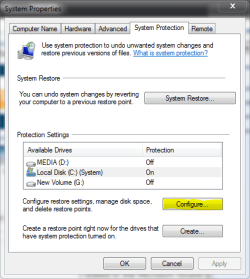
After a couple of google queries I found out how to enable it again, which points me to "system protection", and it shows me that every drive has system restore diabled, but when I try to enable the option "restore system settings and previous versions of files" is grayed out and I can't enable it.

I looked in the Microsoft forums but none of the solutions helped...

any suggestions?

My System SpecsSystem Spec
01-27-2010   #2


Windows 7 Home Premium SP1, clean install, upgrade disc


You may want to try this Vista and Windows 7 is the same in this respect.

Using Last Known Good Configuration

Wishing you luck
My System SpecsSystem Spec
01-27-2010   #3


Windows 7 Pro 64 SP1


Welcome alme1304,
I would try this tutorial,
SFC /SCANNOW Command - System File Checker
My System SpecsSystem Spec
.


01-27-2010   #4


Seven


just tried both, with no luck. The suggestion box it's still open
My System SpecsSystem Spec
01-27-2010   #5
whs


Vista and Windows7, sometimes Ubuntu and Fedora


Did you actually check (with vssadmin) whether you have any restore points at all.
My System SpecsSystem Spec
01-27-2010   #6


Windows 7 Pro 64 SP1


Did you Click on a drive to highlight it then configure.
Attached Thumbnails
Can't Enable System restore-system-protection.png  
My System SpecsSystem Spec
01-27-2010   #7


Seven


derekimo - yes I've tried that

whs - it didn't say anything, but when I converted the log to a .txt I found this
2010-01-27 20:30:25, Info CSI 0000014a [SR] Verifying 100 (0x00000064) components
2010-01-27 20:30:25, Info CSI 0000014b [SR] Beginning Verify and Repair transaction
2010-01-27 20:30:29, Info CSI 0000014d [SR] Repairing corrupted file [ml:520{260},l:58{29}]"\??\C:\Windows\System32\en-US"\[l:28{14}]"user32.dll.mui" from store
2010-01-27 20:30:29, Info CSI 0000014f [SR] Verify complete


and these other lines
2010-01-27 20:31:59, Info CSI 0000019d [SR] Repairing 1 components
2010-01-27 20:31:59, Info CSI 0000019e [SR] Beginning Verify and Repair transaction
2010-01-27 20:31:59, Info CSI 000001a0 [SR] Repairing corrupted file [ml:520{260},l:58{29}]"\??\C:\Windows\System32\en-US"\[l:28{14}]"user32.dll.mui" from store
2010-01-27 20:31:59, Info CSI 000001a2 [SR] Repair complete
2010-01-27 20:31:59, Info CSI 000001a3 [SR] Committing transaction
2010-01-27 20:31:59, Info CSI 000001a7 [SR] Verify and Repair Transaction completed. All files and registry keys listed in this transaction have been successfully repaired
2010-01-27 20:45:28, Info CSI 00000009 [SR] Verifying 100 (0x00000064) components
2010-01-27 20:45:28, Info CSI 0000000a [SR] Beginning Verify and Repair transaction
2010-01-27 20:45:30, Info CSI 0000000c [SR] Verify complete
I've also tried making restore points via SCRP.exe(small app to make restore points) and through Revo Unistaller, with no luck
My System SpecsSystem Spec
01-27-2010   #8


Windows 7 Pro 64 SP1


You might want to try a Repair Install
My System SpecsSystem Spec
01-27-2010   #9


Windows 7 Home Premium SP1, clean install, upgrade disc


One of these should work:

Click Start then Computer
On the Tools menu Then or Organize Folder Options.
On the View tab, click Show hidden files and folders”.
Clear the Hide protected operating system files (Recommended) check box. Click Yes when you
are prompted to confirm the change.

Click OK.

Right-click the System Volume Information folder in the root folder, and then click Properties.
If the Read-only attibutes is checked, uncheck it and click, OK
Now try creating a restore point.

Hide the System Files when completed

This error might occurs because the recovery partition is enabled for File Backup or System Restore and is almost full. To work around this, do not select D:\ as a backup source. Also, go to System Protection in Control Panel and make sure that D:\ is not enabled for restore points.

Also try to reboot the Computer in Selective Startup with all the Protection Disabled

Type Services in Start Menu Search Box, hit Enter. Make sure that the Volume Shadow Copy Service is Running and set on Automatic. If the Status of System Restore Service is not Started, Start it. Also set it on Automatic if it is not. A reboot may be required. Reconfirm again, and now try

Reset the Repository.
Boot into Safe Mode without networking and open a command prompt as administrator.
Now Type net stop winmgmt and hit Enter. This will stop the Windows Management Instrumentation Service
Next go to C:\Windows\System32\wbem and rename therepository folder to repository old
Restart.
Now again open a command prompt as administrator, type net stop winmgmt and hit Enter.
Next Type winmgmt /resetRepository and hit Enter.
Restart.Now see if you can create a System Restore Point manually. Hope some of this
helps you.

Last edited by richc46; 01-28-2010 at 12:40 AM..
My System SpecsSystem Spec
01-27-2010   #10
whs


Vista and Windows7, sometimes Ubuntu and Fedora


I am puzzled !!

alme1304 - those files look like they come from the System File Checker. Looks like it did repair something. I was asking that you run vssadmin list shadows and see whether there are any restore points on your C.

Richard, what is the significance of this in the context ???

Quote:
2. This error might occurs because the recovery partition is enabled for File Backup or System Restore and is almost full. To work around this, do not select D:\ as a backup source. Also, go to System Protection in Control Panel and make sure that D:\ is not enabled for restore points.
My System SpecsSystem Spec
Reply

 Can't Enable System restore problems?


Thread Tools


Similar Threads for: Can't Enable System restore
Thread Forum
can't enable "Restore system settings..." button in dialog box Backup and Restore
Why Can't I Enable System Restore? Backup and Restore
System Restore Manager: A complete Windows System Restore Management Backup and Restore
System Restore - Enable or Disable Tutorials
System Restore Configuration - Enable or Disable Tutorials


All times are GMT -5. The time now is 10:27 AM.


Windows 7 Forums is an independent web site and has not been authorized,
sponsored, or otherwise approved by Microsoft Corporation.
"Windows 7" and related materials are trademarks of Microsoft Corp.
© Designer Media Ltd
  

1 2 3 4 5 6 7 8 9 10 11 12 13 14 15 16 17 18 19 20 21 22 23 24 25 26 27 28 29 30