Windows 7 Forums


Windows 7: 'Unspecified Error' with Backup and Restore

23 Mar 2010   #1

Windows 7 Home Premium 64-bit
 
 
'Unspecified Error' with Backup and Restore

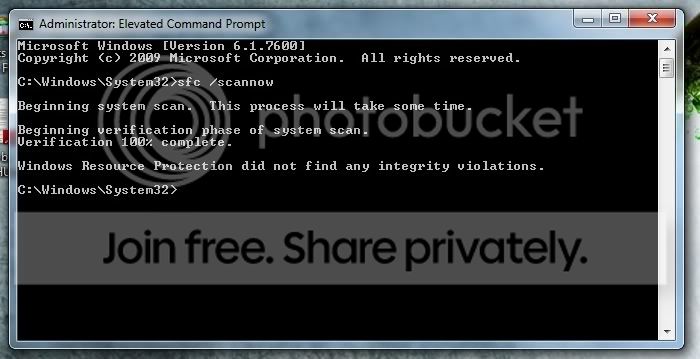
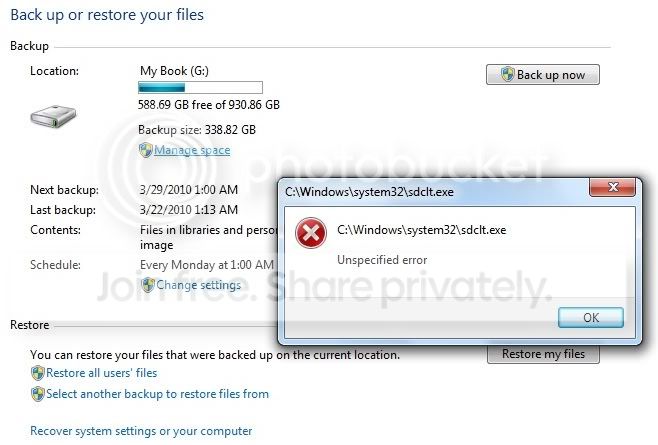
When attempting to use Backup and Restore in Windows 7 I get an 'unspecified error' in reference to the executable file 'sdclt.exe' which is the Backup application located in the System32 folder. The error occurs when you click on 'Manage Space' or 'Change Settings.' Running the System File Checker on 'sdclt.exe' results in no file integrity issues. I have attached a Problem Step Recorder and a screenshot of the results of the System File Checker. If anyone knows how to resolve this issue I would greatly appreciate your input. Thank you.

p.s. - I am able to successfully backup my computer due to creating a workaround shortcut but the errors I am getting are still present.

Attached Files
File Type: zip PSR_-_Windows_Backup_-_Unspecified_Error_-_100323.zip (926.5 KB, 252 views)
My System SpecsSystem Spec

24 Mar 2010   #2

Windows 7 x64 pro/ Windows 7 x86 Pro/ XP SP3 x86


Run CMD as Admin. At the command prompt, type the following line, then press ENTER:
sfc /scannow
Check whether the problem is resolved.

Last edited by Bill2; 24 Mar 2010 at 12:28 AM.. Reason: formatting
My System SpecsSystem Spec
24 Mar 2010   #3

Windows 7 Home Premium 64-bit


Quote   Quote: Originally Posted by Bill2 View Post
Run CMD as Admin. At the command prompt, type the following line, then press ENTER:
sfc /scannow
Check whether the problem is resolved.
Thank you for the suggestions. No integrity violations found:


Here is a screenshot of the error I get If I click on Manage Space or Change Settings:
My System SpecsSystem Spec
.


24 Mar 2010   #4

Windows 7 x64 pro/ Windows 7 x86 Pro/ XP SP3 x86


My System SpecsSystem Spec
24 Mar 2010   #5

Windows 7 Home Premium 64-bit


Quote   Quote: Originally Posted by Bill2 View Post
Thank you for your post. I certainly hope that this thread leads to a solution and that people do link to it in the future. However, it seems you provided a link to this very same thread which, as of yet, does not have a solution.
My System SpecsSystem Spec
24 Mar 2010   #6

Windows 7 x64 pro/ Windows 7 x86 Pro/ XP SP3 x86


Oops...my bad. This is the link i intended to post.

Backup User and System Files - Reset to Default Configuration
My System SpecsSystem Spec
25 Mar 2010   #7

Windows 7 Home Premium 64-bit


Quote   Quote: Originally Posted by Bill2 View Post
Oops...my bad. This is the link i intended to post.

Backup User and System Files - Reset to Default Configuration
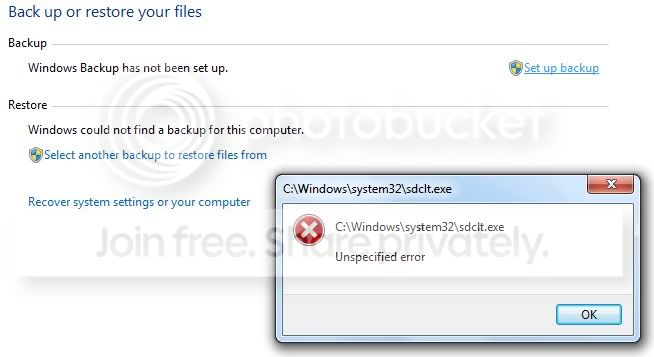
That is a very helpful link for resetting the backup. However, after multiple attempts to repair backup as instructed in the link I still get the same message about an 'Unspecified Error.' This happens after I click on 'Set up backup.' I don't understand what could be causing the backup program (sdclt.exe) from working properly. System File Checker evidently doesn't think there is anything wrong with it but clearly something is awry. I would try doing an OS repair but it seems I don't have the right discs. All I have are the 4 DVD's I made as backup for Vista and since the laptop did not come with an install disc for Vista. Also, I qualified for the free upgrade to Windows 7 and I'm not certain if I can use that to repair Windows.
My System SpecsSystem Spec
25 Mar 2010   #8

Windows 7 x64 pro/ Windows 7 x86 Pro/ XP SP3 x86


AFAIK, you should be able to do a repair install from the upgrade dvd. Try it, if it doesnt work, there are 2 options.

1) You can create a repair disk yourself. Click Start, All Programs, Maintenance, Create a System Repair Disk.
2) Download the Repair disk from the following link.

Download Windows 7 System Recovery Discs — The NeoSmart Files
My System SpecsSystem Spec
25 Mar 2010   #9

Windows 7 Home Premium 64-bit


Quote   Quote: Originally Posted by Bill2 View Post
AFAIK, you should be able to do a repair install from the upgrade dvd. Try it, if it doesnt work, there are 2 options.

1) You can create a repair disk yourself. Click Start, All Programs, Maintenance, Create a System Repair Disk.
2) Download the Repair disk from the following link.

Download Windows 7 System Recovery Discs — The NeoSmart Files
Thanks! Those options are excellent. If I was having a problem that caused me to not be able to use my computer I would certainly go those routes. I attempted both the Toshiba Windows 7 upgrade disc and I made a copy of the Recovery Disc you linked to. Both options would involve having to backup all of my user data and after completing the system image replacement or fresh upgrade install I would have to replace all of the programs I manually installed. Granted, there is an option to back up user files and system files however that likely won't work as the problem is with one of my system files. The only four issues I'm dealing with right now are:
1. This problem with backup and recovery, although I am able to physically backup the computer via a workaround.
2. Toshiba HDD/SSD Alert feature wont reinstall properly and is not working.
3. Unless I have my new 1TB Western Digital external hard drive connected and have Windows running the included Western digital SmartWare process, I get a startup message saying something like 'WDDM Could not start.' My issue is just that the WD SmartWare, when running, gobs up way too much memory.
4. I'm getting a system error log almost every day which is connected to my touchpad on my Toshiba laptop. I have the touchpad turned off (via a button on the keyboard) and I'm using a mouse instead. Still, this shouldn't necessarily generate a system error.

I would like to just be able to fix these four issues and I would be a happy camper.

But what I really want to do is simply replace the system file that is evidently causing the problem. The file is C:\Windows\System32\sdclt.exe. Normally this would be automatic with the 'sfc /scannow' command but it claims that sdclt.exe is fine. It is the backup and recovery system file. Is there a way to just do that? I have tried doing a search for this file on my recovery discs, and online, and I have not had luck. How would one go about doing that? If I can do this then the repair would take a matter of minutes as opposed to hours and hours that it would take to reinstall all of my programs one by one and customize my computer how I want it.
My System SpecsSystem Spec
25 Mar 2010   #10

Windows 7 x64 pro/ Windows 7 x86 Pro/ XP SP3 x86


1) Try Chkdsk. Heres a tutorial on how to do it in seven.

How to use CHKDSK (Check Disk) - Windows 7
My System SpecsSystem Spec
Reply

 'Unspecified Error' with Backup and Restore problems?


Thread Tools


Similar help and support threads for: 'Unspecified Error' with Backup and Restore
Thread Forum
Unspecified error during restore 0x8000ffff Backup and Restore
error 0x80004005: unspecified error windows 7 General Discussion
explorer.exe unspecified error ?????!!!! General Discussion
Error during restore. "An unspecified error occurred during system.." Backup and Restore
Unspecified error Installation & Setup


All times are GMT -5. The time now is 03:28 AM.


Seven Forums Android App Seven Forums IOS App Follow us on Facebook

Windows 7 Forums is an independent web site and has not been authorized,
sponsored, or otherwise approved by Microsoft Corporation.
"Windows 7" and related materials are trademarks of Microsoft Corp.
© Designer Media Ltd
  

1 2 3 4 5 6 7 8 9 10 11 12 13 14 15 16 17 18 19 20 21 22 23 24 25 26 27 28 29 30 31 32