Windows 7 Forums


Windows 7: dual boot from a cloned disk image

06 Apr 2010   #1

windows 7 32 bit
 
 
dual boot from a cloned disk image

Hi, I just bought a new laptop with Windows 7 installed on it and was wondering if it would be possible to clone the XP hard disk from my old computer as a disk image and use it to dual boot my new computer as this would save a hell of a lot of time trying to reinstall XP, then reinstalling all the programs and move all data. Any help would be greatly appreciated.

My System SpecsSystem Spec

06 Apr 2010   #2

Windows 7 Professional x64
Rednecksville


Quote   Quote: Originally Posted by stano5 View Post
Hi, I just bought a new laptop with Windows 7 installed on it and was wondering if it would be possible to clone the XP hard disk from my old computer as a disk image and use it to dual boot my new computer as this would save a hell of a lot of time trying to reinstall XP, then reinstalling all the programs and move all data. Any help would be greatly appreciated.
I'm not sure that will work, because all the new drivers would have to be loaded.

Furthermore, I don't think that would be legal, because the OEM licenses are tied to the original hardware they were installed in.
My System SpecsSystem Spec
06 Apr 2010   #3

Vista x64 / 7 X64


Hi Stan,

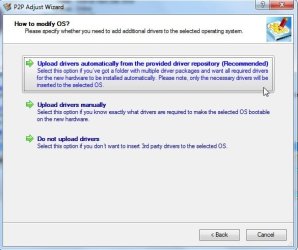
You would need to adjust XP to the new hardware - Paragon P2P Adjust program is made for that purpose.

You also need to have the right kind of XP product key to use it on a different machine.
My System SpecsSystem Spec
.


06 Apr 2010   #4

windows 7 32 bit


Thanks for the quick reply Jonathan_King, the XP version is a copy I bought to update my old computer a few years ago so I don't think there'd be any problems with OEM licensing (although I'm not 100% sure). Would it be possible to do the cloned XP install first, then add Windows 7 as the second bootable OS?
My System SpecsSystem Spec
06 Apr 2010   #5

windows 7 32 bit


Quote   Quote: Originally Posted by SIW2 View Post
Hi Stan,

You would need to adjust XP to the new hardware - Paragon P2P Adjust program is made for that purpose.

You also need to have the right kind of XP product key to use it on a different machine.
Thanks for the reply. I got an original copy of xp to upgrade my old computer a few years back so I assumed that would work, (then again I also know what they say about assume).

Would P2P Adjust have to be installed before XP or after.
My System SpecsSystem Spec
06 Apr 2010   #6

Vista x64 / 7 X64


Normally you install P2P on another o/s partition or machine , or run it from the boot disc.

Just point it at the problem partition -in 2 secs, it makes all the drivers currently in the o/s )( and the hal ) adjust to the new hardware.

The issue you may have is XP may not have the drivers neded for the new hardware.

You would need to d/l XP drivers for the new hardware ( check the mobo site for XP drivers).

Then you can use P2P Adjust to inject those .

dual boot from a cloned disk image-pspadjust-2010-04-06_150744.jpg
My System SpecsSystem Spec
06 Apr 2010   #7

windows 7 32 bit


Thanks a lot SIW2, I'll give this a try and let you know how it goes. Again, cheers for the help.
My System SpecsSystem Spec
Reply

 dual boot from a cloned disk image problems?


Thread Tools


Similar help and support threads for: dual boot from a cloned disk image
Thread Forum
System Image same as Cloned drive? Backup and Restore
Dual boot with cloned copy - boot problem Installation & Setup
want to dual boot on cloned windows Installation & Setup
Dual-boot :ubuntu on PATA disk, 7 on SATA disk Installation & Setup
Dual Boot Image Backup? Anyone ? Backup and Restore


All times are GMT -5. The time now is 01:37 PM.


Seven Forums Android App Seven Forums IOS App Follow us on Facebook

Windows 7 Forums is an independent web site and has not been authorized,
sponsored, or otherwise approved by Microsoft Corporation.
"Windows 7" and related materials are trademarks of Microsoft Corp.
© Designer Media Ltd
  

1 2 3 4 5 6 7 8 9 10 11 12 13 14 15 16 17 18 19 20 21 22 23 24 25 26 27 28 29 30 31 32