| Windows 7: Internet Explorer Won't Close |
28 Aug 2010
|
#1 | | |
Internet Explorer Won't Close So I don't know if this has anything to do with it, but I recently hooked my computer up to my TV with a VGA cable and tried out IE on the TV screen for a few minutes to see what it looked like. Then I moved it back onto my screen and ever since then I've been trying to figure out how to close it. When I try to close it it just makes a bell noise and although I can open and close tabs, I can't close the original tab even when others are open. I'm getting really pissed off. I usually use Firefox but I have it optimized for my netbook and I had to use IE to drag over onto the other screen so I just want to get this program off my screen and probably off my computer next.
EDIT: Also I don't know what this means, but I'm running Windows 7 and I just noticed that when I scroll over the IE icon at the bottom it shows each tab open, but I have 3 tabs open and it's only showing the two that will close. The other doesn't show up. | My System Specs |
| |
28 Aug 2010
|
#2 | | Windows 7 Home Premium SP1, clean install, upgrade disc CT |
Run antivirus scan
Download and run malwarebytes Internet Explorer - Reset
Go to tools
Internet options
advanced
reset
This removes all the add ons, which can be replaced later.
Nothing works, you can try a system restore.
Last edited by Brink; 28 Aug 2010 at 10:26 PM..
Reason: added link
| My System Specs | | System Manufacturer/Model Number Dell XPS 420 OS Windows 7 Home Premium SP1, clean install, upgrade disc CPU Intel Core2 processsor Q8200(2.33Ghz 1333FSB) Quad Core Tech Motherboard Dell Memory 6 gb Graphics Card ATI Radeon 256MB HD3650 Sound Card Intergrated 7.1 Channel Audio Monitor(s) Displays Dell SP2009W 20" Keyboard Dell USB Keyboard Mouse Dell Premium Optical USB Cooling Fan Hard Drives 640 GB Serial ATA Hard drive Internet Speed DSL 2.85 |
28 Aug 2010
|
#3 | | Windows 7 Home Premium x64 SP1 Bay Area Peninsula |
Have a look at Capt. Jack's IE Restorator tool. Try the reregister first, then if needed you can try the reset, which will accomplish what Rich suggested as well. SF IE Restorator - Troubleshooting General Issues with IE
A Guy | My System Specs | | OS Windows 7 Home Premium x64 SP1 CPU INTEL Core i5-750 Quad-Core 3.37GHz Motherboard ASUS P7P55D Memory KINGSTON 4GB (2 x 2GB) HyperX PC3-12800 DDR3 1600MHz CL8 Graphics Card MSI N240GT-MD1G/D5 GeForce GT 240 1GB 128-bit GDDR5 Monitor(s) Displays Samsung SyncMaster B2430H 24" Screen Resolution 1920 x 1080 PSU ANTEC TruePower New TP-550, 80 PLUS, 550W Case ANTEC Three Hundred Illusion Cooling COOLER MASTER Hyper 212 Plus, 4 x 120mm 1 x 140mm Noctua's Hard Drives Intel X25M Gen2 80GB, SEAGATE 500GB Barracudaź 7200.12, SATA 3 Gb/s, 7200 RPM, 16MB cache Internet Speed 20 + Mbps Antivirus Avast Browser Opera |
29 Aug 2010
|
#4 | | Windows 7 Enterprise Trial 32-bit SP1 |

Quote: Originally Posted by REEDandRAYact ...ever since then I've been trying to figure out how to close it. When I try to close it it just makes a bell noise and although I can open and close tabs, I can't close the original tab even when others are open... Even after you reboot? (If you can't reboot normally, use ctrl-alt-del to get a new screen with a red shut down button.) | My System Specs | | System Manufacturer/Model Number OQO 2+ OS Windows 7 Enterprise Trial 32-bit SP1 CPU Intel Atom 1.86 GHz Motherboard OQO 2+ Memory 2 GB Graphics Card Intel GMA 500 Sound Card IDT Monitor(s) Displays LCD Screen Resolution 800 x 480 (portable) 1280 x 1024 (docked) Keyboard Slide out (portable) DiNovo Edge (docked) Mouse Eraser head (portable) Logitech Bluetooth (docked) PSU 9 Ah Battery (portable) or OQO Brick (docked) Case Shirt Pocket Sized Cooling Tiny Fan Hard Drives 64 GB SSD Internet Speed WWAN or 802.11G (portable) T1 (docked) Other Info DVD-RW OQO Docking Station |
29 Aug 2010
|
#5 | | Windows 7 Home Premium 64bit sp1 Laguna Hills Southern California |
seems windows 7 does this alot it will lock up the IE with me it gives a a/v warning but if i turn gamer mode on which disables most of the a/v the IE goes back to normal
I was experiencing this as well but you can thank your A/V for locking up the IE
and if you have a feature to turn some of the A/V scans off you will be able to continue
I found that the only way it will unlock itself | My System Specs | | Computer type PC/Desktop System Manufacturer/Model Number Built by me FX - Series Scorpious OS Windows 7 Home Premium 64bit sp1 CPU Vishera FX 8350 Oc' 4.812Ghz 1.488 V-core full load 50c Motherboard Asus Sabertooth 990fx rev 2.0 Memory 16gb Corsair Vengeance ram 1600mhz Oc'ed to 1750mhz Graphics Card VisionTek HD7970 Ghz.ed Bios Crossfire 1150/1560 power 10% Sound Card AC97 Monitor(s) Displays 27" ViewSonic 1920/1080dp hdmi 37in vizio hdmi dual monitors Screen Resolution 1920x1080 27"- 1920x1080 37" Keyboard Logitech wireless keyboard Mouse Logitech wireless mouse PSU HX1050w Corsair Silver 80plus certified crosfire/sli Case Thermaltake Element V Cooling Antec 620 Water cooling system and 4 120 mm LED fans Hard Drives Ocz Agility 120Gb SSD Seagate baracuda 500 Gb WD Mybook 500Gb Internet Speed Cable 25+ mb Antivirus WebRoot Spysweeper with Antivirus Browser IE-9, Chrome, Opera Other Info I have 2 systems FX AM3+ 8350-K15 Oc'ed 4.812Ghz AM2+ 965 BE Stock 3.4 Ghz Both stable Both Gaming Rigs Also Hp Notebook 1.65 ghz Dual core amd E-450 8gb Patriot Ram DDR3 Discrete Gpu Hd6320 dedicated ram 1973 mb 15.5 screen |
02 Sep 2010
|
#6 | | |
Please elp, I can't start the reset or download the link because it wants me to close all open windows which is exactly what I can't do! | My System Specs | | System Manufacturer/Model Number Dell OS Wndows 7 64 bit |
02 Sep 2010
|
#7 | | Windows 7 Home Premium 64bit sp1 Laguna Hills Southern California |
cntrl alt del at the same time go to task manager force a close | My System Specs | | Computer type PC/Desktop System Manufacturer/Model Number Built by me FX - Series Scorpious OS Windows 7 Home Premium 64bit sp1 CPU Vishera FX 8350 Oc' 4.812Ghz 1.488 V-core full load 50c Motherboard Asus Sabertooth 990fx rev 2.0 Memory 16gb Corsair Vengeance ram 1600mhz Oc'ed to 1750mhz Graphics Card VisionTek HD7970 Ghz.ed Bios Crossfire 1150/1560 power 10% Sound Card AC97 Monitor(s) Displays 27" ViewSonic 1920/1080dp hdmi 37in vizio hdmi dual monitors Screen Resolution 1920x1080 27"- 1920x1080 37" Keyboard Logitech wireless keyboard Mouse Logitech wireless mouse PSU HX1050w Corsair Silver 80plus certified crosfire/sli Case Thermaltake Element V Cooling Antec 620 Water cooling system and 4 120 mm LED fans Hard Drives Ocz Agility 120Gb SSD Seagate baracuda 500 Gb WD Mybook 500Gb Internet Speed Cable 25+ mb Antivirus WebRoot Spysweeper with Antivirus Browser IE-9, Chrome, Opera Other Info I have 2 systems FX AM3+ 8350-K15 Oc'ed 4.812Ghz AM2+ 965 BE Stock 3.4 Ghz Both stable Both Gaming Rigs Also Hp Notebook 1.65 ghz Dual core amd E-450 8gb Patriot Ram DDR3 Discrete Gpu Hd6320 dedicated ram 1973 mb 15.5 screen |
03 Sep 2010
|
#8 | | Windows 7 Home Premium x64 SP1 Bay Area Peninsula |

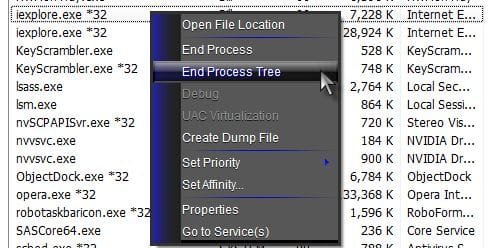
Quote: Originally Posted by anna62 Please elp, I can't start the reset or download the link because it wants me to close all open windows which is exactly what I can't do! Press Ctrl+Shift+Esc to bring up task manager. On processes tab, right click iexplore.exe and left click end process tree.
A Guy | My System Specs | | OS Windows 7 Home Premium x64 SP1 CPU INTEL Core i5-750 Quad-Core 3.37GHz Motherboard ASUS P7P55D Memory KINGSTON 4GB (2 x 2GB) HyperX PC3-12800 DDR3 1600MHz CL8 Graphics Card MSI N240GT-MD1G/D5 GeForce GT 240 1GB 128-bit GDDR5 Monitor(s) Displays Samsung SyncMaster B2430H 24" Screen Resolution 1920 x 1080 PSU ANTEC TruePower New TP-550, 80 PLUS, 550W Case ANTEC Three Hundred Illusion Cooling COOLER MASTER Hyper 212 Plus, 4 x 120mm 1 x 140mm Noctua's Hard Drives Intel X25M Gen2 80GB, SEAGATE 500GB Barracudaź 7200.12, SATA 3 Gb/s, 7200 RPM, 16MB cache Internet Speed 20 + Mbps Antivirus Avast Browser Opera |
25 May 2012
|
#9 | | |
Win7 leaves IE processes running I have multiple Windows 7 systems, and having IExplore processes running after you exit the browser is the NORM.
Sometimes there wil be 5 or 7 iexplore.exe processes running with the browser window closed. Seems there's a problem killing IE processes on exit.
No, this is NOT an infection, adware, add-on, or anything similar. It's a BUG in IE. | My System Specs | | |
26 May 2012
|
#10 | | |

Quote: Originally Posted by sbus ...It's a BUG in IE. Welcome to the Seven Forums.
Which version of IE are you seeing this happen in? IE8 or IE9? 32bit or 64?
If it is a bug, then others should be able to reproduce it. I don't see this happen on any of the Windows 7 systems that I work with. What steps should I try to see what you are seeing? | My System Specs | | System Manufacturer/Model Number Employer provided Dell E6430 OS W7 Pro SP1 64bit CPU i5 3320M @ 2.6GHz Motherboard 0CPWYR Memory 4GB Graphics Card Intel HD Graphics 4000 Screen Resolution 1600 x 900 Hard Drives 119GB LITEONIT SSD Antivirus Employer mandated Symantec Endpoint Protection Browser Firefox, IE9 & IE8 via VM Internet Explorer Won't Close problems? All times are GMT -5. The time now is 09:06 PM. | |