Join Forum
|
Login
|
Today's Posts
|
Tutorials
|
Vista Forum
|
Windows 8 Forum
Windows 7 Help Forums
>
Windows 7 help and support
>
Browsers & Mail
»
Windows 7: Please help - opera browser
01 Oct 2010
#
1
mat420
windows 7
46 posts
Please help - opera browser
Gr i just stopped the scripts while filling out a 45 minute long job application and dont know how to reanable them
it wont let me go any further until i do
please, anyone? Any ideas? I cant find shit.
Thanks so much
newest opera
windows xp
My System Specs
OS
windows 7
02 Oct 2010
#
2
A Guy
Windows 7 Home Premium x64 SP1
32,098 posts
Bay Area Peninsula
Not positive what you did, but try this:
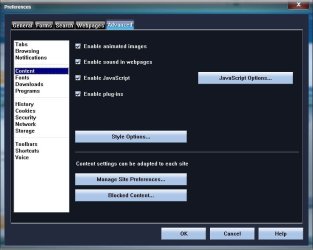
Open Opera> Tools> Preferences> Advanced Tab> Content on left
Or, while on page
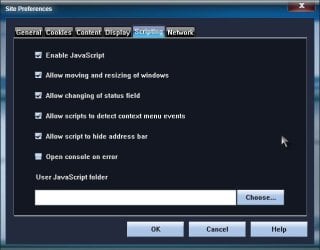
Right click> Edit site preferences> Scripting
If not, more specific what you did and issue.
A Guy
My System Specs
OS
Windows 7 Home Premium x64 SP1
CPU
INTEL Core i5-750 Quad-Core 3.37GHz
Motherboard
ASUS P7P55D
Memory
KINGSTON 4GB (2 x 2GB) HyperX PC3-12800 DDR3 1600MHz CL8
Graphics Card
MSI N240GT-MD1G/D5 GeForce GT 240 1GB 128-bit GDDR5
Monitor(s) Displays
Samsung SyncMaster B2430H 24"
Screen Resolution
1920 x 1080
PSU
ANTEC TruePower New TP-550, 80 PLUS, 550W
Case
ANTEC Three Hundred Illusion
Cooling
COOLER MASTER Hyper 212 Plus, 4 x 120mm 1 x 140mm Noctua's
Hard Drives
Intel X25M Gen2 80GB, SEAGATE 500GB Barracudaź 7200.12, SATA 3 Gb/s, 7200 RPM, 16MB cache
Internet Speed
20 + Mbps
Antivirus
Avast
Browser
Opera
02 Oct 2010
#
3
mr pc
Windows 7
363 posts
You could try this
Go to Menu > Settings > Preferences > Advanced Tab > Content and enable Javascripts
or you could try this
Type opera:config in your address bar to open Preference Editor
Type: 'script' in the search window and check to see what is unchecked in the options listed.
goodluck!
I'm sorta new to Opera but find it to be a fun but complicated browser
My System Specs
OS
Windows 7
.
02 Oct 2010
#
4
mat420
windows 7
46 posts
i know most sites dont but i didnt think he application would expire
well
it did
need to fill out their 45 min application all over again :/
i did try the javascript options with the pictures, didnt work
mr pcs method i didnt get a chance to try ;/
thanks to both of u tho, i def apprecaite it.
My System Specs
OS
windows 7
03 Oct 2010
#
5
A Guy
Windows 7 Home Premium x64 SP1
32,098 posts
Bay Area Peninsula
Sorry it didn't help, but you are welcome. A Guy
My System Specs
OS
Windows 7 Home Premium x64 SP1
CPU
INTEL Core i5-750 Quad-Core 3.37GHz
Motherboard
ASUS P7P55D
Memory
KINGSTON 4GB (2 x 2GB) HyperX PC3-12800 DDR3 1600MHz CL8
Graphics Card
MSI N240GT-MD1G/D5 GeForce GT 240 1GB 128-bit GDDR5
Monitor(s) Displays
Samsung SyncMaster B2430H 24"
Screen Resolution
1920 x 1080
PSU
ANTEC TruePower New TP-550, 80 PLUS, 550W
Case
ANTEC Three Hundred Illusion
Cooling
COOLER MASTER Hyper 212 Plus, 4 x 120mm 1 x 140mm Noctua's
Hard Drives
Intel X25M Gen2 80GB, SEAGATE 500GB Barracudaź 7200.12, SATA 3 Gb/s, 7200 RPM, 16MB cache
Internet Speed
20 + Mbps
Antivirus
Avast
Browser
Opera
Please help - opera browser problems?
«
IE9 Add-on Save
|
My favorites for IE9 got sorted
»
Thread Tools
Printable Version
Email this Page
Similar help and support threads for: Please help - opera browser
Thread
Forum
HELP! Opera Browser Dodgy!
Browsers & Mail
[Opera] Browser!
Browsers & Mail
Opera browser
Browsers & Mail
Opera 10 Beta Browser!!
Browsers & Mail
Opera Browser Update 9.64
Browsers & Mail
All times are GMT -5. The time now is
09:13 AM
.
Contact Us
-
Windows 8 Support
-
Windows Vista Support
-
Legal
-
Privacy and cookies
-
Top
Google+
Windows 7 Forums is an independent web site and has not been authorized,
sponsored, or otherwise approved by Microsoft Corporation.
"Windows 7" and related materials are trademarks of Microsoft Corp.
©
Designer Media Ltd