|
Welcome to Windows 7 Forums. Our forum is dedicated to helping you find solutions with any problems, errors or issues you are experiencing with Windows 7. The Windows 7 forum also covers news and updates and has an extensive Windows 7 tutorial section that covers a wide range of tips and tricks.
Windows 7 - Problems restoring messages in Windows Live Mail |
10-08-2010
|
#1 | | Windows 7 Home Premium 64 bit |
Problems restoring messages in Windows Live Mail Can anyone help please? After having my PC repaired, I've restored my Windows Live Mail accounts and contacts, that I backed up onto an external with Windows 7 Backup and Restore. I have also managed to get some old messages back into my system that were in the storefolder before the machine was sent away, by going to C:\Users\yourname\AppData\Local\Microsoft\Windows Live Mail.
However, those newer mails that were in the inboxes have not materialised. As well as backing them up with the Win 7 Backup and Restore feature, I also made a separate backup of these, copying the store folder (in the same way I used to with Outlook Express) and saving it to my external hard drive. I've tried to import the files from this backup too, but it whizzes through in a couple of seconds and says the import is complete, yet the folders of this second backup appear empty and none of the mails are in the storage folder when I search for a name or subject. Does anyone have any idea where these newer messages might have gone to and how I can get them back into WLM please?
Any help greatly appreciated.
| My System Specs | | OS Windows 7 Home Premium 64 bit |
10-08-2010
|
#2 | | Windows 7 Ultimate x64 SP1 |
Hello Ricsnave, and welcome to Seven Forums.
Not sure if it will be the same since you used a different method to export/backup your email messages, but mine show in Storage folders towards the bottom in the left pane of Windows Live Mail when the messages have been imported back. You can look at the tutorial below for more details on this. Windows Live Mail - Export and Import Email Messages
Hope this helps,
Shawn | My System Specs | | System Manufacturer/Model Number Self built custom OS Windows 7 Ultimate x64 SP1 CPU Intel i7-980X 3.3 Ghz (3.48 Ghz OC'd) Motherboard ASUS P6X58D Premium Memory 12 GB (2GBx6) DDR3 PC3-16000 2000 MHz Kingston HyperX Graphics Card Sapphire HD5870 Eyefinity 6 2GB Sound Card Realtek HD Audio ALC889 Integrated Chip Monitor(s) Displays 3x 27" Asus VE278Q Screen Resolution 1920x1080 Keyboard Logitech Cordless Desktop MX 5500 Revolution Mouse Logitech Cordless Desktop MX 5500 Revolution PSU OCZ Series Gold OCZZ1000M 1000W Case Corsair Obsidian 800D Cooling Thermalright Ultra 120 Extreme Copper CPU heat sink w/120 MM Hard Drives 160GB OCZ RevoDrive X2
** 2 x 1TB Samsung HDD HD154UI SATA Internet Speed 50 Mb/s Download and 2 Mb/s Upload Other Info Microsoft LifeCam Cinema
** Lite-On iHBS212 12x BD Writer
** Samsung CLX-3175FW Printer
** Netgear WNDR3800 Router
** Motorola SBG6580 Cable Modem
** 2x APC Back-UPS XS 1500 |
10-08-2010
|
#3 | | Windows 7 Home Premium 64 bit |
Thanks so much Shawn. Yes I am aware of the storage folders, yet none of these newer messages are in them and they don't come up when searched for either. I believe they should be on the backup as made, but I really don't know where! Are there any other ways of getting this data off the drive or will I have to pay a professional to do it? | My System Specs | | OS Windows 7 Home Premium 64 bit |
10-08-2010
|
#4 | | Windows 7 Ultimate x64 SP1 |
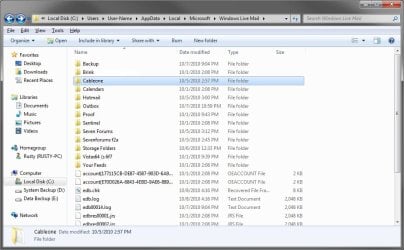
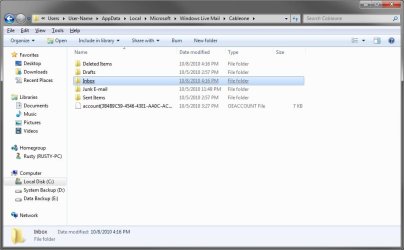
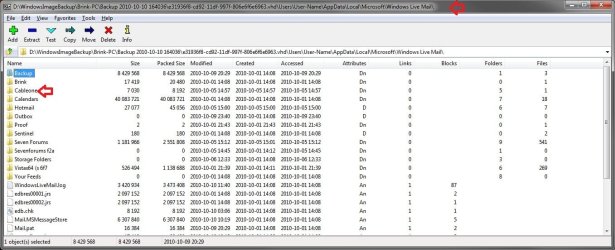
The actual email message would be the .eml file in your backup if you are able to locate them. You can copy the .eml files directly into one of the email folders (ex: Inbox) for an account (ex: Cableone) at the location below. Substitute Cableone with the email account that you want it in instead, and substitue Inbox for the email folder in (ex: Cableone) that you want it in. Afterwards, close and reopen Windows Live Mail to have the messages restored to that location. C:\Users\yourname\AppData\Local\Microsoft\Windows Live Mail\Cableone\Inbox  | My System Specs | | System Manufacturer/Model Number Self built custom OS Windows 7 Ultimate x64 SP1 CPU Intel i7-980X 3.3 Ghz (3.48 Ghz OC'd) Motherboard ASUS P6X58D Premium Memory 12 GB (2GBx6) DDR3 PC3-16000 2000 MHz Kingston HyperX Graphics Card Sapphire HD5870 Eyefinity 6 2GB Sound Card Realtek HD Audio ALC889 Integrated Chip Monitor(s) Displays 3x 27" Asus VE278Q Screen Resolution 1920x1080 Keyboard Logitech Cordless Desktop MX 5500 Revolution Mouse Logitech Cordless Desktop MX 5500 Revolution PSU OCZ Series Gold OCZZ1000M 1000W Case Corsair Obsidian 800D Cooling Thermalright Ultra 120 Extreme Copper CPU heat sink w/120 MM Hard Drives 160GB OCZ RevoDrive X2
** 2 x 1TB Samsung HDD HD154UI SATA Internet Speed 50 Mb/s Download and 2 Mb/s Upload Other Info Microsoft LifeCam Cinema
** Lite-On iHBS212 12x BD Writer
** Samsung CLX-3175FW Printer
** Netgear WNDR3800 Router
** Motorola SBG6580 Cable Modem
** 2x APC Back-UPS XS 1500 |
10-09-2010
|
#5 | | Windows 7 Home Premium 64 bit |
Thanks Shawn, I have looked for .eml files in both the backups I have made (one using Windows 7 Backup and Restore and the second using the HP System Backup tool) and it appears that about 6 months worth of email messages haven't been backed up, despite no error messages appearing or anything to the contrary happening. I'm assuming these messages are now lost forever, which is a bore, unless they are hidden and can be extrapelated another way. Also, what's the most effective way of backing up my WLM files in the future to prevent this from happening again in the future? Any advice would be greatly appreciated. | My System Specs | | OS Windows 7 Home Premium 64 bit |
10-09-2010
|
#6 | | Windows 7 Ultimate x64 SP1 |
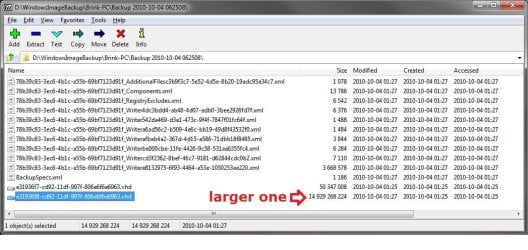
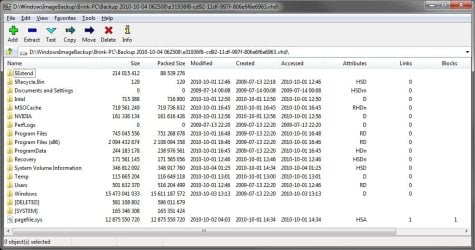
There should be a VHD file in the Backup Folder that Backup and Restore uses to backup the files and folders in. You can open the VHD file from within the free program 7-Zip to then be able to look through the files in it. If you find them, then you can just extract them to your desktop and use the method above to restore them. | My System Specs | | System Manufacturer/Model Number Self built custom OS Windows 7 Ultimate x64 SP1 CPU Intel i7-980X 3.3 Ghz (3.48 Ghz OC'd) Motherboard ASUS P6X58D Premium Memory 12 GB (2GBx6) DDR3 PC3-16000 2000 MHz Kingston HyperX Graphics Card Sapphire HD5870 Eyefinity 6 2GB Sound Card Realtek HD Audio ALC889 Integrated Chip Monitor(s) Displays 3x 27" Asus VE278Q Screen Resolution 1920x1080 Keyboard Logitech Cordless Desktop MX 5500 Revolution Mouse Logitech Cordless Desktop MX 5500 Revolution PSU OCZ Series Gold OCZZ1000M 1000W Case Corsair Obsidian 800D Cooling Thermalright Ultra 120 Extreme Copper CPU heat sink w/120 MM Hard Drives 160GB OCZ RevoDrive X2
** 2 x 1TB Samsung HDD HD154UI SATA Internet Speed 50 Mb/s Download and 2 Mb/s Upload Other Info Microsoft LifeCam Cinema
** Lite-On iHBS212 12x BD Writer
** Samsung CLX-3175FW Printer
** Netgear WNDR3800 Router
** Motorola SBG6580 Cable Modem
** 2x APC Back-UPS XS 1500 |
10-09-2010
|
#7 | | Windows 7 Ultimate 32 bit |
Can any of these newer messages still be retrieved from the server or have they been deleted? Have you tried importing one folder at a time from the store folder to see if that makes a difference?
In the past I tried copying the WLM store folder as a back up and temporarily renaming to get it rerecognised on my old XP machine but this did not work when I changed to Windows 7 I assume because there must be another catalogue file that didn't match trhe store directory structure. The correct way is in the link posted by Brink to first export and then reimport rather than importing from the original untouched store folder.
Don't give up as there may still be a way to save your messages if they are somehow backed up somewhere! In the meantime is it possible to ask the individuals you know to resend the important messages during a certain time period including the ones you sent to them?
Kind regards
Chris | My System Specs | | OS Windows 7 Ultimate 32 bit |
10-10-2010
|
#8 | | Windows 7 Enterprise Trial 32-bit SP1 |

Quote: Originally Posted by Brink There should be a VHD file in the Backup Folder that Backup and Restore uses to backup the files and folders in. You can open the VHD file from within the free program 7-Zip to then be able to look through the files in it. If you find them, then you can just extract them to your desktop and use the method above to restore them. The 7-Zip link you provided includes a list of supported formats:
Supported formats: - Packing / unpacking: 7z, ZIP, GZIP, BZIP2 and TAR
- Unpacking only: ARJ, CAB, CHM, CPIO, DEB, DMG, HFS, ISO, LZH, LZMA, MSI, NSIS, RAR, RPM, UDF, WIM, XAR and Z.
But VHD is not listed. If 7-Zip doesn't work there is a Tutorial about viewing the contents of a VHD here: Virtual Hard Disk - Create and Attach VHD
I found this discussion about adding VHD support to 7-Zip but all it suggests is mounting it as in the previous link: http://sourceforge.net/projects/seve.../topic/2970718 | My System Specs | | System Manufacturer/Model Number OQO 2+ OS Windows 7 Enterprise Trial 32-bit SP1 CPU Intel Atom 1.86 GHz Motherboard OQO 2+ Memory 2 GB Graphics Card Intel GMA 500 Sound Card IDT Monitor(s) Displays LCD Screen Resolution 800 x 480 (portable) 1280 x 1024 (docked) Keyboard Slide out (portable) DiNovo Edge (docked) Mouse Eraser head (portable) Logitech Bluetooth (docked) PSU 9 Ah Battery (portable) or OQO Brick (docked) Case Shirt Pocket Sized Cooling Tiny Fan Hard Drives 64 GB SSD Internet Speed WWAN or 802.11G (portable) T1 (docked) Other Info DVD-RW OQO Docking Station |
10-10-2010
|
#9 | | Windows 7 Ultimate x64 SP1 |
Hello Ron.
That's another good option that could be used as well. Thank you.
7-Zip does support opening and extracting from within VHD files though. | My System Specs | | System Manufacturer/Model Number Self built custom OS Windows 7 Ultimate x64 SP1 CPU Intel i7-980X 3.3 Ghz (3.48 Ghz OC'd) Motherboard ASUS P6X58D Premium Memory 12 GB (2GBx6) DDR3 PC3-16000 2000 MHz Kingston HyperX Graphics Card Sapphire HD5870 Eyefinity 6 2GB Sound Card Realtek HD Audio ALC889 Integrated Chip Monitor(s) Displays 3x 27" Asus VE278Q Screen Resolution 1920x1080 Keyboard Logitech Cordless Desktop MX 5500 Revolution Mouse Logitech Cordless Desktop MX 5500 Revolution PSU OCZ Series Gold OCZZ1000M 1000W Case Corsair Obsidian 800D Cooling Thermalright Ultra 120 Extreme Copper CPU heat sink w/120 MM Hard Drives 160GB OCZ RevoDrive X2
** 2 x 1TB Samsung HDD HD154UI SATA Internet Speed 50 Mb/s Download and 2 Mb/s Upload Other Info Microsoft LifeCam Cinema
** Lite-On iHBS212 12x BD Writer
** Samsung CLX-3175FW Printer
** Netgear WNDR3800 Router
** Motorola SBG6580 Cable Modem
** 2x APC Back-UPS XS 1500 |
10-10-2010
|
#10 | | Windows 7 Home Premium 64 bit |
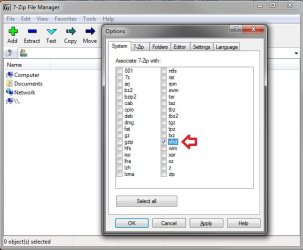
Thanks Shawn & Ron. I installed 7-Zip as you suggested, but in the options/system box as pictured, there is a shorter list and no vhd checkbox. Should I therefore create and attach a VHD, as in the article that Ron has attached, or would it do no good if it's not already installed? Also, would a Vhd really show files that an actual HD would/can not? Apologies for my ignorance but I am a relative PC novice in the great scheme of things! Thank you both for your continued help, which is hugely appreciated. | My System Specs | | OS Windows 7 Home Premium 64 bit Problems restoring messages in Windows Live Mail problems? All times are GMT -5. The time now is 01:55 PM. |  |